
Create a young Woman Reclining Naturally
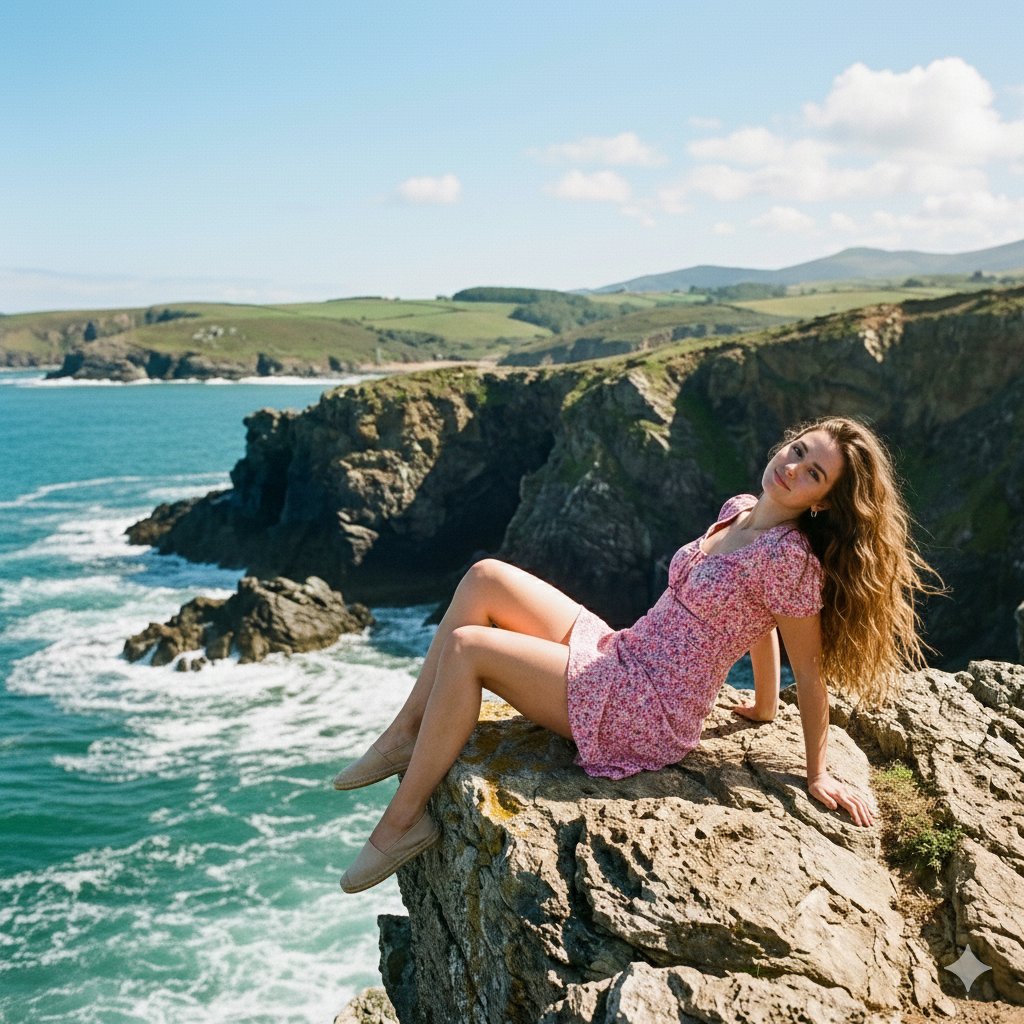
How to a beautiful young woman reclining naturally on a rocky cliff edge overlooking turquoise ocean waves.
0
Times used
0
Likes
Unlocking Serenity: Mastering the "Create a young Woman Reclining Naturally" AI Art Style with Orno
In the ever-expanding universe of AI image generation, certain prompts capture the imagination more than others. They are not just commands, but gateways to entire moods, stories, and aesthetics. One such evocative style is "Create a young Woman Reclining Naturally." This prompt conjures images of tranquility, raw beauty, and a profound connection with nature. It’s a masterful blend of the human form and the majestic power of the natural world, and with Orno’s advanced AI image editor, bringing this vision to life has never been easier or more spectacular.
This comprehensive guide will explore the depths of this captivating AI art style. We'll deconstruct the core elements of the prompt, show you how to customize it for unique results using Orno, and delve into the psychology of why these images are so compelling. Whether you're a seasoned digital artist or a curious newcomer to text-to-image AI, you'll discover the techniques to generate breathtaking, photorealistic art that speaks volumes.
The Essence of the "Woman Reclining Naturally" Style
At its heart, this style is about capturing a moment of unguarded peace. It's the antithesis of a stiff, posed portrait. The "reclining naturally" aspect suggests a subject completely at ease in her environment, her posture relaxed and authentic. This sense of realism is what makes the final image so powerful. The scene is not just a picture; it's an invitation to feel the sea breeze, hear the crashing waves, and share in a moment of quiet contemplation.
The magic lies in the juxtaposition of soft and hard elements: the gentle curves of the human form against the rugged, unyielding texture of a rocky cliff. It’s the vibrant, life-giving turquoise of the ocean meeting the vast, open sky. Orno's AI excels at rendering these complex textures and lighting scenarios, creating a harmonious composition that feels both dramatic and deeply serene. This style is a popular choice for artists and creators looking to generate imagery for mood boards, digital art collections, book covers, or simply to explore the creative potential of AI.
Deconstructing the Prompt: The Three Pillars of a Perfect Image
To truly master this AI-generated art style, it’s crucial to understand the key components that make the prompt so effective. Each phrase is a powerful instruction to the AI, guiding it toward a specific visual outcome. Let's break it down.
The Subject: A Young Woman Reclining Naturally
This is the soul of your image. The term "young woman" gives the AI a clear demographic, but the most important words here are "reclining naturally." This instruction tells Orno's sophisticated AI model to avoid rigid, artificial poses. Instead, the AI will generate postures that suggest relaxation and comfort—a gentle slump of the shoulders, a casual placement of a hand, a natural curve of the spine. The goal is to create an image that feels like a candid snapshot rather than a staged photo shoot. Orno’s engine is trained on vast datasets of human anatomy and posture, allowing it to interpret "naturally" with incredible nuance, resulting in realistic and believable subjects.
The Setting: A Rocky Cliff Edge
The environment is just as critical as the subject. A "rocky cliff edge" provides a dramatic stage for your scene. It introduces texture, shadow, and a sense of scale. Orno's AI can generate a wide variety of rock formations, from sharp, jagged granite to smooth, weathered sandstone. The "edge" element adds a touch of drama and emphasizes the vastness of the ocean beyond. This setting provides an incredible opportunity to play with light. The way sunlight catches the high points of the rocks while casting deep shadows in the crevices is a detail that photorealistic AI, like the one powering Orno, can render with stunning accuracy.
The Backdrop: Turquoise Ocean Waves
The final pillar is the vibrant, dynamic backdrop. "Turquoise ocean waves" sets a specific color palette and introduces movement into a still image. The word "turquoise" suggests clear, tropical, or Mediterranean waters, instantly creating a warm and inviting atmosphere. "Waves" instructs the AI to generate the texture of moving water—the white foam of a crashing wave, the gentle ripples near the shore, and the reflection of the sky on the water's surface. The contrast between the static, solid cliff and the ever-moving ocean is a classic compositional technique that adds immense visual interest to your AI-generated art.
How to Master This Style with Orno's AI Image Editor
The base prompt is your starting point, but the true creative power is unleashed when you begin to customize and refine your vision. Orno's AI image editor provides you with the tools to act as a digital art director, guiding the AI to produce precisely what you imagine.
Start by entering the core prompt into the Orno text-to-image generator: "A beautiful young woman reclining naturally on a rocky cliff edge overlooking turquoise ocean waves, photorealistic, cinematic lighting."
This is a strong foundation. Now, let's explore how to build upon it.
Customizing Your Creation: Prompt Modifiers and Techniques
Think of your prompt as a recipe. The core ingredients are set, but the spices and seasonings are what make it uniquely yours. Here are some modifier categories you can use to tailor your image in Orno:
- Control the Lighting and Mood: Lighting is everything in art. It dictates the mood and emotional tone of the image. Try adding terms like:
- "golden hour lighting" for warm, soft, and long shadows.
- "dramatic storm clouds overhead" for a more somber and intense feel.
- "soft morning mist" to create a dreamy, ethereal atmosphere.
- "cinematic volumetric lighting" for visible rays of light that add depth.
- Define the Subject's Appearance and Attire: Be more specific about your subject to get a more precise result.
- "woman with long, windswept brown hair"
- "wearing a simple, flowing white linen dress"
- "barefoot, with a thoughtful expression"
- "looking out towards the horizon"
- Experiment with Artistic Styles: While photorealism is a great goal, Orno can emulate countless other styles.
- "in the style of an impressionist oil painting"
- "delicate watercolor illustration"
- "8k, hyper-detailed, fantasy art"
- "vintage film photograph, Kodak Portra 400"
- Refine with Negative Prompts: Use Orno’s negative prompt feature to tell the AI what you don't want to see. This is incredibly useful for cleaning up artifacts. For example, you could add "blurry, deformed, extra limbs, unrealistic" to the negative prompt field to improve the quality and realism of your generated woman.
Why This Style Resonates: The Allure of Natural Escapism
Why are we so drawn to creating and viewing images like this? The "Woman Reclining Naturally" style taps into a deep-seated human desire for freedom, peace, and a connection to the natural world. In our fast-paced, digitally-saturated lives, an image of someone completely at ease in a majestic, untamed environment offers a form of visual escapism.
It represents an ideal—a moment of pure, uninterrupted serenity. The AI-generated image becomes a window into a world we aspire to inhabit, even if just for a moment. This powerful emotional resonance is why this style is not just a technical exercise for an AI photo generator, but a genuine act of creating meaningful and beautiful art that connects with people on a fundamental level.
Beyond the Cliffside: Adapting the "Reclining Naturally" Concept
The beauty of this prompt structure is its versatility. The core concept of "a person reclining naturally" can be transported to any setting you can imagine, showcasing the incredible flexibility of Orno as a creative partner. Don't limit yourself to the coast!
- Urban Serenity: Try "A young woman reclining naturally on a plush beanbag on a rooftop balcony, overlooking the sparkling city lights of Tokyo at night, cinematic."
- Forest Retreat: Generate "An elven woman with silver hair reclining naturally on a giant, moss-covered root in an ancient, enchanted forest, dappled sunlight filtering through the canopy."
- Cozy Comfort: Create "A young woman in a cozy sweater reclining naturally in a window seat, reading a book as rain streaks down the glass, warm interior lighting."
By changing the subject and the environment, you can use the same fundamental prompt structure to explore endless creative avenues, all powered by Orno's intuitive text-to-image AI.
Frequently Asked Questions (FAQ)
What is the "Create a young Woman Reclining Naturally" style in AI art?
It's an AI image generation style focused on creating serene, realistic, and beautiful scenes of a woman in a relaxed, natural pose within a majestic natural setting, typically a cliffside overlooking an ocean. The style emphasizes tranquility, realism, and the harmonious blend of the human form with nature.
How can I get the most realistic results with Orno?
To achieve peak realism, use highly descriptive keywords. Add terms like "photorealistic," "hyper-detailed," "8K resolution," "shot on a DSLR camera," and specify lighting conditions like "cinematic lighting" or "golden hour." Also, make effective use of Orno's negative prompt feature to exclude undesirable elements like "cartoon," "blurry," or "deformed hands."
Can I use images generated with this style for commercial projects?
The ability to use AI-generated images for commercial purposes depends on the platform's terms of service. Orno offers user-friendly licensing options. We always recommend reviewing Orno's latest terms of service to ensure your intended use case is compliant, giving you peace of mind for your creative or business projects.
What are the best keywords to add for a more detailed image?
For more detail, focus on specifics. Instead of "dress," try "flowing white chiffon dress." Instead of "ocean," try "churning ocean waves with white seafoam." Add details about the time of day ("at sunset"), the weather ("light fog on the water"), and the subject's expression ("serene expression," "eyes closed"). The more detail you provide Orno's AI, the more intricate the final image will be.
Is Orno's AI image editor easy for beginners to use?
Absolutely. Orno is designed with a user-friendly interface that is intuitive for both beginners and advanced users. You can start with simple prompts like the one discussed in this article and get stunning results immediately. As you grow more confident, you can explore advanced settings and prompt modification techniques to gain even finer control over your creations.
Ready to create your own moment of serene beauty? Dive into Orno's AI image editor today and bring your vision of the "Woman Reclining Naturally" to life. The cliff is waiting.
Use This Prompt
Transform your images with AI
Save this prompt as its own icon for one-tap access.