
Create a xtreme Wet Close-up Portrait
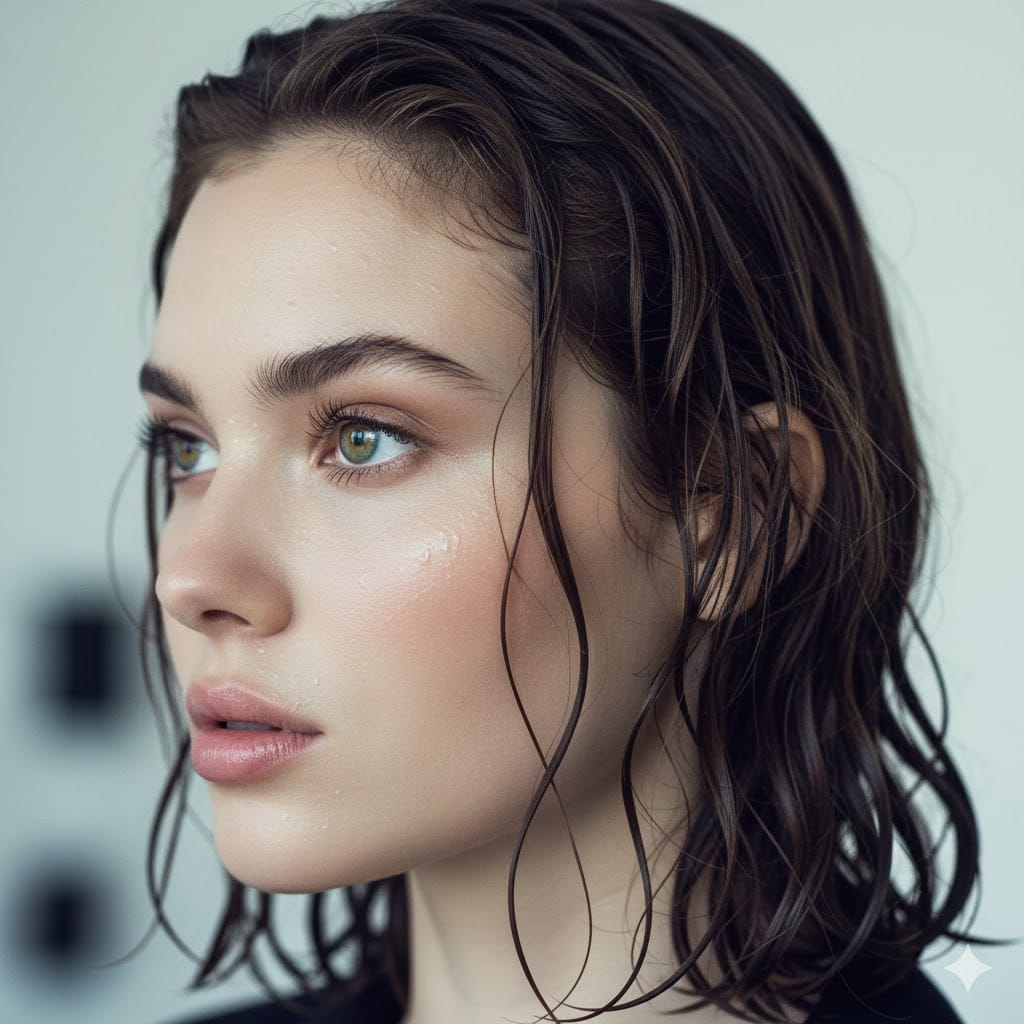
How to xtreme wet close-up portrait. Young woman's face in profile (use uploaded pictures for proper reference) Dark wet hair naturally glued to the skin.
3
Times used
0
Likes
Unveiling the "Xtreme Wet Close-up Portrait": The Anatomy of an AI Masterpiece
In the vast universe of digital art and AI image generation, certain styles emerge that capture the imagination, blending raw emotion with breathtaking technical skill. The "Xtreme Wet Close-up Portrait" is one such style. It’s more than just a prompt; it’s a recipe for creating deeply evocative, high-fashion, and hyperrealistic portraits that stop viewers in their tracks. This style, masterfully executed by the Orno AI image editor, combines intimacy, texture, and mood to produce visuals that feel both professionally shot and profoundly personal. Let's deconstruct the core elements that make this AI art style so compelling.
The Power of the "Xtreme Close-up"
The first element, the "xtreme close-up," immediately establishes a sense of intimacy. Unlike a standard portrait, this perspective pushes past conventional boundaries, inviting the viewer into the subject's personal space. This proximity allows the AI to render an incredible level of detail. You can see the subtle textures of the skin, the delicate strands of eyelashes, and the universe reflected in the iris of an eye. In AI art, this level of detail is a testament to the power of the generation model. Orno excels at this, creating photorealistic portraits where every pore and freckle contributes to the overall narrative of the image. This perspective forces an emotional connection, making the portrait not just an image to be seen, but an experience to be felt.
The "Wet" Element: A Canvas for Light and Emotion
The "wet" aspect is the signature of this style. Water is a powerful symbol, representing everything from purity and rebirth to sorrow and intensity. When applied to a portrait, it transforms the image. The glistening on the skin creates dynamic highlights and deep shadows, accentuating the contours of the face. Water droplets become tiny lenses, catching and refracting light in complex ways that add a layer of realism and visual interest. The prompt's specific direction, "Dark wet hair naturally glued to the skin," is crucial. This isn't a perfectly coiffed, studio-wet look; it's raw and organic. The hair clings to the temples, forehead, and neck, framing the face in a way that feels unposed and authentic. This effect can convey a range of moods: the aftermath of a rainstorm, the intensity of an athletic performance, or a moment of quiet, vulnerable introspection.
The Elegance of the Profile View
Choosing a "face in profile" is a deliberate artistic decision. While a front-facing portrait confronts the viewer directly, a profile view offers a different kind of engagement. It highlights the subject's silhouette—the line of the forehead, the curve of the nose, the shape of the lips and chin. This perspective has roots in classical art, from Roman coins to Renaissance portraiture, and it lends a timeless, almost sculptural quality to the image. In the context of AI generation, it allows for a focused exploration of facial structure and the interplay of light on a single plane, creating a dramatic and often contemplative mood. The subject seems lost in thought, their gaze directed at something beyond the frame, which invites the viewer to wonder about their story.
Crafting Your Perfect AI Wet Portrait with Orno: A Step-by-Step Guide
The beauty of modern AI image generators like Orno is that they democratize artistry. You don't need a professional camera, lighting equipment, or a model to create a stunning "Xtreme Wet Close-up Portrait." You just need your creativity and the right set of instructions for the AI. Here’s how you can use Orno to bring this powerful style to life.
Step 1: The Foundation - Your Master Prompt
Every great AI image starts with a great prompt. The prompt is your direct communication with the AI, telling it exactly what you envision. For this style, our core prompt is:
"Create a xtreme wet close-up portrait. Young woman's face in profile. Dark wet hair naturally glued to the skin."
Let's break down why this prompt is so effective:
- "xtreme wet close-up portrait": This sets the scene, defining the composition, style, and primary element.
- "Young woman's face in profile": This specifies the subject, their general age, and the precise viewing angle.
- "Dark wet hair naturally glued to the skin": This adds the crucial textural and realistic detail that defines the style's raw aesthetic.
Using this as your starting point in the Orno AI image editor will already yield impressive results, thanks to our finely-tuned model that understands nuance and artistic intent.
Step 2: Personalize Your Creation with Orno's Image-to-Image Feature
This is where Orno truly sets itself apart. What if you want the portrait to resemble a specific person—perhaps yourself, a friend, or a character you've imagined? The prompt includes the instruction, "use uploaded pictures for proper reference," which is a perfect use case for Orno's powerful image-to-image (or "img2img") capabilities. By uploading a clear photo of a face, you provide the AI with a concrete visual guide. Orno's advanced AI will then intelligently blend the features from your reference photo with the artistic style defined in your text prompt. The result is a unique, personalized "Xtreme Wet Close-up Portrait" that carries the likeness of your chosen subject. This feature is a game-changer for creating custom AI avatars, personalized digital art, and conceptual character designs.
Step 3: Experiment and Iterate for a Unique Masterpiece
The initial prompt is a fantastic starting point, but the true magic of AI art lies in experimentation. Orno encourages you to become a prompt engineer and fine-tune your creation. Consider adding descriptive keywords to modify the mood, lighting, and environment. Here are some ideas:
- For Lighting: Add terms like "dramatic chiaroscuro lighting," "soft neon glow," "cinematic lighting," or "golden hour sidelight."
- For Mood: Try keywords such as "melancholic," "serene," "defiant," "introspective," or "ethereal."
- For Details: Include specifics like "raindrops on the skin," "subtle steam in the air," "monochromatic color scheme," or "high-contrast black and white."
Don't be afraid to use Orno's negative prompt feature as well. If the AI is generating images with smiles but you want a more serious tone, you can add "smiling, happy" to the negative prompt to guide it away from those expressions. Each iteration brings you closer to the exact image in your mind's eye.
Why the "Xtreme Wet Look" is Dominating Digital Art and Photography
This AI-generated style isn't just a random trend; it taps into several powerful currents in contemporary visual culture. Its popularity stems from its ability to convey a high-end aesthetic, tell compelling stories, and showcase the incredible capabilities of hyperrealistic AI.
The High-Fashion and Editorial Edge
Flip through the pages of any high-fashion magazine or scroll through a luxury beauty brand's social media, and you'll inevitably find professional photography that echoes this style. The "wet look" is a staple in editorial and beauty shoots because it's inherently dramatic. It strips away artifice, focusing on raw form, texture, and light. By using Orno to create these portraits, artists and content creators can produce visuals with a professional, expensive feel, perfect for portfolios, brand campaigns, and eye-catching social media content.
Deep Emotional Storytelling
A great portrait does more than capture a likeness; it tells a story. The "Xtreme Wet Close-up Portrait" is a masterclass in visual narrative. The combination of the intimate close-up, the vulnerability implied by the water, and the contemplative profile view creates a potent emotional cocktail. The resulting image feels like a single, poignant frame from a larger story. Is the subject caught in a downpour? Emerging from a swim? Or are the water droplets a metaphor for tears? The ambiguity is part of the appeal, allowing the viewer to project their own feelings and interpretations onto the image.
A Showcase of Hyperrealism
This style is the ultimate test for an AI image generator's ability to render realism. Creating convincing water droplets, realistic skin texture with specular highlights, and fine, wet hair strands that interact believably with the skin requires a sophisticated AI model. Orno's engine is specifically designed to handle these complexities, generating 4K, high-resolution images that blur the line between digital creation and reality. For AI art enthusiasts, successfully generating a perfect "Xtreme Wet Close-up Portrait" is a benchmark of quality, showcasing both their prompting skill and the power of the tool they're using.
Orno: Your Ultimate AI Co-creator for Stunning Portraits
While the prompt is your blueprint, the AI image editor is your workshop. To build a masterpiece like the "Xtreme Wet Close-up Portrait," you need the best tools. Orno is engineered from the ground up to be the ultimate artistic partner for creators who demand quality, control, and realism.
- Superior Photorealism: Orno’s AI models are trained on vast datasets to understand the physics of light, texture, and human anatomy, resulting in portraits of unparalleled realism.
- Intuitive Image-to-Image Control: Our user-friendly interface makes it simple to upload your reference photos and guide the AI to create personalized portraits that truly capture a specific likeness.
- Speed and Efficiency: We believe that creativity shouldn't have to wait. Orno delivers high-resolution images in seconds, allowing you to iterate and experiment rapidly to perfect your vision.
- Advanced Customization: With powerful tools like detailed prompting, negative prompts, and style strength adjustments, Orno gives you the granular control needed to bring even the most specific artistic ideas to life.
Frequently Asked Questions (FAQ)
What is the "Xtreme Wet Close-up Portrait" AI style?
It's an AI image generation style focused on creating intense, emotional, and hyperrealistic portraits. Key features include a very tight close-up shot of a face, typically in profile, with the dramatic visual element of wet hair and skin, creating a raw and high-fashion aesthetic.
Can I use my own face for this AI portrait style in Orno?
Absolutely! This is one of Orno's greatest strengths. By using our image-to-image feature, you can upload a photograph of yourself or anyone else. Orno's AI will then use that photo as a reference to generate the "Xtreme Wet Close-up Portrait" in that person's likeness.
How can I make my AI wet portrait look more realistic?
To enhance realism, focus on detailed prompts. Add keywords related to light and texture, such as "photorealistic skin texture," "detailed water droplets," "specular reflections," "8k," and "sharp focus." Using a high-quality reference image in Orno's image-to-image tool will also significantly improve the realism and accuracy of the final portrait.
What are some good keywords to add to the prompt for different moods?
For a melancholic mood, try "somber, moody lighting, rain, tears." For a powerful or defiant mood, use "intense gaze, strong jawline, dramatic shadows, determined." For a serene or ethereal feel, try "soft light, tranquil, peaceful expression, glowing skin."
Is the Orno AI image editor suitable for beginners?
Yes, Orno is designed for users of all skill levels. Beginners can start with simple, clear prompts like the one for this style and get amazing results instantly. For advanced users, Orno offers a suite of powerful features for fine-tuning and complex prompt engineering, providing a high ceiling for creative exploration.
Can I use the images I create with Orno for commercial purposes?
Please refer to Orno's specific terms of service regarding commercial usage rights for the images you generate. Generally, AI art platforms have clear policies on how generated content can be used, and we encourage you to review ours to ensure you are in compliance.
The "Xtreme Wet Close-up Portrait" is more than a trend; it's a new frontier in digital expression, and it's at your fingertips. It challenges you to think like a photographer, a director, and a storyteller. Ready to create a portrait that resonates with raw power and stunning beauty? Dive into the Orno AI image editor and bring your breathtaking vision to life today!
Use This Prompt
Transform your images with AI
Save this prompt as its own icon for one-tap access.