
Create a world When GTA 6
How to a photo of the world when GTA 6 is released.
0
Times used
0
Likes
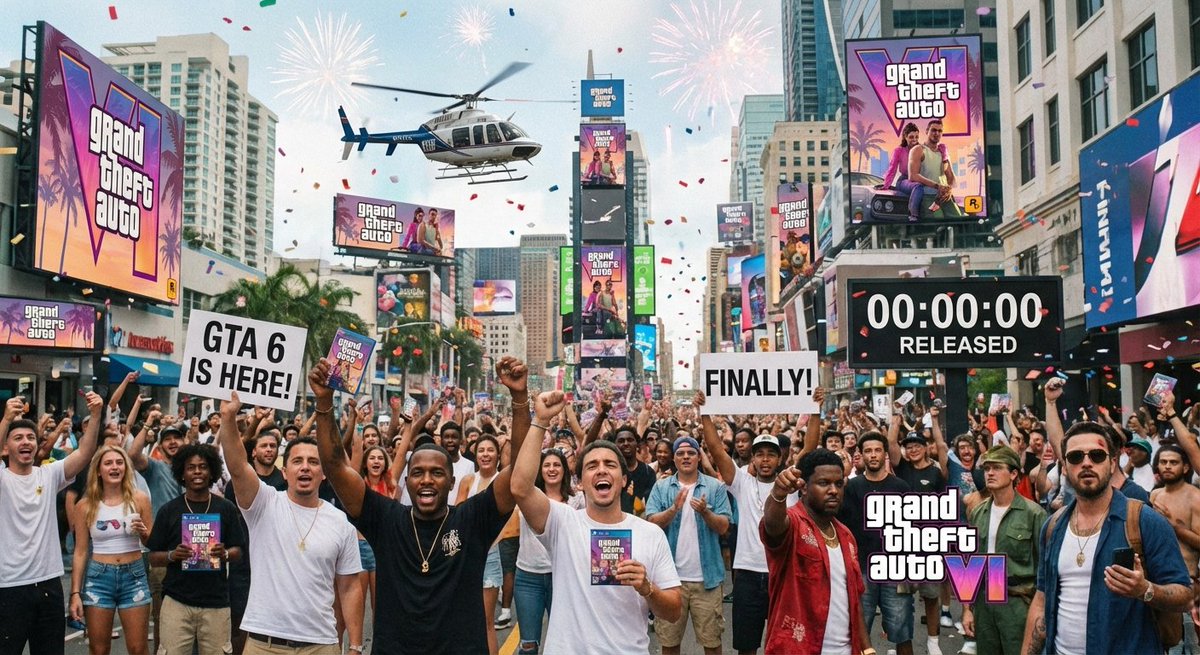
The anticipation is more than just hype; it's a global cultural event a decade in the making. Grand Theft Auto 6 is not just a game; it's a benchmark in entertainment, and its release will be a moment etched in history. But what will that moment actually look like? What will the world feel like when GTA 6 is finally in our hands? Instead of just imagining it, you can now visualize it with the power of AI. Welcome to the "Create a world When GTA 6" AI image generation style, a unique and powerful prompt available exclusively on Orno, your go-to AI image editor.
This innovative text-to-image style harnesses the collective excitement and futuristic speculation surrounding the game's release. It empowers you to become a digital artist, crafting stunning, detailed, and often hilarious visions of a world celebrating the arrival of the most awaited video game of all time. Whether you envision chaotic street parties in a neon-drenched Vice City or a sleek, futuristic society transformed by the game's launch, Orno provides the tools to bring your most creative ideas to life.
What is the "Create a world When GTA 6" AI Art Style?
At its core, the "Create a world When GTA 6" style is a specialized AI prompt designed to interpret and visualize the future. The foundational prompt, "How to a photo of the world when GTA 6 is released," asks our advanced AI model to think beyond the game itself and focus on the real-world (or a hyper-real world) reaction to its launch. It’s a genre of speculative digital art that blends futuristic aesthetics, gaming culture, and a touch of the satirical chaos that the Grand Theft Auto series is famous for.
Images generated with this style often feature several key elements:
- Futuristic Cityscapes: Think flying cars, holographic advertisements for GTA 6, advanced architecture, and streets teeming with life, all bathed in the iconic neon glow of Vice City or other sprawling metropolises.
- Celebratory Atmosphere: The AI excels at capturing a sense of pandemonium and joy. You'll see crowds of ecstatic fans, digital confetti, and city-wide parties.
- Integration of Technology: Expect to see advanced tech like delivery drones carrying game copies, people experiencing the game in augmented reality, and futuristic gaming setups integrated into daily life.
- Satirical Undertones: True to the GTA spirit, the AI can generate humorous and satirical scenes, poking fun at consumer culture, hype cycles, and the very fabric of modern society.
This style is more than just a filter; it's a conceptual playground. By using Orno's powerful AI image generator, you're not just creating fan art; you're contributing to a visual narrative of one of the biggest pop culture moments of our generation.
Why This GTA 6 AI Prompt is Capturing a Cultural Moment
The wait for Grand Theft Auto 6 has been monumental. Since the release of GTA V in 2013, a whole generation of gamers has grown up, technology has leaped forward, and the world has changed dramatically. This long wait has built a level of anticipation that transcends the gaming community, becoming a mainstream phenomenon fueled by speculation, leaks, and viral memes.
The "Create a world When GTA 6" prompt taps directly into this shared cultural energy. It provides a creative outlet for the millions of fans who have spent years imagining what the next chapter from Rockstar Games would bring. Here’s why it has become so popular:
- Shared Imagination: It allows users to visualize and share their personal predictions and fantasies about the game's impact, creating a collective, crowd-sourced vision of the future.
- Meme Culture Engine: The prompt is perfect for creating viral, humorous, and shareable content. Imagine generating an image of world leaders pausing a summit to play GTA 6 or historical monuments being redecorated for the launch. The possibilities for AI-generated memes are endless.
- Digital Fan Art Evolved: This is the next evolution of fan art. Instead of just drawing characters, fans can now generate entire worlds and scenarios with incredible detail, pushing the boundaries of creative expression. Orno's text-to-image AI makes this accessible to everyone, not just those with traditional artistic skills.
How to Generate Your Own "GTA 6 World" Images with Orno
Creating your own stunning, futuristic vision of the GTA 6 launch day is incredibly simple with Orno's intuitive AI image editor. You don't need any design experience to start generating breathtaking images. Just follow these simple steps.
Step 1: Access Orno's AI Image Generator
Navigate to the Orno AI image generator tool on our website. Our platform is designed to be fast, user-friendly, and accessible directly from your browser. No downloads or complex installations are required. Simply open the page and get ready to create.
Step 2: Select the "Create a world When GTA 6" Style
In our extensive library of AI styles, you'll find the "Create a world When GTA 6" option. Selecting this style pre-loads our AI with the specific parameters, aesthetics, and contextual understanding needed to generate on-theme images. It’s the secret sauce that ensures your creations capture that unique, futuristic, celebratory vibe.
Step 3: Craft Your Text Prompt
This is where your imagination comes into play. While the style sets the stage, your text prompt directs the action. You can be as simple or as detailed as you like. To get you started, here are some prompt ideas, ranging from basic to advanced:
- Simple Prompts: "Times Square celebrating the GTA 6 launch," "A neon-lit street in Vice City at night," "Gamers lining up outside a futuristic store."
- Detailed Prompts: "A hyper-realistic photo of a family in a futuristic living room, unboxing GTA 6 with expressions of pure joy, cinematic lighting."
- Creative Prompts: "A cyberpunk alleyway in Tokyo, rain-slicked streets reflecting giant holographic billboards of the GTA 6 logo, cinematic 8k photo."
- Satirical Prompts: "An oil painting of Napoleon Bonaparte playing GTA 6 on a futuristic console in his study."
Step 4: Generate and Refine
Hit the "Generate" button and watch as Orno's AI brings your text prompt to life in seconds. The AI will provide you with a unique image based on your input. Don't love the first result? No problem. You can generate new variations, tweak your prompt slightly for a different outcome, or use Orno's built-in editing tools to further enhance your AI-generated image. The power to create the perfect scene is entirely in your hands.
Prompting Tips for a Perfect "GTA 6 Release" Scene
To truly master the "Create a world When GTA 6" style and get jaw-dropping results from our AI photo generator, keep these expert tips in mind.
Be Specific with Setting and Time
Don't just say "a city." Define it. Is it "a sun-drenched beachfront in Vice City at dusk" or "a gritty, rain-soaked back alley in Leonida at midnight"? Adding specifics about the location (real or fictional) and time of day adds depth and directs the AI to generate more compelling lighting and atmosphere.
Define the Mood and Atmosphere
Use powerful adjectives to set the tone. Words like "chaotic," "joyful," "dystopian," "utopian," "serene," "vibrant," or "apocalyptic" can drastically change the feeling of the generated image. A "joyful pandemonium in the streets" will look very different from a "serene, utopian celebration."
Incorporate Characters and Action
Bring your scene to life by adding people and describing what they are doing. Instead of "a street," try "a street crowded with people cheering and dancing, holding copies of GTA 6." Adding characters and actions makes the image more dynamic and tells a richer story.
Experiment with Artistic Modifiers
The Orno AI is incredibly versatile. You can layer artistic styles on top of the main theme. Try adding phrases like "in the style of a cinematic movie poster," "hyper-detailed 8K photograph," "vaporwave aesthetic," "concept art for a video game," or "shot on Portra 400 film" to influence the final look and feel of your creation.
Frequently Asked Questions (FAQ)
What exactly is the "Create a world When GTA 6" style?
It is a specialized AI image generation style on Orno that uses the prompt "How to a photo of the world when GTA 6 is released" as a conceptual base. It's designed to create images that speculatively visualize the global reaction and atmosphere on the day the highly anticipated game Grand Theft Auto 6 is launched, often featuring futuristic, celebratory, and satirical elements.
Do I need to be an artist or a prompt expert to use this Orno style?
Absolutely not! Orno is designed for everyone, from seasoned digital artists to complete beginners. The "Create a world When GTA 6" style is pre-tuned to deliver great results. You can start with very simple text prompts and still get amazing, high-quality images. Our guide and tips are here to help you unlock even more creative potential as you get more comfortable.
Can I use the AI-generated GTA 6 images I create for my projects?
The images you create with Orno are yours to use. However, usage rights can depend on your specific plan and the nature of the project (e.g., personal vs. commercial). We always recommend reviewing Orno's terms of service for detailed information on copyright and commercial use to ensure you are in full compliance.
How is Orno's AI generator different for creating gaming art?
Orno's AI models are trained on vast and diverse datasets, allowing for a deep understanding of artistic styles, cultural phenomena, and specific niches like gaming. Our specialized styles, like this one, are fine-tuned to grasp the specific aesthetics and context of video game culture, resulting in more relevant, detailed, and imaginative outputs than generic text-to-image generators.
The world is waiting, imagining, and buzzing with excitement for GTA 6. Don't just be a part of the conversation—drive it. With Orno's "Create a world When GTA 6" AI image style, you have the ultimate tool to visualize the future, create stunning digital art, and share your vision with the world. Ready to see what the future holds? Try Orno's AI Image Editor today and start creating!
Use This Prompt
Transform your images with AI
Save this prompt as its own icon for one-tap access.