
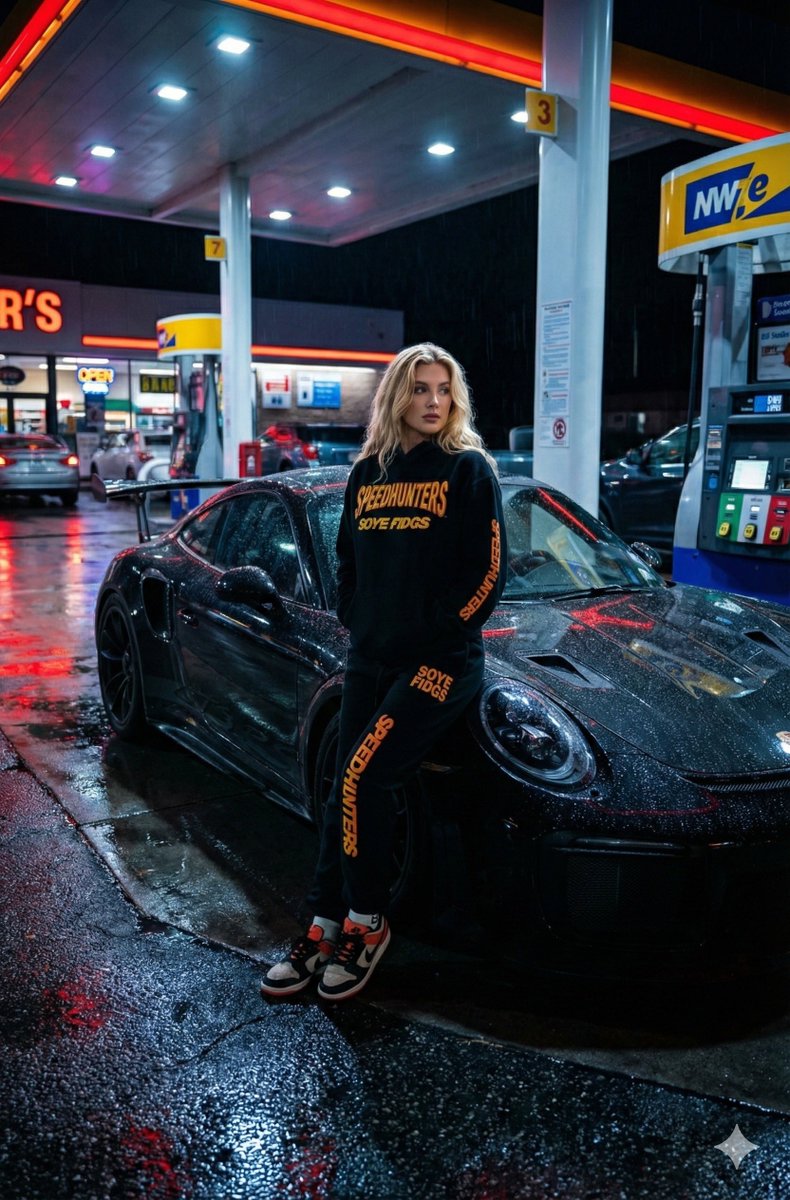
Create a wet Ground Reflecting Colorful Urban
How to wet ground reflecting colorful urban lights
0
Times used
0
Likes
Unlocking the Atmosphere: A Deep Dive into the "Wet Ground Reflecting Colorful Urban" AI Style
There's a unique magic to a city after a downpour. The world, once mundane, transforms into a glittering canvas. Every streetlamp, every neon sign, every passing headlight bleeds its color onto the glistening asphalt, creating a vibrant, distorted mirror of the urban jungle. This moody, cinematic atmosphere, once the exclusive domain of patient photographers and skilled digital painters, is now at your fingertips. Welcome to the world of the "Wet Ground Reflecting Colorful Urban" AI image generation style, a powerful feature within Orno that lets you create breathtaking, rain-slicked cityscapes in seconds.
This article is your complete guide to mastering this evocative aesthetic. We'll explore what makes this style so captivating, how to use Orno to craft the perfect image, and the endless creative possibilities it unlocks. Get ready to stop just imagining these scenes and start creating them.
What Exactly is the "Wet Ground Reflecting Colorful Urban" AI Style?
At its core, this AI art style is a symphony of three key elements: a reflective surface, a source of vibrant light, and a dense urban environment. It’s more than just a prompt; it's an entire aesthetic built on the interplay of light, shadow, and reflection. Think of the iconic visuals from films like Blade Runner, the neon-drenched streets of Cyberpunk 2077, or the mesmerizing photography of nocturnal Tokyo. That's the mood we're capturing.
Let's break down the essential components that Orno's AI model masterfully combines:
- The Wet Ground: This is your canvas. It's not just flat and wet; it's a textured surface with character. It could be the shimmering blacktop of a wide boulevard, the uneven cobblestones of a historic alley, or large, glassy puddles that create perfect, rippling reflections. The AI understands the physics of how different surfaces hold water and reflect light.
- Colorful Urban Lights: This is your palette. The style thrives on high-contrast, saturated light sources. We're talking about the electric pink and cyan of neon signs, the warm, golden glow from apartment windows, the stark red of taillights, and the cool white of modern LED billboards. These are the "paints" that will be smeared across your wet canvas.
- The Reflection: This is where the magic happens. The AI doesn't just copy and paste the lights onto the ground. It simulates how light behaves on a wet surface—how it stretches, distorts, and breaks apart with the ripples in a puddle or the texture of the pavement. This realistic rendering of reflections is what gives the images their depth and photorealism.
- The Atmosphere: The combination of these elements creates a powerful, immersive mood. The style often evokes feelings of introspection, mystery, energy, or even a touch of dystopian melancholy. It’s cinematic, dramatic, and always tells a story.
Why This AI Art Prompt is a Digital Media Phenomenon
The "wet ground reflecting colorful urban" look has exploded in popularity across social media, digital art communities, and even professional design. But why has this specific aesthetic resonated so strongly with creators?
Inherent Visual Drama
The human eye is naturally drawn to contrast and vibrant color. This style delivers both in spades. The deep, dark tones of the wet pavement and shadowed buildings provide the perfect backdrop for the brilliant neon lights to pop. This high dynamic range creates images that are immediately striking and visually engaging, making them perfect for grabbing attention online.
Evokes Powerful Emotions and Narratives
A rainy city night is a universal trope for storytelling. It can be romantic, lonely, dangerous, or futuristic. When you generate an image in this style, you’re not just creating a picture; you're creating a scene from a movie that doesn't exist. A lone figure under an umbrella, a speeding car sending a spray of water into the air, a quiet noodle stand glowing in an alley—each image is a prompt for a larger story, allowing the viewer to fill in the blanks.
The AI Advantage Over Reality
For photographers, capturing the perfect rainy cityscape is an immense challenge. It requires waiting for the right weather, finding a location with great lighting, using expensive equipment to handle low-light conditions, and often, a lot of luck. With an AI image editor like Orno, you become the director of the weather and the city planner. You can conjure a downpour on demand, design the neon signs, and place your camera at an impossible angle—all without leaving your chair.
How to Master the "Wet Ground Reflecting Colorful Urban" Prompt with Orno
While the "Wet Ground Reflecting Colorful Urban" style in Orno is designed to be powerful right out of the box, you can achieve even more stunning and personalized results by understanding how to guide the AI. Here’s how you can go from a beginner to a master of the neon rain.
Getting Started: The One-Click Wonder
The beauty of Orno is its simplicity. You don't need a complex, paragraph-long prompt to begin.
- Select the "Wet Ground Reflecting Colorful Urban" style from Orno's style library.
- In the text prompt box, enter a simple subject. For example, "a person walking a dog" or "a red sports car."
- Click "Generate."
Advanced Prompting: Fine-Tuning Your Vision
Ready to take full control? By adding descriptive keywords and phrases to your base prompt, you can direct the AI with incredible precision. Think of these as modifiers that shape the final image. Here are some ideas:
- Specify the Setting: Go beyond a generic city. Try prompts like "A rain-slicked street in 1980s Tokyo," "a narrow alley in a cyberpunk metropolis," or "a historic European square with wet cobblestones."
- Control the Weather: "Wet ground" is just the start. Use phrases like "heavy downpour with large puddles," "a light mist hanging in the air," "foggy night after the rain," or "steam rising from the asphalt."
- Dictate the Color Palette: Don't leave the colors to chance. Add terms like "vibrant pink and blue neon lights," "warm golden and orange glow from streetlights," or "monochromatic scene with a single pop of red."
- Add and Detail Subjects: Populate your world. Instead of just "a car," try "a classic 1950s convertible, cherry red, headlights on." Instead of "a person," try "a detective in a trench coat looking at a holographic advertisement." -Choose Your Camera Shot: Direct the scene like a filmmaker. Use photography and cinematography terms like "wide-angle shot," "low-angle perspective," "cinematic lighting," "shallow depth of field with bokeh," or "dynamic motion blur."
Example Prompts and Their Potential Results
Let's see how these techniques come together:
Simple Prompt: "A coffee shop"
Advanced Prompt: "A cozy coffee shop on a corner, its warm golden light spilling onto the wet pavement of a dark city street, heavy rain, cinematic wide-angle shot, steam on the windows."
The advanced prompt will produce a far more specific and atmospheric image. You'll not only see the coffee shop but feel its warmth against the cold, rainy night. The specific camera angle will create a more dramatic and immersive scene.
The Orno Advantage: Why Our AI Excels at This Style
You can type a text prompt into any AI generator, but Orno is specifically tuned to deliver superior results for styles like "Wet Ground Reflecting Colorful Urban." Here's why:
- Photorealistic Rendering Engine: Our AI model has been trained on vast datasets of high-resolution photography. It understands the subtle physics of light, water, and texture, resulting in reflections and lighting effects that are incredibly believable.
- Intuitive Style-Based Workflow: We've done the heavy lifting of prompt engineering for you. Our pre-built style ensures you get the core aesthetic right every time, letting you focus on the creative details of your subject and composition.
- Speed and Iteration: Don't wait minutes for a single image. Orno's fast generation allows you to experiment with different prompts, refine your ideas, and produce multiple variations in a fraction of the time, accelerating your creative process.
- Consistent and High-Quality Output: Whether you're creating a single stunning piece or a whole series of images for a project, Orno's style filter provides a consistent look and feel, ensuring professional, high-quality results every time.
Creative Applications for Your Rainy Cityscapes
The images you create with this style are more than just digital art; they are versatile assets. Here are just a few ways you can use your creations:
- Concept Art: Quickly visualize worlds for video games, films, or animations. -Marketing and Advertising: Create eye-catching, moody backgrounds for product promotions or social media campaigns. -Music Promotion: Design the perfect album art for a synthwave, lo-fi, or electronic music track. -Writing and Publishing: Generate a unique book cover or find visual inspiration for your next short story or novel. -Personalization: Create custom, high-resolution wallpapers for your phone and computer that perfectly match your vibe.
Frequently Asked Questions (FAQ)
What is the "Wet Ground Reflecting Colorful Urban" prompt?
It's an AI image generation style or prompt that focuses on creating images of cityscapes at night, typically during or after rain. Its key features are wet, reflective surfaces like streets and puddles that mirror the vibrant colors of neon signs, traffic lights, and other urban light sources, creating a moody and cinematic atmosphere.
Do I need to be an expert to use this style in Orno?
Not at all! Orno has a pre-configured "Wet Ground Reflecting Colorful Urban" style. You can simply select it and enter a basic subject to get incredible results immediately. The advanced prompting techniques are there for when you want more creative control.
How can I make my reflections more vibrant and detailed?
In your prompt, use words that emphasize both the light and the surface. Try adding phrases like "vibrant saturated neon," "glowing holographic signs," "large mirror-like puddles," or "glossy wet asphalt" to encourage the AI to focus on creating sharp, colorful reflections.
Can I add specific characters or objects to my rainy city scene?
Absolutely. Simply include them in your prompt. Be as descriptive as possible. For example, instead of "a man," try "a man in a long black coat holding a glowing red umbrella." The more detail you provide, the better the AI can incorporate your subject into the scene.
What's the difference between this style and a generic "cyberpunk" style?
There's a lot of overlap! However, "cyberpunk" often implies more specific futuristic elements like flying cars, cyborgs, and dystopian themes. "Wet Ground Reflecting Colorful Urban" is a broader aesthetic. You can create a cyberpunk scene with it, but you could also create a scene from 1940s film noir or a contemporary, realistic view of New York in the rain. This style is the foundational atmosphere; cyberpunk is a genre you can build on top of it.
Are the images I create with Orno free to use?
Please refer to Orno's specific terms of service regarding image rights and usage. Generally, AI art generators have policies that allow for broad commercial and personal use of the images you create.
The city at night, washed clean by the rain, is a world of endless stories and breathtaking beauty. It's a world that used to be difficult to capture, but now, it's yours to create. Ready to command the rain and paint with neon? Try Orno's "Wet Ground Reflecting Colorful Urban" style today and bring your cinematic visions to life.
Use This Prompt
Transform your images with AI
Save this prompt as its own icon for one-tap access.