
Create a walk
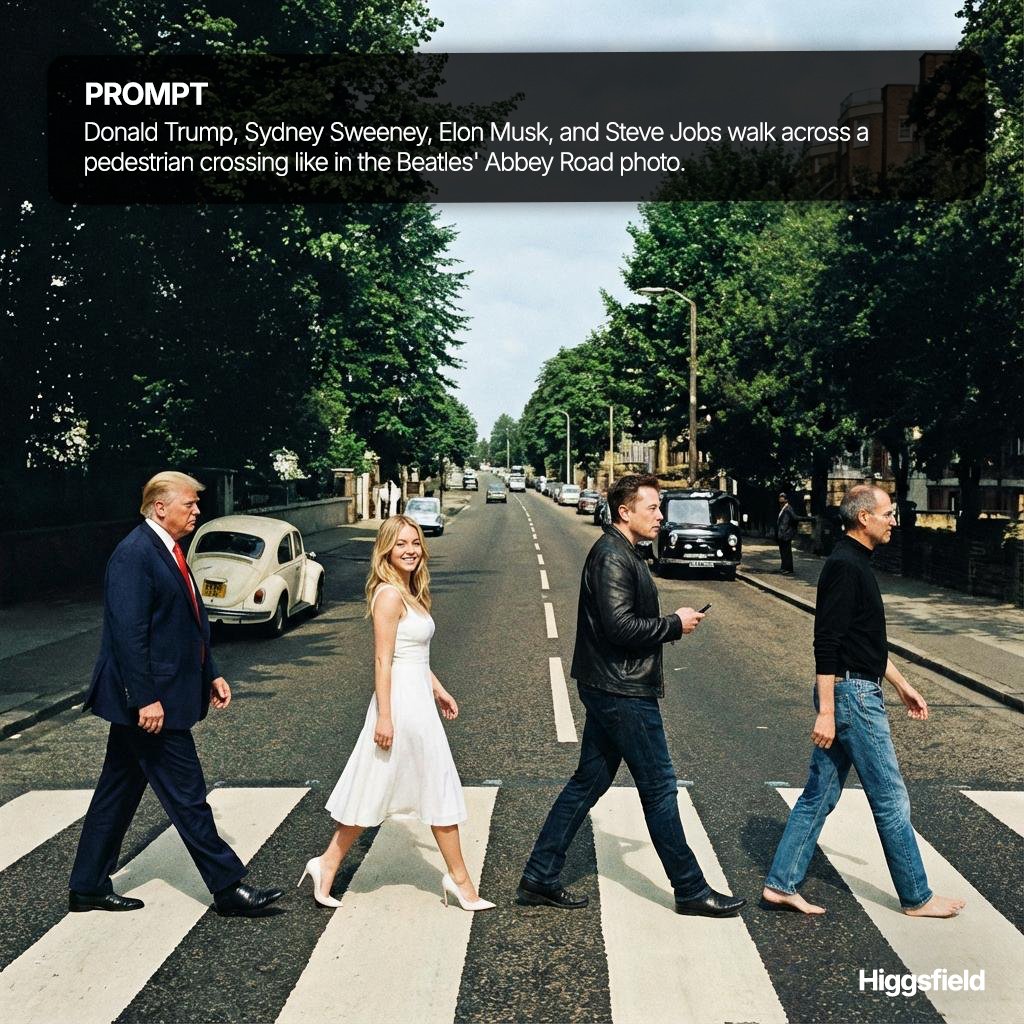
How to [List of well-known figures] walk across a pedestrian crossing like in the Beatles' Abbey Road photo.
0
Times used
0
Likes
The Ultimate Guide to the "Create a walk" AI Style: Reimagining an Iconic Moment
In the vast, ever-expanding universe of AI image generation, some trends capture the imagination more than others. They tap into a shared cultural memory, offering a new lens through which to view the familiar. One such phenomenon is the "Create a walk" style, an AI art prompt that has taken the internet by storm. This creative style allows users to replicate one of the most iconic photographs in music history—The Beatles' Abbey Road album cover—but with a twist: you can cast anyone, or anything, you can imagine in the leading roles.
Here at Orno, we've engineered our AI image editor to make harnessing this incredible creative power both simple and intuitive. This guide will walk you through everything you need to know about the "Create a walk" style, from its cultural origins to practical prompting tips that will help you generate stunning, hilarious, and thought-provoking images. Get ready to direct your own legendary street-crossing moment.
What Exactly is the "Create a walk" AI Image Style?
The "Create a walk" style is a text-to-image prompt specifically designed to generate a picture of four figures walking in a line across a pedestrian crossing, also known as a zebra crossing. The composition, posing, and general atmosphere are directly inspired by the legendary 1969 photograph of John Lennon, Ringo Starr, Paul McCartney, and George Harrison taken for their album, "Abbey Road."
At its core, the AI model understands several key elements from this prompt:
- The Setting: A paved street with white stripes of a pedestrian crossing.
- The Action: The act of walking, typically from one side of the frame to the other.
- The Cast: Four distinct figures, arranged in a single-file line.
- The Composition: A low-angle shot that captures the full bodies of the subjects and the surrounding environment.
What makes this AI style so powerful is its flexibility. The AI doesn't just copy the original photo; it uses it as a foundational template. By simply changing the subjects in your prompt—for example, from "The Beatles" to "four astronauts"—the AI generates an entirely new scene that still feels instantly recognizable. This fusion of familiarity and novelty is the magic behind the "Create a walk" trend.
Why the Abbey Road Cover is a Perfect Canvas for AI Art
Of all the famous photographs in the world, why has this particular one become such a popular template for AI image generation? The answer lies in its unique combination of simplicity and cultural resonance.
Instant Recognizability
The Abbey Road cover is more than just a photo; it's a cultural icon. Even people who aren't die-hard Beatles fans can often recognize the image. This widespread familiarity provides a powerful shared context. When you create a version with characters from Star Wars or famous scientists, the joke or creative statement lands immediately because the viewer understands the reference point. The AI leverages this cultural shorthand to create images with built-in meaning.
A Simple, Strong Composition
The structure of the photograph is brilliant in its simplicity. Four figures, a straight line, a clear direction of movement. This straightforward composition provides an ideal framework for an AI model. There are clear "slots" for the AI to place your chosen characters, making it less prone to the chaotic or nonsensical results that can sometimes arise from more complex prompts. It’s a stable, reliable foundation upon which endless creativity can be built.
Endless Potential for Parody and Mashups
The juxtaposition of the mundane (crossing a street) with the extraordinary (being The Beatles) is part of the original's charm. The "Create a walk" AI style supercharges this by allowing for absurd and delightful mashups. What would it look like if the Ghostbusters crossed Abbey Road? Or the four Ninja Turtles? Or even four historical philosophers debating as they walk? Orno's AI image editor allows you to answer these questions visually, turning a simple "what if" into a compelling piece of art.
How to Use the "Create a walk" Style in Orno: A Step-by-Step Guide
We believe that powerful AI tools should be accessible to everyone, not just tech wizards. That's why we've made generating your own iconic walk with Orno an effortless process. Follow these simple steps:
- Navigate to the Orno AI Generator: Open our tool and get ready for the magic. Our user-friendly interface is designed to make your creative journey smooth and enjoyable.
- Select the "Create a walk" Style: You can either find our pre-built "Create a walk" style in the style library or simply type it as part of your prompt. This tells the AI the specific composition you're aiming for.
- Define Your Cast: This is where your imagination takes center stage. Who do you want to see crossing the road? Be specific! Instead of just "wizards," try "Gandalf, Dumbledore, Merlin, and Harry Potter." The more detail you provide, the better the AI can render your vision.
- Refine with Additional Styles (Optional): Want to see your walk in a different artistic style? Orno makes it easy. Add modifiers to your prompt like "in a photorealistic style," "as a vintage cartoon," "in the style of pixel art," or "as a claymation scene." You can combine the "Create a walk" structure with virtually any aesthetic.
- Generate and Share: Click the "Generate" button and watch as Orno brings your idea to life in seconds. Once you have a result you love, you can easily download it and share your masterpiece with the world.
Pro Prompting Tips for a Perfect "Walk"
A great AI image starts with a great prompt. Here are some tips and examples to help you get the most out of the "Create a walk" style in Orno.
- Be Specific with Characters: The AI works best with well-known figures it has been trained on. The more famous the character, the more accurate the depiction will be.
- Good Prompt: "Create a walk with Homer Simpson, Peter Griffin, Bender, and Rick Sanchez, in the style of their respective shows."
- Less Effective Prompt: "Create a walk with four cartoon characters."
- Mix and Match Eras and Genres: The most compelling images often come from unexpected combinations.
- Example: "Create a walk with a Roman Centurion, a medieval knight, a samurai, and a futuristic cyborg soldier, photorealistic."
- Example: "Create a walk with Dracula, Frankenstein's monster, the Wolfman, and the Mummy, in the style of a classic horror movie poster."
- Play with the Environment: While the default is a London street, you can change the setting.
- Example: "Create a walk with four aliens crossing a pedestrian street on Mars, red planet landscape."
- Example: "Create a walk with four video game characters crossing a rainbow road from Mario Kart."
- Use Descriptive Adjectives: Add adjectives to control the mood and details.
- Example: "Create a walk with four grumpy-looking cats wearing tiny business suits, cinematic lighting."
- Example: "Create a walk with four joyful ghosts floating across a spooky street at midnight."
Frequently Asked Questions (FAQ)
What is the "Create a walk" AI prompt?
It's an AI art prompt that instructs a text-to-image generator like Orno to create a picture of four figures walking across a pedestrian crossing, in a style that mimics the iconic Beatles' Abbey Road album cover. Users can specify any characters they want to be in the image.
Do I need to be an artist or a tech expert to use this style in Orno?
Absolutely not! Orno is designed for everyone. Our intuitive interface and pre-optimized styles like "Create a walk" mean you don't need any artistic skill or technical knowledge. If you can type a description of what you want to see, you can create amazing AI art.
Can I use my own original characters, or only famous ones?
You can describe any character you can imagine! While the AI is most accurate with well-known public figures and fictional characters, you can certainly describe your own. For example, you could try: "Create a walk with a tall warrior with a flaming sword, a small rogue in a dark cloak, a wise old wizard with a long white beard, and a cheerful cleric holding a holy symbol."
What makes Orno's "Create a walk" generator special?
Orno is optimized for both quality and ease of use. Our implementation of the "Create a walk" style is fine-tuned to produce high-fidelity, compositionally sound images. Furthermore, our platform allows you to easily layer this with other stylistic effects, giving you a level of creative control that is both powerful and incredibly easy to access.
Can I change the background from the classic Abbey Road setting?
Yes! As mentioned in our prompting tips, you can add details to your prompt to change the location. Try adding phrases like "on a neon-lit street in Tokyo," "across a dusty road in the wild west," or "on a futuristic sky-bridge" to transport your characters to a whole new world.
Are the images I generate with Orno's "Create a walk" style mine to use?
Yes, the images you create are yours. Please refer to Orno's specific terms of service for detailed information on usage rights for personal and commercial projects, but we believe in empowering our creators.
The "Create a walk" AI style is a testament to how artificial intelligence can be used as a tool for cultural commentary, parody, and pure creative fun. It transforms a passive memory into an active canvas. Ready to direct your own iconic moment and make history (or just a really cool picture)? Dive into the Orno AI image editor and start creating your walk today!
Use This Prompt
Transform your images with AI
Save this prompt as its own icon for one-tap access.