
Create a vibrant 2
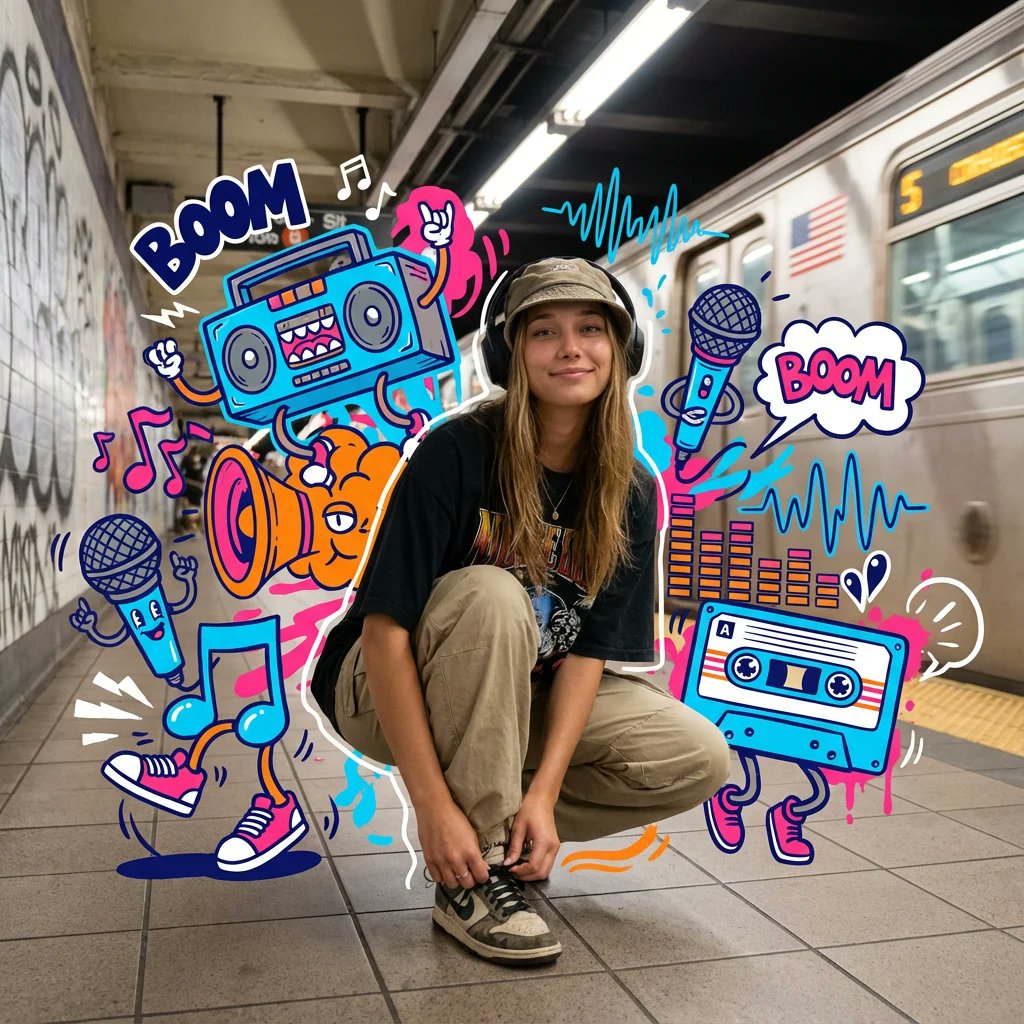
How to a vibrant, mixed-media masterpiece featuring a photorealistic young street-dancer surrounded by a chaotic explosion of 2D graffiti-style musical...
0
Times used
0
Likes
Unleash the Rhythm: A Deep Dive into Orno's "Create a vibrant 2" AI Style
In the world of digital art, the most electrifying creations often emerge from the collision of contrasting ideas. Imagine the raw, kinetic energy of a street dancer, captured with breathtaking realism, suddenly erupting into a symphony of flat, graphic chaos. This is the heart of "Create a vibrant 2," one of Orno's most dynamic and visually stunning AI image generation styles. It’s more than just a prompt; it’s a portal to a world where photorealism and graffiti street art dance together in a vibrant, mixed-media masterpiece.
This comprehensive guide will explore the depths of the "Create a vibrant 2" style. We'll break down its core components, teach you how to master your prompts for jaw-dropping results, and showcase why this unique style is a game-changer for artists, designers, musicians, and creators of all kinds. Get ready to transform your text descriptions into explosive works of art with the power of Orno's advanced AI.
Deconstructing the Vibe: What Makes "Create a vibrant 2" So Unique?
At its core, "Create a vibrant 2" is an exercise in beautiful contradiction. It masterfully blends the hyper-realistic with the stylized, the three-dimensional with the two-dimensional. To truly understand its power, we need to look at its three fundamental pillars: the photorealistic subject, the graffiti explosion, and the mixed-media fusion.
The Photorealistic Heartbeat: The Street Dancer
The anchor of every "Create a vibrant 2" image is its central subject: a photorealistic young street dancer. Orno's AI doesn't just create a cartoon or a drawing; it strives to generate a figure that looks like it was captured by a high-speed camera. You'll see the intricate details in the fabric of their clothes, the subtle expression on their face, and the realistic play of light and shadow on their form. This commitment to realism creates a powerful focal point that grounds the image, making the surrounding chaos even more impactful. The AI is trained to understand the anatomy of movement, allowing you to generate figures in dynamic poses—mid-freeze, mid-jump, or mid-spin—that feel authentic and alive.
The Chaotic Symphony: A 2D Graffiti Explosion
Exploding from around the dancer is a whirlwind of 2D, graffiti-style elements. This is where the style sheds realism and embraces pure, unadulterated graphic energy. Based on the style's core logic, this "chaotic explosion" is infused with musical themes. Think of it as the visual representation of a song's beat drop. You'll see elements like:
- Stylized musical notes and treble clefs
- Abstract sound waves and frequency patterns
- Bold graffiti tags and bubble letters
- Paint splatters, drips, and aerosol spray effects
- Geometric shapes and arrows that direct the eye and convey motion
The key here is the "2D" nature of these elements. They exist on a different plane from the dancer, creating a fascinating visual depth and a collage-like effect that defines the mixed-media aesthetic.
A Fusion of Worlds: The Mixed-Media Approach
The term "mixed-media" traditionally refers to artwork created from more than one medium. In the world of AI image generation, it signifies the blending of distinct artistic styles within a single piece. "Create a vibrant 2" is the perfect example. It's a digital collage that seamlessly combines the precision of photography with the raw, expressive freedom of street art. This fusion is what makes the style so versatile and exciting. It's not just a picture of a dancer; it's a story about movement, music, and the urban environment, all told through a unique visual language that only an advanced AI like Orno can articulate so fluently.
Mastering the Prompt: Your Guide to Creating with "Create a vibrant 2"
While simply selecting the "Create a vibrant 2" style in Orno and typing "a breakdancer" will yield impressive results, the true magic happens when you take control of the prompt. By providing the AI with more specific details, you can art-direct your vision with incredible precision. Here’s how to become a prompt-engineering pro with this style.
Fine-Tuning Your Vision: Customization is Key
Think of your prompt as a set of instructions. The more detailed your instructions, the closer the AI will get to your intended outcome. Here are some elements you can control:
- The Dancer: Be specific! Instead of "dancer," try "A dynamic female hip-hop dancer with curly hair," "A young male B-boy in a red hoodie performing a flare," or "A dancer with popping and locking moves." You can specify clothing, ethnicity, expression, and the exact dance move.
- The Graffiti Elements: Don't just settle for a generic "explosion." Direct the chaos. Use terms like "an explosion of neon pink and electric blue musical notes," "a vortex of monochrome graffiti sound waves," or "a splash of yellow and black spray paint tags and arrows."
- The Color Palette: Color is crucial for setting the mood. Use descriptive words to guide the AI. Examples include "a vibrant, multi-colored palette," "a moody, dark color scheme with neon highlights," or "a retro-inspired pastel color palette."
- The Composition: While the style defaults to a central figure, you can influence the overall scene. Add background details like "on a gritty urban street at night," "under a single spotlight on a dark stage," or "in front of a concrete wall."
Example Prompts and Their Potential Results
Let's put it all together. Here are a few detailed prompts to inspire you and demonstrate the power of specific language within the Orno AI image editor.
Prompt 1: A photorealistic young female street-dancer with athletic build, mid-air in a powerful jump, wearing a black beanie and a loose-fitting grey tracksuit. She is surrounded by a chaotic explosion of 2D graffiti-style musical sound waves and treble clefs in vibrant magenta and cyan. --style "Create a vibrant 2"
Expected Result: A high-energy image with a lifelike dancer as the clear focus. The surrounding elements will be bright and cool-toned, specifically featuring musical symbols and abstract wave patterns, creating a sense of rhythm and motion.
Prompt 2: A detailed, realistic portrait of a male popper with sunglasses, his body contorted in a robotic locking move. A dense whirlwind of 2D, white and orange graffiti arrows, geometric shapes, and abstract paint splatters swirls around him against a dark background. --style "Create a vibrant 2"
Expected Result: A more intense and focused image. The photorealism will shine on the dancer's pose and clothing. The graffiti will be high-contrast and more geometric than melodic, suggesting an electronic or funk beat.
Prompt 3: A full-body shot of a breakdancer executing a difficult freeze on a city sidewalk. The scene is a mixed-media masterpiece, with a photorealistic dancer at the center of an overwhelming explosion of colorful, 2D bubble letters, graffiti tags, and cartoonish spray-can illustrations. --style "Create a vibrant 2"
Expected Result: This prompt leans heavily into classic hip-hop and graffiti culture. The image will feel busy and layered, with the 2D elements almost consuming the realistic background, perfectly capturing the essence of vibrant street art.
A Game-Changer for Modern Creatives
The "Create a vibrant 2" style isn't just a fun feature; it's a powerful tool for a wide range of creative professionals. With Orno, generating world-class visuals is no longer limited by budget or technical skill.
- Musicians and DJs: Instantly create stunning album art, concert posters, or social media promotions that visually capture the energy of your music.
- Graphic Designers: Generate unique base images for campaigns, website hero sections, or branding projects that require a modern, urban, and energetic feel. - Social Media Managers: Create scroll-stopping content for brands in fashion, music, sports, or entertainment. These images are guaranteed to grab attention and boost engagement. - Digital Artists: Use the style as a starting point for more complex digital paintings, as a source of inspiration, or as a way to rapidly prototype creative ideas.
Frequently Asked Questions (FAQ)
What exactly is the "Create a vibrant 2" style in Orno?
It's a specialized AI image generation style that creates mixed-media art. It combines a central, photorealistic subject (typically a street dancer) with a surrounding explosion of 2D, flat, graffiti-style elements often themed around music and motion. It’s designed to produce dynamic, high-contrast, and visually exciting images.
Do I need to be an expert at writing prompts to use this style?
Not at all! The beauty of Orno's style presets is their accessibility. You can get incredible results with a very simple prompt like "a girl dancing." However, learning to add more descriptive details, as outlined in this guide, will give you greater control and allow you to fully realize your unique creative vision.
Can I change the main subject from a street dancer to something else?
Absolutely. While the style is optimized for dancers, its core logic can be applied to other dynamic subjects. Try prompting for "a photorealistic skateboarder," "a lifelike BMX rider," or even "a photorealistic basketball player dunking a ball." The AI will adapt and surround your chosen subject with the signature graffiti explosion. Experimentation is key!
What makes Orno the best AI image editor for this style?
Orno is specifically engineered to handle complex, mixed-media styles like "Create a vibrant 2." Our AI model excels at blending photorealism with graphic elements, maintaining coherence while celebrating contrast. The intuitive interface, combined with the power of pre-trained styles, makes it easy for anyone to generate professional-quality art that would otherwise require hours of work in traditional design software.
How can I make the graffiti elements more prominent in my image?
To give the graffiti more visual weight, use powerful and descriptive words in your prompt. Try phrases like "an overwhelming explosion of graffiti," "a dense cloud of 2D elements," "the dancer is consumed by a whirlwind of musical notes," or "heavy, bold graffiti tags." Using words that imply scale and density will signal to the AI to make those elements a more dominant part of the composition.
Your Stage is Set: Start Creating with Orno
The "Create a vibrant 2" style is more than an algorithm; it’s a creative partner. It understands the language of the streets, the rhythm of music, and the power of artistic contrast. It offers a unique opportunity to generate visuals that are both technically impressive and emotionally resonant, capturing a feeling of raw, untamed energy.
Now it's your turn to take the stage. Dive into the Orno AI image editor, select the "Create a vibrant 2" style, and let your imagination run wild. Whether you are a seasoned designer or just starting your creative journey, you have the power to create breathtaking, mixed-media masterpieces at your fingertips. Unleash your creativity and start generating with Orno today!
Use This Prompt
Transform your images with AI
Save this prompt as its own icon for one-tap access.