
Create an upright But Relaxed Posture
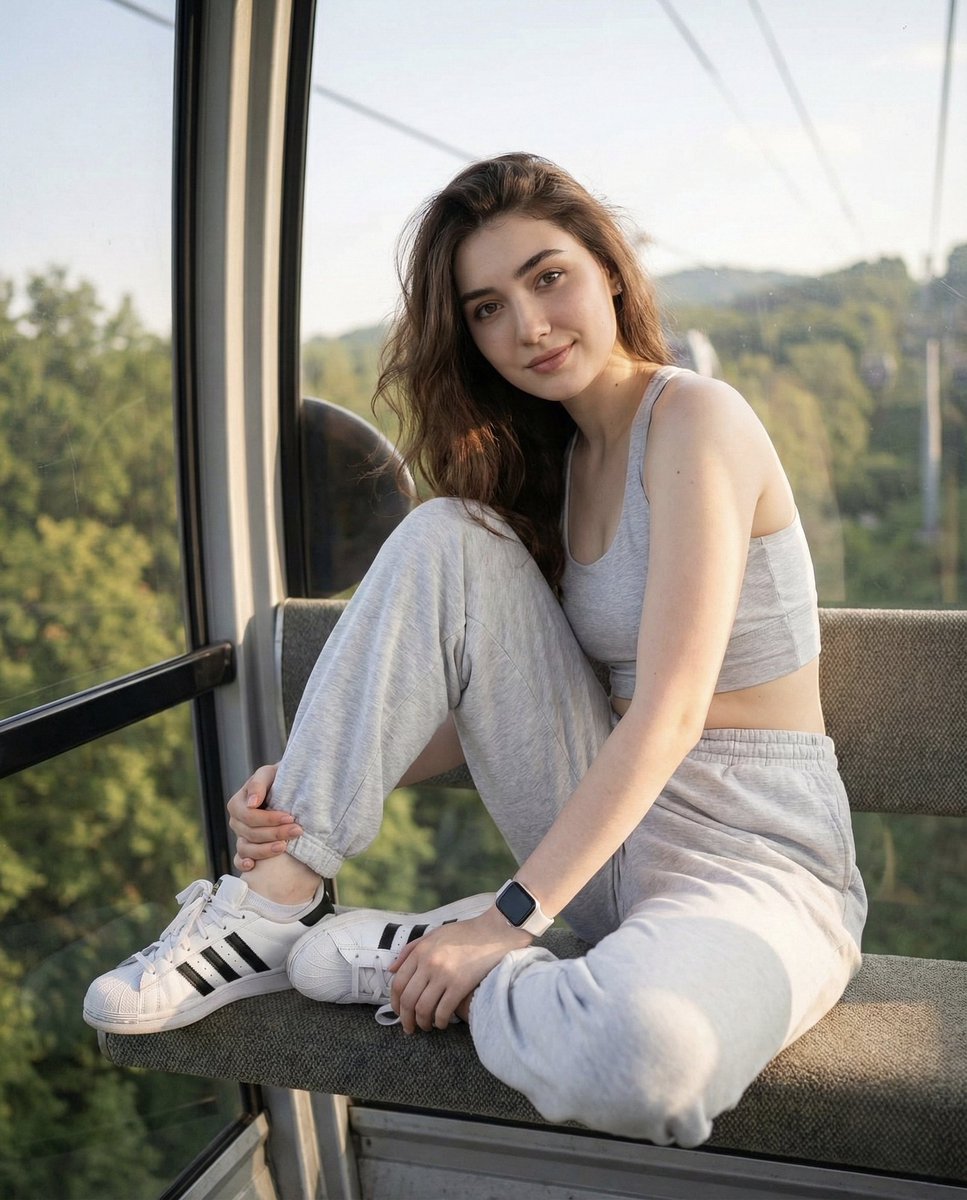
How to upright but relaxed posture, shoulders slightly turned toward the camera, natural soft smile, head tilted slightly downward while looking toward...
0
Times used
0
Likes
Unlock Authentic Portraits: Mastering the "Upright But Relaxed Posture" AI Style
In the world of AI image generation, the quest for realism is paramount. We've all seen them: AI-generated portraits that are technically perfect but emotionally hollow. The subjects stand stiffly, their smiles feel forced, and they lack the subtle spark of life that connects with a viewer. This is the "uncanny valley" of AI art, and at Orno, we're dedicated to helping you cross it. That's why we're so excited to delve into one of our most powerful and nuanced styles: "Create an upright But Relaxed Posture."
This isn't just a prompt; it's a recipe for authenticity. It's a collection of carefully chosen words that guide Orno's advanced generative AI to produce portraits that are not only photorealistic but also relatable, confident, and engaging. Whether you're a professional creating an AI headshot for LinkedIn, a marketer designing ad creative, or an artist bringing a character to life, understanding the intricacies of this style will fundamentally change the quality of your AI-generated images. Let's explore how to transform simple text into captivating, human-like portraits with the Orno AI image editor.
Deconstructing the Magic: What Makes the "Upright But Relaxed Posture" Style Work?
The power of this prompt lies in its specific, yet natural, instructions. Each phrase targets a key element of human body language that communicates confidence and approachability. When combined, they instruct the Orno AI to move beyond generic poses and tap into the subtleties of a genuine portrait session.
The Foundation: "Upright But Relaxed"
The core of the pose begins here. "Upright" conveys confidence, professionalism, and self-assurance. It prevents the AI from generating slumped or passive postures. However, "upright" alone can lead to rigidity. The addition of "but relaxed" is the crucial modifier. It tells the AI to soften the edges, to ease the tension in the shoulders, and to create a pose that feels natural and comfortable, not like a soldier at attention. This duality is the key to creating an image of someone who is both competent and approachable—a perfect combination for a professional headshot or a brand representative.
Adding Depth: "Shoulders Slightly Turned Toward the Camera"
A flat, forward-facing "mugshot" style can feel confrontational and one-dimensional. By instructing the AI to have the "shoulders slightly turned," you introduce depth and dynamism into the composition. This classic portrait photography technique, known as the three-quarter pose, is more flattering for most body types and creates a more engaging visual line for the viewer's eye to follow. It subtly invites the viewer into the image, making the portrait feel more like an interaction and less like an inspection. Orno's AI image generator understands this compositional nuance, using it to craft images that have a professional, photographic quality.
The Soul of the Portrait: "Natural Soft Smile"
The smile is often the biggest giveaway of an AI-generated person. AI models can struggle with mouths, often creating smiles that are too wide, too toothy, or asymmetrical. The prompt "natural soft smile" is a specific command to avoid these pitfalls. "Soft" instructs the AI to aim for a gentle, closed-mouth or slightly-parted-lip smile, exuding warmth and sincerity. "Natural" pushes the AI to incorporate the subtle muscle movements around the eyes (the "Duchenne smile") that signal genuine happiness. This is a far cry from a generic "smiling person" prompt and is a testament to how sophisticated text-to-image generation has become within Orno.
Creating Connection: "Head Tilted Slightly Downward While Looking Toward..."
This final instruction is the masterstroke for creating connection. A slight downward tilt of the head is a non-threatening, engaging gesture. When combined with the subject "looking toward" the camera or the viewer, it creates a powerful sense of direct eye contact and intimacy. It feels personal and thoughtful, drawing the viewer in and making them feel seen. This simple directive transforms the subject from a static image into a personality you feel you could have a conversation with. It’s these subtle details that elevate a good AI image into a great one.
Practical Applications: Who Needs This AI Portrait Style?
The versatility of the "Upright But Relaxed Posture" style makes it an indispensable tool for a wide range of users on the Orno platform. The ability to generate high-quality, authentic portraits on demand is a game-changer.
- Professionals and Job Seekers: Create the perfect AI headshot for LinkedIn, company websites, or speaker bios. Generate a professional and approachable image that instills confidence and trust, without the cost or time of a photoshoot.
- Marketers and Small Business Owners: Populate your websites, social media feeds, and advertisements with realistic, diverse, and royalty-free images of people. You can create a consistent look for your brand's human element, tailored to your exact demographic needs.
- Writers and Game Developers: Visualize your characters with stunning realism. Use this prompt as a base to generate concept art, character profiles, and promotional materials that perfectly capture the personality you've written on the page.
- Social Media Users: Craft an idealized yet authentic-looking profile picture for your personal accounts. Experiment with different looks, lighting, and backgrounds to create an image that truly represents you.
How to Use and Customize the "Upright But Relaxed Posture" Prompt in Orno
Getting started with this style in our AI photo generator is easy. You can use the core prompt as a template and build upon it to bring your specific vision to life. The more detail you provide, the more tailored your result will be.
Step 1: Start with the Base Prompt
Copy and paste this into the Orno prompt box:
Photorealistic portrait of a [person], upright but relaxed posture, shoulders slightly turned toward the camera, natural soft smile, head tilted slightly downward while looking toward the camera.
Step 2: Define Your Subject
Replace `[person]` with a detailed description. Think about:
- Age and Gender: "a 45-year-old woman," "a young man in his late 20s."
- Profession/Role: "a confident female CEO," "a friendly barista," "a creative software engineer."
- Appearance: "with curly auburn hair and green eyes," "with a neatly trimmed beard and glasses."
Step 3: Set the Scene
Add details about the context to refine the image:
- Clothing: "wearing a charcoal grey business suit," "in a simple black t-shirt," "wearing a cozy knit sweater."
- Background: "in a modern, sunlit office with a blurred background," "against a solid, neutral grey studio backdrop," "outdoors in a park during autumn."
- Lighting: "lit by soft window light," "dramatic studio lighting," "warm golden hour light."
Example of a Detailed Prompt:
Photorealistic portrait of a 35-year-old female architect with dark hair tied in a loose bun, upright but relaxed posture, shoulders slightly turned toward the camera, natural soft smile, head tilted slightly downward while looking toward the camera. She is wearing a simple navy blue blazer. The background is a minimalist, modern office with soft, diffused lighting. Shot with a DSLR, 85mm lens, shallow depth of field.
Frequently Asked Questions (FAQ)
What makes the "Upright But Relaxed Posture" style look so natural?
The style's natural look comes from its combination of specific instructions that mirror the techniques of professional portrait photographers. It avoids generic commands like "standing person" and instead provides the Orno AI with nuanced body language cues—the relaxed shoulders, the slight turn, the soft smile—that together create a composition that feels posed yet authentic, confident yet approachable.
Can I use this style for full-body images in Orno?
Absolutely. While the prompt is optimized for headshots and upper-body portraits, you can easily adapt it for full-body shots. Simply specify "full-body portrait" at the beginning of your prompt and add details about the subject's lower body posture, such as "standing with one leg slightly forward" or "casually leaning against a wall." The core principles of the upright but relaxed torso and shoulders will still apply, ensuring a natural-looking result.
How can I ensure my AI-generated headshots look professional?
To ensure a professional look, combine the "Upright But Relaxed Posture" style with specific keywords related to professional photography. Add phrases like "professional headshot," "corporate portrait," "studio lighting," and "solid color background." Also, specify professional attire, such as "wearing a business suit" or "in a crisp button-down shirt." These additions will guide the Orno AI to generate an image perfectly suited for LinkedIn or a corporate website.
Does Orno's AI understand complex emotional cues like a "soft smile"?
Yes. Orno's generative AI model is trained on a massive dataset of images and their descriptions, allowing it to understand the subtle differences between emotional expressions. It recognizes that a "soft smile" is different from a "wide grin" or a "smirk." By using precise, descriptive emotional language, you can guide the AI to generate faces that convey specific feelings and moods with remarkable accuracy, moving far beyond the generic "AI smile."
Start Creating Your Perfect Portrait Today
The "Upright But Relaxed Posture" style is more than just a clever prompt; it's a gateway to creating AI-generated images with a new level of humanity and realism. It empowers you to direct the AI with the eye of a photographer, focusing on the subtle details that make a portrait truly captivating. By mastering this style within the Orno AI image editor, you can leave the uncanny valley behind and start producing professional, engaging, and authentic portraits for any purpose. Dive in, experiment with the details, and discover the incredible potential of text-to-image art today.
Use This Prompt
Transform your images with AI
Save this prompt as its own icon for one-tap access.