
Create an ultra-realistic V6 Realism Portrait
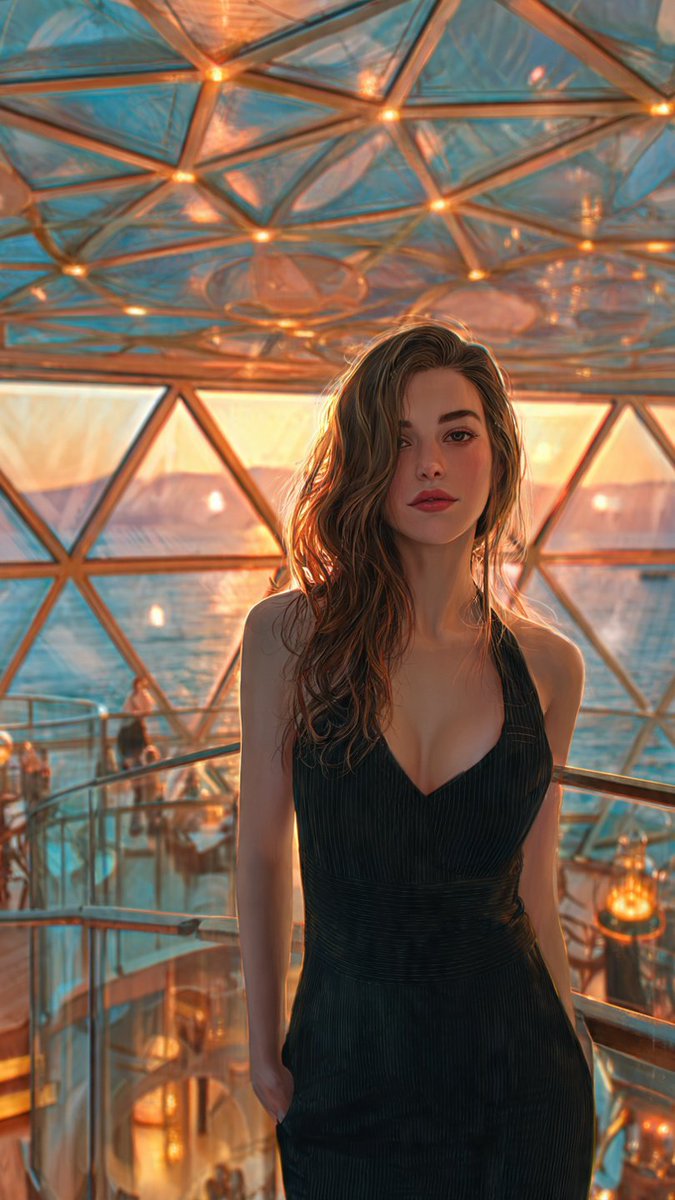
How to ultra-realistic V6 realism portrait of an adult woman with long wavy brown hair, sharp refined facial features, full natural lips, and flawless...
0
Times used
0
Likes
Unlocking Hyperrealism: A Deep Dive into the "Ultra-Realistic V6 Realism Portrait" Style
In the ever-evolving world of artificial intelligence, the quest for perfect photorealism is the ultimate frontier. Artists, designers, and creators are constantly pushing the boundaries of what's possible, seeking to generate images that are indistinguishable from high-end photography. This is where the power of advanced AI image editors like Orno shines, particularly with specialized styles like the "Ultra-Realistic V6 Realism Portrait." This isn't just about creating a picture; it's about breathing digital life into a concept, crafting a portrait so detailed and lifelike it feels like you could reach out and touch it. If you've ever wanted to master the art of photorealistic AI portraits, this guide will unlock the secrets behind this incredible style, showing you how to generate stunningly realistic characters from nothing more than a few lines of text.
What Exactly is the "Ultra-Realistic V6 Realism Portrait" Style?
At its core, this style is a specialized preset within the Orno AI image editor designed to achieve the highest level of photorealism currently possible. It’s a culmination of advanced algorithms, vast training data, and a deep understanding of light, texture, and human anatomy. Let's break down the name to understand its power:
- Ultra-Realistic: This goes beyond simple realism. It aims for hyperrealism—a level of detail that often surpasses what the naked eye might notice in a casual glance. Think individual hair strands, subtle skin pores, and the natural, imperfect reflection of light in the eyes.
- V6 Realism: "V6" signifies the sixth and most advanced version of Orno's realism engine. Each iteration of our engine becomes more sophisticated, better at interpreting nuanced prompts, and more capable of rendering complex textures like skin, hair, and fabric. V6 represents a quantum leap in generating lifelike human features without the uncanny valley effect.
- Portrait: The style is specifically optimized for creating portraits. It understands the subtleties of facial structure, emotional expression, and the way light and shadow play across a human face to convey depth and personality.
When you use this style in Orno, you're telling our AI to prioritize photorealistic accuracy above all else, leveraging our most powerful engine to turn your text prompt into a breathtakingly real digital human.
Deconstructing the Prompt: The Anatomy of a Perfect AI Portrait
The magic of AI image generation lies in the prompt. A well-crafted prompt is like giving a master artist precise instructions. Let's analyze a classic prompt for this style to understand why each word matters:
"Create an ultra-realistic V6 realism portrait of an adult woman with long wavy brown hair, sharp refined facial features, full natural lips, and flawless, dewy skin, soft natural lighting, looking directly at the camera with a gentle smile."
The Power of Specificity: Hair, Features, and Skin
Vague prompts lead to generic results. The strength of the "V6 Realism Portrait" style is its ability to interpret highly specific details. In our example prompt, we didn't just say "hair"; we said "long wavy brown hair." This tells the AI three distinct things: length, texture, and color. The more descriptive you are, the more control you have.
- Facial Features: Describing features as "sharp refined" and lips as "full natural" guides the AI in shaping the facial structure. You could also try terms like "soft jawline," "high cheekbones," or "almond-shaped eyes" to further define your subject.
- Skin Texture: Skin is one of the most difficult things to render realistically. Using terms like "flawless, dewy skin" or alternatively, "freckled skin," "mature skin with fine lines," or "sun-kissed skin" gives Orno the specific textural information it needs to avoid the plastic-like finish common in less advanced AI generators.
Beyond the Physical: Adding Emotion and Atmosphere
A truly compelling portrait captures more than just a physical likeness; it captures a mood. This is achieved through describing expression, lighting, and camera details.
- Expression: "Looking directly at the camera with a gentle smile" instantly injects personality. Experiment with "a thoughtful expression," "a confident smirk," "eyes filled with curiosity," or "a look of quiet contemplation."
- Lighting: Lighting is everything in photography, and the same is true for AI image generation. "Soft natural lighting" creates a gentle, flattering look. You can drastically change the mood by specifying "dramatic Rembrandt lighting," "golden hour sunlight," "neon city lights at night," or "cinematic moody lighting."
- Camera and Composition: While not in the base prompt, adding camera details can elevate your portrait. Try adding terms like "shot on a Canon EOS R5, 50mm f/1.2 lens," "bokeh background," or "shallow depth of field" to simulate a professional photoshoot and achieve that creamy, out-of-focus background that makes the subject pop.
How to Create Your V6 Realism Portrait with Orno: A Step-by-Step Guide
Ready to create your own masterpiece? Orno makes the process intuitive and powerful. Follow these simple steps to start generating hyper-realistic portraits in minutes.
Step 1: Open the Orno AI Image Editor
Navigate to the Orno AI image generation tool. Our clean and user-friendly interface is designed to get you from idea to image with zero friction. You'll find the text prompt bar front and center, ready for your creative input.
Step 2: Craft Your Detailed Prompt
This is where your vision comes to life. Start with the core subject and then layer on the details we discussed above. Remember: be specific! Think like an art director. Don't be afraid to write a longer, more descriptive prompt. The V6 engine is designed to understand complex sentences.
Pro-Tip: Start with a base prompt, generate an image, and then refine your prompt to tweak the details. AI art is an iterative process!
Step 3: Utilize Advanced Settings for Finer Control
Orno provides tools for even greater precision. Below the prompt bar, you'll find options like Negative Prompts. This is where you can tell the AI what to avoid. For realistic portraits, common negative prompts include "3D render, cartoon, anime, ugly, deformed, blurry, bad anatomy." This helps steer the AI away from common digital art pitfalls and pushes it further towards photorealism.
Step 4: Generate, Review, and Refine
Click the "Generate" button and watch as Orno's V6 engine processes your request and brings your portrait to life. The first result is often amazing, but don't stop there. Maybe you want to change the hair color, adjust the lighting, or try a different expression. Simply modify your prompt and generate again. You can create multiple variations until you land on the perfect image that matches your vision.
Who Can Benefit from Ultra-Realistic AI Portraits?
The applications for high-quality, photorealistic AI portraits are virtually limitless. This technology is a game-changer for professionals and hobbyists across numerous fields:
- Digital Artists and Designers: Quickly create concept art, character sheets, and reference images without needing a live model.
- Writers and Authors: Bring characters from your novels and stories to life, creating a visual reference for yourself and your readers. - Game Developers: Generate realistic character avatars, NPCs (non-player characters), and marketing materials for your games.
- Marketers and Advertisers: Create unique, royalty-free lifestyle images and diverse model shots for campaigns without the expense of a photoshoot.
- Social Media Managers: Populate feeds with stunning, eye-catching visuals that stop the scroll.
- Hobbyists and Enthusiasts: Explore your creativity, design your ideal D&D character, or simply have fun creating beautiful works of art.
Frequently Asked Questions (FAQ)
What is V6 realism in AI art?
V6 realism refers to the 6th generation of Orno's AI image generation engine, which is specifically optimized for creating photorealistic and hyper-realistic images. It features improved understanding of natural language, superior rendering of fine details like skin texture and light, and a significant reduction in digital artifacts, resulting in images that are more lifelike than ever before.
Can I create portraits of different ethnicities, ages, and genders?
Absolutely. The Orno V6 engine is trained on a diverse dataset to ensure you can create characters of any description. Simply be specific in your prompt. Use descriptors like "elderly man with kind eyes," "young East Asian woman," "teenager with freckles," or "middle-aged Black man with a beard" to guide the AI to generate the exact character you envision.
How can I make my AI portraits even more realistic?
The key is in the details. Beyond describing the person, add details about the environment, lighting, and camera. Use phrases like "subtle lens flare," "shot in the style of Annie Leibovitz," "ultra-detailed 8K photography," and "natural imperfections" to push the realism to the next level. Using a strong negative prompt to exclude artistic styles is also crucial.
Is it difficult to write prompts for realistic AI images?
Not at all! It's more of a creative process than a technical one. Start with a simple description and gradually add more detail. The best way to learn is by experimenting. Try changing one word in your prompt and see how it affects the outcome. With Orno's intuitive interface, you'll be a prompt engineering expert in no time.
What's the difference between AI-generated portraits and digital photography?
Digital photography captures light from the real world using a sensor. An AI-generated portrait is a completely new image created by an AI model based on patterns it learned from analyzing millions of existing images. While the goal of the "V6 Realism Portrait" style is to mimic photography perfectly, the image itself never existed in the real world—it was synthesized pixel by pixel from your text description.
Begin Your Journey into Hyperrealism with Orno
The "Ultra-Realistic V6 Realism Portrait" style is more than just a feature; it's a gateway to a new era of digital creativity. It empowers you to create characters and scenes that were once confined to your imagination, with a level of quality and realism that rivals professional photography. Orno puts this incredible power at your fingertips with a tool that is both incredibly advanced and remarkably easy to use.
Stop dreaming about your characters and start creating them. Dive into the Orno AI image editor today and experience the future of digital art. Your first breathtakingly realistic portrait is just a prompt away.
Use This Prompt
Transform your images with AI
Save this prompt as its own icon for one-tap access.