
Create an ultra-realistic Portrait Of A Man
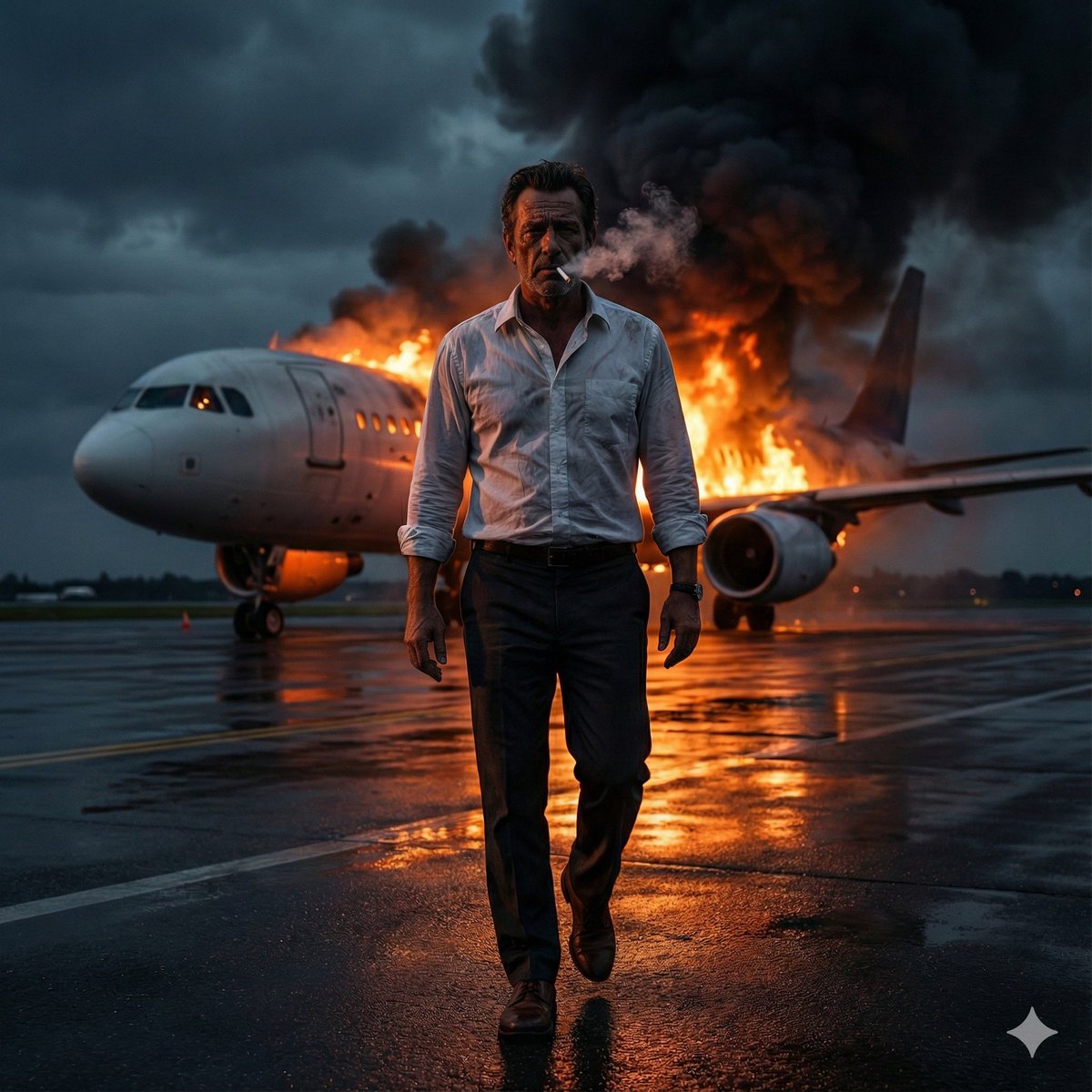
How to ultra-realistic portrait of a man walking toward the camera on an airport runway at night, a .
0
Times used
0
Likes
Mastering Photorealism: How to Create an Ultra-Realistic Portrait of a Man with AI
In the rapidly evolving world of digital art, the quest for photorealism has reached new heights with the advent of AI image generation. Gone are the days when creating a hyper-realistic image required years of technical skill and expensive software. Today, with a powerful tool like Orno AI Image Editor and the right prompt, you can conjure breathtakingly real portraits from mere words. One of the most captivating and popular styles is the "ultra-realistic portrait," a prompt that turns simple text into digital photography. Let’s dive deep into a specific, cinematic example: creating an ultra-realistic portrait of a man walking toward the camera on an airport runway at night.
This detailed guide will not only break down this specific prompt but will also equip you with the knowledge to adapt, modify, and master the art of AI photorealism. We'll explore the nuances of prompt engineering, advanced techniques, and how to leverage Orno’s features to bring your most ambitious creative visions to life.
Why Ultra-Realistic AI Portraits Are a Game-Changer
The allure of ultra-realism in AI art is undeniable. It blurs the line between the digital and the real, creating images that are not just visually stunning but also emotionally resonant. This technology isn't just for artists; it's a revolutionary tool for marketers, filmmakers, game developers, and anyone in need of high-quality, bespoke visual content.
- Unmatched Creative Freedom: Imagine needing a specific shot—a 1940s detective on a rainy street or an astronaut on a Martian landscape. Instead of costly photoshoots or complex 3D modeling, you can generate it in seconds with an AI portrait generator like Orno.
- Cost-Effective Content Creation: Stock photography can be limiting and expensive. AI image generation provides a near-infinite supply of unique, royalty-free images tailored precisely to your needs.
- Concept Visualization: For filmmakers and creative directors, AI is an invaluable tool for creating storyboards, character concepts, and look-books, helping to communicate a vision long before production begins.
- Personalized Art: Create stunning, personalized portraits for yourself, for loved ones, or for social media profiles that stand out from the crowd. The only limit is your imagination.
Deconstructing the "Ultra-Realistic Portrait of a Man" Prompt
A great AI image starts with a great prompt. The prompt is your direct line of communication with the AI model. Let's dissect our example prompt to understand why it works so well and how each component contributes to the final masterpiece.
The core prompt: ultra-realistic portrait of a man walking toward the camera on an airport runway at night
The Style: "ultra-realistic portrait"
This is the foundational command. The term "ultra-realistic" tells the AI to prioritize photorealism above all else. It instructs the model to focus on intricate details like skin texture, fabric weave, realistic lighting, and natural human anatomy. Synonyms like "photorealistic," "hyperrealistic," or even adding camera terms like "8K resolution" can further enhance this effect.
The Subject: "of a man"
This defines who or what is the focal point of the image. It's simple but crucial. You can easily modify this to change the entire narrative. Consider these variations:
- "portrait of a woman in a business suit"
- "portrait of an elderly pilot with weathered skin"
- "portrait of a determined female athlete"
The more descriptive you are with your subject, the more control you have over the outcome.
The Action & Composition: "walking toward the camera"
Static portraits can be powerful, but adding action creates dynamism and a sense of story. "Walking toward the camera" establishes a direct, engaging composition. It creates a sense of movement and immediacy. Other action-based prompts could include "looking over his shoulder," "adjusting his tie," or "standing under a streetlamp." This part of the prompt directs the AI on how to frame the subject within the scene.
The Setting: "on an airport runway"
The environment is more than just a background; it’s a character in itself. An airport runway evokes themes of travel, transition, loneliness, or purpose. It provides leading lines, unique textures (asphalt, painted markings), and interesting opportunities for lighting. Changing the setting dramatically alters the mood. Imagine the same man "in a dense, foggy forest" or "in a bustling neon-lit cyberpunk city."
The Lighting & Atmosphere: "at night"
Lighting is arguably the most critical element for realism and mood. "At night" immediately suggests a high-contrast scene. It forces the AI to think about light sources: runway lights, terminal building glow, moonlight, or even the lights from an approaching aircraft. This creates dramatic shadows, highlights, and a cinematic feel. You could refine this further with terms like "during a thunderstorm," "at golden hour," or "under the soft glow of twilight."
Step-by-Step Guide: Creating Your Portrait with Orno
Ready to create your own cinematic masterpiece? Follow these simple steps using the Orno AI Image Editor.
Step 1: Open the Orno AI Image Editor
Navigate to the Orno tool on our website. You'll find a simple text input field where you can begin crafting your prompt. Familiarize yourself with the interface, including the "Generate" button and any advanced settings available.
Step 2: Start with a Simple, Core Prompt
Don't overcomplicate it at first. Begin with the basics to see what the AI produces. Start by typing:
ultra-realistic portrait of a man
Generate this image. This gives you a baseline and lets you see Orno's default interpretation of realism and subject matter.
Step 3: Add Layers of Detail and Context
Now, let's build upon our base. Add the action, setting, and lighting elements we discussed. Modify your prompt to be more specific:
An ultra-realistic, cinematic portrait of a rugged man in his 40s with a leather jacket, walking toward the camera on an empty airport runway at night.
Notice how we added more descriptors for the subject ("rugged," "in his 40s," "leather jacket") and the scene ("cinematic," "empty"). This specificity guides the AI toward a more refined result.
Step 4: Use Orno's Advanced Features for Fine-Tuning
Top-tier AI image generators like Orno offer advanced controls. Look for options like:
- Negative Prompts: This is a field where you tell the AI what not to include. For realistic portraits, common negative prompts are
--no cartoon, 3d render, painting, blurry, deformed hands, extra limbs. This helps clean up artifacts and steer the model away from an illustrative style. - Aspect Ratio: For a cinematic feel, choose a widescreen aspect ratio like 16:9 or 21:9 instead of the default square (1:1).
- Style Selection: Orno may offer pre-set styles like "Photorealistic," "Cinematic," or "Vivid." Selecting one can bolster the effect of your text prompt.
Step 5: Generate, Iterate, and Refine
AI art creation is a process of discovery. Your first generation might be close, but not perfect. Don't be discouraged! This is where the fun begins. Analyze the result and think about what you want to change. Is the lighting too harsh? Add "soft lighting" to your prompt. Is the man too young? Change "man" to "middle-aged man." Small tweaks can lead to big improvements. Generate again and again until you have an image that perfectly matches your vision.
Advanced Tips for Master-Level AI Photorealism
Once you've mastered the basics, use these pro-level techniques to push your creations to the next level.
Control the Camera and Lens
Think like a photographer. Specifying camera settings can have a profound impact on realism. Try adding these phrases to your prompt:
- Specify a Lens:
shot on a 85mm lensfor a classic portrait look, or35mm lensfor a wider, more environmental shot. - Control the Aperture: Use
f/1.8to create a shallow depth of field with a beautifully blurred background (bokeh). Usef/11for a deep depth of field where everything is in sharp focus. - Name a Camera Model: Mentioning a specific camera, like
shot on a Sony A7IVorLeica M11 photography, can influence the AI's understanding of color science and grain.
Master Cinematic Lighting
Go beyond "at night." Use specific lighting terminology to orchestrate the mood:
- Rim Lighting: Creates a bright outline around the subject, separating them from the background.
- Volumetric Lighting: Makes light beams visible, like light cutting through fog or dust. Perfect for a misty runway.
- Dramatic, High-Contrast Lighting: Emphasizes shadows and highlights, inspired by film noir.
- Anamorphic Lens Flare: Adds a horizontal flare effect, a hallmark of cinematic visuals.
Explore Creative Variations
The "man on a runway" prompt is a fantastic template. Use it as a launchpad for your own unique stories:
Photorealistic portrait of a female astronaut in a sleek white suit, walking away from her spaceship on a desolate runway on Mars, twin suns setting.Ultra-realistic, vintage 1960s photo of a glamorous flight attendant, smiling at the camera on an airport runway, a propeller plane in the background, golden hour.Cinematic shot of a cybernetically-enhanced detective in a trench coat, standing on a rain-slicked runway in a futuristic city, neon signs reflecting in the puddles, 8K, shot on 50mm lens.
Frequently Asked Questions (FAQ)
What is an AI image generator?
An AI image generator, like the Orno AI Image Editor, is a tool that uses artificial intelligence (specifically, a type of model called a diffusion model) to create images from text descriptions, also known as "prompts." You simply describe what you want to see, and the AI generates a unique image based on your input.
Why do my AI-generated people sometimes have weird hands or eyes?
This is a common challenge in AI image generation. AI models are trained on vast datasets of images, but complex, highly detailed anatomy like hands can still be difficult to render perfectly every time. Using a strong negative prompt (e.g., --no deformed hands, bad anatomy, extra fingers) and generating multiple versions of an image can help you get a better result.
Can I use the images I create with Orno for commercial purposes?
Please refer to Orno's specific terms of service. Generally, many AI art platforms grant you commercial rights to the images you generate, meaning you can use them for marketing, products, and other business purposes. Always check the platform's policy to be sure.
How can I make my AI portrait more unique and less generic?
Specificity is key. Instead of "man," try "grizzled fisherman with a gray beard and a woolen sweater." Instead of "city," try "a charming, cobblestone street in old-town Prague." The more unique details, emotions, and contexts you add to your prompt, the more unique your final image will be.
What is the single best prompt for a realistic photo?
There is no single "best" prompt, but a great formula is: [Subject Description] + [Action/Pose] + [Setting/Environment] + [Lighting] + [Style/Camera Details]. For example: "An ultra-realistic photo of a smiling elderly woman with laugh lines, tending to her rooftop garden, bathed in warm golden hour light, shot on a Canon EOS R5 with a 50mm f/1.4 lens, 8K."
Your Vision, Realized with Orno
The ability to create an ultra-realistic portrait of a man on an airport runway at night is more than just a cool party trick; it's a testament to how far AI has come. It represents a new frontier of creativity, where your imagination is the only true constraint. By understanding the building blocks of a great prompt and leveraging the powerful features of the Orno AI Image Editor, you can move from being a spectator to being a creator.
So, what story will you tell? What worlds will you build? The runway is clear. It's time to bring your vision to life. Start creating with Orno today!
Use This Prompt
Transform your images with AI
Save this prompt as its own icon for one-tap access.