
Create an ultra-realistic Cinematic Portrait 2
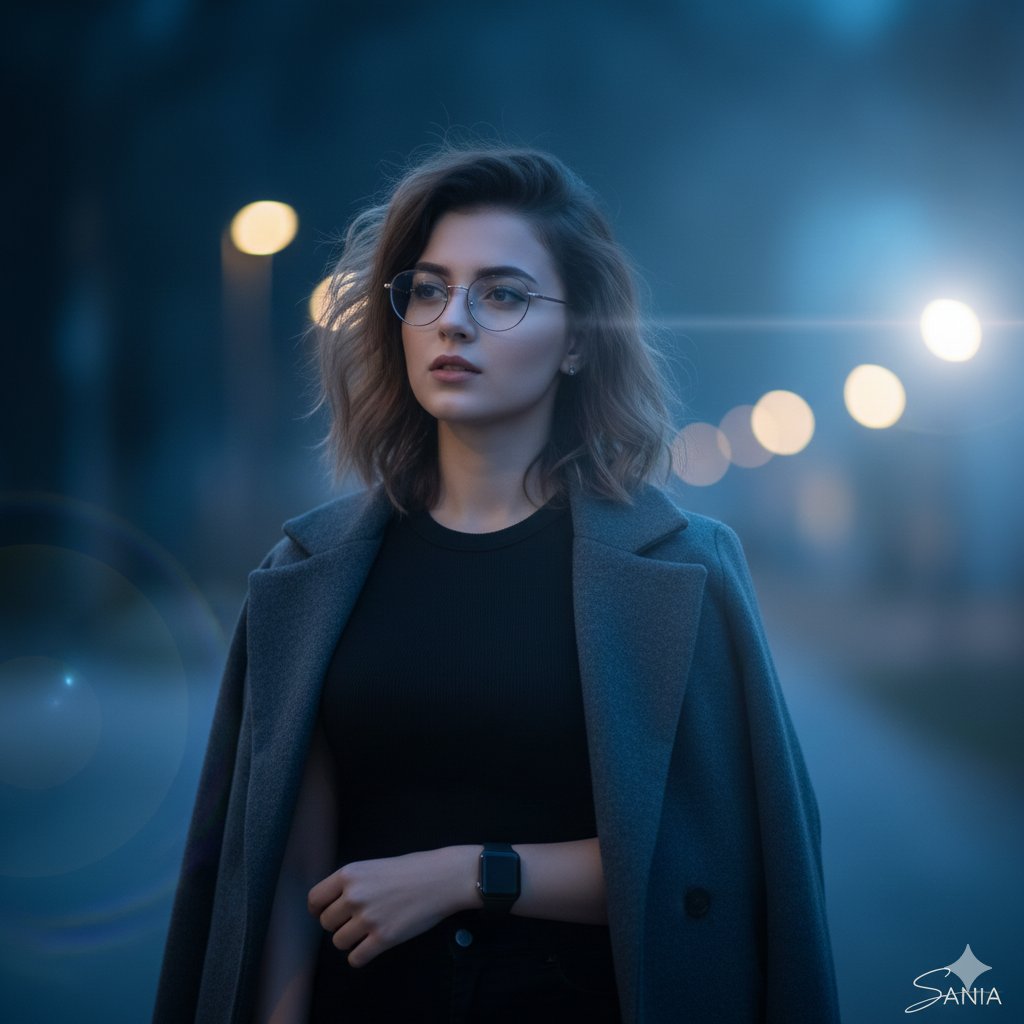
How to ultra-realistic cinematic portrait of a girl, standing alone in quiet after-evening blue hour.
0
Times used
0
Likes
Mastering the Mood: A Deep Dive into the "Ultra-Realistic Cinematic Portrait 2" Style with Orno
In the world of AI image generation, some styles transcend simple creation and become tools for storytelling. The "Ultra-Realistic Cinematic Portrait 2" style, available exclusively in Orno, is one such masterpiece. It’s more than just a prompt; it's a gateway to creating evocative, moody, and breathtakingly realistic portraits that resonate with the quiet depth of a film still. This guide will explore every facet of this powerful style, showing you how to harness its potential to create stunning visual narratives with Orno's advanced AI engine.
The core of this style is captured in its descriptive prompt: "How to ultra-realistic cinematic portrait of a girl, standing alone in quiet after-evening blue hour." Each word is carefully chosen to guide the AI, and understanding these components is the key to unlocking its full creative power. Whether you're a digital artist, a photographer looking to explore new mediums, or a creative mind eager to bring your visions to life, this article will serve as your comprehensive manual for mastering cinematic AI portraiture.
Deconstructing the Magic: What is the "Ultra-Realistic Cinematic Portrait 2" Style?
This Orno style is a carefully engineered preset designed to produce a very specific aesthetic. It’s not about bright, flashy colors or fantasy scenes. It’s about subtlety, emotion, and photorealism. Let's break down the key elements that make this style so compelling:
- Ultra-Realistic: This is the cornerstone. The AI model is instructed to prioritize photorealism above all else. It focuses on rendering lifelike skin textures, realistic hair strands, natural fabric folds, and accurate light-and-shadow interplay. The goal is to create an image that could easily be mistaken for a high-end photograph taken with a professional DSLR camera.
- Cinematic: This keyword infuses the image with the language of film. It tells Orno's AI to think about composition, lighting, and color grading in a way that tells a story. You'll notice elements like a shallow depth of field (a soft, blurry background), a thoughtful composition that draws the eye to the subject, and a color palette that evokes a specific mood, much like a scene from an indie film or a prestige drama.
- Portrait of a Girl: While the subject is customizable, the default "girl" sets a tone of introspection and vulnerability. The AI generates a subject that fits the quiet, contemplative mood of the overall scene.
- Standing Alone: This detail is crucial for the emotional weight of the image. It introduces themes of solitude, contemplation, and serenity. The subject isn't interacting with anyone; they are lost in their own world, allowing the viewer to project their own narrative onto the scene.
- Quiet After-Evening Blue Hour: This is the secret ingredient. The "blue hour" is a real-world photographic term for the period of twilight each morning and evening when the sun is just below the horizon, and the sky is filled with a deep, serene blue light. It's a time of soft, diffused lighting that is incredibly flattering for portraits and creates a profound sense of peace and melancholy.
The Allure of the Blue Hour in AI-Generated Art
The "blue hour" is more than just a time of day; it's a mood. In traditional photography, chasing this fleeting light is a challenge. With Orno's AI image editor, you have perfect blue hour lighting on demand. Understanding why this lighting is so powerful will help you use the "Cinematic Portrait 2" style more effectively.
The Psychology of Cool Tones
The cool, blue-dominated color palette of the blue hour naturally evokes feelings of calmness, serenity, and introspection. Unlike the warm, energetic glow of the golden hour, the blue hour is quieter and more contemplative. When you generate an image using this style, you are tapping into this inherent color psychology to create a portrait that feels deep and emotionally resonant. Orno's AI excels at balancing these cool tones, ensuring the subject's skin tones remain natural while the environment is bathed in that signature ethereal blue light.
Soft, Diffused Lighting
One of the biggest advantages of blue hour light is its softness. There are no harsh shadows or bright, blown-out highlights. This diffused light wraps gently around the subject, revealing subtle details in their features and clothing. For an AI aiming for "ultra-realism," this is the perfect condition. Orno can focus on rendering intricate textures without having to fight against harsh lighting, resulting in a cleaner, more believable, and more flattering portrait.
Customizing Your Vision: How to Adapt the "Cinematic Portrait 2" Prompt in Orno
The beauty of Orno is that our pre-built styles are fantastic starting points, not rigid templates. The base prompt for "Cinematic Portrait 2" is your launchpad. By making small, intelligent tweaks, you can create a vast array of unique and personal artworks. Here’s how to become a master of prompt engineering with this style.
Changing the Subject and Context
Don't feel limited to a "girl." The core mood of the style can be applied to any subject. Try these variations:
- "ultra-realistic cinematic portrait of a thoughtful old man with a beard, standing alone..."
- "ultra-realistic cinematic portrait of a young boy looking up at the sky, standing alone..."
- "ultra-realistic cinematic portrait of a woman in a long coat, standing alone..."
You can also change the setting to add another layer to your story. The "quiet after-evening blue hour" works beautifully in many locations:
- "...standing alone on a deserted city street after a rain."
- "...standing alone on a windswept beach looking at the ocean."
- "...standing alone on a rooftop overlooking the city lights."
Adding Photographic and Cinematic Details
To push the realism and cinematic quality even further, try adding specific camera and lens terminology. Orno's AI is trained on a massive dataset of photographs and understands these terms well.
- Specify a lens: "...portrait of a girl, shot on a 50mm f/1.8 lens..." This will encourage a natural-looking depth of field.
- Describe the background: "...standing alone, with a soft bokeh background..." This explicitly asks for those pleasing, out-of-focus light orbs.
- Mention a film stock: "...portrait of a girl, cinematic film still from a Kodak Portra 400..." This can influence the color grading and grain of the final image, adding an authentic, analog feel.
Fine-Tuning the Emotion
Use adjectives to guide the AI toward a specific feeling. The "quiet" mood is the default, but you can steer it in different directions.
- For a more somber feel: "...a melancholy girl, standing alone..."
- For a sense of optimism: "...a hopeful girl, standing alone..."
- For a touch of mystery: "...an enigmatic girl, standing alone..."
Why Orno Excels at Creating Photorealistic Cinematic Portraits
Many text-to-image tools can generate pictures, but Orno is engineered for artists and creators who demand quality, realism, and control. Here’s why the "Cinematic Portrait 2" style shines on our platform:
- Advanced Photorealism Engine: Our models are specifically trained to understand the nuances of light, texture, and human anatomy, which is essential for creating believable portraits.
- Intuitive Interface: You don't need to be a prompt engineering wizard to get started. Our pre-built styles like this one give you incredible results with a single click, while still offering deep customization for advanced users.
- Speed and Iteration: Creativity is about experimentation. Orno generates high-quality images quickly, allowing you to try different prompt variations and refine your idea without long waits, keeping you in the creative flow.
- Consistent Quality: The "Cinematic Portrait 2" style is a reliable tool. It consistently produces high-quality, aesthetically pleasing images that adhere to the core principles of the prompt, giving you a dependable foundation for your creative projects.
Frequently Asked Questions (FAQ)
What makes an AI-generated portrait "cinematic"?
A "cinematic" portrait uses techniques from filmmaking to enhance its storytelling and visual appeal. This includes specific color grading (like the cool tones of the blue hour), a shallow depth of field to isolate the subject, thoughtful composition (like the rule of thirds), and an overall mood that feels like a still frame from a movie. Orno's AI interprets the "cinematic" keyword to apply these artistic principles automatically.
Can I use the "Cinematic Portrait 2" style for male subjects or groups?
Absolutely! The style is incredibly versatile. Simply change "girl" in the prompt to "man," "old woman," "boy," or any other subject you can imagine. While the default prompt specifies "standing alone," you can experiment with "a couple standing together" to see how the AI adapts the mood to a shared moment.
How can I make my results even more realistic?
To enhance realism, try adding details about clothing materials ("wearing a wool coat"), specific facial features ("with freckles"), and camera settings ("shot with a shallow depth of field," "sharp focus on the eyes"). The more specific, real-world details you provide to Orno, the more information the AI has to build a truly photorealistic image.
What is the difference between the "blue hour" and "golden hour" in AI art?
Just like in photography, these terms refer to different types of light and mood. The "golden hour" is the period shortly after sunrise or before sunset, characterized by warm, soft, golden light. It creates a feeling of warmth, happiness, and nostalgia. The "blue hour," which this style uses, is the period just before sunrise or after sunset, with cool, blue, diffused light. It creates a mood that is calmer, more serene, and often more introspective or melancholic.
Do I need to be a professional photographer to use this Orno style?
Not at all! That's the power of Orno. This style encapsulates decades of photographic knowledge about lighting, composition, and mood into a single, easy-to-use preset. It allows anyone, regardless of their technical background, to create images with the quality and emotional depth of a professional cinematic portrait. It's your personal on-demand photographer and art director, all in one.
Ready to create your own breathtaking visual story? Dive into the Orno AI image editor, select the "Ultra-Realistic Cinematic Portrait 2" style, and start bringing your quiet, cinematic visions to life. The blue hour is waiting.
Use This Prompt
Transform your images with AI
Save this prompt as its own icon for one-tap access.