
Create an ultra-realistic 8k Portrait
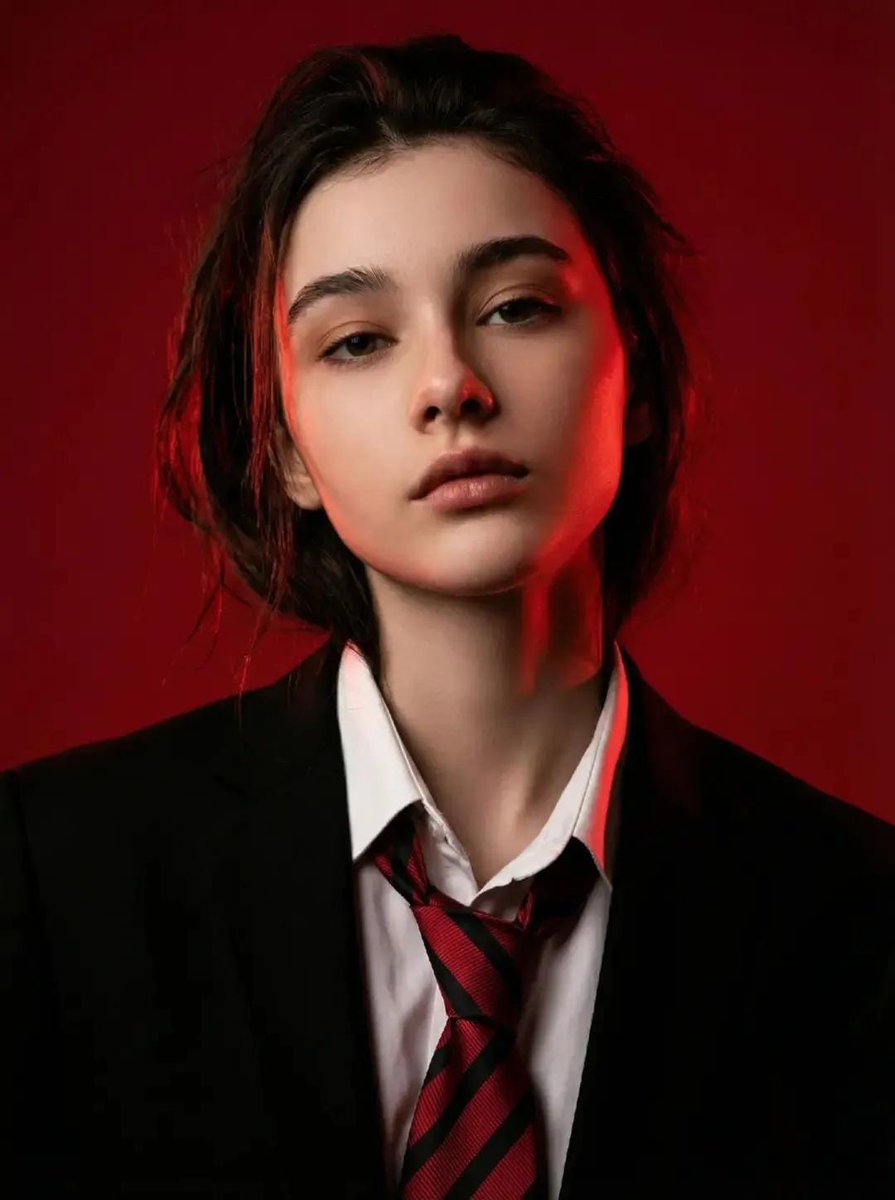
How to ultra-realistic 8k portrait, standing against a deep red background.
0
Times used
0
Likes
Unlock Hyperrealism: Master the Art of the Ultra-Realistic 8K AI Portrait
In the world of digital art and content creation, the quest for realism is a timeless pursuit. Artists and designers have spent countless hours mastering techniques to capture the subtle nuances of human expression, the intricate play of light on skin, and the crisp details that make a portrait feel alive. Today, that pursuit has been revolutionized. With the power of advanced generative AI, creating breathtakingly realistic portraits is no longer the exclusive domain of master painters or photographers. Welcome to the future of portraiture, powered by Orno's AI image editor.
One of the most powerful and visually stunning styles you can master is the "Ultra-Realistic 8K Portrait." This guide will walk you through everything you need to know to leverage this incredible capability within Orno, focusing on the dramatic and evocative prompt: "ultra-realistic 8k portrait, standing against a deep red background." We'll explore the technology, deconstruct the prompt, and provide actionable tips to help you generate portraits that are not just images, but works of art.
What Exactly is an "Ultra-Realistic 8K Portrait"?
Let's break down this powerful phrase to understand the quality you can expect. It’s more than just a buzzword; it’s a promise of unparalleled detail and clarity that blurs the line between the digital and the real.
- Ultra-Realistic: This goes beyond simple photorealism. Ultra-realism, or hyperrealism, in AI image generation refers to the model's ability to render microscopic details. Think about the fine lines around the eyes, the subtle texture of skin pores, the individual strands of hair catching the light, and the lifelike reflection in the subject's eyes. Orno's AI is trained on vast datasets of high-fidelity photographs, enabling it to understand and replicate these details with astonishing accuracy.
- 8K Resolution: Resolution is key to realism. An 8K image (approximately 7680 x 4320 pixels) contains four times the pixels of a 4K image and sixteen times that of a standard 1080p HD image. This massive pixel count means your generated portraits are incredibly sharp, crisp, and packed with detail. They are perfect for large-format printing, professional digital displays, and for zooming in to appreciate the intricate details without any loss of quality. With Orno, you're not just creating a picture for a small screen; you're creating a high-resolution asset ready for any application.
Deconstructing the Prompt: The Magic Behind the Words
The beauty of text-to-image AI lies in the prompt. Each word is an instruction, a creative brushstroke that guides the AI toward your vision. The style "ultra-realistic 8k portrait, standing against a deep red background" is a perfect example of a concise yet powerful prompt.
The Core Components:
- "Ultra-realistic 8k portrait": This sets the primary goal. You are instructing Orno to prioritize photorealism above all else and to render the image in a high-resolution format. This part of the prompt tells the AI to access its knowledge of professional photography, lighting techniques, and human anatomy.
- "Standing": A simple but important word. It defines the subject's pose. This implies a full-body or three-quarter shot, giving the portrait a sense of presence and context that a simple headshot might lack. It invites the AI to consider posture, clothing, and how the body occupies space.
- "Against a deep red background": This is the artistic flourish. The background is not an afterthought; it's a critical element that sets the mood, directs focus, and enhances the subject. A deep red background can evoke feelings of passion, power, drama, or elegance, making the portrait far more compelling.
The Artistic Impact of a Deep Red Background
Why specify a deep red background? Color theory and art history teach us that color is never just color. A specific background choice can dramatically alter the perception of a portrait.
- Creates Dramatic Contrast: A rich, deep red makes skin tones pop. It creates a powerful visual separation between the subject and their environment, forcing the viewer's eye to focus on the human element.
- Evokes Strong Emotions: Red is a color associated with a wide spectrum of intense emotions—love, passion, anger, strength, and courage. Using it as a backdrop infuses your portrait with a narrative and an emotional weight that a neutral background cannot achieve.
- Professional and Timeless: Think of classic painted portraits or high-fashion photoshoots. A solid, bold-colored background is a hallmark of professional studio photography. It removes distracting environmental elements, creating a timeless and sophisticated aesthetic.
How to Create Your Ultra-Realistic 8K Portrait in Orno: A Step-by-Step Guide
Ready to bring your own characters to life? Orno makes the process of generating stunning AI portraits incredibly simple and intuitive. Follow these steps to create your masterpiece.
- Navigate to the Orno AI Image Editor: Open our tool and prepare to unleash your creativity. Our interface is designed to be user-friendly, whether you're a seasoned AI artist or a complete beginner.
- Select the Style or Enter Your Prompt: You can often find popular styles like "Ultra-Realistic 8K Portrait" as a preset. Alternatively, you can type the prompt directly into the text box:
an ultra-realistic 8k portrait of a grizzled space explorer with a cybernetic eye, standing against a deep red background. The more specific you are, the better. - Customize and Refine: This is where you make the portrait truly yours. Modify the subject to be anything you can imagine:
- "A serene elven queen with silver hair..."
- "A determined female athlete in sportswear..."
- "A pensive 1940s detective in a fedora..."
- Adjust Advanced Settings (Optional): For those who want more control, Orno offers advanced options. You can specify the aspect ratio (e.g., 9:16 for a phone wallpaper, 16:9 for a desktop background, or 2:3 for a classic portrait look), or add a negative prompt to exclude elements you don't want (e.g., `negative prompt: blurry, cartoon, text`).
- Generate and Iterate: Click the "Generate" button and watch as Orno's AI brings your vision to life in seconds. Don't love the first result? No problem. You can generate multiple variations, or slightly tweak your prompt and try again. The creative process is one of discovery!
Prompt Engineering 101: Tips for God-Tier AI Portraits
While the base prompt is powerful, true mastery comes from learning how to "speak" the AI's language. Here are some pro tips to elevate your portraits from great to unforgettable.
- Specify Lighting: Lighting is everything in photography. Add terms like "cinematic lighting," "soft studio lighting," "dramatic rim lighting," or "golden hour" to control the mood and dimension of your image.
- Mention Camera and Lens Details: To push realism even further, describe the virtual camera. For example: "shot on a Canon EOS R5, 85mm f/1.2 lens, shallow depth of field." This tells the AI to replicate the specific look and beautiful background blur (bokeh) of high-end portrait photography.
- Describe Emotion and Expression: Don't just describe what the person looks like; describe what they are feeling. Use words like "a subtle, confident smile," "a look of intense concentration," "eyes filled with melancholy," or "a joyful, uninhibited laugh."
- Detail Clothing and Textures: Be specific about what your subject is wearing. Instead of "a shirt," try "a black leather jacket with intricate stitching" or "a flowing silk dress." Mentioning textures helps the AI render more detailed and tactile surfaces.
Practical Applications: What Can You Do With Your AI Portraits?
The high quality of an 8K portrait from Orno opens up a world of possibilities for both personal and professional use.
- Digital Art & Portfolios: Create stunning character concepts or unique art pieces to showcase your creative vision.
- Marketing & Branding: Generate unique, royalty-free brand mascots or visuals for advertising campaigns that stand out.
- Social Media Content: Craft the perfect, eye-catching profile picture or avatar that truly represents you or your brand.
- Game & Film Development: Quickly create high-quality concept art for characters, saving hours of manual work.
- Personalized Gifts: Design a unique portrait of a fictional character for a friend or even a stylized representation of a loved one for a one-of-a-kind piece of wall art.
Why Choose Orno for Your AI Portrait Generation Needs?
In a sea of AI tools, Orno stands out by focusing on quality, speed, and user experience. When you choose Orno to create your ultra-realistic 8k portraits, you are choosing:
- Unmatched Realism: Our AI models are fine-tuned to produce some of the most detailed and lifelike portraits available.
- True High-Resolution Output: We deliver genuine 8K quality, ensuring your creations are ready for any professional application.
- An Intuitive Platform: You don't need to be a tech expert to get incredible results. Our platform is built for creatives of all skill levels.
- Speed and Efficiency: Generate stunning images in seconds, not hours, allowing you to iterate on your ideas faster than ever before.
- Endless Creative Freedom: With extensive customization options and a powerful AI engine, the only limit is your imagination.
Frequently Asked Questions (FAQ)
What does 8K resolution really mean for an AI-generated image?
8K resolution (typically 7680x4320 pixels) for an AI image means it is generated with an exceptionally high pixel density. This results in an image that is incredibly sharp, clear, and detailed. You can zoom in on facial features, fabric textures, or background elements and still see crisp details, making it ideal for high-quality prints, professional design work, and large digital displays.
Can I use the ultra-realistic portraits I create with Orno for commercial projects?
This typically depends on the platform's terms of service. Orno is designed to be a powerful tool for creators. Please refer to our official Terms of Service page for the most accurate and up-to-date information regarding commercial usage rights for the images you generate.
How can I make my AI portraits even more realistic?
Beyond a detailed prompt, focus on three key areas: lighting, texture, and imperfections. Add specific lighting instructions ("soft window light," "dramatic chiaroscuro"). Detail the textures of clothing and skin ("worn leather," "freckled skin"). Finally, adding subtle imperfections, like a stray hair or a slight asymmetry, can break the "digital perfection" and make a portrait feel more human and believable.
Does the background color of an AI portrait really matter that much?
Absolutely. The background is a powerful tool for setting the mood and directing the viewer's attention. A "deep red background" creates drama and makes the subject stand out. A soft, out-of-focus natural background might feel more candid and serene. A dark, moody background can add a sense of mystery. Always consider what story you want your portrait to tell and choose a background that supports it.
What's the main difference between a "realistic" and an "ultra-realistic" AI portrait?
While both aim for photorealism, "ultra-realistic" (or hyperrealistic) pushes the boundaries of detail. A realistic portrait might look like a standard, well-taken photograph. An ultra-realistic portrait aims for the quality of a high-end, professional photoshoot with a top-tier camera. It focuses on micro-details: skin pores, the moisture in an eye, the subtle fraying of fabric, and the complex interplay of light and shadow on a microscopic level. It's the difference between believable and breathtaking.
Ready to create a portrait that will stop people in their tracks? Dive into the Orno AI image editor, try the "Ultra-Realistic 8K Portrait" style, and start bringing your most vivid ideas to life today.
Use This Prompt
Transform your images with AI
Save this prompt as its own icon for one-tap access.