
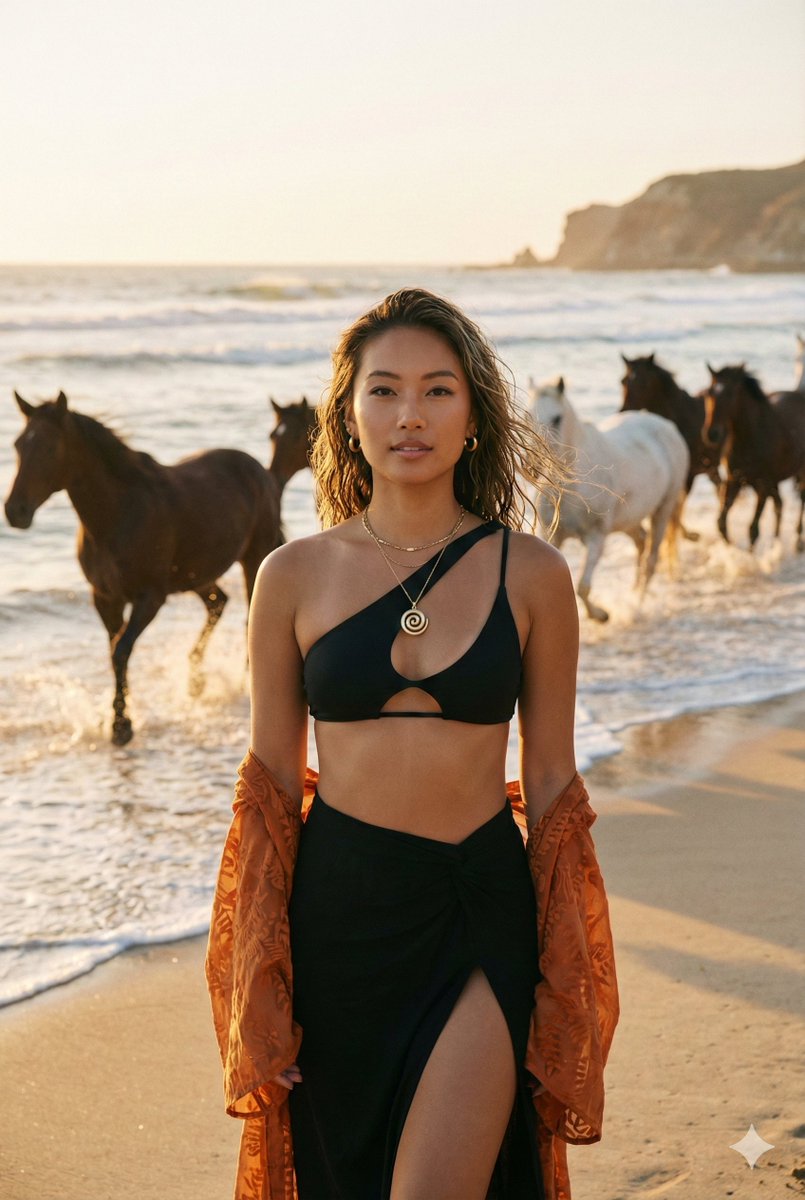
Create an ultra-cinematic
How to ultra-cinematic, warm-toned beach scene at sunset.
0
Times used
0
Likes
Unlock the Magic of Hollywood: Creating Ultra-Cinematic Scenes with AI
There's a special kind of magic in a cinematic image. It's more than just a picture; it's a story, an emotion, a captured moment that feels grand and timeless. Think of the sweeping vistas in a blockbuster film, the warm, nostalgic glow of a sunset in a romance, or the dramatic shadows in a thriller. This visual language, once the exclusive domain of professional filmmakers and photographers with expensive gear, is now at your fingertips. Welcome to the world of AI image generation, where with a few simple words, you can become the director of your own visual masterpiece. With Orno's powerful AI image editor and our specially trained "ultra-cinematic" style, you can effortlessly generate breathtaking, movie-quality visuals. This guide will take you on a deep dive into mastering one of the most evocative prompts: creating an "ultra-cinematic, warm-toned beach scene at sunset."
What Exactly Makes an Image "Ultra-Cinematic"?
Before we can create a cinematic image, we need to understand its DNA. The term "cinematic" isn't just a buzzword; it refers to a collection of specific visual techniques that filmmakers use to tell stories and evoke feelings. Orno's AI has been trained to recognize and replicate these elements, giving your creations an authentic, professional feel. Let's break down the key components.
The Power of Light and Color
Light is the soul of cinema. The "ultra-cinematic" style excels at manipulating light to create mood and drama. For our warm-toned beach scene, we're harnessing the power of the "golden hour"—that magical time shortly after sunrise or before sunset. During this period, the light is softer, warmer, and more diffuse, casting long, dramatic shadows and bathing everything in a golden-red hue. Orno's AI understands this concept intimately. When you ask for a "warm-toned sunset," it doesn't just make the image orange; it simulates the physics of light, creating realistic color grading, lens flares, and a sense of warmth that you can almost feel.
Composition and Framing: The Director's Eye
A cinematic shot is carefully composed. It's not a random snapshot. Filmmakers use specific framing techniques to guide the viewer's eye and create a sense of scale and depth. Wide-angle shots are a hallmark of cinematic landscapes, making a beach scene feel vast and epic. The AI also understands aspect ratios. While a standard photo might be 4:3, a cinematic image often uses a widescreen aspect ratio like 16:9 or even 2.35:1, instantly giving it that movie-like look. Orno's built-in tools allow you to generate images in these specific formats, perfecting the cinematic illusion from the start.
Texture and Atmosphere: Adding Soul and Realism
Perfection is often the enemy of realism. Digital images can sometimes feel too clean, too sterile. Cinema, especially classic film, has texture. This is where elements like film grain, subtle lens distortion, and atmospheric haze come into play. Adding a touch of "film grain" can instantly make a digital creation feel more organic and tangible, as if it were shot on real celluloid. Requesting an "anamorphic lens flare" will add those distinctive horizontal flares that are a signature of high-end cinema lenses. These subtle imperfections are what breathe life and atmosphere into your AI-generated art, transforming it from a simple picture into a piece of photorealistic storytelling.
Mastering the "Ultra-Cinematic Beach Sunset" Prompt in Orno
Now that we understand the theory, let's get practical. The beauty of Orno's AI image editor is its ability to understand both simple commands and complex, layered instructions. Let's start with our base prompt and build from there to create truly unique and stunning results.
Deconstructing the Core Prompt
Our starting point is: "ultra-cinematic, warm-toned beach scene at sunset." Each part of this prompt is a powerful instruction to the Orno AI:
- ultra-cinematic: This is the master command. It tells the AI to activate its knowledge of cinematic lighting, composition, color theory, and texture. It's the foundation for the entire aesthetic.
- warm-toned: This command focuses on the color palette. It ensures the AI prioritizes the golden, orange, and red hues of a perfect sunset, creating a feeling of warmth and nostalgia.
- beach scene: This sets the location. The AI will generate elements like sand, water, waves, and a horizon.
- at sunset: This defines the lighting. It instructs the AI to place the sun low on the horizon, creating long shadows, dramatic light, and beautiful reflections on the water.
Even this simple prompt will yield beautiful results in Orno. But the real magic begins when you add your own creative details.
Adding Layers of Detail for Stunning Results
Think of yourself as a director telling the AI exactly what you want in the shot. The more specific you are, the more tailored the final image will be. Here are some elements you can add to your prompt to take it to the next level:
- Specify the Subject: Who or what is the star of your scene? Instead of a generic beach, try prompts like:
- "…a lone surfer carrying their board along the shoreline, silhouetted against the sun."
- "…a rustic wooden pier stretching into the calm ocean."
- "…dramatic, powerful waves crashing against volcanic rock formations."
- "…a romantic couple walking hand-in-hand, their long shadows trailing behind them on the wet sand."
- Define the Camera and Lens: Mimic real-world photography for hyperrealistic results.
- "…shot on 35mm film, subtle film grain."
- "…anamorphic lens, cinematic lens flare."
- "…telephoto lens, compressing the background."
- "…shallow depth of field, focusing on a seashell in the foreground."
- Describe the Atmosphere and Mood: How do you want the image to feel?
- "…serene and peaceful atmosphere, calm water."
- "…moody and dramatic, storm clouds on the horizon."
- "…nostalgic and dreamy, soft focus."
- "…epic and grand, wide-angle shot."
Example Combined Prompt: "ultra-cinematic, warm-toned beach scene at sunset, a rustic wooden pier stretching into the calm ocean, shot on Kodak Portra 400, anamorphic lens flare, nostalgic and dreamy mood, hyperrealistic."
By combining these elements, you are providing the Orno AI with a rich, detailed blueprint. The result will be a unique, high-quality image that perfectly matches your creative vision, looking less like a random generation and more like a carefully planned film still.
Step-by-Step Guide: Your First Ultra-Cinematic Image with Orno
Ready to create your own cinematic masterpiece? It’s incredibly simple. Follow these steps to generate your first image with Orno:
- Navigate to the Orno AI image editor on our website.
- In the prompt box, start by typing your core style: "ultra-cinematic".
- Continue building your prompt with the details of your vision. Let's use our example: "ultra-cinematic, warm-toned beach scene at sunset, a lone surfer walking on the shore, dramatic lighting, shot on 35mm film, film grain."
- Below the prompt box, explore options like Aspect Ratio. Select "16:9" for a modern widescreen look or "21:9" for an even more epic, film-like frame.
- Click the "Generate" button and watch as Orno’s advanced AI interprets your text and brings your cinematic scene to life in seconds.
Don't be afraid to experiment! Change one or two words, try a different subject, or specify a different mood. Every generation is a new opportunity for a stunning discovery.
Frequently Asked Questions (FAQ)
Can I add people or specific objects to my cinematic beach scene?
Absolutely! The Orno AI is highly adept at interpreting subjects. Simply describe them in your prompt. For example, you could add "...with a vintage VW bus parked on the sand" or "...a girl in a flowing white dress standing on the pier." The more descriptive you are, the better the AI can render your vision.
How do I get a more "vintage" or "retro film" look?
To achieve a vintage aesthetic, use keywords that reference old film stocks and techniques. Add phrases like "shot on Kodachrome," "vintage 1970s photo," "faded color palette," or "light leaks" to your prompt. Combining these with "subtle film grain" and "ultra-cinematic" will produce beautiful, nostalgic results.
Does the Orno "ultra-cinematic" style work for scenes other than beaches?
Yes, it's incredibly versatile! This guide focuses on the beach sunset theme as a perfect example of the style's capabilities, but the "ultra-cinematic" modifier is a powerful tool for any scene. Try it with prompts like: "ultra-cinematic, neon-lit cyberpunk city street at night, rain-slicked pavement" or "ultra-cinematic, misty forest at dawn, light rays filtering through the trees." The core principles of dramatic lighting, careful composition, and rich texture will be applied to any subject you can imagine.
What is the best aspect ratio for cinematic AI images?
For a true cinematic feel, widescreen aspect ratios are best. A 16:9 ratio is the standard for modern high-definition video and works great. For a more classic, epic Hollywood "widescreen" look, an aspect ratio of 2.35:1 (or similar, like 21:9) is an excellent choice. Orno provides these options so you can frame your masterpiece perfectly.
Are the images I create with the Orno AI image editor mine to use?
Yes. The images you generate using your Orno account are yours to use for a wide range of purposes, including social media, blogs, personal art projects, and commercial use, depending on your subscription plan. We always recommend checking our latest terms of service for specific details on usage rights.
Your Vision, Brought to Life
The art of creating a cinematic image is no longer confined to Hollywood sets and expensive equipment. With Orno's sophisticated AI image editor, you have a powerful creative partner ready to turn your ideas into breathtaking visuals. The "ultra-cinematic" style is your key to unlocking a world of dramatic lighting, epic landscapes, and emotionally resonant scenes. Whether you're a digital artist, a content creator, or simply someone with a story to tell, the power to direct is now in your hands.
Ready to direct your first masterpiece? Jump into the Orno AI image editor today and create the "ultra-cinematic, warm-toned beach scene at sunset" you've been dreaming of.
Use This Prompt
Transform your images with AI
Save this prompt as its own icon for one-tap access.