
Create a surreal 2
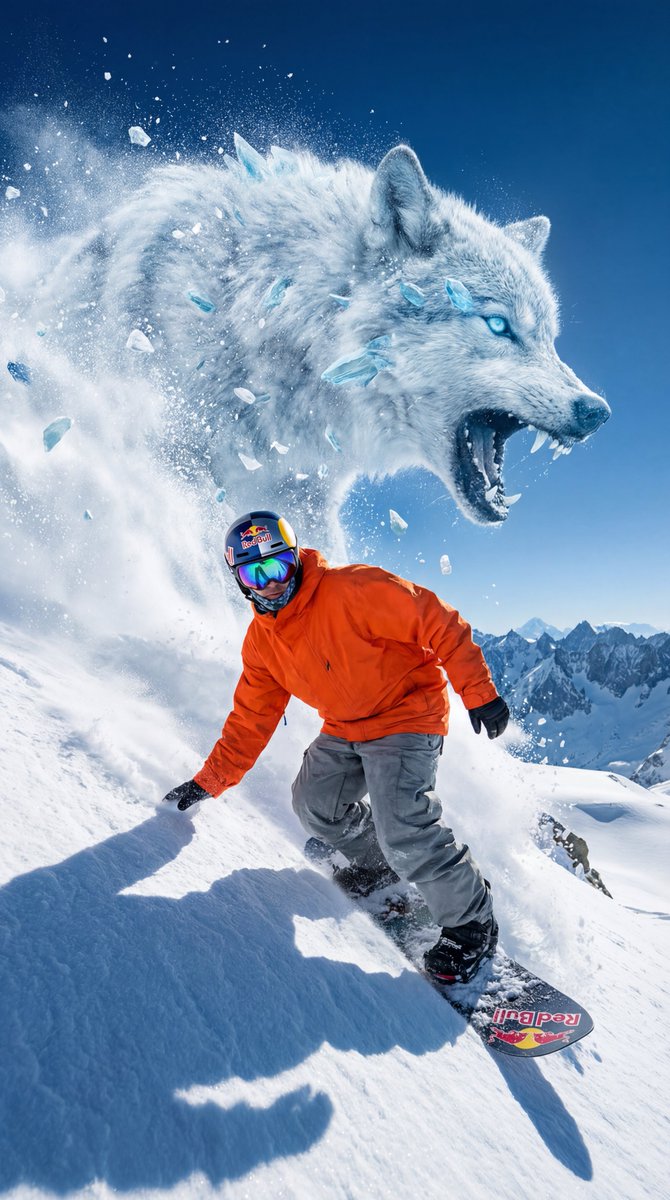
How to a surreal, high-octane cinematic concept art piece featuring an extreme snowboarder carving down a mountain, pursued by a colossal wolf formed...
0
Times used
0
Likes
Unleashing the Impossible: A Deep Dive into the "Create a surreal 2" AI Image Style
Imagine a world where the impossible becomes a breathtaking visual reality. Picture a lone snowboarder, a blur of motion against an endless expanse of white, carving a perfect line down an impossibly steep mountain. Now, imagine they are not alone. Rising from the very snow behind them, a colossal wolf, a mythic beast of shadow and frost, gives chase. This isn't a scene from a blockbuster film or an epic video game; it's a vision you can create in seconds with Orno's revolutionary AI image style: "Create a surreal 2".
In the rapidly evolving landscape of AI image generation, prompt-based styles are the paintbrushes of the modern artist. They are the starting point for incredible journeys into digital creativity. The "Create a surreal 2" style is more than just a prompt; it's a gateway to crafting high-octane, cinematic concept art that pulses with energy and narrative. This article will explore the depths of this unique AI art style, guiding you on how to master its potential within the Orno AI image editor and transform your text-based ideas into stunning, surreal masterpieces.
What Makes "Create a surreal 2" a Game-Changer in AI Art?
At its core, the "Create a surreal 2" style is designed to blend disparate, powerful concepts into a single, cohesive image. It masterfully combines extreme sports, mythical fantasy, and a distinct cinematic aesthetic. Let's break down the key ingredients that make this AI generation style so compelling for artists, designers, and creators of all levels.
The Fusion of Surrealism and High-Octane Action
Surrealism in art is about unlocking the subconscious, creating dreamlike scenes that defy logic. This style takes that core idea and injects it with a shot of pure adrenaline. The image isn't just a static, strange landscape; it's a moment of intense action frozen in time. The AI understands the need for dynamism—the spray of snow, the focused posture of the snowboarder, the predatory lunge of the colossal wolf. This combination creates a powerful narrative tension that immediately grabs the viewer's attention and sparks their imagination. It’s a perfect example of how generative AI can be used for powerful visual storytelling.
The Cinematic Concept Art Aesthetic
This style doesn't just create a picture; it crafts a scene. The output emulates the look and feel of professional concept art used in the film and video game industries. You can expect:
- Dramatic Lighting: The AI prioritizes lighting that enhances the mood, like low-angle sun casting long shadows, or an ethereal glow from the mythical creature, creating high contrast and visual drama. -
- Epic Composition: Images generated with this style often use compositional rules like the rule of thirds to create a sense of scale and grandeur. The snowboarder might be placed off-center to emphasize the vastness of the mountain and the sheer size of the pursuing wolf. -
- Atmospheric Effects: Expect to see swirling snow, lens flares, and atmospheric haze that add depth, realism, and a cinematic quality to the final image. Orno’s AI model is trained to interpret these nuances to build a fully realized world.
Deconstructing the Core Prompt Elements
The base prompt—"a surreal, high-octane cinematic concept art piece featuring an extreme snowboarder carving down a mountain, pursued by a colossal wolf"—provides a rich foundation. The Orno AI intelligently interprets each part to build the final image.
- The Snowboarder: This is the human element, the focal point of the action. The AI excels at rendering dynamic poses, capturing the energy of a sharp turn or a dramatic leap. It understands the gear, the posture, and the sheer grit of an extreme sports athlete.
- The Colossal Wolf: This is where the surrealism shines. The AI doesn't just render a large wolf; it infuses it with otherworldly characteristics. Is it made of storm clouds? Is it a spectral being of light and shadow? The style encourages this creative ambiguity, making each generation unique.
- The Mountain: The environment is a character in itself. The AI generates jagged peaks, perilous cliffs, and vast, powdery slopes that convey both beauty and danger, providing the perfect stage for this epic chase.
How to Master "Create a surreal 2" in the Orno AI Image Editor
Unlocking the power of this style is incredibly straightforward with Orno's user-friendly interface. But the real magic happens when you start to customize the prompt, making the concept truly your own. Here’s how you can go from a blank canvas to a surreal masterpiece.
Step-by-Step Guide to Your First Generation
- Navigate to the style library within the Orno AI image editor.
- Select the "Create a surreal 2" style. The base prompt will automatically load.
- Take a moment to read the prompt and understand its structure.
- For your first attempt, simply hit the "Generate" button without any changes. This will give you a baseline understanding of the style's incredible output.
- Review your AI-generated surreal art and save your favorite results!
Customizing Your Surreal Vision: Prompt Engineering Tips
The initial prompt is just the beginning. The true power of Orno lies in its flexibility. By modifying the prompt, you can direct the AI to create a nearly infinite variety of scenes. Here are some ideas to get your creative gears turning:
Change the Creature
The colossal wolf is just one possibility. Try swapping it out for other mythical or fantastical beasts to completely change the story.
- "…pursued by a colossal dragon made of jagged ice shards."
- "…chased by a leviathan of shadow and smoke erupting from the snow."
- "…guided by a flock of ethereal phoenixes with glowing wings." -
- "…racing against a swarm of mechanical, insect-like drones."
Modify the Hero and Their Action
Who says it has to be a snowboarder? Change the protagonist and their mode of transport for a fresh take on the high-octane concept.
- "…an extreme skier launching off a cliff, pursued by…"
- "…a futuristic soldier on a hoverboard gliding down a mountain of scrap metal, pursued by…"
- "…a mystical sorcerer surfing on a wave of pure energy down a crystal mountain, pursued by…"
Transform the Environment
The mountain setting is classic, but your imagination doesn't have to stop there. Transport the entire scene to a new, even more surreal location.
-
-
- "…carving down a colossal sand dune in a neon-lit desert at midnight." -
- "…racing down the ash-covered slopes of an erupting volcano." -
- "…gliding along the glowing rings of a futuristic, cyber-punk planet."
Add Stylistic Modifiers
Use descriptive keywords to influence the final aesthetic of the artwork. This is a powerful way to fine-tune the AI's output to match your specific vision.
-
-
- Add "in the style of a vintage comic book, cel-shaded" for a graphic, bold look. -
- Include "glowing neon accents, vibrant colors, synthwave aesthetic" for a retro-futuristic feel. -
- Specify "ultra-detailed 8K render, photorealistic textures" to push the AI towards realism. -
- Try "impressionistic brush strokes, oil painting" for a more traditional art style.
Applications: Beyond Just a Cool Picture
While creating stunning visuals is rewarding in itself, the "Create a surreal 2" style and the Orno AI image editor have practical applications across various creative fields. This tool is designed to accelerate creativity and bring professional-grade visuals to everyone.
- Concept Artists: Quickly generate dozens of variations for a scene to pitch ideas for video games, films, or animations.
- Authors and Writers: Create inspiring book covers or promotional art for fantasy and sci-fi novels.
- Marketers: Design dynamic and eye-catching visuals for social media campaigns and advertisements that stop the scroll.
- Tabletop RPG Players: Bring your campaign worlds and epic moments to life with custom character and monster art.
- Hobbyists: Design unique wallpapers, posters, and personal art projects with ease.
Frequently Asked Questions (FAQ)
What is the "Create a surreal 2" style in Orno?
It's a pre-built, expertly crafted prompt style within the Orno AI image editor. It is designed to generate high-quality, cinematic concept art featuring a dynamic action scene that blends extreme sports with surreal, fantastical elements, like a snowboarder being chased by a giant mythical creature.
Can I sell the images I create with this AI style?
Yes. Images you generate using Orno, including those from the "Create a surreal 2" style, are yours to use. You hold the commercial rights and can use them for your projects, business, or sell them as you see fit, according to Orno's terms of service.
Do I need to be a professional artist to use this AI image generator?
Absolutely not! Orno and styles like "Create a surreal 2" are designed for everyone, from seasoned digital artists to complete beginners. The style provides a fantastic starting point, and our intuitive interface makes it easy to start generating incredible images with just a few clicks.
How can I make the wolf in my image look more menacing or ethereal?
This is where prompt modification is key! To make it more menacing, add descriptive words like "glowing red eyes," "baring sharp, crystalline teeth," or "made of shadow and nightmare." For a more ethereal look, try "made of starlight and cosmic dust," "translucent spirit form," or "glowing with a soft, blue light."
What other similar styles does Orno offer?
Orno boasts a vast library of AI image generation styles! If you enjoy the cinematic and fantastical nature of "Create a surreal 2," you might also love our styles for creating cyberpunk cityscapes, epic fantasy landscapes, detailed character portraits, or photorealistic wildlife scenes. Explore the style library to find your next creative spark.
Start Your Surreal Adventure with Orno Today
The "Create a surreal 2" style is a testament to the creative power of modern AI. It's a tool that breaks down the barriers between a fleeting idea and a fully realized, epic work of art. It invites you to think bigger, to mash up genres, and to tell stories that were previously confined to your imagination.
Whether you're an artist seeking a new source of inspiration, a writer wanting to visualize your world, or simply a creative soul eager to explore the frontiers of digital art, this style is your ticket to a new realm of possibility. Don't just imagine the impossible. Create it. Dive into the Orno AI image editor, select the "Create a surreal 2" style, and unleash your own high-octane, cinematic masterpiece today.
Use This Prompt
Transform your images with AI
Save this prompt as its own icon for one-tap access.