
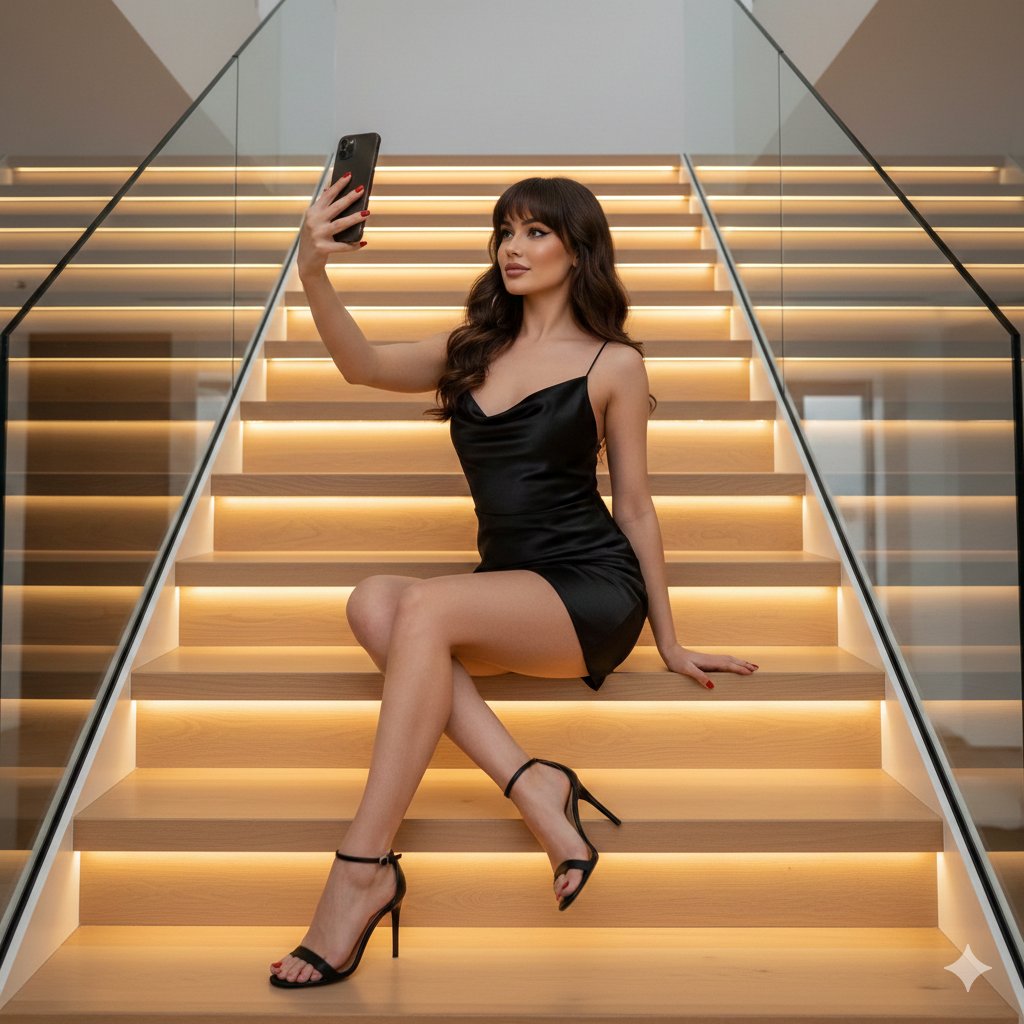
Create a subject Is Sitting Sideways
How to the subject is sitting sideways on a wide, light-wood stair step.
0
Times used
0
Likes
Discover the Art of Contemplation: Mastering the "Create a subject Is Sitting Sideways" AI Prompt
In the vast universe of AI image generation, some prompts possess a quiet power that transcends complexity. They are elegant, evocative, and endlessly versatile. The "Create a subject Is Sitting Sideways" style, a signature prompt within the Orno AI image editor, is a perfect example of this. It’s more than just a command; it's an invitation to create scenes of introspection, casual elegance, and profound visual storytelling. This style, centered on a subject posed sideways on a wide, light-wood stair step, offers a clean, modern aesthetic that serves as a perfect canvas for countless creative projects.
Whether you are a digital artist seeking a compelling character pose, a marketer in need of unique lifestyle imagery, or a storyteller looking to visualize a pivotal moment, this prompt is your key. In this detailed guide, we will explore the nuances of this powerful Orno style, learn how to customize it to perfection, and understand the artistic principles that make it so effective. Get ready to transform simple text into compelling visual narratives.
Unpacking the "Create a subject Is Sitting Sideways" Style
At its core, the power of this AI image generation prompt lies in its masterful blend of three key elements: the subject, the pose, and the setting. Each component is deliberately chosen to create a harmonious and aesthetically pleasing composition. Let's break down what makes this combination so special.
The Subject: A Blank Canvas for Your Imagination
The prompt intentionally leaves the "subject" open-ended, granting you complete creative control. This isn't just about generating a generic person; it's about bringing a specific character to life. With Orno's advanced text-to-image capabilities, your subject can be anyone you envision:
- A young woman with windswept hair, lost in thought.
- A stylish man in a tailored suit, exuding quiet confidence.
- An ethereal fantasy character with pointed ears and glowing eyes.
- An elderly artist with paint-splattered clothes, reflecting on their work.
The ability to define every detail, from ethnicity and age to clothing and expression, makes this prompt a foundational tool for character design and development.
The Pose: The Eloquence of "Sitting Sideways"
The sideways pose is a classic technique in portraiture and art for a reason. Unlike a direct, confrontational forward-facing pose, sitting sideways introduces a layer of nuance and narrative. It suggests the subject is unaware of or unconcerned with the viewer, creating a candid, "slice-of-life" feeling. This pose can convey a range of emotions: calmness, melancholy, anticipation, or simple relaxation. It naturally creates a beautiful profile, highlighting the contours of the face and form in a way that is both artistic and flattering.
The Setting: The Minimalist Beauty of a "Wide, Light-Wood Stair Step"
The choice of a wide, light-wood stair step is a stroke of genius in set design. Here’s why it works so well:
- Minimalist Aesthetic: The clean lines and neutral tones of light wood prevent the background from overpowering the subject. It’s a minimalist canvas that makes your character the undeniable focal point.
- Natural Light and Texture: Light wood interacts beautifully with light, whether it's the soft glow of a morning sun or the dramatic shadows of cinematic lighting. The subtle grain of the wood adds a touch of organic texture, preventing the scene from feeling sterile.
- Leading Lines: The horizontal line of the stair step and the potential diagonal lines of the staircase itself act as powerful compositional tools, guiding the viewer's eye directly to the subject.
Why This AI-Generated Pose is a Game-Changer for Creatives
The "Create a subject Is Sitting Sideways" prompt isn't just a fun tool; it's a practical and powerful asset for professionals across various fields. Its ability to quickly generate high-quality, atmospheric images opens up new workflows and creative possibilities.
For Digital Artists & Illustrators
Struggling with a difficult pose or need a quick reference for lighting on a character? This prompt is your new best friend. Generate dozens of variations in seconds to find the perfect anatomical reference. Use the generated image as a base layer for a digital painting, saving hours of initial sketching and composition work. It's the ultimate tool for overcoming creative blocks and accelerating your concept art process.
For Marketers & Social Media Managers
Authentic, high-quality imagery is the currency of modern marketing. Instead of relying on generic stock photos, use Orno to create bespoke lifestyle images that perfectly match your brand's aesthetic. This prompt is ideal for brands in the wellness, fashion, interior design, and lifestyle sectors. Generate a series of images with a consistent look and feel for a cohesive and professional social media feed or website, all without the cost and logistics of a physical photoshoot.
For Photographers
Use generative AI as your virtual pre-production studio. Before a real-life portrait session, use this prompt to experiment with composition, lighting schemes, and posing ideas. Visualize how different outfits or moods will look in a similar setting. It’s an incredible way to refine your creative vision and show clients a mood board of what you plan to achieve, ensuring everyone is on the same page.
Mastering the Prompt: A Guide to Customization in Orno
The base prompt is a fantastic starting point, but the true magic happens when you begin to customize it. Orno's AI image editor is designed to be intuitive, allowing you to add descriptive layers to your prompt to achieve your precise vision. Here’s how you can tailor every aspect of the image.
Customizing Your Subject
Be specific! The more detail you provide, the closer Orno will get to your vision. Think about age, hair, clothing, and expression.
Create a young woman with long curly brown hair and glasses Is Sitting Sideways...Create a handsome man in his 40s with a short beard, wearing a black turtleneck, Is Sitting Sideways...Create an anime-style teenage boy with spiky blue hair Is Sitting Sideways...
Modifying the Atmosphere and Lighting
Lighting is everything. It sets the mood and transforms a simple scene into a dramatic one. Add lighting cues to your prompt to control the emotional tone.
...on a wide, light-wood stair step, bathed in warm, golden hour sunlight....on a wide, light-wood stair step, dramatic chiaroscuro lighting, deep shadows....on a wide, light-wood stair step, soft, diffused light from a large window.
Experimenting with Artistic Styles
Orno isn't limited to photorealism. You can command the AI to render your scene in virtually any artistic style imaginable.
Create a subject Is Sitting Sideways..., in the style of a vintage photograph....as a vibrant watercolor illustration....hyperrealistic, 8k, sharp focus, detailed....in a graphic novel ink style, bold lines.
The Psychology of the Sideways Pose in Visual Art
Understanding why this pose is so compelling can help you use it more effectively in your creative work. The sideways profile is rich with psychological subtext. By turning the subject away from the viewer, you create a sense of intimacy and voyeurism. We are not being presented with a performance; we are being given a glimpse into a private moment of contemplation. This lack of direct eye contact encourages the viewer to wonder what the subject is thinking or looking at, sparking curiosity and building a narrative beyond the frame. It’s a powerful tool for conveying authenticity and drawing the audience into the emotional world of your character.
Orno: Your Partner in Creative AI Image Generation
The "Create a subject Is Sitting Sideways" style is just one of thousands of possibilities waiting for you inside Orno. Our platform is built to be both powerful for professionals and accessible for beginners. With a user-friendly interface and a robust AI engine that understands nuanced, natural language, Orno empowers you to bring your most ambitious creative ideas to life. Forget wrestling with complicated software or sifting through stock photo libraries. With Orno, you are the director, the artist, and the photographer. We provide the canvas; you provide the vision. Start exploring today and see how text-to-image generation can revolutionize your creative workflow.
Frequently Asked Questions (FAQ)
Can I specify the gender, age, and appearance of the subject?
Absolutely. Orno's AI is highly responsive to detailed descriptions. You can specify gender, approximate age ("a man in his 60s"), hair color and style ("a woman with a short blonde bob"), clothing ("wearing a red silk dress"), and even mood ("looking pensive") directly in your prompt for more accurate results.
What other settings can I place the subject in besides stairs?
The "light-wood stair step" is the core of this specific style, but Orno's capabilities are limitless. You can modify the prompt to place your subject anywhere you can imagine: "sitting sideways on a park bench," "sitting sideways on a windswept cliff," or "sitting sideways on a velvet couch in a grand library." Simply replace the setting description with your desired location.
Is the "Create a subject Is Sitting Sideways" style good for creating realistic photos?
Yes, it's excellent for photorealism. To achieve a realistic look, add photographic terms to your prompt. Try including phrases like "photorealistic," "hyper-detailed," "8k resolution," "shot on a DSLR with a 50mm lens," and "natural lighting." These keywords will guide the AI to generate an image that mimics a high-quality photograph.
How can I use the images I generate with Orno?
The images you create with Orno can be used for a wide range of personal and commercial projects, depending on your subscription plan. Common uses include social media content, website graphics, blog illustrations, marketing materials, concept art, storyboarding, and personal art projects. Please refer to Orno's terms of service for specific usage rights.
Why is my generated image not exactly what I prompted?
AI image generation is an iterative process. Sometimes the AI may interpret a word differently or prioritize one part of the prompt over another. If your first result isn't perfect, don't worry! This is part of the creative process. Try rephrasing your prompt, adding more specific details, or using negative prompts to exclude things you don't want to see. Each regeneration brings you closer to the perfect image.
Use This Prompt
Transform your images with AI
Save this prompt as its own icon for one-tap access.