
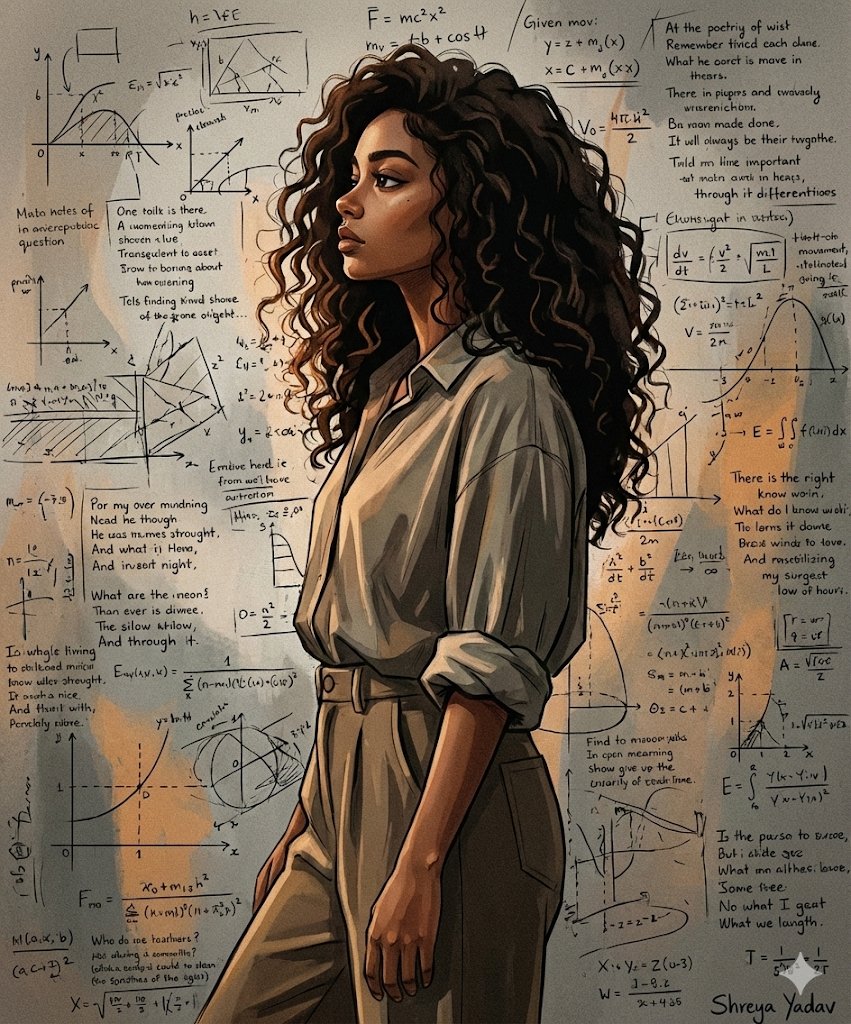
Create a stylized Woman Portrait Against Scribbled
How to stylized Woman Portrait Against Scribbled Wall
0
Times used
0
Likes
Unleash Your Inner Artist: Mastering the "Stylized Woman Portrait Against Scribbled" AI Art Style
In the dynamic world of AI-generated art, certain styles emerge that capture the imagination, blending classic aesthetics with raw, contemporary energy. One such captivating trend is the "Stylized Woman Portrait Against Scribbled" style. This fusion of elegant portraiture and chaotic, expressive backgrounds creates visuals that are not just seen, but felt. It's a style that tells a story of contrast, emotion, and modern artistry. If you've ever wanted to create stunning, edgy, and deeply evocative portraits, you're in the right place. With the Orno AI Image Editor, mastering this powerful style is not only possible but also an incredibly creative journey.
This guide will walk you through everything you need to know about this unique AI art prompt. We'll explore its artistic roots, deconstruct the core elements, and provide you with expert-level prompt engineering techniques to generate breathtaking images. Get ready to transform simple text prompts into compelling works of digital art with Orno.
What Exactly is the "Stylized Woman Portrait Against Scribbled" Style?
At its core, this style is a visual dialogue between order and chaos, serenity and energy. It juxtaposes a clearly defined, often artistically rendered portrait of a woman with a background that feels spontaneous, abstract, and untamed. Think of a beautifully composed photograph or painting that has been placed against a wall covered in graffiti, charcoal sketches, or frantic ink scribbles. This contrast is the secret ingredient that makes the final image so compelling.
Key Visual Elements:
- The Subject: The focal point is a "stylized woman." This means she isn't necessarily photorealistic. She can be painterly, illustrative, cartoonish, or sculpted from digital clay. The key is that she has a distinct artistic flair, setting her apart from a simple photograph. Her expression, pose, and attire are crucial in setting the mood.
- The Background: The "scribbled wall" is the dynamic stage for our subject. This isn't just a simple texture; it's an active element of the composition. The scribbles can range from minimalist, delicate pencil lines to dense, overlapping layers of spray paint, ink, or crayon. It represents raw emotion, urban decay, or the frantic pace of modern life.
- The Interaction: The magic happens where the subject and background meet. Does the color from the scribbles bleed into her portrait? Do the lines on the wall seem to emerge from her thoughts? This interplay between the clean lines of the portrait and the wild energy of the background is what gives the style its profound depth and narrative potential.
This style draws inspiration from various art movements, including street art and graffiti, where artists like Jean-Michel Basquiat blended figures with text and abstract marks. It also echoes abstract expressionism, which emphasized spontaneous and subconscious creation. With an AI image generator like Orno, you can become the director of this artistic fusion, blending genres and moods with a few carefully chosen words.
How to Generate "Stylized Woman Portrait Against Scribbled" Art in Orno
Creating your own masterpiece in this style is an exciting process of experimentation and refinement. Orno's powerful text-to-image AI is perfectly tuned to understand the nuance required for such artistic prompts. Here’s how you can get started and level up your creations.
The Foundational Prompt
Every great creation starts with a simple idea. Your base prompt is your starting block. Open the Orno AI Image Editor and try this:
Base Prompt: A stylized portrait of a woman against a scribbled wall.
This will give you a good starting point. Orno's AI will interpret "stylized" and "scribbled" to produce a variety of results. But the real power lies in adding details and directing the AI with more specific language. This is where prompt engineering comes in.
Advanced Prompt Engineering: Taking Control of Your Vision
To move from interesting results to awe-inspiring art, you need to add layers of detail to your prompt. Think of yourself as an art director guiding the AI. Here’s how to break it down:
1. Defining Your Subject
Who is this woman? What is her story? The more detail you provide, the more unique your character will be.
- Appearance: Specify features like
woman with long flowing silver hair,woman with freckles and green eyes, orprofile of an african woman with intricate braids. - Emotion: Mood is everything. Use words like
serene expression,pensive gaze,joyful laugh, ordefiant stare. - Style & Clothing: Dress your character to match the mood. Try
wearing a minimalist black turtleneck,adorned in futuristic chrome accessories, orin a vintage floral dress.
2. Commanding the Scribbles
The background is just as important as the subject. Don't leave it to chance; dictate its style, color, and intensity.
- Color Palette: Are the scribbles chaotic and colorful or subdued and moody? Use prompts like
monochromatic black ink scribbles,vibrant neon graffiti tags,pastel-colored chalk scribbles, orsepia-toned pencil sketches. - Texture and Medium: What were the scribbles made with? This changes the whole feel. Try
charcoal scribbles on a concrete wall,thick, impasto paint splatters, ordelicate, thin ballpoint pen lines. - Density: Control the chaos. Do you want
sparse, minimalist scribblesor adense, overlapping and chaotic background?
3. Setting the Artistic Style & Lighting
This is the final layer that ties everything together. Define the overall artistic medium and how the scene is lit.
- Overall Style: Use art terms to guide the AI. Examples include
oil painting style,graphic novel illustration,art deco poster art,anime key visual, ormixed media collage. - Lighting: Lighting creates drama and focus. Try
dramatic chiaroscuro lighting,soft, diffused morning light,cinematic rim lighting, orglowing neon cyberpunk lighting.
Example Prompts to Try in Orno
Let's put it all together. Here are a few detailed prompts you can copy, paste, and tweak within the Orno image generator:
- Prompt 1 (Moody & Artistic):
Fine art oil painting of a woman with a pensive expression, looking away from the viewer. She is set against a concrete wall covered in dense, black charcoal scribbles and abstract shapes. Dramatic, cinematic side lighting, high contrast. - Prompt 2 (Vibrant & Modern):
Pop art illustration of a woman with bright pink hair and sunglasses, smiling. The background is a white brick wall covered in vibrant, multi-colored spray paint graffiti, tags, and scribbles. Clean lines, bold colors, dynamic composition. - Prompt 3 (Soft & Ethereal):
Delicate watercolor portrait of a woman with closed eyes and a serene expression. The background is a soft wash of pastel colors with faint, minimalist pencil scribbles and poetic text. Soft, ambient lighting, ethereal mood.
Creative Applications: What to Do With Your AI Art
This versatile style isn't just for experimentation. The images you create with Orno can be used in a multitude of practical and creative ways:
- Unique Social Media Profiles: Stand out from the crowd with a profile picture or banner that is truly one-of-a-kind.
- Digital Art and Portfolios: A perfect addition to any digital artist's portfolio, showcasing a command of mood and composition.
- Concept Art: Develop character designs for stories, video games, or graphic novels, instantly visualizing their personality and world.
- Branding and Marketing: Create edgy and eye-catching visuals for a modern brand, blog, or music album cover.
- Personalized Decor: Print your favorite creations on high-quality paper or canvas to create stunning wall art for your home or office.
Frequently Asked Questions (FAQ)
What is the best starting prompt for this style in Orno?
A great starting point is: stylized art of a woman's portrait, background of a scribbled wall. From there, begin adding specific descriptors for her appearance (e.g., "red hair"), the style of scribbles (e.g., "charcoal scribbles"), and the overall artistic medium (e.g., "oil painting").
Can I create portraits of men or non-binary characters with this style?
Absolutely! The prompt structure is completely flexible. Simply replace "woman" with "man," "person," "android," or any other subject you can imagine. The principles of contrasting a defined subject with a chaotic background remain the same, allowing for endless creative exploration.
How can I make the scribbles more colorful and vibrant?
To get more color into your background, use specific color-related keywords in your prompt. Try adding phrases like vibrant neon graffiti, rainbow-colored crayon scribbles, background of multi-colored paint splatters and drips, or specify a palette like scribbles in shades of blue and gold.
Is this style limited to illustrative art, or can it be photorealistic?
While the style's name includes "stylized," you can certainly push it towards realism. Try combining a prompt like ultra-realistic photo of a woman's face with in front of a wall covered in spray paint scribbles. The power of this style is in the contrast, so even a photorealistic subject against an abstract background will produce a striking and compelling image.
Why is Orno the best tool for creating this AI art style?
Orno is designed for artists and creators who value control and quality. Our AI model excels at interpreting nuanced, artistic language, allowing you to fine-tune every element of your composition. Furthermore, with a user-friendly interface and a suite of powerful editing tools, Orno provides a seamless workflow from initial idea to finished masterpiece. It’s the perfect playground for bringing complex, imaginative styles like the "Stylized Woman Portrait Against Scribbled" to life.
Ready to Create?
The "Stylized Woman Portrait Against Scribbled" style is more than just a prompt; it's a gateway to creating emotionally resonant and visually stunning art. It invites you to play with contrast, tell stories, and blend different artistic worlds. There's a universe of creative possibilities waiting for you. Open the Orno AI Image Editor, start with a simple prompt, and see where your imagination takes you. Your next masterpiece is just a few words away.
Use This Prompt
Transform your images with AI
Save this prompt as its own icon for one-tap access.