
Create a slender
How to a slender, V-shaped facial structure with a refined, delicate jawline and a pointed chin.
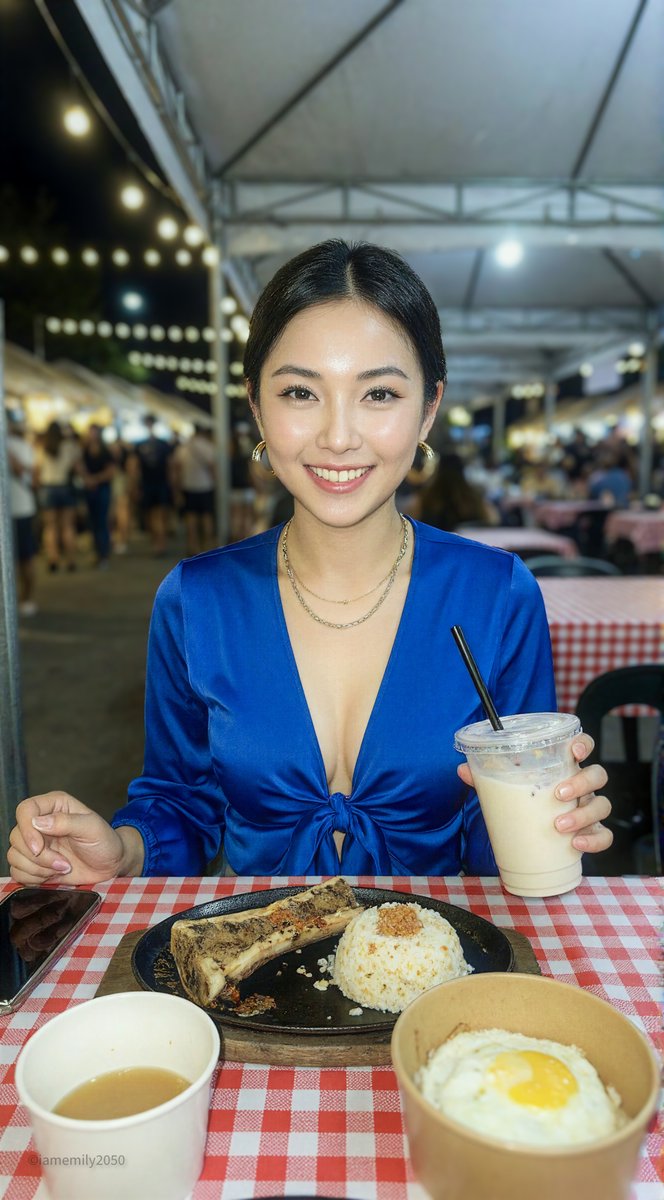
0
Times used
0
Likes
Unveiling the "Create a Slender" AI Style: The Art of Digital Delicacy
In the vast world of digital art and AI image generation, certain aesthetics capture the imagination and become iconic. One such look is the elegant and refined facial structure characterized by a slender, V-shape. This aesthetic, celebrated in everything from classic art to modern anime and high fashion, conveys a sense of grace, youth, and sophistication. But achieving this specific look manually can be a challenge. That’s where Orno’s powerful AI image editor steps in with the revolutionary "Create a slender" style, a one-click solution to master this coveted aesthetic.
This detailed guide will explore the nuances of the "Create a slender" style, showcase its creative applications, and provide you with expert tips to generate breathtaking AI portraits. Whether you're a digital artist, a writer visualizing characters, or simply a creative soul exploring the possibilities of AI, this style is your key to unlocking a new level of artistic elegance.
What is the "Create a Slender" AI Generation Style?
At its core, the "Create a slender" style is a sophisticated instruction for the Orno AI. The official description captures it perfectly: "How to create a slender, V-shaped facial structure with a refined, delicate jawline and a pointed chin." Let's break down these elements to understand the visual magic they create:
- Slender, V-shaped Facial Structure: This is the foundation of the style. Imagine a face that gently tapers from the cheekbones down to the chin, forming a soft "V" shape. It’s the antithesis of a square or round face, creating an immediate impression of elegance and refinement. This structure is often a hallmark of characters in anime, fantasy art, and fashion illustration.
- Refined, Delicate Jawline: The "Create a slender" style eschews a harsh, overly defined jaw. Instead, it instructs the AI to render a jawline that is clear and present but soft and graceful. It’s a line of subtle definition, contributing to the overall delicate and sophisticated feel of the portrait.
- Pointed Chin: The feature that completes the V-shape. A softly pointed chin acts as the anchor for the entire facial structure, drawing the viewer's eye and enhancing the sense of grace and poise. It’s the final touch that solidifies the aesthetic.
When combined, these elements instruct the Orno AI to produce portraits with a consistently elegant and ethereal quality, making it a go-to style for anyone looking to create visually stunning and aesthetically pleasing characters.
Why is This Aesthetic So Popular in Digital Art?
The appeal of the V-shaped face is global and timeless. It's prominently featured in East Asian beauty standards, where it's often referred to as the "melon seed face," and is celebrated for its youthful and photogenic qualities. In the West, it's a staple of high-fashion models and classic Hollywood stars, associated with glamour and elegance. For digital artists and character designers, this facial structure is incredibly versatile. It can convey innocence, wisdom, mystique, or nobility, making it the perfect canvas for a wide range of fantasy, sci-fi, and anime-inspired creations.
How to Master the "Create a Slender" Prompt with Orno
One of the greatest strengths of the Orno AI image editor is its simplicity and power. You don't need to be a prompt engineering wizard to achieve incredible results. Here’s how you can start creating stunning slender portraits in seconds.
Step-by-Step Guide to Your First Slender Portrait
- Start with a Base Idea: Open the Orno AI image editor and think about the subject of your portrait. Let's start with something simple like,
portrait of a beautiful elf princess. - Apply the "Create a slender" Style: Now, simply add the "Create a slender" modifier. Orno’s interface makes this easy, allowing you to select it from a list of styles. Your prompt now becomes a powerful combination of a subject and a specific aesthetic.
- Add Details and Context: Enhance your prompt further. Do you want her to have
long silver hairandglowing blue eyes? Is she in anenchanted forest with cinematic lighting? Add these descriptive phrases to your prompt. - Generate and Refine: Click the "Generate" button and watch as Orno’s AI brings your vision to life, perfectly interpreting the "Create a slender" style onto your elf princess. If it’s not quite right, you can tweak the prompt or generate new variations with a single click.
Advanced Prompting Techniques for a Unique Look
The "Create a slender" style is a fantastic foundation, but the real magic happens when you combine it with other artistic instructions. This is where you can truly make the style your own. Here are some pro tips and examples:
- For Hyperrealism: Combine the style with text-to-image prompts that emphasize detail and lifelike quality.
Example Prompt:photorealistic portrait of a young woman, Create a slender, detailed skin texture, freckles, soft natural window light, 8k, sharp focus - For Epic Fantasy Art: Blend the elegant facial structure with dramatic, fantastical elements.
Example Prompt:digital painting of a powerful sorceress queen, Create a slender, intricate silver crown, ethereal glowing magic, dark castle background, by Greg Rutkowski and Artgerm - For a Classic Anime Style: Achieve the perfect anime or manga look by pairing the V-shaped face with iconic stylistic choices.
Example Prompt:90s anime style screenshot, a high school girl with pink hair, Create a slender, big expressive eyes, serene expression, classroom setting, cel-shaded - For Gothic and Dark Fantasy: The style can also be used to create hauntingly beautiful and melancholic characters.
Example Prompt:gothic vampire aristocrat, male, Create a slender, pale skin, piercing red eyes, Victorian clothing, dramatic shadow, moody atmosphere
Don't forget to use negative prompts to further refine your results. If the AI is adding unwanted elements, you can add a negative prompt like --no square jaw, round face, harsh shadows to guide it more precisely.
The Creative Applications of the "Slender" V-Shaped Face Style
This powerful AI style isn’t just for creating beautiful portraits; it's a practical tool for a wide range of creative and professional projects.
Character Design for Writers and Game Developers
Visualizing a character is one of the most challenging parts of any creative process. The "Create a slender" style allows writers, D&D dungeon masters, and indie game developers to instantly generate high-quality concept art. Need to create a lineup of ethereal elves, sharp-featured villains, or elegant royal figures? Orno can produce consistent character sheets in minutes, saving you time and helping to solidify your creative vision.
Creating Stunning Digital Art and Avatars
In a crowded digital world, a unique avatar or profile picture helps you stand out. Use the "Create a slender" style to generate a personalized digital representation of yourself or an original character. These AI-generated images are perfect for social media profiles, gaming avatars, or as a base for further digital painting and manipulation. It's your personal, on-demand artist for creating a unique online identity.
Exploring Aesthetic Concepts in Fashion and Beauty
The style also serves as an incredible tool for mood boarding and conceptualization in the fashion and beauty industries. Quickly visualize makeup looks, hairstyles, or accessory designs on a model with a specific, elegant facial structure. This allows for rapid prototyping of ideas before a single photoshoot is even planned, streamlining the creative workflow.
Why Orno is the Best AI Image Editor for the "Create a slender" Style
While many AI art generators exist, Orno is specifically optimized to deliver superior results with stylistic prompts like "Create a slender." Here’s why Orno is the ultimate tool for this aesthetic:
- Precision and Consistency: Orno’s AI model has been finely tuned to understand the subtle nuances of facial anatomy. When you use the "Create a slender" style, you get consistent, high-quality results that accurately reflect the V-shaped, delicate aesthetic every time.
- Speed and Efficiency: Creativity shouldn't have to wait. Orno delivers lightning-fast generation speeds, allowing you to iterate on your ideas rapidly. You can generate dozens of variations in the time it would take to sketch a single one, ensuring your creative flow is never interrupted.
- Seamless Style Blending: Orno's true power lies in its versatility. The "Create a slender" style can be effortlessly combined with hundreds of other styles in Orno’s library, from "Ghibli Style" to "Photorealistic." This allows for an infinite spectrum of creative possibilities.
Frequently Asked Questions (FAQ)
What exactly does the "Create a slender" AI prompt do?
The "Create a slender" style is a specific command for the Orno AI image generator. It instructs the AI to render a subject with a distinctly elegant facial structure, defined by a V-shape, a refined and delicate jawline, and a softly pointed chin. It's a shortcut to achieving a popular and sophisticated aesthetic in your AI-generated art.
Can I use this style for male characters as well?
Absolutely! While often associated with feminine features, this style is incredibly effective for creating androgynous or gracefully handsome male characters. It's perfect for generating characters in the "bishōnen" anime style, fantasy princes, or elegant elven lords. Simply include terms like "man," "male," or "boy" in your base prompt.
How can I make my "slender" portrait more realistic?
To push your creation towards photorealism, you need to combine the style with descriptive keywords that guide the AI. Add prompts like "photorealistic," "hyperdetailed," "8k UHD," and specify realistic lighting, such as "soft morning light" or "studio portrait lighting." Mentioning camera lenses, like "50mm lens," can also enhance the realism.
Does using the "Create a slender" prompt limit my creativity?
Not at all—in fact, it enhances it! Think of the "Create a slender" style as a foundational building block, not a creative limitation. It defines the facial structure, giving you a perfect canvas. From there, you have complete freedom to define the character's clothing, expression, environment, artistic medium, and color palette. It handles the anatomy so you can focus on the storytelling.
Is the Orno AI image editor free to use?
Orno offers a fantastic free trial that gives you a generous number of credits to experiment with the "Create a slender" style and many others. This allows you to experience the full power and quality of our AI. For users who want to generate more images, unlock advanced features, and enjoy faster processing, we offer several affordable subscription plans to suit any creative need.
Ready to sculpt your perfect portrait? The power to create breathtaking characters with elegant, refined features is at your fingertips. Try the "Create a slender" style in Orno today and bring your most graceful visions to life!
Use This Prompt
Transform your images with AI
Save this prompt as its own icon for one-tap access.