
Create a same Face Preserved
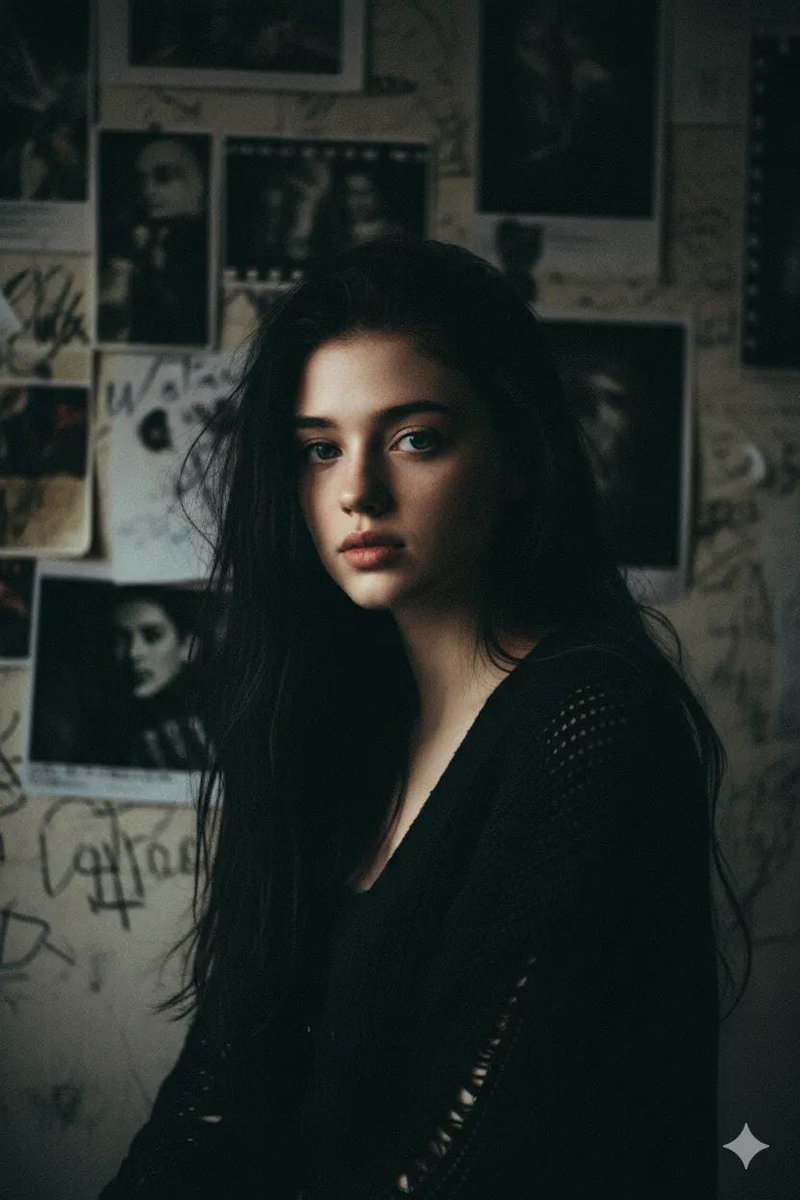
How to same face preserved, shot in near-dark with only a dim window glow hitting one cheek.
0
Times used
0
Likes
The Artist's Dilemma: Cracking the Code of AI Face Consistency
In the burgeoning world of AI image generation, artists, storytellers, and creators have encountered a persistent and frustrating challenge: character consistency. You spend hours crafting the perfect prompt, generating a character with a specific look, a certain glint in their eye, and a unique facial structure. You’ve found your protagonist. But then, you try to place them in a new scene, a different pose, or under new lighting, and the magic vanishes. The face changes, the features morph, and the character you fell in love with is lost to the digital ether. This is the "same face" problem, a hurdle that has long stood in the way of creating coherent visual narratives. Until now.
Welcome to the "Same Face Preserved" style, a revolutionary feature within the Orno AI image editor. This isn't just a technical fix; it's an artistic statement. We’ve combined a powerful face preservation algorithm with a specific, evocative aesthetic: a character shot in near-dark, with only the soft, moody illumination of a dim window glow gracing one cheek. This article delves into this powerful style, exploring how it solves the consistency problem while simultaneously offering a gateway to creating deeply atmospheric and emotionally resonant portraits. With Orno, you can finally keep your character's identity intact, telling their story one perfectly lit frame at a time.
Unlocking Character Consistency: The "Same Face Preserved" Revolution
To appreciate the solution, we must first understand the problem. AI image generators, like Stable Diffusion and others, work in a complex, high-dimensional space known as "latent space." When you write a prompt, the AI interprets it and navigates this space to find a visual representation. Even with the same "seed" (a starting number for the generation process), tiny changes in the prompt—like changing "sitting" to "standing"—can send the AI down a completely different path, resulting in a different face. For creators looking to build a comic, a storyboard, or a series of character studies, this unreliability is a major roadblock.
The Old Way: Complex Workarounds
Historically, achieving face consistency required a high degree of technical skill and patience. Artists had to resort to a patchwork of techniques, including:
- Training Custom Models (LoRAs): This involves gathering dozens of images of a single face and training a small, specialized AI model (a LoRA) to recognize it. It’s powerful but time-consuming and requires technical expertise.
- Image-to-Image and Inpainting: Generating a base image and then painstakingly using inpainting tools to replace the face, hoping the lighting and style match.
- Complex Prompt Engineering: Attempting to "brute force" consistency by using incredibly detailed facial descriptions and locking the seed, which severely limits creative freedom.
The Orno Way: Effortless Preservation
The "Same Face Preserved" style in Orno abstracts away all that complexity. Our advanced AI is specifically engineered to identify and lock the core facial features of a character from an initial generation or an uploaded image. Once that identity is established, the model intelligently retains it across subsequent prompts. You can change the clothes, the background, the pose, and even the art style, and Orno works tirelessly to ensure the character's face remains consistent. It’s the seamless solution that lets you focus on what truly matters: your creative vision.
Deconstructing the "Near-Dark with Dim Window Glow" Aesthetic
The "Same Face Preserved" style is more than just a technical tool; it’s a curated artistic direction. The specific prompt, "shot in near-dark with only a dim window glow hitting one cheek," is designed to produce images with incredible depth, mood, and cinematic quality. Let's break down the elements of this powerful aesthetic.
The Power of Chiaroscuro and Low-Key Lighting
This style is a modern digital interpretation of a classic art technique known as chiaroscuro, famously used by painters like Rembrandt and Caravaggio. It involves using strong contrasts between light and shadow to model three-dimensional forms and create a dramatic atmosphere.
- Mood and Mystery: Near-dark settings immediately evoke a sense of intimacy, introspection, or suspense. What is hidden in the shadows is just as important as what is revealed in the light.
- Focus and Emphasis: By illuminating only a small part of the scene—one side of the face—the AI guides the viewer's eye directly to the subject's expression. This makes it perfect for character-driven portraits where emotion is key.
- Depth and Form: The "dim window glow" acts as a key light that sculpts the character's features. It creates highlights on the cheekbone, jawline, and brow, giving the face a tangible, three-dimensional quality that can feel hyper-realistic.
The Narrative of the Window
The choice of a "window glow" is intentional. A window is a natural framing device and a source of narrative potential. Is the character looking out at a rainy cityscape? Are they waiting for someone? Is the light from a futuristic neon sign or the soft moonlight of a fantasy world? This single element in the prompt invites storytelling, turning a simple portrait into a snapshot from a larger narrative.
How to Master "Same Face Preserved" with Orno: A Step-by-Step Guide
Ready to bring your own consistent characters to life? With Orno's intuitive interface, achieving this stunning, moody style is incredibly straightforward. Follow these steps to become a master of character creation.
Step 1: Establish Your Character's Face
First, you need to tell Orno who your character is. You have two main options:
- Text Prompt: Write a detailed description of your character. For example:
"A rugged male fantasy rogue with a faint scar over his left eyebrow, short-cropped black hair, and piercing green eyes, photorealistic."Generate images until you find a face that perfectly captures your vision. - Image Upload: If you already have an image—whether it's a previous AI generation, a photograph, or a piece of art—you can upload it to Orno. Our AI will analyze the facial structure to use as the base for all future generations.
Step 2: Select the "Same Face Preserved" Style
Once you have your base character, simply navigate to Orno's style library and select "Same Face Preserved." This will activate the face-locking algorithm and apply the "near-dark with dim window glow" lighting effect. You’ll see the prompt automatically appended, but the magic is happening behind the scenes.
Step 3: Unleash Your Creativity with New Scenes
This is where the fun begins. Your character's face and the core lighting are now locked in. You can now change the rest of the prompt to place your character in any situation imaginable. The key is to focus your new prompt on the setting, action, and clothing. For example:
A rugged male fantasy rogue... sitting at a wooden table in a medieval tavern, counting gold coins.A rugged male fantasy rogue... hiding in the alleyways of a sprawling city, wearing a dark cloak.A rugged male fantasy rogue... in a moment of quiet reflection, looking at an old map.
Orno will generate new images that maintain the character's face and the signature window-lit style while completely changing the context. You can create a full visual story with a perfectly consistent protagonist.
Prompting Tips and Creative Ideas for Your Consistent Characters
To take your creations to the next level, here are some pro tips and creative applications for the "Same Face Preserved" style in Orno.
- Create Character Sheets: Generate a series of expressions for the same character (e.g., "smiling," "frowning," "surprised") to create a full character reference sheet for a project.
- Visual Storytelling: Plan out a short story and generate key scenes. Your character waking up, discovering a clue, and facing a challenge—all with a consistent face and a cohesive, moody lighting theme.
- Explore Different Genres: The lighting is versatile. Apply it to various genres by changing the subject and setting. A sci-fi android by a spaceship viewport, a Victorian detective in their Baker Street flat, or a modern-day musician in a dimly lit studio.
- Experiment with Light Modifiers: While the core style is set, you can influence it. Try adding terms like
"soft moonlight from the window,""dramatic sliver of light,"or"warm glow from a streetlamp outside the window"to your prompt to subtly alter the color and intensity of the light source. - Combine with Medium Styles: Try blending the lighting with different artistic mediums. Add
"as a charcoal sketch"or"in the style of an oil painting"to your prompt to see how the dramatic lighting translates across different artistic interpretations.
Why Orno is the Ultimate Tool for AI Face Consistency and Artistic Lighting
While other tools offer piecemeal solutions, Orno provides a fully integrated, artist-focused experience. The "Same Face Preserved" style exemplifies our philosophy:
- Simplicity Meets Power: We've taken a highly complex technical challenge—face preservation—and turned it into a one-click style. You don't need to be an AI engineer to be a master storyteller.
- Curated Aesthetics: We don't just give you tools; we give you artistic starting points. The "near-dark with dim window glow" is a professionally designed aesthetic that guarantees beautiful, high-quality results.
- Creative Velocity: Stop wrestling with settings and start creating. Orno empowers you to generate entire series of consistent, atmospheric images in a fraction of the time it would take with other methods. This speed allows for more experimentation and a more refined final product.
Frequently Asked Questions (FAQ)
Can I use my own face with the "Same Face Preserved" style?
Yes, absolutely. Orno's image-to-image capabilities are perfect for this. Simply upload a clear photo of yourself, and our AI will use it as the reference. You can then select the "Same Face Preserved" style to create stunning, moody, and consistent self-portraits or avatars for your projects.
Does this style work for non-human or fantasy characters?
Yes. The face preservation algorithm is designed to work with any character that has a defined facial structure. Whether you're creating an elf, a cyborg, an anthropomorphic animal, or a classic monster, Orno can lock onto its features and maintain consistency across your generations.
What is the difference between this and just using the same seed number?
Using the same seed can help maintain a similar composition and color palette, but it's highly unreliable for preserving facial identity. A small change in the prompt can still result in a completely different face. Orno's "Same Face Preserved" style uses a dedicated AI model trained specifically for facial recognition and consistency, which is far more robust and reliable than relying on a seed alone.
How can I make the window glow effect stronger or softer?
You can influence the lighting by adding descriptive keywords to your main prompt. For a stronger effect, try using words like "harsh sliver of light," "dramatic side-lighting," or "bright moonlight." For a softer look, try "faint glow," "diffused window light," or "soft, ambient light." Experiment to find the perfect balance for your scene.
Is the "Same Face Preserved" style free to use in Orno?
Yes, this powerful style is available to all Orno users. Our platform operates on a credit system, providing every user with a generous number of free credits to start creating immediately. If you need to generate more, we offer flexible plans to purchase additional credits, allowing you to continue bringing your creative visions to life without interruption.
The era of inconsistent AI characters is over. With Orno's "Same Face Preserved" style, you have the power to create compelling, continuous narratives with characters that your audience can connect with. Step out of the dark and into the perfectly sculpted light. Try Orno today and give your characters the consistency they deserve.
Use This Prompt
Transform your images with AI
Save this prompt as its own icon for one-tap access.