
Create a reflection In The Mirror Shows
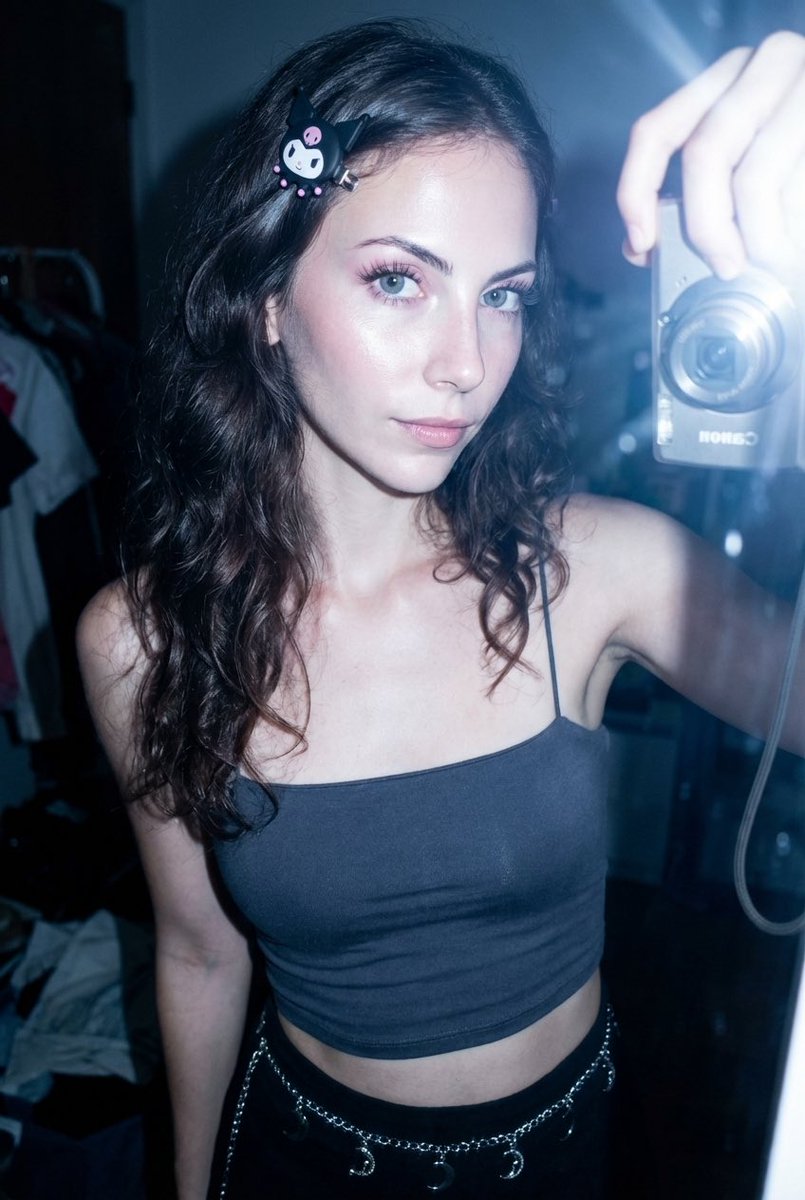
How to a reflection in the mirror shows another woman's hand taking the photo of the model
0
Times used
0
Likes
Exploring the Unseen: Mastering the "Reflection in the Mirror Shows" AI Style
In art and photography, mirrors have long been powerful symbols of truth, introspection, and a second reality. They reflect what's in front of them with unflinching honesty. But what if a mirror could show something else entirely? What if it could reveal a hidden truth, a secret observer, or a narrative twist just beyond the frame? This is the captivating idea behind one of the most intriguing AI image generation styles: creating an image where a reflection in a mirror shows another person's hand taking the photo. It’s a concept that challenges reality and opens up a universe of creative storytelling. With a powerful tool like the Orno AI Image Editor, you can move beyond simple text-to-image prompts and become the director of these complex, narrative-driven scenes. This article delves deep into the "Create a reflection In The Mirror Shows" style, guiding you on how to master this prompt and unlock a new level of AI artistry.
Unlocking the "Reflection in the Mirror Shows" Style with AI
The "Reflection in the Mirror Shows" prompt isn't just about creating a mirror selfie. It’s a sophisticated instruction that asks an AI to understand multiple layers of reality within a single frame. You have the primary subject, the room they are in, the mirror itself, and then the crucial twist—a reflection that defies logic. The reflection should not show the back of the subject, but rather the perspective of the photographer, signified by a hand holding a camera or a smartphone.
This type of prompt is a true test for an AI art generator. It requires a deep contextual understanding of several concepts:
- Subject and Object Distinction: The AI must differentiate between the model standing in front of the mirror and the separate entity (the hand) that should appear only in the reflection.
- The Physics of Reflection: While bending the rules, the AI still needs to grasp the basic idea of a mirror as a reflective surface to place the "incorrect" reflection convincingly.
- Narrative Interpretation: The AI has to interpret the narrative implication—that someone else is present and taking the photo, creating a sense of mystery or collaboration.
Early AI models would often struggle with this, merging the subject with the reflection or failing to render the hand accurately. However, advanced platforms like Orno are specifically tuned to handle such complex, layered prompts, giving creators the power to bring these imaginative and surreal mirror scenes to life with stunning realism and artistic flair.
Crafting the Perfect Prompt: A Step-by-Step Guide
Prompt engineering is the key to mastering this style. A well-written prompt is like a detailed script for the AI. Let's break down how to construct the perfect prompt in Orno to achieve this captivating effect.
Step 1: Defining the Main Subject and Setting
Before you get to the mirror, you need to set the stage. A detailed description of your main subject and their environment will ground the image in a believable reality, making the surreal reflection even more impactful. Consider these elements:
- The Model: Describe their appearance, clothing, pose, and expression. Is she pensive, confident, or playful? Example: "A photo of a thoughtful young woman with long auburn hair, wearing a simple white linen dress."
- The Environment: Where is this scene taking place? A sun-drenched bedroom, a moody vintage bathroom, or a sleek, modern dressing room? Details matter. Example: "...standing in a rustic bedroom with warm morning light filtering through a window."
Combining these gives you a strong foundation: "A photo of a thoughtful young woman with long auburn hair, wearing a simple white linen dress, standing in a rustic bedroom with warm morning light filtering through a window."
Step 2: Describing the Mirror and the Crucial Reflection
This is where the magic happens. You need to be explicit and clear in your instruction to the AI. First, describe the mirror itself. Is it a "large, ornate gilded mirror" or a "simple, round minimalist mirror"? Then, you must precisely state what the reflection shows.
The key phrase is "the reflection in the mirror shows..." This tells the AI to create a disparity between the real world and the reflected one. Here's how to structure it:
Prompt Snippet: "...she is looking into a large, ornate gilded mirror. The reflection in the mirror shows another woman's hand holding a black smartphone, taking the picture."
This command is unambiguous. It tells the AI to generate the hand and phone *only* within the boundaries of the mirror's reflection. You can add details to the hand, such as "a hand with a silver ring" or "a hand with red painted nails," to add more character to the unseen photographer.
Step 3: Setting the Atmosphere and Style
To elevate your image from a simple generation to a piece of art, add keywords that define the overall mood, lighting, and artistic style. This guides the AI's "creative eye."
- Lighting: Use terms like "cinematic lighting," "soft and diffused," "dramatic shadows," or "neon glow."
- Color Palette: You can suggest "warm tones," "monochromatic," or "vibrant and saturated colors."
- Overall Style: Add phrases like "hyperrealistic photo," "shot on Portra 400 film," "digital art," or "ethereal fantasy."
Complete Prompt Example: "Hyperrealistic photo of a thoughtful young woman with long auburn hair, wearing a simple white linen dress, standing in a rustic bedroom with warm morning light filtering through a window. She is looking into a large, ornate gilded mirror. The reflection in the mirror clearly shows another woman's hand with red painted nails holding a black smartphone, taking the picture. Cinematic lighting, warm tones, incredibly detailed."
Step 4: Using Orno's AI Image Editor to Refine Your Creation
Your first generation might be close, but true mastery comes from iteration. This is where Orno's powerful and intuitive platform shines. Generate a few variations of your prompt. Perhaps one version is perfect, or maybe you like elements from different ones. Use Orno's suite of editing tools to refine the final image. You can adjust contrast, enhance details, or even use inpainting tools to fix minor imperfections in the generated hand or reflection. Orno makes it easy to experiment and perfect your vision without needing complex external software.
Why This AI Style is a Game-Changer for Creatives
The "Reflection in the Mirror Shows" style is more than just a clever AI trick; it's a powerful narrative tool that can be used across various creative fields:
- Digital Artists & Photographers: This style allows you to explore themes of identity, perception, and the unseen observer. It’s a way to create surreal, thought-provoking digital art that immediately captures attention and invites interpretation.
- Storytellers & Marketers: Imagine a marketing campaign built around this concept. A single, intriguing image can tell a whole story, creating buzz and engagement. It adds a layer of mystery that makes viewers stop and think, "What's the story here?"
- Social Media Creators: In a world saturated with standard mirror selfies, this AI-generated style offers a way to create truly unique, scroll-stopping content. It’s innovative, artistic, and guaranteed to make your feed stand out.
Advanced Prompting Techniques for Mirror Reflections
Once you've mastered the basic concept, you can push the boundaries even further with Orno. Here are a few advanced ideas to experiment with.
Playing with Perspectives and Identities
Who says the hand has to belong to another woman? Change the narrative by altering the description. Try prompting for:
- "...the reflection shows a man's hand holding a vintage film camera."
- "...the reflection shows a skeletal hand taking the photo."
- "...the reflection shows a robotic chrome hand holding a futuristic device."
Altering the Entire Reflected World
Take the surrealism to the next level. Instead of just changing the photographer, change the entire reflected scene. This is a true test of the AI's ability to compartmentalize realities.
Example Prompt: "A young woman in a modern apartment looks into a mirror. The reflection shows the same woman, but as an old lady in a victorian room."
Incorporating Artistic Styles
Blend this complex narrative prompt with famous artistic styles. Orno can seamlessly merge these concepts to create something entirely new.
Example Prompt: "A woman looks into a mirror, the reflection in the mirror shows another woman's hand taking the photo, in the style of a glowing neon-soaked cyberpunk painting, synthwave aesthetic."
Frequently Asked Questions (FAQ)
Why does my AI mirror reflection not look right?
Generating complex reflections is one of the more difficult tasks for an AI. If your result isn't perfect, the issue is likely prompt clarity. Be very specific with your language. Use phrases like "The reflection *only* shows..." and ensure your description of the hand is detailed. Also, try generating a few variations. AI is a creative process, and sometimes it takes a few attempts to get the perfect composition. Using a high-quality AI image editor like Orno, which is designed for such complexity, will give you a much higher success rate.
Can I use the "Reflection in the Mirror Shows" style for male subjects?
Absolutely! The concept is completely gender-neutral. Simply adjust the prompt accordingly. For example: "A handsome man in a tailored suit adjusts his tie while looking in a bathroom mirror. The reflection in the mirror shows a woman's hand holding a smartphone to take his picture." The storytelling possibilities are endless.
What makes Orno the best tool for this specific AI style?
Orno is optimized for handling complex, layered prompts that require a high degree of contextual understanding. Our AI model excels at interpreting narrative instructions, separating the primary scene from the reflected one. Furthermore, Orno's high-resolution output ensures that the fine details—like the texture of the hand or the glint on the smartphone screen—are rendered beautifully. Combined with our user-friendly interface and powerful post-generation editing tools, Orno provides the ideal environment for both beginners and experts to master this advanced AI style.
Are the images I generate with Orno free to use?
Yes, the images you create on Orno are yours to use. Depending on your subscription plan, you have generous commercial rights to use your creations for projects, marketing, social media, and more. We always recommend checking our latest terms of service for the full details.
How can I make the reflected hand look more realistic?
AI can sometimes struggle with hands. To improve realism, add more detail to your prompt. Instead of just "a hand," try "a photorealistic, slender woman's hand with short, manicured nails." You can also use "negative prompts," an advanced feature where you tell the AI what to avoid, such as "deformed fingers, extra limbs." Experimenting with these specifics in Orno will help you generate a more lifelike and convincing hand in the reflection.
The "Reflection in the Mirror Shows" style is a testament to how far AI image generation has come. It’s a tool for storytellers, a canvas for artists, and a playground for the curious. It transforms a simple image into a puzzle box of narrative potential. Ready to bend reality and create your own visual mystery? Try the "Reflection in the Mirror Shows" style on Orno's AI Image Editor today and see what stories you can reveal!
Use This Prompt
Transform your images with AI
Save this prompt as its own icon for one-tap access.