
Create a recreate The Woman Exactly As
How to recreate the woman exactly as shown in the reference image with 100% identical facial features, bone structure, skin tone, and natural expression.
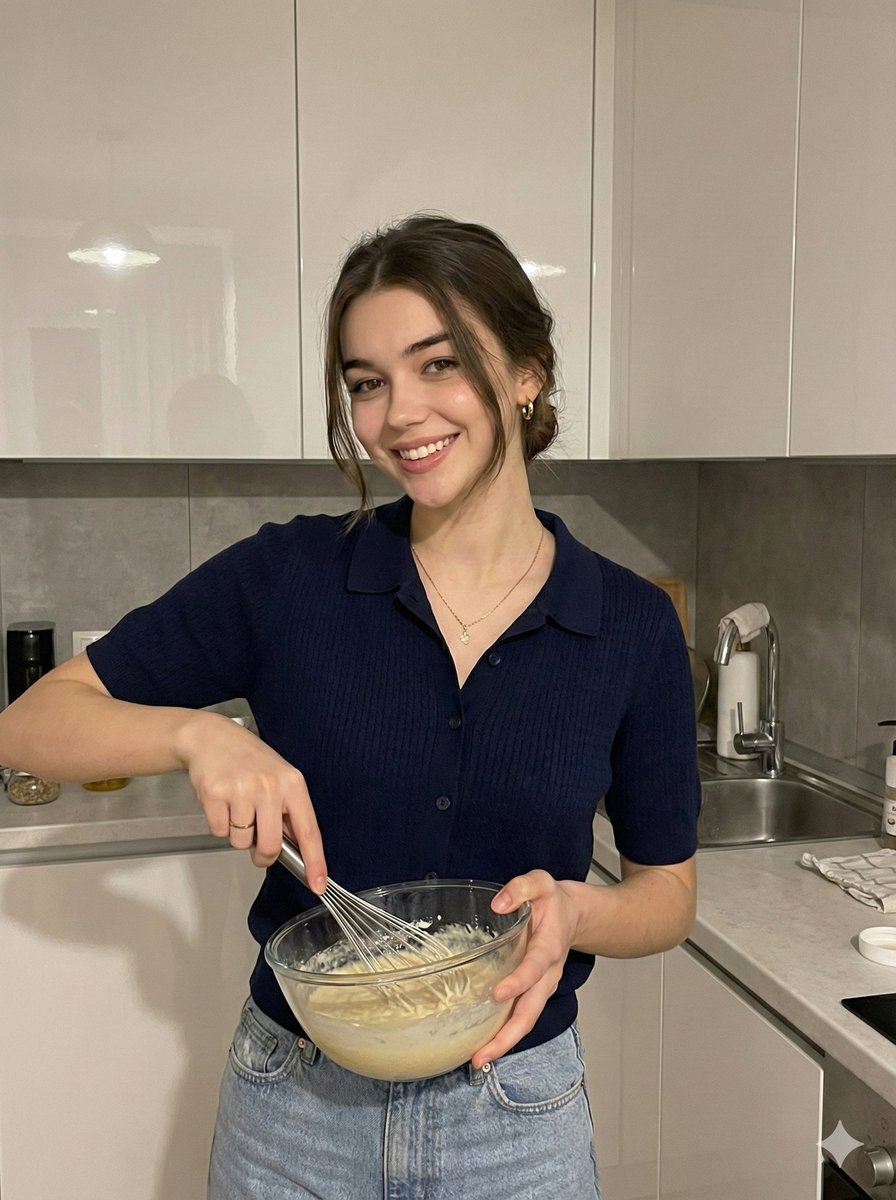
0
Times used
0
Likes
Unlocking Perfect Facial Consistency: A Deep Dive into the "Recreate The Woman Exactly As" AI Style
In the rapidly evolving world of AI image generation, one challenge has consistently stood as the final frontier: true facial consistency. For artists, storytellers, marketers, and creators, the frustration is familiar. You generate a stunning character, but in the next image, her eyes are slightly different, her jawline has shifted, and the subtle essence of her identity is lost. The dream has always been to create not just a similar face, but the exact same face, across countless scenes, styles, and scenarios. With Orno's revolutionary "Recreate The Woman Exactly As" style, that dream is now a reality.
This powerful feature is more than just a clever prompt; it's a sophisticated instruction to our AI engine, designed to meticulously analyze and replicate a person's identity with unparalleled precision. It goes beyond surface-level similarity, delving into the core components of what makes a face unique. This guide will explore the mechanics, applications, and best practices for mastering this game-changing style, empowering you to achieve 100% facial and character consistency in your AI-generated art.
What Exactly Does "Recreate The Woman Exactly As" Accomplish?
At its core, this style command instructs the Orno AI to prioritize the identity of the person in a reference image above all else. Unlike standard image-to-image generation that might only borrow thematic or compositional elements, this style locks onto the specific biometric data of the subject. It’s a targeted approach focused on flawless replication.
When you use this prompt, Orno's AI focuses on meticulously recreating:
- Identical Facial Features: The precise shape, size, and spacing of the eyes, the unique curve of the nose, the specific form of the lips, and even the subtle details of the ears are all preserved. No more "AI-generated generic face" syndrome.
- Authentic Bone Structure: The underlying foundation of the face—the cheekbones, jawline, chin, and brow ridge—is replicated with anatomical accuracy. This ensures that the person looks the same from different angles and in various lighting conditions.
- Consistent Skin Tone and Texture: The AI analyzes the hue, saturation, and brightness of the skin in the reference photo, ensuring the generated image maintains a natural and consistent complexion. It can even capture subtle textures like freckles or moles if they are clear in the source image.
- Natural Expression Nuances: While you can prompt for different emotions, the AI understands the subject's default or resting expression. This means the way their eyes naturally crinkle when they smile or the subtle set of their mouth is carried over, adding a layer of authenticity that is often missing in AI portraits.
Why Precise Facial Recreation is a Game-Changer for Creators
The ability to maintain character consistency opens up a universe of creative and professional possibilities. This isn't just a novelty; it's a foundational tool for serious projects.
For Storytellers and Comic Book Artists
Imagine creating a graphic novel where your protagonist looks perfectly consistent in every single panel, from a wide-shot action scene to an emotional close-up. The "Recreate The Woman Exactly As" style allows you to establish a character and maintain their identity throughout an entire narrative, fostering a stronger connection with the audience.
For Marketers and Brands
Develop a consistent brand mascot or AI-generated influencer. With Orno, you can place your unique virtual brand ambassador in various marketing campaigns—posing with different products, appearing in seasonal ads, or engaging with followers on social media—all while maintaining a single, recognizable identity that builds brand equity.
For Virtual Photoshoots and E-commerce
Save thousands on model fees and studio time. Provide a reference image of a model and generate an entire catalog of product shots. You can change their clothing, hairstyle, background, and lighting, all while the model's face remains exactly the same. This is the future of agile and cost-effective fashion and product photography.
For Personal and Creative Projects
Ever wanted to see yourself as a character in a fantasy epic, a cyberpunk hero, or a figure in a Renaissance painting? This style allows you to insert yourself (or a friend, with their permission) into any imaginable world with stunning realism. Create personalized avatars for gaming, social media, or simply for the fun of artistic exploration.
How to Master "Recreate The Woman Exactly As" in Orno: A Step-by-Step Guide
Unlocking the full potential of this style is easy with Orno's intuitive interface. Follow these steps to achieve flawless results.
Step 1: Choose the Perfect Reference Image
The quality of your output is directly tied to the quality of your input. For best results, your reference photo should be:
- High-Resolution and Clear: The AI needs data to work with. A sharp, non-blurry image is crucial.
- Well-Lit: Use a photo with even, frontal lighting that clearly illuminates all facial features. Avoid harsh shadows or dramatic, artistic lighting that obscures parts of the face.
- Forward-Facing: A direct, passport-style photo where the subject is looking at the camera is ideal.
- Neutral Expression: While not strictly necessary, a neutral expression provides a clean baseline for the AI to build upon when you prompt for other emotions.
Step 2: Upload Your Image and Craft Your Prompt
In the Orno editor, upload your chosen reference image. Then, begin crafting your prompt. The key is to start with the core command and build from there. The structure looks like this:
[Core Command] + [Description of the new scene, style, and action]
Example Prompt 1 (Simple Scene Change):
"Create a recreate The Woman Exactly As in the reference image, standing on a sunlit street in Paris, smiling softly, wearing a red beret. Photorealistic, golden hour lighting."
Example Prompt 2 (Artistic Style Change):
"Create a recreate The Woman Exactly As in the reference image, portrait painted in the style of Rembrandt, dramatic chiaroscuro lighting, pensive expression, wearing 17th-century Dutch clothing."
Example Prompt 3 (Action and Environment):
"Create a recreate The Woman Exactly As in the reference image, as a sci-fi explorer on a Mars colony, looking at the horizon, wearing a futuristic helmet with the visor up. Cinematic, detailed, 8k resolution."
Step 3: Utilize Negative Prompts for Refinement
A negative prompt tells the AI what to avoid. This is incredibly useful for refining your results and eliminating unwanted artifacts. For facial recreation, a good negative prompt can make all the difference.
Example Negative Prompt:
"Deformed, blurry, bad anatomy, disfigured, extra limbs, poorly drawn face, mutation, ugly, extra fingers, plastic look, sunglasses."
Step 4: Iterate and Experiment
AI generation is an iterative process. Don't be afraid to run the prompt a few times to get the perfect result. You can also adjust Orno's advanced settings, like the CFG scale (which controls how closely the AI adheres to your prompt), to fine-tune the final image. A slightly higher CFG scale often enhances the fidelity to the reference face.
Frequently Asked Questions (FAQ)
Can this style be used to recreate men or non-binary individuals?
Absolutely. While the style is named "Recreate The Woman Exactly As" for simplicity, the underlying technology is gender-agnostic. It works with equal precision on any human face. You can use the prompt as is, or adjust it to "recreate the person" or "recreate the man" for clarity—the AI is smart enough to understand the core instruction is to replicate the face in the reference image.
How is this different from a simple AI face swap?
A face swap typically cuts out a face from one image and "pastes" it onto another, often resulting in mismatched lighting, skin tones, and unnatural edges. Orno's "Recreate" style generates the entire image, including the face, from scratch. This means the replicated face is organically integrated into the new scene with correct lighting, shadows, and perspective, creating a far more seamless and believable result.
Is the recreation truly 100% identical?
In the realm of AI, "100%" is an ambitious goal, but this style gets closer than any other tool on the market. With a high-quality reference image and a well-crafted prompt, the replication of key features, bone structure, and overall identity is exceptionally accurate. Minor variations can occur, especially in highly stylized images, but for photorealistic outputs, the resemblance is stunningly precise.
Can I use images generated with this style for commercial projects?
Yes. As per Orno's terms of service, you generally own the rights to the images you create. However, it is your responsibility to ensure you have the rights to use the reference image of the person you are recreating. Always obtain consent and permission from the individual in the photo before using their likeness for commercial purposes.
The Future of Identity is Here
The "Recreate The Woman Exactly As" style is more than a feature; it's a paradigm shift in AI-powered creativity. It hands the keys of consistency and control over to the creator, eliminating the guesswork and randomness that once plagued AI portraiture. Whether you're building a brand, telling a story, or exploring the boundaries of your own imagination, Orno provides the tools to bring your vision to life with unprecedented fidelity. Stop settling for "close enough" and start creating with perfect, predictable precision. Try the "Recreate" style in Orno today and experience the future of digital identity creation.
Use This Prompt
Transform your images with AI
Save this prompt as its own icon for one-tap access.