
Create a prompt On Nano Banana Pro : White Ceramic Coffee Cup Rests
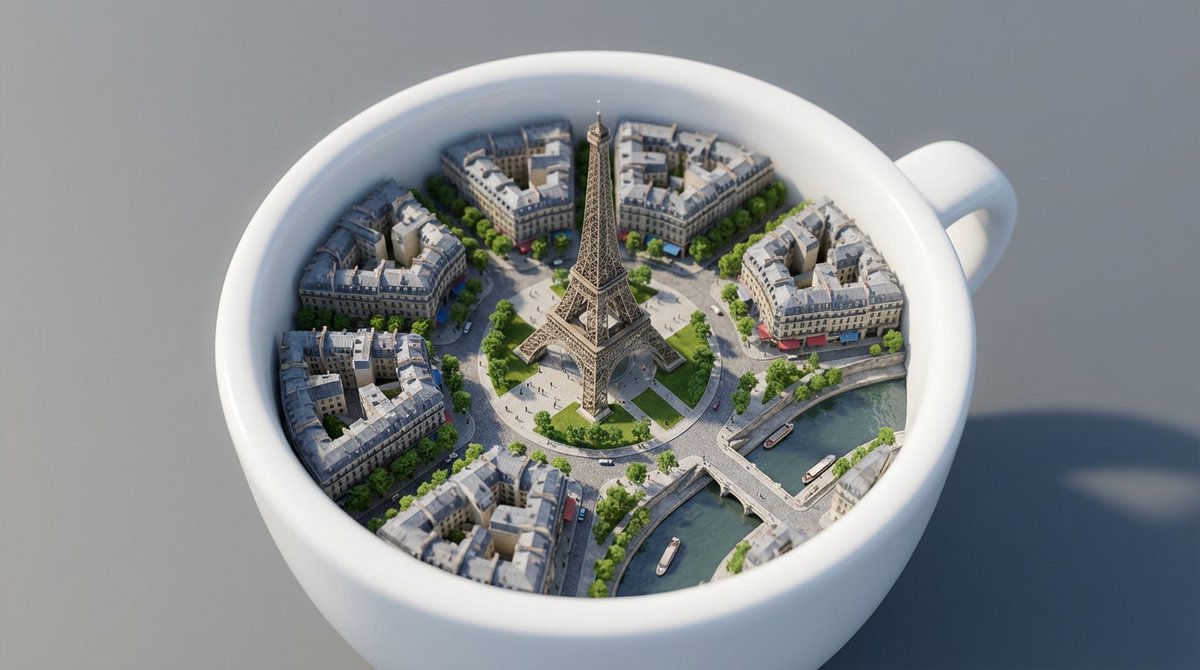
How to prompt on Nano Banana Pro : White ceramic coffee cup rests on a smooth gray surface, its interior transformed into a miniature version of Paris.
1
Times used
0
Likes
Unlocking a World in a Coffee Cup: The Nano Banana Pro Style Explained
In the mesmerizing world of AI image generation, the only limit is your imagination. What if you could capture an entire city, with all its romance and grandeur, within the confines of an everyday object? This is the magic behind one of the most captivating AI art styles available on Orno: the "Nano Banana Pro: White Ceramic Coffee Cup Rests" prompt. This style isn't just about creating a pretty picture; it's about mastering the art of surrealism, juxtaposition, and visual storytelling, turning a simple text prompt into a digital masterpiece. Whether you're a seasoned prompt engineer or a curious newcomer to text-to-image generation, this guide will walk you through everything you need to know to create your own breathtaking miniature worlds using Orno's powerful AI image editor.
What is the "White Ceramic Coffee Cup Rests" Style?
At its core, this style is a beautiful exercise in surreal concept art. It takes a familiar, comforting object—a white ceramic coffee cup—and transforms it into a vessel for the extraordinary. The base prompt, "White ceramic coffee cup rests on a smooth gray surface, its interior transformed into a miniature version of Paris," provides the perfect foundation. Let's break down its key elements:
- The Mundane Anchor: The "white ceramic coffee cup" acts as our anchor to reality. It's simple, recognizable, and clean, providing a perfect, uncluttered canvas for the main event. Its simplicity makes the surreal element inside even more striking.
- The Neutral Stage: The "smooth gray surface" is a crucial, yet subtle, component. It creates a minimalist, non-distracting background that forces the viewer's eye directly to the cup and its magical contents. It suggests a studio setting, enhancing the feeling of a carefully composed piece of art.
- The Surreal Twist: The "miniature version of Paris" is where the magic happens. It’s the unexpected element that elevates the image from a simple still life to a captivating piece of surreal AI art. The choice of Paris evokes feelings of romance, history, and iconic architecture, all condensed into a tiny, intricate world.
The Power of Juxtaposition in AI Art
The "White Ceramic Coffee Cup" style is a masterclass in juxtaposition—the artistic technique of placing two contrasting elements side-by-side to create a compelling effect. Here, the vast, bustling cityscape of Paris is contrasted with the small, intimate space of a coffee cup. This blend of the ordinary and the extraordinary sparks curiosity and invites the viewer to look closer. Using an AI image generator like Orno to explore these concepts allows you to create visuals that are not only beautiful but also thought-provoking. It’s this kind of creative AI prompting that pushes the boundaries of digital art and allows for unique visual storytelling.
Crafting the Perfect Prompt: A Step-by-Step Guide with Orno
The base prompt is your starting point, but the real fun begins when you start to customize and refine it. Orno's AI is incredibly responsive to detailed instructions, allowing you to act as the director of your digital creation. Let’s explore how to take this prompt from great to absolutely unforgettable.
The Foundation: Deconstructing the Base Prompt
Understanding why the base prompt works is key to modifying it effectively. Each phrase serves a purpose in guiding the AI:
White ceramic coffee cup: This is specific. It tells the AI the subject, material (ceramic), and color. Changing this to "chipped enamel mug" or "clear glass teacup" would produce a radically different mood.rests on a smooth gray surface: This sets the composition and lighting. "Smooth" and "gray" suggest soft, diffused light and minimal reflections, letting the cup be the hero.interior transformed into a miniature version of Paris: This is the core creative instruction. The word "transformed" encourages the AI to blend the city into the cup's interior seamlessly.
Level Up Your Prompt: Adding Detail and Nuance
Now, let's add layers to your creation. By incorporating descriptive keywords, you can control the mood, lighting, detail, and camera perspective of your AI-generated image. Think of yourself as a photographer and a set designer combined.
Controlling the Lighting and Atmosphere
Lighting is everything. It dictates the mood of your image. Try adding these phrases to your prompt in Orno:
- For a warm, romantic feel:
golden hour light,soft sunset glow,warm, inviting light spilling from the cup - For a dramatic, cinematic look:
dramatic studio lighting,cinematic volumetric lighting,rim lighting highlighting the cup's edge - For a touch of magic:
bioluminescent glow from the miniature city,faint steam rising, catching the light
Enhancing the Detail and Realism
The magic of this style is in the intricate details. Guide Orno’s AI to focus on realism and complexity:
- Specify the level of detail:
hyper-detailed,intricate details,8k resolution,photorealistic - Describe the city itself:
tiny Haussmann-style buildings,miniature Eiffel Tower glowing softly,a tiny River Seine flowing where coffee should be - Add textural elements:
glossy ceramic glaze,subtle reflections on the smooth surface,delicate porcelain cup
Defining the Camera Shot
Your point of view changes the story. Experiment with different camera angles:
- For an intimate view:
macro shot,extreme close-up on the cup's interior,shallow depth of field - For a more traditional look:
eye-level view,still life composition - For a unique perspective:
top-down view looking into the Parisian world,dynamic low-angle shot
Prompt Examples for Inspiration
Here are a few complete prompts you can copy and paste into the Orno AI image editor to see the incredible variety you can achieve. Use these as a launchpad for your own creativity!
Prompt 1: The Photorealistic Classic
Photorealistic macro shot of a glossy white ceramic coffee cup resting on a dark slate countertop. The interior is a hyper-detailed, intricate miniature of Paris at dawn, with soft morning light illuminating the tiny Eiffel Tower and Haussmann buildings. Faint, ethereal steam rises from the cup. Cinematic lighting, shallow depth of field, 8k, masterpiece.
Prompt 2: The Fantasy Dream
Digital art of a white porcelain teacup on an antique wooden table. Inside, a magical, glowing miniature Paris at night, with starry sky swirling like coffee. The tiny city has a bioluminescent glow. Ethereal, dreamlike, fantasy concept art, highly detailed.
Prompt 3: The Vintage Postcard
A vintage-style photograph of a simple white coffee mug on a checkered tablecloth. Inside the mug is a miniature, sepia-toned Paris, evoking an old postcard. Soft, nostalgic lighting, grain texture, shallow focus.
Prompt 4: The Modern Minimalist
Clean, minimalist composition of a white ceramic coffee cup on a smooth concrete surface. The interior contains a stark, architectural model of Paris, all in white. Bright, high-key studio lighting, sharp focus, modern aesthetic.
Why Orno is the Ultimate Tool for This AI Style
While the prompt is your blueprint, the AI image generator is your builder. Orno is uniquely equipped to handle the complexity and nuance of the "White Ceramic Coffee Cup" style, making it the ideal platform for bringing these intricate visions to life.
Precision and Control with the Nano Banana Pro Model
The "Nano Banana Pro" model, which powers Orno's text-to-image generation, excels at interpreting complex, layered prompts. It understands the abstract concept of a "world within an object" and renders the intricate details of the miniature city with stunning accuracy. This precision means you spend less time re-rolling and more time refining your perfect image.
High-Resolution Outputs for Incredible Detail
A style that relies on miniature details demands a high-resolution output. Orno generates crystal-clear, high-resolution images that allow you to zoom in and appreciate every tiny window, bridge, and streetlamp in your miniature Paris. This quality is essential for creating professional-grade digital art that looks incredible on any screen.
A User-Friendly Interface for Seamless Creation
Orno's intuitive interface makes advanced prompt engineering accessible to everyone. You don't need to be a coding expert to craft detailed prompts. Simply type your creative ideas, select your style, and watch Orno's AI work its magic. The ability to easily tweak and re-generate images encourages experimentation, which is the heart of creative AI art.
Frequently Asked Questions (FAQ)
What is the "Nano Banana Pro" model in Orno?
Nano Banana Pro is the name of the advanced, proprietary AI model that powers the Orno image editor. It's been trained to understand complex, nuanced, and creative prompts, making it exceptionally good at generating surreal and highly detailed images like the ones described in this article.
Can I use other cities besides Paris in the coffee cup?
Absolutely! That's the beauty of prompt engineering. Simply replace "Paris" with any other location you can imagine. Try creating a miniature "Tokyo at night with neon signs," a tiny "Venice with gondolas on canals of coffee," or a "futuristic cyberpunk cityscape." The possibilities are endless!
How do I get a more photorealistic result with this prompt?
To enhance realism, use specific keywords in your prompt. Include terms like "photorealistic," "hyper-detailed," "8k resolution," "shot on a DSLR," and specify lighting conditions like "cinematic lighting" or "soft natural light." Also, describing realistic textures like "glossy ceramic glaze" or "dark slate surface" can significantly improve the final result in Orno.
What if my AI-generated image doesn't look right?
Don't be discouraged! AI image generation is a process of iteration. If your first result isn't perfect, try adjusting your prompt. Be more specific: if the Eiffel Tower is missing, add "featuring the Eiffel Tower" to your prompt. If the lighting is flat, add "dramatic lighting." Small changes can lead to big improvements.
Is Orno's AI image editor free to use for this style?
Orno offers various plans, including a free tier that allows you to experience the power of our AI image generator. You can start creating your own surreal coffee cup art right away and explore the full potential of the Nano Banana Pro model.
You now have the keys to unlock a universe of creativity, all starting with a simple coffee cup. The "Nano Banana Pro: White Ceramic Coffee Cup Rests" style is more than just a prompt; it's a gateway to mastering visual storytelling and surrealism in the exciting field of AI art. So grab your favorite beverage, open the editor, and start building worlds. Ready to create your own miniature masterpiece? Try Orno's AI Image Editor today and bring your surreal visions to life!
Use This Prompt
Transform your images with AI
Save this prompt as its own icon for one-tap access.