
Create a portrait Of A Young Woman
How to realistic portrait of a young woman (keep the face and appearance 100% identical to the reference — do not alter anything).
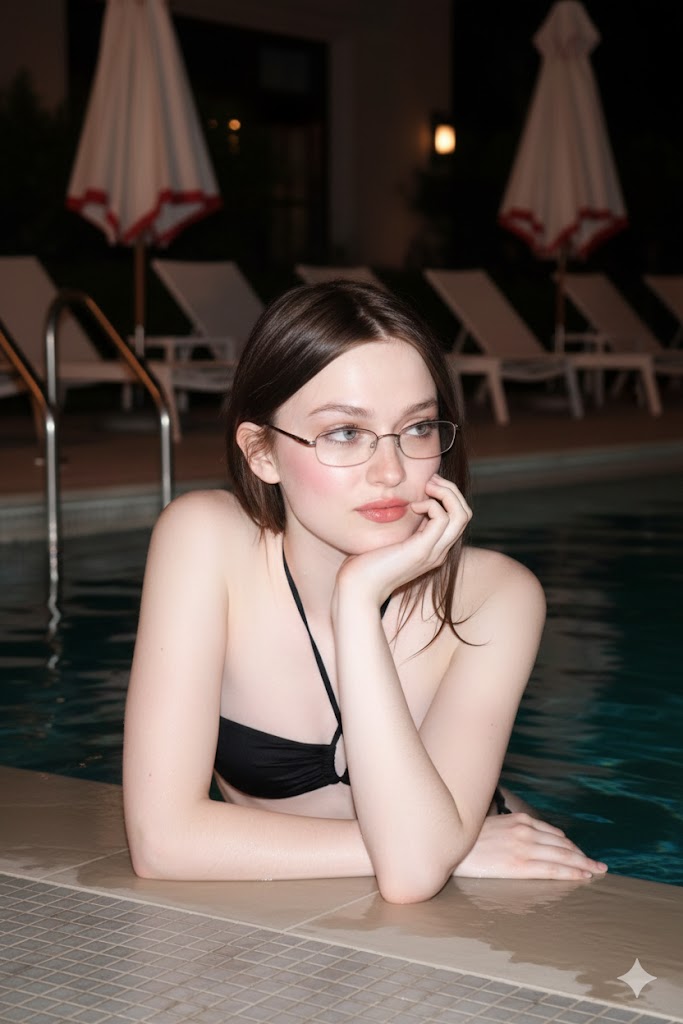
0
Times used
0
Likes
Unlocking Flawless AI Portraits: A Deep Dive into the "Create a Portrait of a Young Woman" Style
In the rapidly evolving world of AI image generation, one challenge has consistently stood out: creating truly photorealistic portraits that maintain a consistent and identical likeness to a real person. While many AI tools can generate beautiful images of *a* person, generating a specific person across various scenes, styles, and lighting conditions has been the holy grail. That's where Orno, your advanced AI image editor, changes the game with our groundbreaking style: "Create a portrait Of A Young Woman".
This isn't just another text-to-image prompt. It's a sophisticated, fine-tuned model designed for one crucial purpose: to create a stunning, realistic portrait of a young woman while keeping her face and appearance 100% identical to your reference photo. Forget about uncanny valley resemblances or characters that change from one generation to the next. This guide will explore how this powerful Orno style works, how you can master it, and why it's the ultimate tool for artists, professionals, and creators who demand perfection and consistency.
What Exactly Is the "Create a Portrait of a Young Woman" AI Style?
At its core, this Orno style is an advanced implementation of image-to-image and facial replication technology, simplified into a single, powerful command. It instructs the AI to perform a highly specific task: analyze the facial features, structure, and unique characteristics from a source image and then render a new portrait that flawlessly incorporates that exact face into a new scene described by your text prompt.
The Core Directive: "Do Not Alter Anything"
The magic lies in its primary directive: maintaining a 100% identical appearance. Unlike standard AI portrait generators that take creative liberties, our model is trained to prioritize likeness above all else when this style is active. This means:
- Identical Facial Structure: The AI preserves the unique bone structure, jawline, and shape of the face from your reference photo.
- Consistent Features: Eye color, nose shape, lip contour, and even subtle details like freckles or beauty marks are meticulously replicated.
- True-to-Life Likeness: The final result is not just a "similar-looking" person; it's an AI-generated portrait of the *same* person, placed in a new, imaginative context.
This technology bridges the gap between AI's creative potential and the need for realistic, consistent character representation, making it an indispensable tool for a wide range of applications.
A Step-by-Step Guide: How to Create Realistic AI Portraits in Orno
Harnessing this powerful style is incredibly intuitive with Orno's user-friendly interface. Follow these simple steps to start creating your own photorealistic masterpieces.
Step 1: Choose the Perfect Reference Image
The quality of your final AI portrait is heavily dependent on the quality of your reference photo. The AI needs clear data to work with. For best results, select a photo where:
- The face is clearly visible and well-lit: Avoid heavy shadows, backlighting, or photos where parts of the face are obscured by hair or hands.
- The resolution is high: A sharp, high-quality image provides more detail for the AI to analyze and replicate.
- The expression is relatively neutral: While the AI can work with smiles, a neutral or soft expression often provides a more versatile base for the AI to build upon.
- The subject is looking forward: A direct, front-facing or slightly angled photo works best for accurate facial mapping.
Step 2: Craft Your Vision with a Descriptive Prompt
Once you've uploaded your reference image and selected the "Create a portrait Of A Young Woman" style, the real fun begins. Your text prompt will define the environment, mood, attire, and style of your new portrait. The AI will seamlessly blend the identical face from your reference into the scene you describe. Be specific to get the best results!
Example Prompts:
- For a professional look: "Create a portrait Of A Young Woman, professional corporate headshot, wearing a navy blue blazer, soft studio lighting, blurred office background, confident expression."
- For a fantasy theme: "Create a portrait Of A Young Woman, as a forest elf with intricate silver jewelry, enchanted forest at dusk, ethereal glow, cinematic lighting, photorealistic."
- For a vintage vibe: "Create a portrait Of A Young Woman, 1950s film noir style, sitting at a classic diner counter, neon lights reflecting in the window, grainy film texture, dramatic shadows."
Notice how the core style remains the same, but the text prompt completely transforms the context. This is where your creativity can truly shine.
Step 3: Refine and Upscale
After your initial generation, use Orno's built-in tools to perfect your image. You can generate multiple variations to find the perfect composition, use our AI upscaler to increase the resolution for printing or high-quality display, and experiment with negative prompts to exclude any unwanted elements from your image. This level of control ensures your final output is nothing short of perfect.
Endless Possibilities: Who is This AI Portrait Generator For?
The ability to create consistent, photorealistic portraits of a specific person opens up a world of creative and professional opportunities. Here are just a few ways people are using this Orno style:
- Digital Artists & Storytellers: Maintain character consistency across a series of images for graphic novels, storyboards, or digital art projects. Visualize characters from your scripts or novels with perfect accuracy.
- Professionals & Entrepreneurs: Generate a diverse portfolio of professional AI headshots for LinkedIn, company websites, and marketing materials from a single selfie. Create consistent branding imagery that features your own face.
- Social Media Influencers & Content Creators: Craft stunning and unique profile pictures that are instantly recognizable. Generate a stream of creative content by placing yourself in different imaginative scenarios, from cyberpunk cities to historical settings.
- Individuals & Hobbyists: Create personalized gifts for loved ones, such as a portrait of them as their favorite movie character. See yourself in different eras, fashions, and artistic styles for fun and creative exploration.
Frequently Asked Questions (FAQ)
We've gathered some of the most common questions about this unique AI portrait style to help you get started.
Can I use the "Create a portrait Of A Young Woman" style for men, children, or older individuals?
Absolutely! While the style is named to reflect a popular use case, the underlying technology is all about facial replication, regardless of age or gender. Simply provide a clear reference photo of the person you wish to portray—man, woman, or child—and Orno's AI will use that specific face for the generation. The name is just a label for the powerful "keep face identical" function.
What makes Orno's face replication better than other AI image generators?
Many AI tools struggle with consistency, often producing "cousins" of the person in the reference photo rather than an identical match. Orno is different because this style is built on a model specifically fine-tuned for 1:1 likeness. We prioritize the preservation of facial identity over abstract creative interpretation. This, combined with our intuitive interface, means you don't need complex prompting or technical skills to achieve perfect, consistent results every time.
Will the AI alter features like my eye color, face shape, or unique moles?
No. The core instruction of this style is to "not alter anything" about the face. Our AI meticulously maps the features from your reference photo, including eye color, freckles, moles, and the unique shape of your nose and jawline. It then protects these features during the generation process, ensuring the final portrait is an authentic representation.
How can I ensure I get the most photorealistic AI portrait?
There are two keys to maximum realism. First, start with a high-quality, well-lit source image as detailed in our guide above. A great input leads to a great output. Second, be descriptive in your text prompt. Use keywords that guide the AI towards realism, such as "photorealistic," "8K," "cinematic lighting," "sharp focus," and "detailed skin texture." The more detail you provide about the scene, the more seamlessly the AI can integrate the replicated face into a believable environment.
Is it free to use this AI portrait style on Orno?
Orno offers a generous free trial that allows you to experience the full power of our AI image editor, including the "Create a portrait Of A Young Woman" style. You can generate a number of high-quality, realistic portraits to see the incredible results for yourself. For users who need higher volume or advanced features, we offer a range of affordable subscription plans to fit any need.
The era of inconsistent AI faces is over. With Orno, you have the power to create, innovate, and express yourself with perfect, photorealistic consistency. Ready to see yourself in a new light? Try the "Create a portrait Of A Young Woman" style in Orno today and bring your vision to life.
Use This Prompt
Transform your images with AI
Save this prompt as its own icon for one-tap access.