
Create a please Place The Product Image
How to please place the product image onto the diagram template.
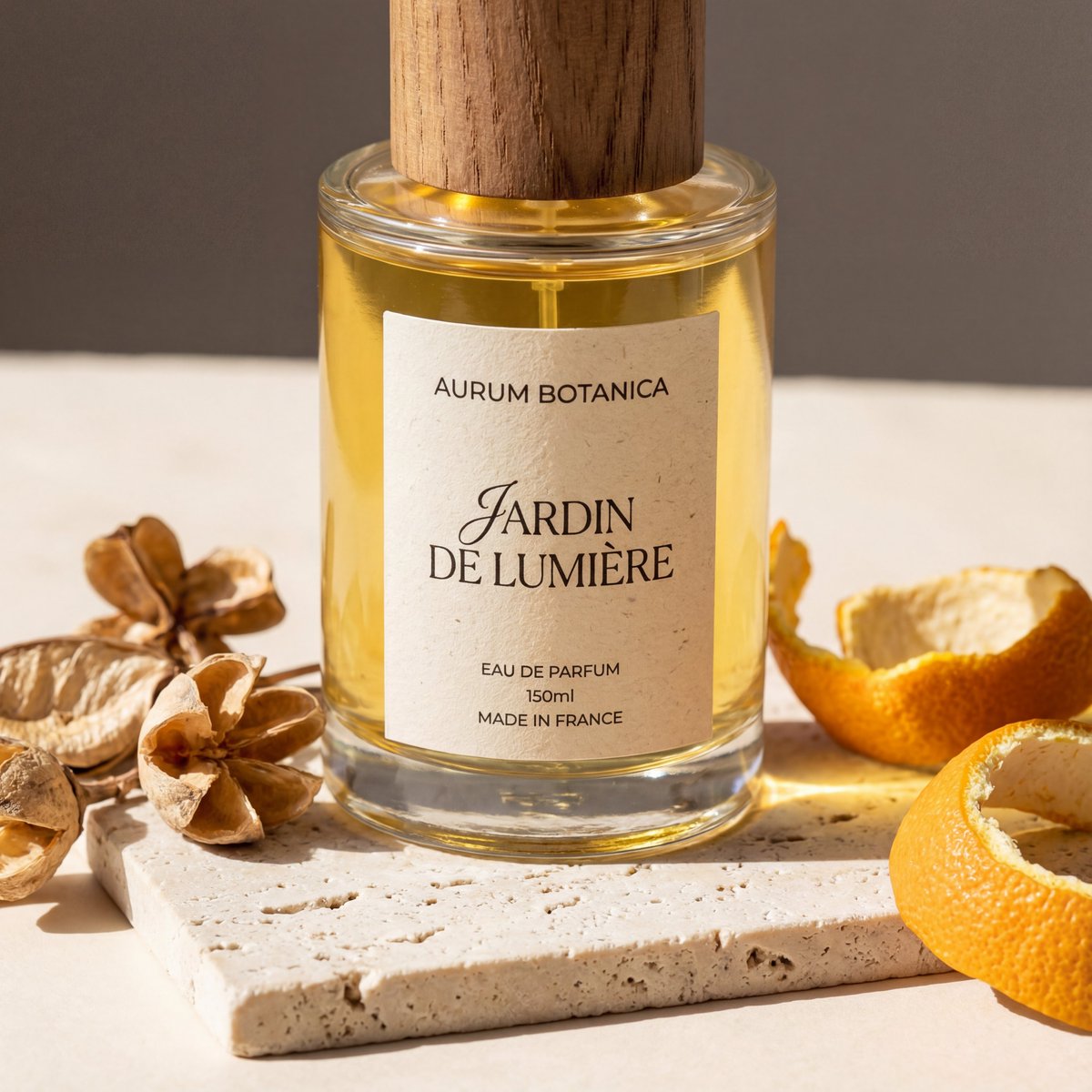
1
Times used
0
Likes
Unlock Professional Product Visuals: A Deep Dive into Orno's "Place The Product Image" AI Style
In the hyper-competitive world of e-commerce and digital marketing, a picture isn't just worth a thousand words—it's worth conversions, clicks, and brand loyalty. But creating a diverse portfolio of high-quality, contextual product images has traditionally been a costly and time-consuming endeavor. It requires professional photographers, expensive studio time, prop sourcing, and extensive post-production. What if you could bypass all that and generate an endless supply of stunning, bespoke product scenes in seconds? Welcome to the future of product visualization, powered by Orno's revolutionary AI image generation style: "Create a please Place The Product Image".
This powerful feature is more than just a filter or a background remover; it’s a virtual creative studio at your fingertips. It allows you to take a standard, isolated product photo and seamlessly place it into any environment, scene, or diagram you can imagine. This guide will explore the immense potential of this style, how it works, and how you can leverage it within Orno to elevate your brand and captivate your audience.
What Exactly Is the "Create a please Place The Product Image" Style?
The name, while a bit quirky, is a direct instruction to the AI model. It’s a specialized prompt designed for a sophisticated form of AI image generation that blends an existing image (your product) with a newly created one (the background and environment). Think of it as intelligent, AI-driven compositing. You provide the star of the show—your product—and Orno’s AI acts as the director, set designer, and lighting technician, building a perfect world around it based on your text prompts.
Unlike standard text-to-image generators that create everything from scratch, the "Place The Product Image" style is built for contextualization. It understands that the uploaded image is the focal point and must be integrated realistically. The AI analyzes your product's shape, size, and even implied texture to generate appropriate shadows, reflections, and lighting, making the final image look cohesive and professional, not like a cheap cutout.
Whether you need to place a bottle of skincare on a marble bathroom counter, a pair of hiking boots on a misty mountain path, or a piece of tech onto a futuristic schematic, this is the tool that makes it happen instantly.
A Game-Changer for E-commerce, Marketing, and Design
The applications of this AI-powered style are vast and transformative. It's not just a novelty; it's a powerful business tool that provides a significant competitive edge.
Elevate Your E-commerce Storefront
Static, white-background product shots are standard, but they don't tell a story. Customers want to see products in a real-world context to envision themselves using them. With Orno's "Place The Product Image" style, you can:
- Create Compelling Lifestyle Shots: Place your handmade coffee mugs on a cozy breakfast table, your new line of jackets on a model in a bustling city street (without hiring a model!), or your gardening tools in a lush, sun-dappled garden.
- Generate Themed Collections: Launching a holiday collection? Instantly generate images of your products in festive settings with snow, lights, and seasonal props.
- Increase Conversion Rates: Rich, contextual, and professional-looking images build trust and desire, directly impacting your bottom line. A/B test different backgrounds to see what resonates most with your customers.
Streamline Your Marketing and Advertising Campaigns
Marketers are constantly under pressure to produce fresh, engaging visual content for a multitude of channels. This AI style is an engine for infinite creativity and efficiency.
- Endless Social Media Content: Need a dozen unique images for an Instagram campaign? Generate variations of your product on different backgrounds, in different styles (from minimalist to vibrant), and for different audiences in minutes.
- High-Impact Advertising Visuals: Create eye-catching banners for Google Ads, Facebook, and your website. Place your product in abstract, conceptual scenes that grab attention and communicate your brand's unique value proposition.
- Email Marketing that Converts: Enhance your newsletters with beautiful product showcases that feel aspirational and premium, encouraging click-throughs and purchases.
Enhance Product Design and Conceptualization
The "diagram template" aspect of this style is a powerful tool for designers and innovators. Before a product is even manufactured, you can visualize it in its intended environment or as part of a larger system.
- Rapid Prototyping: Take a 3D render or a sketch of a new product and place it into a realistic scene to see how it looks and feels.
- Better Presentations: Create compelling pitch decks and client presentations by showing, not just telling, how a new design will fit into a home, office, or technical setup.
- Instructional Diagrams: Place a product component onto a clean, technical blueprint with callouts to create clear and professional user manuals or assembly guides.
How to Master the "Place The Product Image" Style in Orno
Getting started is incredibly simple. Orno’s intuitive interface ensures that you can achieve professional results without a steep learning curve. Follow these steps to transform your product images.
Step 1: Prepare and Upload Your Product Image
The quality of your final image depends heavily on the quality of your source image. For best results, upload a high-resolution photo of your product. A PNG file with a transparent background is ideal, as it allows the AI to place the object without any pesky white boxes around it. If you don't have one, you can use Orno's built-in background remover tool first.
Step 2: Select the "Place The Product Image" Style
Once your image is uploaded, navigate to Orno's library of AI styles. You'll find the "Create a please Place The Product Image" style clearly listed. Selecting it tells the AI that you are performing an integration task, ensuring it prioritizes your uploaded image as the subject.
Step 3: Craft Your Descriptive Prompt
This is where your creativity comes to life. Your text prompt is your instruction to the AI set designer. Be specific and descriptive. Don't just say "on a table"; describe the table. Is it a rustic oak dining table, a sleek glass office desk, or a weathered picnic table? The more detail you provide, the closer the result will be to your vision. Think about lighting, materials, colors, and overall mood.
Here are a few examples to get you started:
- For a skincare product: "Place the product image of the serum bottle on a white marble vanity, next to a small green succulent plant, soft morning light."
- For a piece of tech: "Place the product image of the wireless headphones on a minimalist wooden desk next to a laptop and a cup of coffee, top-down view."
- For a fashion accessory: "Place the product image of the leather handbag on a polished concrete floor, with dramatic, hard shadows from a window, high-fashion aesthetic."
- For a technical diagram: "Place the product image of the processor chip onto a clean, futuristic blue circuit board diagram with glowing lines."
Step 4: Generate, Iterate, and Refine
Click "Generate" and watch Orno's AI bring your scene to life in seconds. You'll often get multiple variations to choose from. Don't love the first result? Don't worry! Tweak your prompt. Add or change keywords. Try specifying the camera angle ("wide angle shot," "macro shot") or lighting ("studio lighting," "golden hour"). With each generation, you'll get closer to the perfect image. You can save your favorite results or continue refining until you're completely satisfied.
Frequently Asked Questions (FAQ)
What kind of product images work best for this style?
High-resolution images with a clean, transparent background (saved as a .PNG file) will give you the most seamless and professional results. The AI can then perfectly blend your product into the generated scene without any residual background artifacts.
Can I use the "Place The Product Image" style for things other than products?
Absolutely! This style is incredibly versatile. You can use it to place a company logo onto a virtual storefront, embed a piece of text into a photograph of a sandy beach, or place a character sprite into a fantasy landscape. If you can isolate it in an image, Orno can place it in a scene.
How is this different from a standard text-to-image AI?
A standard text-to-image AI creates the entire image, including the subject, from scratch based on your text. This "Place The Product Image" style is more advanced; it's a form of image-to-image generation. It takes your existing, specific image as the non-negotiable subject and then builds a new, coherent world around it, ensuring your product is the star and is rendered with realistic lighting and perspective.
Is this AI style difficult for beginners to use?
Not at all. Orno is designed with a user-friendly interface that makes powerful AI tools accessible to everyone. The process is as simple as uploading an image, selecting the style, and writing a descriptive sentence. You don't need any technical skills in graphic design or photography to create stunning visuals.
Can the AI create realistic shadows and reflections for my product?
Yes, and this is one of the most powerful aspects of Orno's AI. The model analyzes the lighting conditions you describe in your prompt (e.g., "bright sunlight," "moody neon lights") and applies physically plausible shadows, reflections, and highlights to your product, making it look naturally integrated into the environment.
Your Imagination is the Only Limit
The "Create a please Place The Product Image" style in Orno is more than just an AI tool—it's a paradigm shift for visual content creation. It democratizes professional product photography, empowering small business owners, marketers, designers, and creators to produce world-class imagery without the traditional barriers of cost and complexity. Stop spending thousands on photoshoots and start exploring the infinite creative possibilities of AI.
Ready to transform your product imagery and make your brand stand out? Try the "Place The Product Image" style in Orno today and see the future of visual content creation for yourself.
Use This Prompt
Transform your images with AI
Save this prompt as its own icon for one-tap access.