
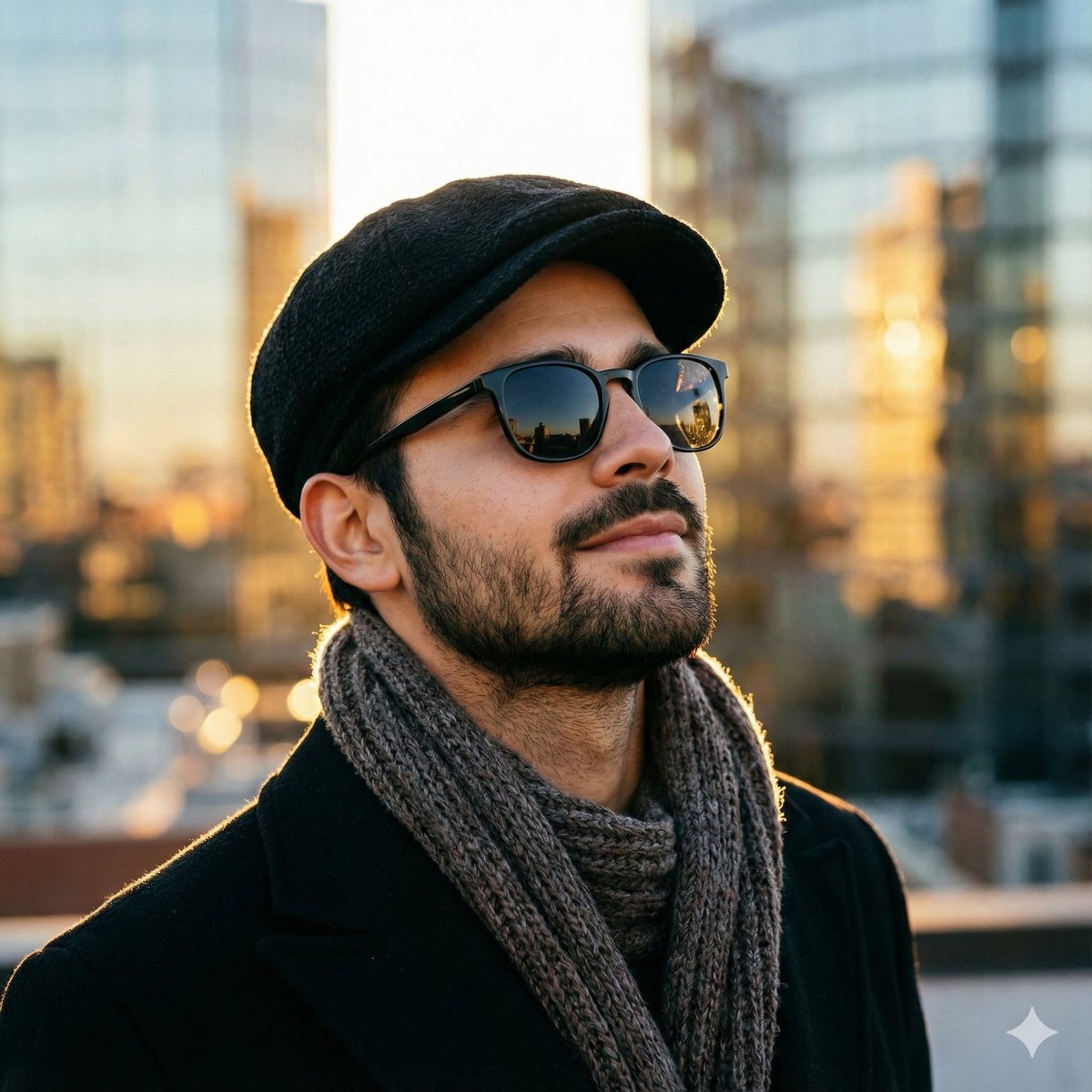
Create a photo-realistic Close-up Portrait Based
How to photo-realistic close-up portrait based on the provided description.
0
Times used
0
Likes
Unlock Breathtaking Realism: A Deep Dive into Photo-realistic Close-up Portraits with AI
In the world of photography, a close-up portrait is more than just a picture; it's an intimate glimpse into a person's soul. It captures the subtle flicker of an emotion, the intricate map of life etched in their features, and the unique story told by their eyes. For decades, achieving this level of professional, photo-realistic quality required expensive equipment, expert lighting knowledge, and a skilled photographer. Today, that power is at your fingertips with Orno's revolutionary AI style: "Create a photo-realistic Close-up Portrait Based".
This isn't just another filter or effect. It's a sophisticated text-to-image model, meticulously trained to understand the nuances of light, texture, and human expression. Whether you're a digital artist designing characters, a writer visualizing your protagonist, or a marketer in need of unique, royalty-free faces, this guide will walk you through mastering the art of the AI-generated realistic portrait. Prepare to move beyond simple images and start creating digital masterpieces that breathe with life.
What is the "Photo-realistic Close-up Portrait" AI Style?
At its core, the "Photo-realistic Close-up Portrait" style is an advanced AI image generation tool designed to transform your text descriptions into stunningly lifelike portraits. Think of it as collaborating with a virtual professional photographer. You provide the creative direction through your prompt, and Orno's AI uses its vast knowledge of photographic principles to execute your vision with incredible precision.
This style excels at rendering the fine details that separate a simple graphic from a convincing photograph:
- Unmatched Detail: From individual strands of hair and delicate eyelashes to realistic skin texture with subtle pores and freckles, the level of detail is extraordinary.
- Authentic Lighting: The AI understands how light interacts with surfaces. It can create soft, diffused window light, the warm glow of golden hour, or the dramatic shadows of cinematic lighting.
- Emotional Depth: Go beyond blank stares. This style can interpret and render complex emotions, capturing a pensive glance, a joyful laugh, or a look of quiet determination.
- Photographic Qualities: The generated images mimic the characteristics of high-end cameras and lenses, including natural depth of field (bokeh) that makes the subject pop.
Using this tool, you can generate an endless supply of unique, hyperrealistic portraits for any purpose, all without ever picking up a camera.
The Art of the Prompt: How to Master Realistic AI Portraits
The magic of any powerful AI image editor lies in the quality of your prompt. A well-crafted prompt is the key to unlocking the full potential of Orno's realistic portrait generator. Let's break down the essential components for creating jaw-dropping images.
Describing Your Subject in Detail
Vagueness is the enemy of realism. The more specific you are, the better the AI can interpret your vision. Instead of just "a man," build a person with your words.
Think about these characteristics:
- Age and Gender: "a 70-year-old woman," "a young boy around 10 years old."
- Ethnicity and Heritage: "a Japanese woman," "a man of Scandinavian descent," "a woman with Brazilian features."
- Hair: Don't just say "blonde hair." Describe it. "Shoulder-length honey blonde hair with soft waves," "a man with a short, salt-and-pepper buzzcut," "intricate cornrows with silver beads."
- Eyes: The eyes are the focal point. Be specific. " piercing blue eyes with a steel-grey ring," "warm, almond-shaped brown eyes," "deep-set hazel eyes that catch the light."
- Facial Features: Add character with details like "a dusting of freckles across her nose," "a strong, defined jawline," "laugh lines around his eyes," "a beauty mark above her lip."
Example:
Weak Prompt: a woman with red hair
Strong Prompt: "Close-up portrait of a 25-year-old Irish woman with a cascade of fiery, copper-red curly hair, pale skin with a light dusting of freckles, and captivating emerald green eyes."
Capturing Emotion and Expression
A realistic portrait feels alive because it conveys emotion. Use your prompt to direct the mood of your subject. This is how you tell a story with a single image.
- Subtle Smiles: "a faint, knowing smirk," "a gentle, serene smile," "a closed-mouth smile that reaches her eyes."
- Intensity and Thought: "a look of fierce determination," "a pensive, thoughtful expression, gazing just past the camera," "eyes narrowed in deep concentration."
- Joy and Wonder: "an expression of pure, unbridled joy, laughing heartily," "a look of awe and wonder, eyes wide."
Example: Add "with a look of quiet confidence and a soft, enigmatic smile" to your subject description to instantly give them personality.
The Critical Importance of Lighting
Lighting is arguably the single most important factor in photorealism. Professional photographers are masters of light, and by specifying it in your prompt, you can guide the AI to create truly cinematic results.
- Natural Light: "soft, diffused morning window light," "dappled sunlight filtering through leaves," "dramatic light from a sunset during golden hour."
- Studio Lighting: "dramatic Rembrandt lighting with a dark background," "softbox key light from the side," "a clean, high-key studio setup with bright, even lighting."
- Creative Lighting: "cinematic neon lighting reflecting on her face," "the warm, intimate glow of candlelight," "moody blue hour light."
Example: "…bathed in the warm, orange glow of golden hour lighting, creating long, soft shadows."
Specifying Camera and Lens Settings (The Pro Touch)
To push your creations to the absolute peak of realism, start thinking like a photographer. Mentioning camera gear and settings tells the AI exactly what kind of photographic style you want to emulate.
- Lens Choice: An 85mm lens is a classic for portraits. Mentioning "shot on an 85mm f/1.4 lens" will encourage a beautifully compressed background and sharp subject. "Macro lens" will signal extreme close-up detail.
- Aperture and Depth of Field: Use terms like "shallow depth of field" or "creamy bokeh background" to create that professional look where the subject is in sharp focus and the background is artfully blurred.
- Film and Photo Style: You can even specify a certain look. "Shot on Kodak Portra 400 film" for a warm, analog feel, or "style of a high-fashion magazine cover shoot."
- Resolution: Adding terms like "8K," "ultra-detailed," "sharp focus," and "hyperrealistic" reinforces your goal for the highest possible quality.
Example: "Ultra-realistic close-up portrait of a thoughtful elderly man… dramatic side lighting, shot on a Sony A7IV with an 85mm f/1.2 lens, incredibly shallow depth of field, beautiful bokeh, 8K, hyper-detailed skin texture."
Why Choose Orno for Your AI Portrait Generation Needs?
While many tools can generate images, Orno is specifically engineered to deliver excellence, especially with complex styles like photo-realistic portraits.
Unparalleled Realism and Detail
The "Create a photo-realistic Close-up Portrait Based" style in Orno is not a general-purpose model. It has been fine-tuned on a massive dataset of award-winning portrait photography. This specialization means it understands the subtle interplay of light on skin, the way catchlights make eyes sparkle, and the physics of how hair falls. The result is a level of hyperrealism that other generators struggle to match.
Speed and Simplicity
Imagine the time, cost, and logistics of organizing a professional photoshoot—finding a model, a photographer, a location, and equipment. Orno condenses that entire process into seconds. Our intuitive interface allows you to select the style, type your creative vision, and generate multiple high-quality options in less than a minute. It’s professional-grade power made accessible to everyone.
Endless Creative Possibilities
This tool is a creative powerhouse for a wide range of users.
- Authors and Game Developers: Bring your characters to life with stunningly realistic concept art and character portraits.
- Marketers and Advertisers: Create unique, diverse, and royalty-free models for your campaigns without expensive stock photo licenses.
- Social Media Users: Design a one-of-a-kind digital avatar that stands out from the crowd.
- Artists: Generate endless inspiration and references for your paintings, drawings, or digital sculptures.
Step-by-Step Guide: Creating Your First Photo-realistic Portrait in Orno
- Navigate to Orno: Open the Orno AI image editor in your browser.
- Select the Style: Find and choose the "Create a photo-realistic Close-up Portrait Based" style from our curated list.
- Craft Your Prompt: In the text input box, write your detailed description. Use the tips from the "Art of the Prompt" section above to be as specific as possible.
- Add a Negative Prompt (Optional): To further refine your result, use the negative prompt field to list things you want to avoid, such as "3D, cartoon, anime, blurry, malformed hands, extra limbs."
- Generate: Click the "Generate" button and watch as Orno's AI brings your concept to life in a matter of seconds.
- Refine and Upscale: Review the generated options. Once you find one you love, you can use Orno's built-in tools to upscale it to a higher resolution, preserving every incredible detail.
Frequently Asked Questions (FAQ)
What makes an AI portrait "photo-realistic"?
Photo-realism in AI images comes from a combination of factors: extreme detail (visible skin pores, fine hairs), accurate physics-based lighting and shadows, natural-looking textures, imperfections (asymmetry, subtle blemishes), and the successful rendering of a believable human expression. It's about tricking the eye into believing it's looking at a photograph, not a render.
Can I use Orno to create a portrait of a specific famous person?
For ethical and legal reasons, we strongly advise against trying to create images of specific real people, especially celebrities or private individuals. Orno's AI portrait generator is designed to create unique, original characters. It is a tool for creativity and imagination, not for creating deepfakes or infringing on personal likeness rights.
How can I improve the realism of my AI-generated portraits?
The best way is to be more specific in your prompt. Beyond describing the subject, focus on the environment and the "camera." Add details about the lighting ("soft morning light from a window"), the lens ("85mm f/1.4 lens"), and the background ("soft, blurry bokeh background"). These photographic terms guide the AI to produce more authentic and professional results.
Is Orno's AI portrait generator free to use?
Orno offers a number of free credits to all new users, allowing you to try out the "Photo-realistic Close-up Portrait" style and other features to see the incredible quality for yourself. For users who need to generate a higher volume of images, we offer various affordable subscription plans that provide a generous amount of monthly credits.
What are the best use cases for AI-generated close-up portraits?
The possibilities are vast! They are perfect for concept art for video games and films, character visualizations for novels, creating unique social media profile pictures and avatars, generating royalty-free models for marketing materials, and providing inspiration and references for digital and traditional artists.
What's the difference between an AI portrait generator and an AI headshot generator?
The terms are often used interchangeably. However, an AI headshot generator typically focuses on creating professional, corporate-style images for platforms like LinkedIn. An AI portrait generator, like Orno's tool, has a much broader artistic scope. It can create professional headshots, but it also excels at creating cinematic, emotional, and highly stylized portraits for creative projects.
The future of digital artistry is here. The "Create a photo-realistic Close-up Portrait Based" style on Orno empowers you to be the photographer, the casting director, and the creative visionary. Stop searching for the perfect image and start creating it.
Ready to craft breathtakingly realistic portraits? Try Orno's AI image generator today and bring your vision to life in stunning detail.
Use This Prompt
Transform your images with AI
Save this prompt as its own icon for one-tap access.