
Create a panels Arranged In A Dynamic
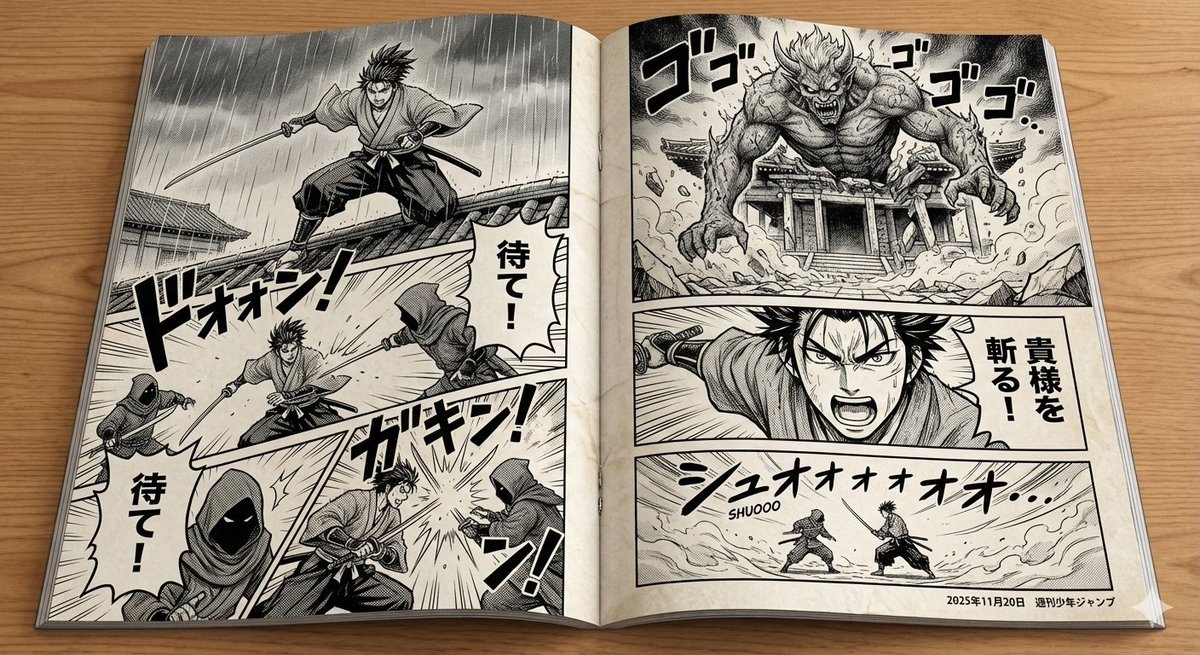
How to style panels arranged in a dynamic layout, resembling a professionally printed Japanese manga.
0
Times used
0
Likes
Unleash Your Inner Mangaka: Mastering the "Panels Arranged In A Dynamic" Style with Orno
Have you ever dreamed of creating your own manga, with dramatic action sequences, expressive characters, and layouts that leap off the page? For decades, this has been the domain of skilled artists who spend countless hours sketching, inking, and structuring every single page. But today, the world of visual storytelling is changing. With the power of AI, that dream is now within your grasp. Welcome to the ultimate guide for using Orno's groundbreaking style: Create a panels Arranged In A Dynamic, your key to generating professional, manga-style comic layouts with a single prompt.
This isn't just about placing a few images next to each other. This is about harnessing an AI that understands the language of visual narrative—the flow, the impact, and the energy that makes Japanese manga a global phenomenon. Whether you're an aspiring comic creator, a writer looking to visualize a scene, or a marketer seeking a novel way to engage your audience, this style is your new superpower. Let's dive into how you can use Orno to create stunning, dynamic comic panels that tell your story.
What Exactly is the "Panels Arranged In A Dynamic" Style?
At its core, the "Panels Arranged In A Dynamic" style is a sophisticated AI prompt command within Orno that instructs the generator to create a single image composed of multiple, distinct panels. However, it goes far beyond a simple grid. It emulates the layout principles of professionally printed Japanese manga.
Think about your favorite manga. The panels are rarely uniform squares. They are an integral part of the storytelling:
- Varied Shapes and Sizes: A large, impactful panel might dominate the page for a climactic moment, while a series of small, rapid-fire panels can convey quick action or a sequence of thoughts.
- Dynamic Angles: Panels are often slanted, overlapping, or even borderless to create a sense of motion, urgency, or chaos. This is a hallmark of action-oriented genres like shonen.
- Narrative Flow: The arrangement guides the reader's eye across the page in a specific sequence, controlling the pacing and rhythm of the story.
- Gutter Space: The space between panels (the gutter) is used deliberately to separate moments in time or to create a dramatic pause.
The "Panels Arranged In A Dynamic" style in Orno understands these conventions. When you use this prompt, you're not just asking for multiple scenes; you're asking for a cohesive, artfully arranged composition that feels like a genuine page from a graphic novel. It's the ultimate tool for AI storytelling and visual narrative creation.
How to Craft the Perfect Dynamic Panel Prompt in Orno
Mastering this style is all about effective prompt engineering. By understanding the building blocks of a great prompt, you can gain incredible control over the final output. Think of your prompt as a creative brief for your personal AI artist. Here’s a step-by-step breakdown.
Step 1: Start with the Core Command
Every prompt for this style must begin with the magic words. This activates the specific layout model within Orno.
Your prompt starts with: Create a panels Arranged In A Dynamic
Step 2: Describe the Overarching Scene and Characters
Next, tell the AI what's happening. Be descriptive. Who are the characters? What are they doing? Where are they? This central theme will influence all the panels, even if they show different moments of the same action.
Example: Create a panels Arranged In A Dynamic of a cybernetic ninja deflecting laser bolts with a katana on a rainy neo-tokyo rooftop.
Step 3: Specify the Art Style
Now, guide the aesthetic. Do you want a clean, modern look or a gritty, classic feel? Mentioning specific manga genres or techniques works wonders here. The more specific you are, the better Orno can match your vision.
- For a classic look: Add terms like "black and white manga style," "heavy use of screentones," "genga sketch style," "inking."
- For a modern feel: Try "clean line art," "vibrant webtoon style," "shonen manga aesthetic."
- For a specific mood: Use descriptors like "dark fantasy manga," "80s shojo manga style," "cyberpunk manga."
Example: Create a panels Arranged In A Dynamic of a cybernetic ninja deflecting laser bolts with a katana on a rainy neo-tokyo rooftop, in a gritty black and white manga style with dramatic cross-hatching and speed lines.
Step 4: Influence the Panel Layout
While the AI is designed to create dynamic layouts automatically, you can give it hints to steer the composition. This is where you can really flex your creative muscles as a director.
- "with a large central impact panel"
- "featuring diagonal and overlapping panels"
- "action breaking through the panel borders"
- "a sequence of three narrow vertical panels"
Final Prompt Example: Create a panels Arranged In A Dynamic of a cybernetic ninja deflecting laser bolts with a katana on a rainy neo-tokyo rooftop, in a gritty black and white manga style with dramatic cross-hatching and speed lines, featuring diagonal panels and action breaking through the borders to emphasize motion.
Advanced Techniques for Pro-Level Results
Once you've got the basics down, you can use these advanced tips to refine your creations and push the boundaries of AI comic creation.
Using Negative Prompts
Sometimes, what you don't want is as important as what you do. Use Orno's negative prompt field to eliminate unwanted elements. If the AI is generating blurry faces or poorly drawn hands, add "blurry," "disfigured," "poorly drawn hands" to the negative prompt. If you want a pure black and white image, add "color," "full color," "colorized" to the negative prompt to ensure a monochrome output.
Achieving Character Consistency (The Holy Grail)
Maintaining a consistent character across multiple AI generations is a known challenge. However, you can significantly improve your odds with this style. Since you are generating multiple panels in a single image, the AI has a better chance of keeping the character consistent within that one generation. For better results, be hyper-specific in your character description: "a young man with spiky silver hair, a scar over his left eye, and a red tattered cloak" is much better than "a man." For creating a longer story, you can generate multiple pages and then use Orno's "Image to Image" feature, using a strong panel from a previous generation as a reference for the next.
Referencing Artistic Styles
Don't be afraid to mention legendary mangaka or specific series to guide the AI's style. Phrases like "in the style of Kentaro Miura," "resembling the art of Akira Toriyama," or "with the atmospheric detail of Tsutomu Nihei" can produce astonishingly accurate and nuanced results. It's a fantastic way to pay homage to your inspirations.
Creative Applications: More Than Just Manga
The "Panels Arranged In A Dynamic" style is an incredibly versatile tool. Its applications extend far beyond personal comic projects. Here are just a few ideas:
- Storyboarding: Quickly generate visual storyboards for films, animations, or video games. A single prompt can produce a whole sequence of shots.
- Social Media Content: Create compelling, narrative-driven carousel posts for Instagram or Twitter that tell a mini-story and stop scrollers in their tracks.
- Marketing and Advertising: Design unique ads that use a comic book format to explain a product's features or tell a brand's story in an engaging way.
- Webtoons and Digital Comics: This is the perfect AI webtoon generator. Create vertical-scrolling-friendly panel layouts to kickstart your next hit series.
- Concept Art: Explore different moments of a key scene for a game or movie, all within one cohesive image.
Why Orno is the Ultimate AI Manga Generator
While many AI image generators exist, Orno is specifically engineered to handle complex, narrative prompts like this one. Our AI model has been trained extensively on visual storytelling structures, allowing it to interpret not just the "what" but the "how" of your prompt.
With Orno, you get:
- Unmatched Cohesion: Our AI excels at creating panels that feel like they belong together, sharing a consistent style and subject matter.
- High-Resolution Output: Generate crisp, detailed pages that look great online and are suitable for print.
- Speed and Efficiency: Go from a simple idea to a fully rendered comic page in seconds, not days. This dramatically accelerates the creative process.
- A Suite of Editing Tools: Once your page is generated, use Orno’s powerful inpainting and outpainting tools to refine details, change expressions, or even expand the canvas.
Orno isn't just a tool; it's a creative partner. We empower you to bring your most ambitious visual stories to life, regardless of your drawing ability.
Frequently Asked Questions (FAQ)
Can I create a full multi-page comic book with this style?
Absolutely! The "Panels Arranged In A Dynamic" style is perfect for generating individual pages. You can create your story one page at a time, using detailed prompts to maintain continuity. For character consistency across pages, describe your character meticulously in each prompt and consider using a previously generated image as a style or character reference.
How do I get the AI to generate panels in full color?
Simply specify it in your prompt! Instead of "black and white manga style," use phrases like "full color webtoon style," "vibrant anime colors," or "cinematic color grading." The AI is just as capable of producing stunning color layouts.
What's the difference between this style and just asking for a "comic book page"?
The difference is in the dynamism and artistic intelligence. A generic "comic book page" prompt might give you a static grid. The "Panels Arranged In A Dynamic" style is specifically trained on the energetic, non-uniform, and narrative-focused layouts of Japanese manga, resulting in a more professional and visually exciting composition.
Can I add text or dialogue bubbles with Orno?
Currently, Orno's AI focuses on generating the visual art. While it may occasionally create text-like shapes, it does not reliably generate legible words. The best workflow is to generate your comic page in Orno and then import the image into a free design program like Canva or a professional one like Clip Studio Paint or Adobe Photoshop to add dialogue, sound effects, and captions.
Is this style beginner-friendly?
Yes! It's incredibly powerful yet easy to start with. A simple prompt like "Create a panels Arranged In A Dynamic of a girl and her pet dragon" will already produce a fascinating result. As you get more comfortable, you can start adding the stylistic and layout details discussed in this guide to gain more precise control.
Start Creating Your Story Today
The barrier between your imagination and a finished comic page has never been lower. The "Panels Arranged In A Dynamic" style is more than just a feature; it's a gateway to a new era of personal expression and storytelling. Stop dreaming about the manga you want to make and start creating it.
Dive into Orno, type your first prompt, and watch as your words are transformed into a breathtaking visual narrative. Try the "Create a panels Arranged In A Dynamic" style in Orno now and bring your story to life!
Use This Prompt
Transform your images with AI
Save this prompt as its own icon for one-tap access.