
Create a narrative
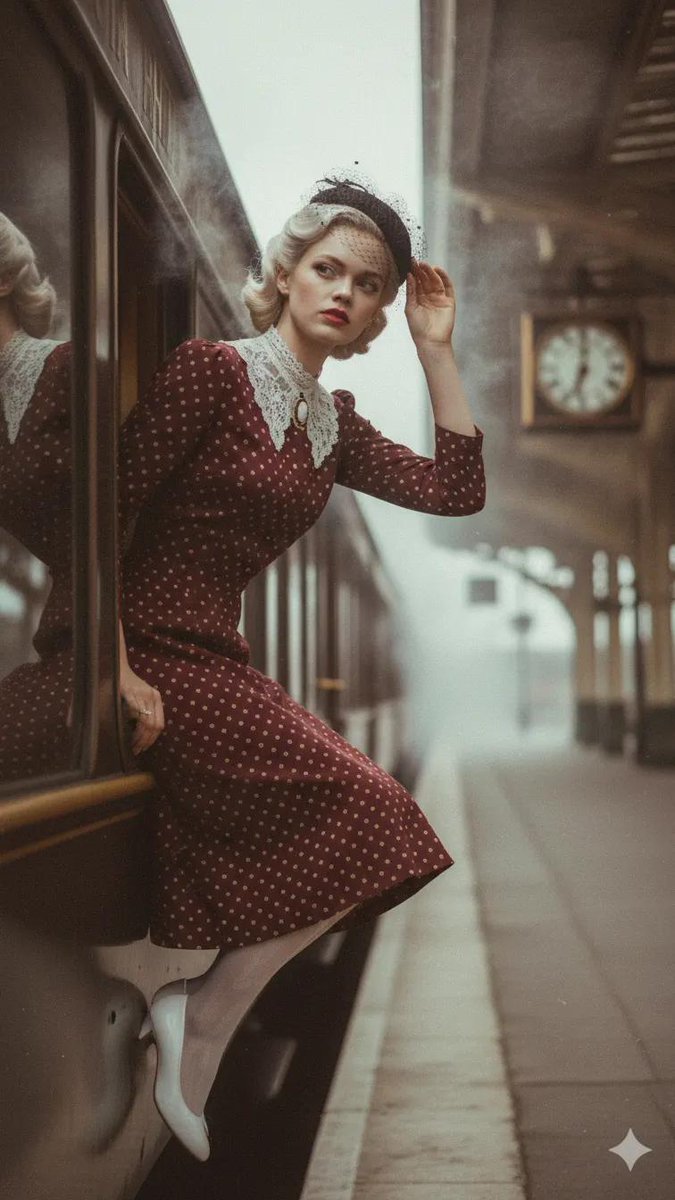
How to narrative, cinematic photofray ,woman in a deep burgundy polka dot dree with cream dots, a high necked white lace collar fastened with a small...
0
Times used
0
Likes
Unlocking Visual Storytelling: A Deep Dive into Orno's "Create a Narrative" AI Style
In the world of visual art, a single image can tell a story more profound than a thousand words. It can capture a fleeting emotion, imply a rich history, or hint at a future yet to unfold. With the rise of advanced AI image generation, creators now have the power to craft these stories with unprecedented detail and control. At Orno, we’ve developed a specialized style designed for exactly this purpose: Create a narrative. This powerful tool transforms your text prompts into cinematic, story-rich photographs, turning you from a simple user into a visual director. Let’s explore how this unique style, exemplified by the prompt "cinematic photofray, woman in a deep burgundy polka dot dree with cream dots...", can revolutionize your creative process.
The "Create a narrative" style isn't just about generating a pretty picture; it's about building a world. It's for the writers who want to see their characters, the filmmakers storyboarding a crucial scene, and the artists who dream in cinematic frames. Using Orno’s sophisticated AI, this style interprets your words to produce images brimming with mood, character, and an undeniable sense of a larger story playing out just beyond the edges of the frame.
What Exactly is the "Create a Narrative" Style?
Think of your favorite film. Each frame is meticulously crafted with specific lighting, composition, and detail to evoke a certain feeling and move the story forward. Orno's "Create a narrative" style is engineered to do the same. It’s an AI model fine-tuned to understand the language of cinema and photography, focusing on the key elements that make an image feel like a moment captured from a larger tale.
A key component you’ll see in prompts for this style is "cinematic photofray." This term instructs the AI to aim for a high-quality, photorealistic output that mimics a still from a movie. It suggests specific artistic choices:
- Cinematic Lighting: Expect dramatic shadows, soft highlights, and a thoughtful use of light to sculpt the scene and draw attention to the subject. This could be the warm glow of a desk lamp in a dusty study or the harsh neon light of a futuristic city street.
- Depth and Composition: The AI prioritizes compositions that feel intentional. It often employs a shallow depth of field, blurring the background to isolate the subject and create a professional, photographic look.
- Textural Realism ("Photofray"): This unique term suggests a subtle, film-like quality. The result isn't a sterile, digital image but one with a hint of film grain, subtle texture, and a richness that feels authentic and tangible. It adds a layer of nostalgia and realism.
At its core, the "Create a narrative" style weaves together four essential pillars of storytelling: Character, Setting, Mood, and Implied Action. By focusing your prompt on these elements, you can guide the Orno AI to generate not just an image, but an entire scene pregnant with meaning.
Deconstructing the Prompt: A Masterclass in Detail
The best way to understand the power of this style is to dissect an effective prompt. Let's use the example as our guide: "How to narrative, cinematic photofray, woman in a deep burgundy polka dot dree with cream dots, a high necked white lace collar fastened with a small..."
Breaking Down the Details: Character & Fashion
The heart of most stories is a compelling character, and detail is the key to bringing them to life. Notice the specificity here:
- "A deep burgundy polka dot dree with cream dots": This isn’t just a "red dress." "Deep burgundy" evokes a sense of sophistication, warmth, or perhaps melancholy. "Polka dot with cream dots" immediately grounds the image in a specific aesthetic, possibly vintage or whimsical. These details give the AI concrete information to build a coherent and believable character.
- "A high necked white lace collar": This adds another layer of personality and historical context. It suggests modesty, elegance, and a bygone era. Details like this guide the AI’s decisions about the character’s hairstyle, posture, and even the overall mood of the scene.
- "Fastened with a small...": The trailing ellipsis is a stroke of genius. It’s an invitation for the AI to be creative. Will it be a cameo brooch? A simple jet-black button? A locket? This small element of chance can lead to wonderful, unexpected details that add to the story.
Setting the Scene: The Power of Implication
While the example prompt doesn't explicitly state a location, the character's attire strongly implies one. The vintage-style dress suggests the scene might be a 1940s train station, a cozy, wood-paneled library, or a charming old bookshop. Orno's AI is trained to pick up on these contextual clues. You can, of course, add explicit settings to your prompt, like "in a dimly lit jazz club" or "walking on a misty London street," to gain even more directorial control over your narrative.
Cinematic Language: Keywords that Elevate Your Art
To fully harness the "Create a narrative" style, you need to speak its language. Incorporating photographic and cinematic terms into your prompt will yield dramatically better results. Try adding some of these to your next creation:
- Lighting: "dramatic lighting," "soft window light," "Rembrandt lighting," "neon glow," "golden hour."
- Mood: "moody atmosphere," "somber tone," "joyful and candid," "eerie and suspenseful."
- Composition: "wide angle shot," "extreme close-up," "from a low angle," "shallow depth of field."
- Texture: "film grain," "lens flare," "soft focus," "hyper-detailed."
For example, you could modify the original prompt to: "Create a narrative, cinematic photofray, golden hour lighting, woman in a deep burgundy polka dot dress... standing by a rain-streaked window, somber tone, shallow depth of field." This level of detail gives the Orno AI a precise blueprint for the story you want to tell.
How to Use the "Create a Narrative" Style in Orno
Ready to become a visual storyteller? Crafting your own cinematic moments in Orno is a simple and intuitive process. Follow these steps to bring your ideas to life:
- Navigate to Orno: Open the Orno AI image editor in your browser.
- Select the Style: Browse our exclusive list of AI styles and choose "Create a narrative." This will load the specialized model designed for cinematic imagery.
- Compose Your Prompt: Begin writing your story. Start with your main subject (the "who") and their core emotion or action (the "what").
- Add Rich Details: Flesh out your prompt with specifics. Describe their clothing, the environment (the "where"), the time of day, and the lighting. Don't be afraid to be descriptive!
- Inject Cinematic Keywords: Sprinkle in terms like "cinematic," "dramatic lighting," or "film grain" to guide the AI toward the exact aesthetic you envision.
- Generate Your Vision: Click the "Generate" button and watch as Orno’s powerful AI interprets your script and renders a unique, story-filled image in seconds. You can then refine your prompt or generate new variations until you have the perfect shot.
Don't wait for inspiration to strike—create it. Try the "Create a narrative" style in Orno today and see what stories you can tell.
Beyond the Polka Dot Dress: Endless Narrative Possibilities
The true beauty of the "Create a narrative" style lies in its incredible versatility. It's a robust engine for any genre you can imagine. Here are just a few ideas to get your creative gears turning:
Sci-Fi Epics & Cyberpunk Scenes
Transport your audience to another world. This style is perfect for creating gritty, atmospheric sci-fi concept art that feels grounded and real.
Example Prompt: "Create a narrative, cinematic photo, a grizzled cyborg detective examining a glowing data chip in a neon-drenched alley, dramatic backlighting from a flickering sign, steam rising from street vents, film grain."
Fantasy Adventures & Mythical Moments
Bring your high-fantasy characters and worlds to life with photorealistic detail. Create moments that feel like they were captured by a photographer on an epic quest.
Example Prompt: "Create a narrative, cinematic photofray, an elf scout peering through ancient ruins at dawn, faint mist clinging to the mossy stones, a weathered bow in her hand, shallow depth of field, moody atmosphere."
Slice-of-Life & Emotional Portraits
Not every story needs dragons or spaceships. The style excels at capturing quiet, intimate moments filled with emotion and humanity.
Example Prompt: "Create a narrative, cinematic photo, an old man smiling softly as he repairs a ship in a bottle, warm afternoon window light streaming through his dusty workshop, motes of dust in the air."
Orno's Edge: Why "Create a Narrative" Excels on Our Platform
While many AI image generators exist, Orno’s "Create a narrative" style is meticulously fine-tuned to deliver superior results for storytellers. Our model is trained on a vast dataset of cinematic and photographic art, giving it a deep understanding of nuance, mood, and composition. We prioritize quality over quantity, ensuring that the images you generate are not just technically proficient but artistically compelling. With high-resolution outputs perfect for professional portfolios and an intuitive interface that simplifies complex creation, Orno is the ultimate tool for anyone looking to master the art of AI visual storytelling.
Frequently Asked Questions (FAQ)
What is the "Create a narrative" style?
It's a specialized AI image generation style available exclusively in Orno. It is designed to transform text prompts into high-quality, photorealistic images that look like stills from a film. It focuses on character, mood, and cinematic lighting to create visuals that tell a story.
How do I write a good prompt for this style?
The key is detail. Think like a director and describe your scene. Focus on the "who, what, where, and when." Be specific about clothing, emotions, and the environment. Most importantly, use cinematic keywords like "dramatic lighting," "moody atmosphere," and "shallow depth of field" to guide the AI's artistic choices.
Can I create characters other than people?
Absolutely! The "Create a narrative" style is genre-agnostic. You can create compelling scenes featuring grizzled robots, majestic dragons, futuristic androids, or anthropomorphic animals. If you can describe it, Orno can help you visualize its story.
Is the "Create a narrative" style good for photorealism?
Yes, it excels at photorealism. Its core purpose is to create images that look like they were taken with a real camera on a movie set. The "photofray" element adds a subtle layer of film grain and texture, enhancing the realism and making the final image feel more authentic and less like a sterile digital creation.
Why should I use Orno for my narrative AI images?
Orno provides a uniquely powerful and user-friendly experience. Our "Create a narrative" style is a fine-tuned model that understands artistic nuance better than generic generators. Combined with fast generation speeds, high-resolution downloads, and an easy-to-use interface, Orno is the ideal platform for creators who want to produce professional-quality narrative art without a steep learning curve.
Your Story is Waiting to Be Told
The "Create a narrative" style is more than just an AI tool—it's a co-creator, a digital cinematographer, and a key to unlocking the worlds that exist in your imagination. It empowers writers, artists, designers, and dreamers to visualize their stories with breathtaking clarity and depth. The only limit is the scope of your vision.
Ready to direct your first scene? Dive into Orno's "Create a narrative" style today and bring your story to life, one stunning frame at a time.
Use This Prompt
Transform your images with AI
Save this prompt as its own icon for one-tap access.