
Create a long
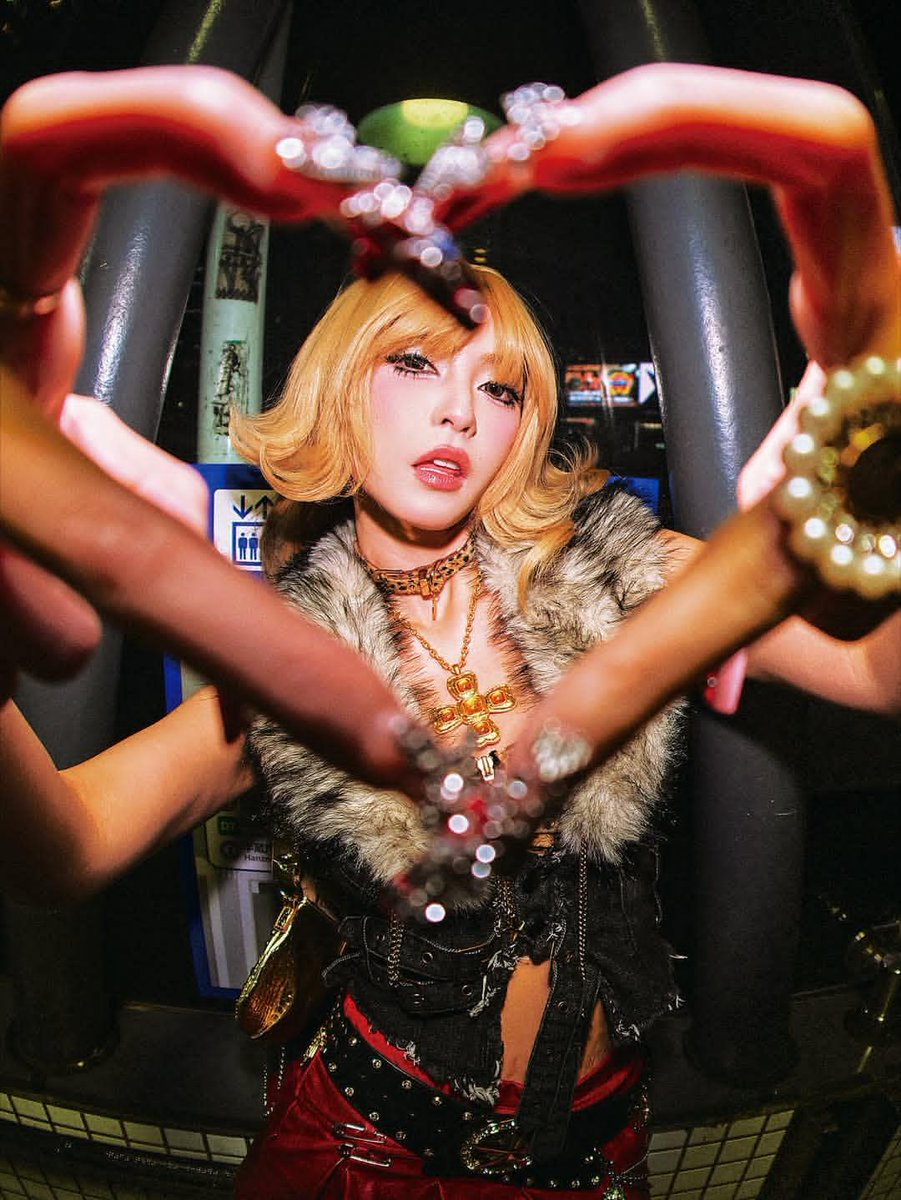
How to long, heavily jeweled and decorated (deconails)
0
Times used
0
Likes
Unlock Digital Opulence: A Deep Dive into the "Create a long" AI Image Style
In the vast, ever-expanding universe of AI image generation, certain styles emerge that capture the imagination, pushing the boundaries of digital creativity. One such style, a true gem within the Orno AI image editor, is the “Create a long” prompt. This isn't just a command; it's an invitation to a world of extravagant detail, breathtaking opulence, and maximalist beauty. Inspired by the heavily jeweled and decorated world of Japanese deconails, this style allows you to transform simple text prompts into hyper-detailed works of art dripping with digital diamonds, pearls, and intricate filigree. Whether you're a seasoned digital artist, a designer seeking inspiration, or simply curious about the power of AI, this guide will walk you through everything you need to know to master the “Create a long” style and generate stunning, jaw-dropping visuals with Orno.
Unpacking the "Create a long" Aesthetic: Digital Art Meets Deconails
At its core, the “Create a long” style is an ode to maximalism. It’s a direct rebellion against minimalist trends, embracing the philosophy that "more is more." To truly understand its visual language, we need to look at its primary inspiration: a vibrant and fascinating subculture from Japan.
The Exquisite Roots in Japanese Deconails
The term "deconails" (a portmanteau of "decoration" and "nails") refers to a style of 3D nail art that originated in Japan. It’s an art form characterized by its sheer extravagance. We're not talking about a single rhinestone; we're talking about a cascade of embellishments. Think long, sculpted nails adorned with an abundance of:
- Rhinestones and Swarovski crystals of all shapes and sizes.
- Lustrous pearls and intricate beadwork.
- Tiny, sculpted 3D charms, from bows and hearts to miniature characters.
- Gold and silver filigree, chains, and metallic accents.
- Glitter, holographic foils, and shimmering powders.
Deconails are more than just a manicure; they are wearable sculptures, a form of personal expression that is both bold and meticulously crafted. The Orno “Create a long” style captures this essence, translating the tangible craft of deconails into the limitless canvas of AI generation.
Translating Maximalism into AI-Generated Art
So, how does an AI interpret this philosophy? The “Create a long” style in Orno is engineered to understand and replicate the key elements of this opulent aesthetic. When you use this prompt, you're telling the AI to focus on:
- Intricate Detail: The AI model prioritizes fine, delicate details. It doesn’t just place a "jewel"; it renders the facets of a crystal, the shimmer of a pearl, and the texture of a metal setting.
- Three-Dimensionality: Images generated with this style have a remarkable sense of depth and texture. The decorations appear to pop off the surface, creating a tangible, 3D effect that you can almost feel.
- Luxurious Materials: The AI has been trained on a vast library of luxurious visuals. It understands how light interacts with gold, how pearls diffuse light softly, and how diamonds sparkle. This results in incredibly realistic and rich material textures.
- Compositional Density: True to its maximalist roots, the style favors dense, layered compositions. It expertly arranges a multitude of elements without making the image feel chaotic, creating a harmonious yet lavish visual feast.
How to Master the "Create a long" Style in Orno: A Step-by-Step Guide
Ready to create your own decadent masterpieces? Using the “Create a long” style in Orno’s AI image editor is intuitive and incredibly fun. Here’s how you can get started and refine your prompts for perfect results.
Crafting Your Core Prompt
The beauty of this style lies in its simple yet powerful structure. The prompt typically begins with the phrase "Create a long" followed by your subject. This acts as the magic key that unlocks the specific jeweled and decorated aesthetic.
Let's look at some examples to see it in action:
- For classic nail art:
Create a long, stiletto nail, heavily jeweled with pink crystals and tiny pearl hearts. - For a fantasy object:
Create a long, ornate elven dagger, the hilt decorated with emeralds and silver filigree. - For something abstract:
Create a long, swirling ribbon of liquid gold, decorated with diamond dust. - For a whimsical subject:
Create a long, fantastical key to a secret garden, covered in tiny sculpted flowers and moss.
As you can see, the subject can be anything you can imagine. The AI will take your concept and apply its signature style of heavy, intricate decoration to it.
Modifiers and Keywords for Precision Control
To elevate your creations from great to breathtaking, you need to add descriptive keywords and modifiers. These words give the AI more specific instructions about the mood, materials, and details you want to see. Think of yourself as a director guiding the AI artist.
Here is a list of powerful modifiers to incorporate into your prompts:
- Artistic Styles:
baroque,rococo,art nouveau,victorian,gothic - Materials & Gems:
mother of pearl,Swarovski crystals,opals,rubies,sapphires,abalone shell,platinum filigree,rose gold - Textures & Finishes:
iridescent,holographic,glossy,polished,translucent,glowing - Camera & Lighting:
macro photography,studio lighting,dramatic lighting,cinematic,soft focus,8k resolution,hyper-detailed
Example Prompt Enhanced with Modifiers:
Create a long, baroque stiletto nail, macro photography, decorated with intricate gold filigree, tiny ruby hearts, and iridescent mother of pearl shards, dramatic studio lighting, hyper-detailed.
This detailed prompt gives the Orno AI a much clearer vision, resulting in a more refined and spectacular image that precisely matches your imagination.
Creative Use Cases for "Create a long" Generations
The stunning images you can produce with this style are more than just pretty pictures. They have a wide range of practical and creative applications across various fields.
Inspiration for Artists and Designers
- Nail Technicians & Artists: Generate an endless stream of unique, complex 3D nail art designs for clients or nail art competitions.
- Jewelry Designers: Quickly visualize and prototype intricate jewelry concepts, from rings and pendants to elaborate tiaras.
- Game Asset & Prop Designers: Create concept art for ornate fantasy weapons, enchanted artifacts, and decorative environmental assets for video games.
- Fashion Designers: Develop mood boards with a focus on embellishment, beading, and luxurious textures for haute couture collections.
Unique Digital Content and Social Media
In a crowded digital landscape, visuals are everything. The “Create a long” style is perfect for producing scroll-stopping content for platforms like Instagram, Pinterest, and TikTok. Create mesmerizing close-ups, abstract backgrounds, or unique branding assets that sparkle and shine, capturing your audience's attention instantly.
Frequently Asked Questions (FAQ)
What exactly is the "Create a long" AI style in Orno?
The "Create a long" style is a specialized text-to-image prompt in the Orno AI editor designed to generate hyper-detailed, opulent images. Its signature aesthetic is characterized by heavy embellishment with jewels, pearls, crystals, and intricate filigree, heavily inspired by Japanese 3D nail art known as "deconails."
Do I have to use the words "Create a long" in my prompt?
Yes, starting your prompt with the phrase "Create a long" is what activates this specific, pre-trained style within Orno. It tells the AI model to apply the maximalist, heavily decorated visual treatment to the subject that follows.
Can I only create images of nails with this style?
Absolutely not! While the style's roots are in nail art, its true power lies in its versatility. You can apply it to virtually any subject you can think of: fantasy weapons, animals, food, technology, clothing, architecture, and more. Experimentation is key—try creating a "long, jeweled dragon scale" or a "long, decorated seashell" to see the amazing results.
How can I make my "Create a long" images look more realistic?
To enhance realism, add photographic terms to your prompt. Keywords like photorealistic, macro photography, 8k UHD, studio lighting, and shallow depth of field will instruct the AI to render the image with realistic lighting, textures, and camera effects.
Is the "Create a long" style free to use in Orno?
Yes, the "Create a long" style is one of the many powerful and creative tools available to all users of the Orno AI image editor. You can start generating incredible, opulent art right away.
What are some good negative prompts to use with this style?
A negative prompt tells the AI what to avoid. For this style, you might want to use negative prompts to clean up the image. Good examples include: blurry, low quality, deformed, malformed, extra fingers, bad anatomy, watermark, text. This can help you get a more polished and professional-looking final result.
Begin Your Journey into Digital Opulence with Orno
The "Create a long" style is more than just an AI prompt; it's a gateway to a new realm of digital artistry where your imagination is the only limit. It empowers you to become a digital jeweler, a fantasy artisan, and a creator of breathtaking beauty. The intricate, lavish, and utterly unique images you can generate are a testament to the incredible synergy between human creativity and artificial intelligence.
There's a whole world of digital diamonds and pearl-encrusted wonders waiting to be discovered. Dive into the Orno AI image editor, type your first "Create a long" prompt, and watch as your words blossom into an extraordinary work of art.
Use This Prompt
Transform your images with AI
Save this prompt as its own icon for one-tap access.