
Create an infographic For A Fighting Game
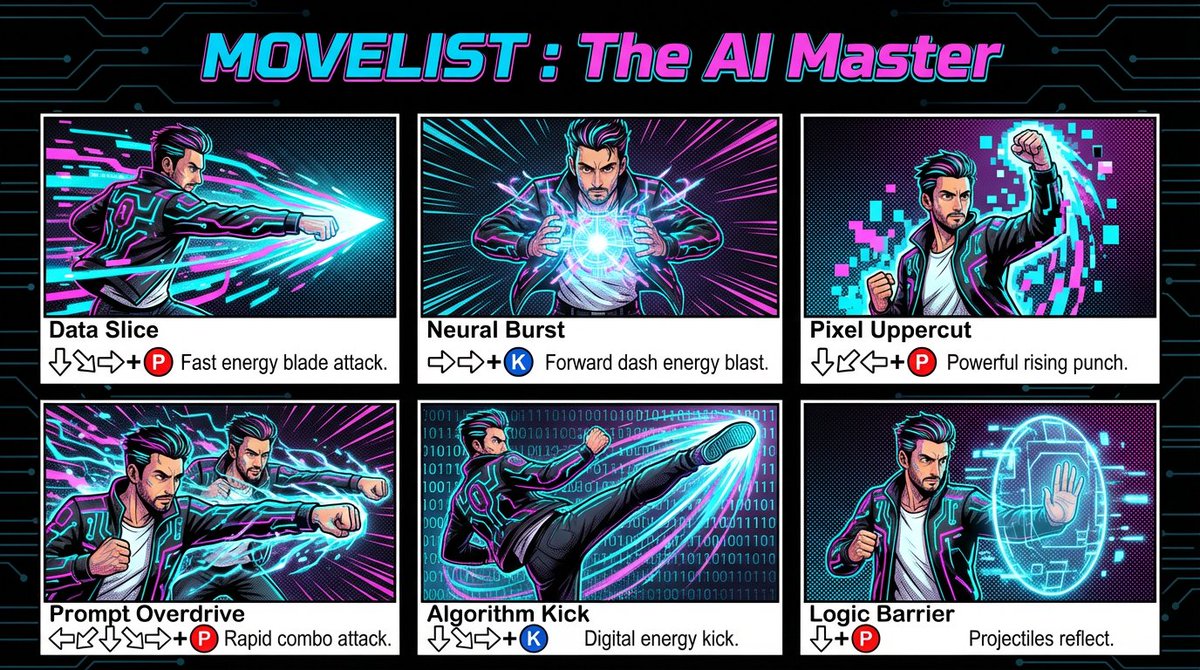
How to infographic for a fighting game showing the complete moveset of an AI-powered fighter inspired by the man in the photo.
0
Times used
0
Likes
Unleash Your Inner Fighter: Crafting Pro-Level Moveset Infographics with AI
Ever looked at a photo of yourself or a friend and thought, "That's a fighting game character right there"? From the iconic character select screens of Street Fighter to the detailed move lists in Mortal Kombat, fighting games have a unique and electrifying visual language. Creating the concept art and design documents for these characters has traditionally required hours of work in complex software. But what if you could transform a simple photograph into a complete, stylish fighting game moveset infographic in mere seconds? Welcome to the future of character design, powered by Orno's revolutionary AI image editor.
With Orno’s “Create an infographic For A Fighting Game” style, you’re not just applying a filter; you’re collaborating with a sophisticated AI to conceptualize an entire virtual fighter. This powerful tool takes a source image and generates a detailed "how-to" infographic, complete with special moves, combo sequences, and a super meter, all stylized to look like it was ripped straight from a AAA game’s strategy guide. This article will serve as your ultimate guide to mastering this feature, exploring its creative potential, and showing you how to level up your design workflow, whether you're an indie game developer, a content creator, or just a fighting game enthusiast.
The Power of a Prompt: What is the "Fighting Game Infographic" Style?
At its core, this style is driven by a descriptive and powerful prompt: "How to infographic for a fighting game showing the complete moveset of an AI-powered fighter inspired by the man in the photo." Let's break down what makes this text-to-image command so effective:
- "How to infographic for a fighting game": This sets the stage and format. The AI understands the specific layout of a moveset guide—using arrows, button icons, and descriptive text to explain complex actions in a visually digestible way.
- "showing the complete moveset": This instructs the AI to be comprehensive. It won't just generate a single cool pose; it will create a series of actions, including basic attacks, special moves, and perhaps even a devastating ultimate attack.
- "of an AI-powered fighter": This gives the AI creative license. It's not just translating the photo literally; it's re-imagining the subject as a unique, AI-generated character with its own theme and abilities.
- "inspired by the man in the photo": This is the crucial link. The AI analyzes the subject's pose, clothing, and overall vibe to inform the character's design, name, and move list. A person in a business suit might become a "CEO of Clobber," while someone in athletic gear could be transformed into a kinetic energy master.
Why Orno is Your Secret Weapon for AI Character and Concept Design
The "Fighting Game Infographic" is just one of many powerful styles available in the Orno AI image editor. Our platform is built from the ground up to empower creators of all skill levels, turning complex design tasks into an intuitive and enjoyable experience. Forget spending hours learning intricate vector software or searching for the perfect stock assets. Orno is your all-in-one AI art generator and editor.
Here’s what makes Orno the go-to tool for game developers, artists, and creative minds:
- Speed and Efficiency: Generate dozens of high-quality character concepts in the time it would take to sketch a single one. This rapid iteration is invaluable for brainstorming and pre-production in game development.
- Unmatched Creativity: Our AI models are trained on vast datasets of artistic styles, including specific gaming aesthetics. This allows Orno to produce unique, coherent, and visually stunning results that feel authentic to the fighting game genre.
- Accessibility for All: You don't need to be a professional graphic designer to create professional-grade visuals. If you can upload a photo and click a button, you can design a fighting game character with Orno.
- Advanced Customization: While our pre-built styles are fantastic starting points, Orno also allows for advanced prompt engineering. You can add your own keywords to the prompt to further guide the AI, pushing the results in a specific creative direction, such as "cyberpunk ninja," "elemental magic," or "brutal grappler."
Step-by-Step: From Photo to Final Boss in Under a Minute
Ready to create your own fighter? Follow this simple guide to use the "Create an infographic For A Fighting Game" style and see the AI magic for yourself.
Step 1: Choose Your Champion (Upload Your Photo)
The quality of your input image plays a significant role in the final output. For best results, choose a photo that is clear, well-lit, and features a single, prominent subject. A dynamic pose can provide the AI with more "inspiration" for creating exciting moves, but even a simple portrait can yield incredible results. Experiment with different photos to see how the AI interprets them!
Step 2: Select the "Fighting Game Infographic" Style
Navigate to Orno's extensive style library. You can easily find the style by searching for keywords like "fighting game," "infographic," or "moveset." Once selected, Orno will automatically apply the core prompt to your uploaded image.
Step 3: Refine Your Vision with Prompt Engineering (Optional)
This is where you can truly take control. Want your fighter to have fire-based attacks? Add "with pyrokinesis and fire elemental moves" to the prompt. Imagining a character from a futuristic setting? Try adding "in a sci-fi neon-drenched city." Tweaking the prompt allows you to guide the AI's creative process, ensuring the final infographic aligns perfectly with your vision.
Step 4: Generate, Review, and Download
Click the "Generate" button and watch as Orno brings your character to life. Within seconds, you'll have a high-resolution infographic detailing your new fighter's entire arsenal. You can generate multiple variations to find the perfect one, then download it to use in your projects.
Beyond the Moveset: Creative Uses for Your AI-Generated Fighter
The utility of this AI-powered tool extends far beyond just a cool image. Here are some practical and creative ways to use your generated infographics:
- For Indie Game Developers: Rapidly prototype character ideas for a new fighting game. Use the visuals in your Game Design Document (GDD) or pitch deck to bring your concepts to life for potential investors or team members.
- For Content Creators & Streamers: Create one-of-a-kind YouTube thumbnails, social media posts, or even on-stream graphics. Imagine revealing your "official" fighting game moveset to your community!
- For Tabletop RPG Players: Design a visually stunning character sheet for a modern or sci-fi TTRPG. It’s a fantastic way to visualize your character's unique abilities and combat style.
- For Pure Fun: Turn your friends, family, or even pets into legendary fighting game heroes. It makes for a hilarious and personalized gift, profile picture, or inside joke.
Frequently Asked Questions (FAQ)
Do I need any graphic design experience to use this Orno style?
Absolutely not! Orno is designed to be user-friendly for everyone, from seasoned professionals to complete beginners. The "Create an infographic For A Fighting Game" style automates the entire design process. All you need is a photo and your imagination.
Can I use the infographics I create for a commercial project?
Yes, the images you generate with Orno can typically be used for commercial purposes, such as in an indie game, for marketing materials, or on a monetized channel. We always recommend checking Orno's latest terms of service for specific details on commercial usage rights.
What type of photo produces the best results?
For optimal results, use a high-resolution photo where the subject is clearly visible and well-lit. Photos with a clean or unobtrusive background tend to work best. A full-body shot or a dynamic pose can give the AI more creative material to work with when designing the moveset.
Can I edit the text for the move names and descriptions on the infographic?
The initial generation, including all text and move names, is created by the AI based on its interpretation of the photo and prompt. While direct text editing within the generation isn't a feature, you can easily download the high-resolution image and use Orno's built-in editing tools or any standard photo editor to modify or replace the text to your liking.
How does the AI actually come up with a moveset from a photo?
Orno’s AI uses a sophisticated process. It first analyzes the visual data in your photo—the subject's pose, clothing, apparent mood, and any objects present. It then cross-references this analysis with its extensive knowledge base of fighting game tropes, character archetypes, and design principles. It synthesizes this information to generate a plausible and thematically consistent character concept, complete with a fitting name and a full set of special moves, all presented in a classic infographic format.
The future of creative design is here. Stop just dreaming about your character ideas and start bringing them to life. Try the "Create an infographic For A Fighting Game" style in Orno today and enter the arena of limitless creativity.
Use This Prompt
Transform your images with AI
Save this prompt as its own icon for one-tap access.