
Create an improved Micro-details
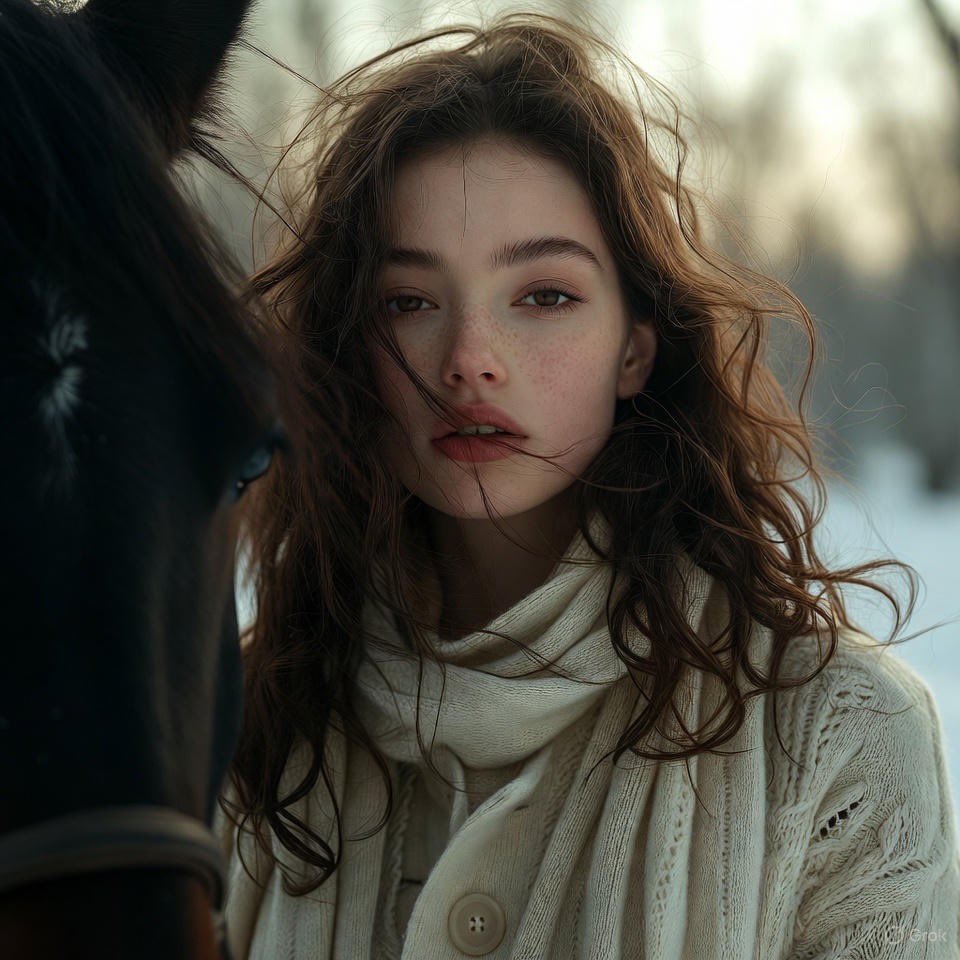
How to improved micro-details, retouched while preserving naturalness and individuality
0
Times used
0
Likes
The Ultimate Guide to "Improved Micro-details" in AI Image Generation
In the rapidly evolving world of AI art, the quest for realism has reached a fever pitch. Creators are no longer satisfied with blurry backgrounds or unnaturally smooth, "plastic" skin. The new frontier is detail—the subtle, intricate, and authentic textures that make an image feel tangible and alive. This is where the "Create an improved Micro-details" style from Orno changes the game. It’s not just another filter; it's a sophisticated AI approach to retouching and enhancement that prioritizes naturalness and individuality, moving beyond artificial perfection to achieve breathtaking authenticity.
If you've ever generated an AI portrait only to find it lacks the subtle pores, fine lines, and delicate hair strands that define a real person, this guide is for you. We'll dive deep into how Orno's "Improved Micro-details" style works, how you can use it to elevate your creations, and why it's an essential tool for any serious digital artist, photographer, or AI enthusiast.
What is the "Improved Micro-details" AI Style?
At its core, the "Improved Micro-details" style is an advanced AI prompting and generation model designed to meticulously render the high-frequency details that are often lost or averaged out in standard text-to-image generation. Think of it as a digital artisan that understands the difference between simply sharpening an image and intelligently adding context-aware texture.
Here’s what sets it apart:
- It's about Enhancement, Not Fabrication: Instead of inventing random details, the style enhances what is implied by your prompt. It intelligently interprets cues for texture, lighting, and material to render details that are not only high-resolution but also logically consistent with the scene.
- It Preserves Naturalness: The primary goal is realism, not flawless, airbrushed perfection. The AI is trained to understand that real surfaces have imperfections. It will render the delicate texture of skin, the subtle weave of a fabric, or the rough grain of wood, all while maintaining a believable and natural look.
- It Respects Individuality: This is crucial, especially for portraits. The "Improved Micro-details" style avoids the dreaded "generic AI face" by preserving and enhancing unique features. Freckles, beauty marks, faint scars, and smile lines are not seen as flaws to be erased but as essential components of a character's identity.
The Orno Difference: Balancing Perfection and Authenticity
Many AI tools can upscale an image or apply a sharpening filter, but this often results in digital artifacts or an unnatural, "over-cooked" appearance. Orno’s implementation of the "Improved Micro-details" style is woven into the very fabric of the generation process, allowing for a more organic and sophisticated result. Our AI model has been fine-tuned on vast datasets of high-resolution photography, enabling it to grasp the nuances of light and texture in a way that generic models can't.
Key Benefits of Using This Style in Orno:
- Photorealistic Skin Texture: Generate portraits where you can almost feel the texture of the skin. The AI adds subtle pores, fine vellus hair (peach fuzz), and realistic light diffusion across the skin's surface, instantly adding a layer of believability.
- Intricate Eye Detailing: The eyes are the window to the soul, and this style gives them unparalleled depth. It renders complex iris patterns, subtle reflections of the environment on the cornea, and the delicate texture of the surrounding eyelids and lashes.
- Hyper-Realistic Fabric and Materials: Move beyond flat, uninspired surfaces. Whether you're prompting for a "worn leather jacket," a "delicate silk dress," or a "rugged denim shirt," the AI will render the specific weave, stitching, folds, and wear-and-tear that make that material unique.
- Crisp Environmental Details: Apply the same level of detail to your backgrounds and settings. Generate images with individually rendered leaves on a tree, the rough texture of a brick wall, or the intricate grains in a wooden table.
How to Use the "Improved Micro-details" Prompt in Orno
Unlocking this powerful feature in Orno is intuitive and seamlessly integrates into your creative workflow. You can transform a good idea into a spectacular, high-detail masterpiece in just a few steps.
Step 1: Craft a Strong Base Prompt
The "Improved Micro-details" style works best when it has a solid foundation to build upon. Start with a clear and descriptive prompt. The more specific you are about your subject, lighting, and composition, the better the AI can interpret your vision.
Good Base Prompt Examples:
close-up portrait of an elderly fisherman with a weathered face, smiling at the camera, soft morning light
- macro photograph of a dew drop on a spider web, intricate details, bokeh background
- fantasy character wearing ornate steel armor with filigree engravings, cinematic lighting
Step 2: Select the "Improved Micro-details" Style
Within the Orno interface, simply select "Improved Micro-details" from our list of curated AI styles. This tells our generative engine to use the specialized model for your creation. It will automatically adjust the generation parameters to prioritize texture, clarity, and fine detail without you needing to wrestle with complex settings.
Step 3: Combine and Refine for Ultimate Control (Advanced)
For power users, the real magic happens when you combine the style with highly specific keywords in your prompt. This gives Orno's AI even more direction to focus its detailing power.
Advanced Prompt Examples with the Style Applied:
- Prompt:
medium shot of a red-haired woman with freckles, detailed skin texture, laugh lines around her eyes, wearing a hand-knitted wool sweater, golden hour light
Style: Improved Micro-details
Result: A portrait that not only captures the subject's features but also the individual strands of wool in her sweater and the authentic texture of her sun-kissed skin. - Prompt:
product shot of a luxury leather watch, macro details on the stitching and metal grain, studio lighting, sharp focus
Style: Improved Micro-details
Result: A commercial-quality image perfect for mockups, highlighting the craftsmanship of the product with incredible clarity.
Beyond Portraits: Versatile Applications for Every Creator
While this style excels at creating stunningly realistic portraits, its utility extends far beyond human subjects. Any concept that benefits from rich texture and sharp detail can be taken to the next level.
Product Photography and Mockups
Create professional-grade product visualizations without needing a camera. Describe your product, from a carbon fiber gadget to a wooden piece of furniture, and let the AI render it with perfect, tactile details that will impress any client.
Concept Art and Character Design
Give your characters and creatures a sense of history and realism. Use prompts to add "battle-worn scratches on a shield," "frayed edges on a wizard's robe," or "scaly, iridescent skin on a dragon" to make your fantasy worlds feel more grounded and believable.
Architectural Visualization
Render architectural concepts with an incredible level of material detail. Showcase the subtle texture of a concrete wall, the reflective properties of a glass facade, or the intricate patterns in a marble floor, helping clients visualize the final project with stunning clarity.
Frequently Asked Questions (FAQ)
Will the "Improved Micro-details" style make my images look fake or overly edited?
Absolutely not. The entire philosophy behind this style is to achieve naturalness. It’s the opposite of a "beautify" filter that smooths over details. Our AI is trained to add detail in a way that is consistent with real-world physics and textures, enhancing realism rather than creating an artificial, hyper-sharp look.
Can I use this style on photos I've already taken or images I've generated before?
The "Improved Micro-details" style is a generative model, meaning it works best when used during the text-to-image or image-to-image creation process within Orno. It builds the details from the ground up. While it can be used in image-to-image to enhance a previous creation, it's designed to be part of the initial generation for the most coherent and spectacular results.
What is the difference between this AI style and a simple upscaling tool?
This is a key distinction. An upscaler's job is to increase the pixel count of an image, and it often has to guess what details to fill in, which can lead to artifacts. Orno's "Improved Micro-details" style generates these fine details contextually *during* the image creation process. The details are more intentional, coherent, and integrated into the image's lighting and composition, resulting in superior quality and authenticity.
Is the "Improved Micro-details" style good for anime or cartoon images?
While you can certainly experiment, the style's primary strength is in photorealism and styles that mimic real-world textures. For flat, cel-shaded, or stylized art forms like anime, the effect might be less noticeable or could introduce a texture that clashes with the intended aesthetic. It excels where realism is the goal.
How does Orno protect the uniqueness of a character's face with this style?
Our model is specifically trained to differentiate between generic texture (like skin pores) and defining features (like the shape of the eyes, a specific scar, or a pattern of freckles). It enhances the former while preserving the latter. This ensures that the AI is adding a layer of realistic detail without overwriting the core identity of your subject, effectively solving the "same face syndrome" common in other AI tools.
Ready to move beyond generic AI images and start creating work with breathtaking depth and realism? Experience the power of authentic detail. Try the "Improved Micro-details" style in Orno today and see the difference for yourself.
Use This Prompt
Transform your images with AI
Save this prompt as its own icon for one-tap access.