
Create an illustration Describe All
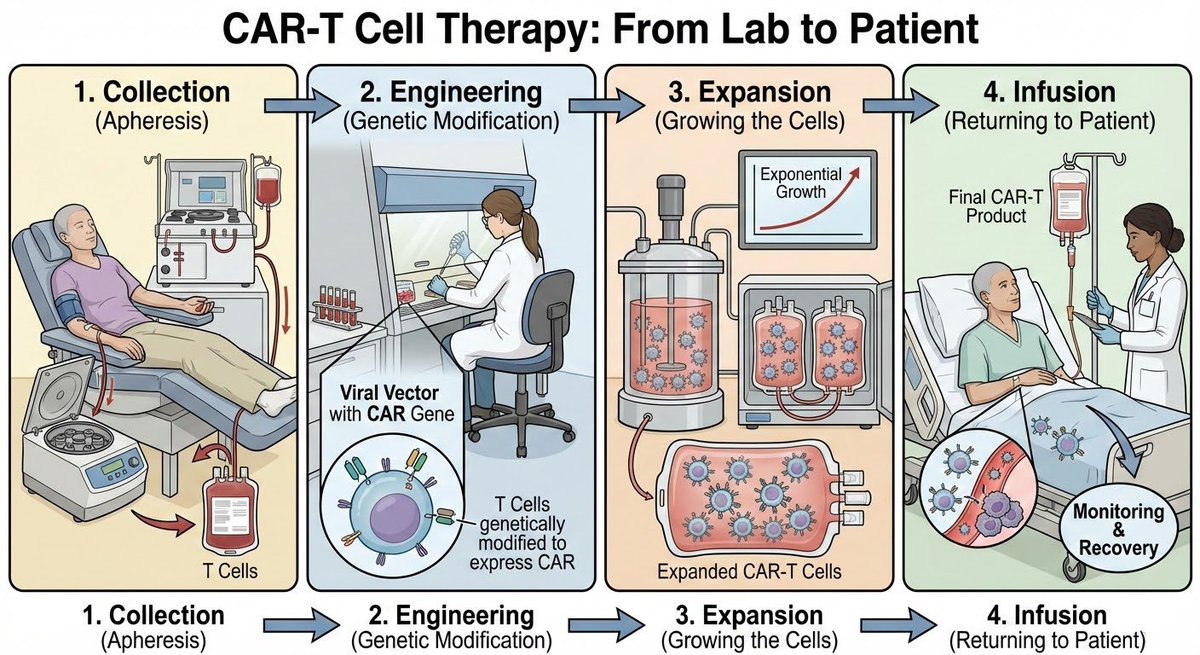
How to in an illustration describe all of the stages of CAR-T cell therapy from lab to patients.
0
Times used
0
Likes
Unlocking Complex Narratives: The "Create an illustration Describe All" Style
In a world saturated with information, clarity is king. How do you explain a complex, multi-stage process without losing your audience in a sea of text? Whether it's a groundbreaking medical procedure, a delicate manufacturing pipeline, or a simple cooking recipe, visual storytelling is the key. But creating compelling, step-by-step illustrations has traditionally required significant time, skill, and resources. Until now.
Enter Orno's revolutionary AI image generation style: "Create an illustration Describe All." This isn't just about creating a single, static image. It's an AI-powered narrative engine designed to break down intricate processes into a sequence of clear, cohesive, and visually stunning illustrations. By understanding the flow and context of a detailed prompt, Orno can generate an entire visual story, making the complex simple and the abstract tangible. To truly understand its power, let's explore how this style masterfully visualizes one of modern medicine's most sophisticated treatments: CAR-T cell therapy.
A Case Study in Clarity: Visualizing CAR-T Cell Therapy with Orno's AI
CAR-T cell therapy is a form of immunotherapy that uses a patient's own immune cells to fight cancer. The prompt, "How to in an illustration describe all of the stages of CAR-T cell therapy from lab to patients," is the perfect challenge for Orno's AI. It demands not just artistry, but a deep understanding of a scientific sequence. Let's break down how Orno’s AI image editor tackles each stage, transforming a complex medical prompt into an educational masterpiece.
Stage 1: Leukapheresis - Collecting the Patient's T-Cells
The journey begins with the patient. The first step, leukapheresis, involves drawing blood from the patient and using a machine to separate out the T-cells, a type of white blood cell. When Orno processes the "Describe All" prompt, it recognizes this as the logical starting point. The resulting AI-generated illustration often depicts a patient comfortably connected to a medical device, with clear visual cues showing blood leaving the body, entering a machine, and returning, with a separate collection of T-cells highlighted. This initial image sets the scene, establishing a human connection to the highly technical process that follows.
Stage 2: T-Cell Activation and Transduction in the Lab
This is where the true "science fiction" of the therapy happens. In a laboratory, these collected T-cells are genetically engineered. A harmless, disabled virus (a viral vector) is used to deliver a new gene into the T-cells. This gene instructs the T-cells to grow a special receptor on their surface, called a Chimeric Antigen Receptor (CAR). Orno's AI visualizes this intricate lab work with remarkable clarity. The illustration generated for this stage typically shows T-cells in a petri dish or flask, with representations of viral vectors introducing new genetic material. The AI often uses visual metaphors, like keys fitting into locks or puzzle pieces coming together, to depict the successful genetic modification, making the concept of transduction accessible to a non-scientific audience.
Stage 3: Expansion - Multiplying the CAR-T Cells
Once the T-cells are successfully transformed into cancer-fighting CAR-T cells, a single cell isn't enough. The small army needs to become a large one. This stage, called expansion, involves growing these newly engineered cells in a bioreactor until there are millions or even billions of them. Orno’s "Describe All" style excels at showing this concept of multiplication. The AI-generated art will often show a progression: a small cluster of cells in a container that, in the next visual beat, fills the container completely. This visual representation of exponential growth is powerful and instantly understandable, conveying the idea of preparing a potent, living medicine.
Stage 4: Quality Control and Preparation
Before the cells can be returned to the patient, they undergo rigorous quality control tests to ensure they are safe and effective. The AI illustration for this stage often shifts the focus to the meticulous care involved. You might see visuals of lab technicians with microscopes, computer readouts displaying data, or vials of the finished product being carefully inspected. This step in the visual narrative builds trust and emphasizes the safety and precision of the therapy.
Stage 5: Infusion - Returning the Engineered Cells to the Patient
The final step brings the journey full circle. The patient receives their own supercharged CAR-T cells back through a simple infusion, similar to a blood transfusion. Orno’s AI creates a concluding image that mirrors the first stage, showing the patient receiving the infusion. But now, the infused cells are visually distinct—often depicted with the newly added CAR receptors—and are shown beginning their work of seeking and destroying cancer cells within the body. This completes the narrative arc, from collection to cure, in a powerful and emotionally resonant way.
Why Orno Excels at "Describe All" Illustrations
Generating such a detailed, multi-part illustration is a significant challenge for most text-to-image models. Here’s why Orno’s AI image editor is uniquely suited for the task.
Unmatched Detail and Narrative Cohesion
Orno’s underlying AI models are trained not just on images, but on stories and sequences. The "Describe All" style leverages this to maintain stylistic and thematic consistency across all the generated "panels" of the illustration. The color palette, line art style, and character design remain uniform, making the final output look like it was created by a single, skilled artist. This narrative intelligence prevents the jarring disconnect you might get from generating five separate images with five separate prompts.
Customization and Creative Control
The initial prompt is just the beginning. With Orno, you have the power to refine and direct the AI. You can add stylistic keywords to your prompt, such as "in a clean vector infographic style with labels," "as a detailed anatomical drawing," or "in a simple, friendly cartoon style." This allows you to tailor the output to your specific audience, whether you're creating a graphic for a scientific journal, an educational website, or a patient-facing brochure.
Speed and Efficiency for Professionals
For researchers, medical writers, educators, and marketers, time is a precious commodity. Commissioning a detailed medical illustration can take weeks and cost a fortune. With Orno, a comprehensive, multi-stage diagram like the CAR-T cell therapy process can be conceptualized and generated in minutes. This dramatically accelerates workflows, allowing professionals to visualize data, explain concepts, and create compelling content faster than ever before.
Beyond Medicine: Other Applications for the "Describe All" Style
The power of visualizing processes isn't limited to science and medicine. The "Create an illustration Describe All" style is a versatile tool for countless applications:
- Education: Generate step-by-step diagrams of the water cycle, the process of photosynthesis, a key historical event, or a complex mathematical theorem.
- Business & Tech: Create clear visuals for a product's supply chain, a customer journey map, a software development lifecycle (SDLC), or a user onboarding flow.
- DIY & How-To Guides: Instantly produce easy-to-follow visual instructions for assembling furniture, cooking a complex recipe, or performing a home repair.
- Creative Storyboarding: Quickly generate key frames and beat boards for an animation, a film scene, or a marketing video, establishing a visual direction in seconds.
Tips for Crafting the Perfect "Describe All" Prompt in Orno
To get the most out of this powerful feature, follow these expert tips:
- Start with a Clear Command: Begin your prompt with an instructive phrase like "Describe all stages of," "Show the step-by-step process of," or "Illustrate the lifecycle of."
- Be Chronological: Structure your prompt logically from beginning to end. Use connectors like "first," "next," "then," and "finally" to guide the AI through the sequence.
- Define the Visual Style: Don't forget to specify the aesthetic. Add terms like "as a flat design infographic," "in a photorealistic style," or "as a simple line drawing with color accents."
- Mention Key Elements: If certain objects, people, or symbols are crucial to your process, make sure to include them in the prompt for each relevant stage.
- Iterate and Refine: Your first generation is a fantastic starting point. Don't be afraid to tweak your prompt, add more detail, or change the style to get closer to your perfect vision. Orno is built for creative exploration!
Frequently Asked Questions (FAQ)
Can I use the "Describe All" style for non-scientific topics?
Absolutely! As mentioned in our section on other applications, this style is incredibly versatile. It's perfect for creating business process diagrams, how-to guides, historical timelines, recipes, and much more. If you can describe it in steps, Orno can illustrate it.
How does Orno keep the illustration style consistent across all steps?
Orno's AI is designed to understand the entire prompt as a single, cohesive request. It maintains a "memory" of the style, color palette, and key elements established in the first part of the illustration and applies them to the subsequent parts. This contextual awareness is key to creating a unified and professional-looking final piece.
What if the AI misses a step in my process or gets a detail wrong?
AI is a powerful tool, and prompt refinement is part of the creative process. If a step is missed, try making your prompt more explicit by numbering the stages (e.g., "1. Collection, 2. Engineering, 3. Expansion..."). If a detail is incorrect, add more specific descriptive language to guide the AI toward the right visual representation.
Is Orno's AI image editor suitable for creating professional medical or scientific illustrations?
Yes. Orno is a powerful tool for professionals in these fields. It can be used for rapid concepting, creating high-quality drafts for presentations and publications, and generating educational materials for patients and students. It dramatically reduces the time and cost associated with traditional illustration while offering incredible flexibility.
How is this "Describe All" style different from just generating multiple separate images?
The key difference is narrative intelligence. When you generate separate images, the AI treats each prompt in isolation. With "Describe All," Orno understands that it's creating a connected sequence. This results in a seamless flow, consistent styling, and a logical progression that tells a complete story—something you can't achieve by simply stitching unrelated images together.
Ready to transform your complex ideas into stunning, easy-to-understand visuals? The "Create an illustration Describe All" style is waiting for you. Try Orno's AI image editor today and bring your entire process to life with the click of a button.
Use This Prompt
Transform your images with AI
Save this prompt as its own icon for one-tap access.