
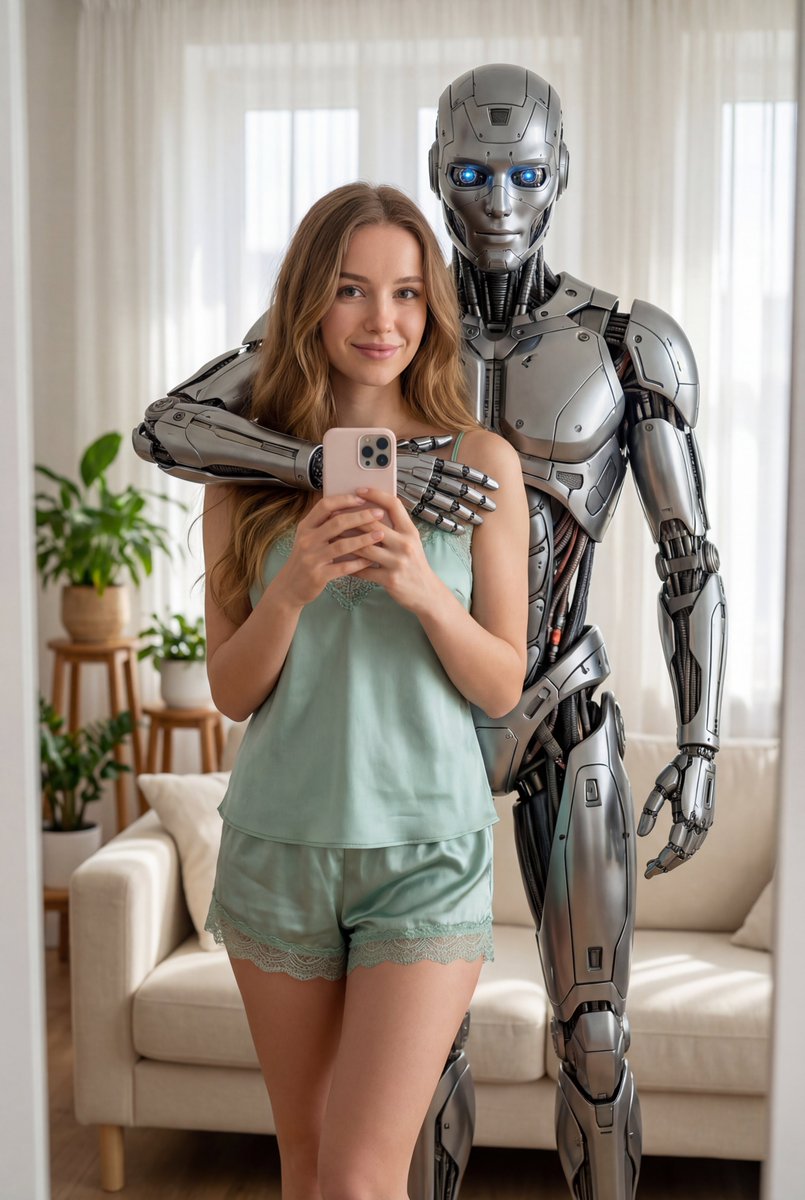
Create a hyperrealistic Ultra-detailed 8k Photo
How to hyperrealistic ultra-detailed 8k photo of YOU (Upload Your Photo) standing in a bright cozy living room, same location as the reference:...
1
Times used
0
Likes
Unlock a New Reality: Crafting Your Hyperrealistic Ultra-detailed 8k Photo with AI
The world of digital art and photography is undergoing a seismic shift, powered by the incredible capabilities of artificial intelligence. Gone are the days when creating a professional, studio-quality photograph required expensive equipment, complex software, and hours of painstaking editing. Today, with AI image editors like Orno, you can generate breathtakingly realistic images from a simple text description. One of the most powerful and sought-after styles in this new frontier is the "hyperrealistic ultra-detailed 8k photo."
This isn't just about making a pretty picture; it's about creating a digital reflection of reality so convincing it blurs the line between the physical and the virtual. It's about placing yourself at the center of any imaginable scene, rendered with a level of clarity and detail that was once the exclusive domain of high-end professional photographers. In this comprehensive guide, we'll dive deep into this revolutionary AI style, explore how you can use Orno to craft your own stunning 8k portraits, and unlock a universe of creative possibilities.
What Exactly is a "Hyperrealistic Ultra-detailed 8k Photo"?
This specific prompt is more than just a collection of impressive-sounding words; it’s a precise set of instructions for the AI, guiding it to produce a specific, high-end result. Let's break down each component to understand the magic behind the machine.
Hyperrealistic: Beyond Just Real
In the context of AI image generation, "hyperrealistic" is the pursuit of perfection. It instructs the AI to create an image that is not just realistic, but virtually indistinguishable from a high-resolution photograph. This means the AI meticulously focuses on:
- Lifelike Textures: From the subtle pores and fine lines on human skin to the soft weave of a cotton shirt or the rough grain of a wooden table, hyperrealism captures the tactile quality of the world.
- Authentic Lighting: The AI model calculates how light should interact with every surface. It renders soft shadows, sharp highlights, subtle reflections in the eyes, and the way light scatters through hair, creating a scene with depth and believability.
- Flawless Physics: Details like how fabric drapes, how hair falls naturally, and how objects cast shadows are all rendered with an understanding of real-world physics, eliminating the uncanny or "artificial" look.
Ultra-detailed: The Art of the Minuscule
While hyperrealism sets the overall goal, "ultra-detailed" is the instruction to zoom in on the specifics. This keyword pushes the AI to expend more computational power on rendering the smallest elements of the image with incredible precision. Think of the individual stitches on a jacket collar, the tiny dust motes catching the light in a sunbeam, or the intricate patterns of an iris. This command ensures your final image isn't just realistic at a glance but holds up to close inspection, revealing a rich tapestry of fine details.
8k Photo: A Commitment to Clarity
The term "8k" is a signal to the AI about the desired output quality. While the final image file may not literally be 8k resolution (7680x4320 pixels) by default, this keyword tells the generation model to emulate the characteristics of an 8k photograph. This means maximum sharpness, no digital noise, incredible clarity, and a crispness that makes the image pop. It’s a shorthand for "give me the highest fidelity output you are capable of." With Orno's built-in upscaling tools, you can then take this high-quality generation and bring it to true high-resolution glory, perfect for printing or professional use.
The True Game-Changer: Putting "YOU" in the Picture
The most revolutionary part of Orno's "Hyperrealistic Ultra-detailed 8k Photo" style is the ability to seamlessly integrate your own likeness into the generated scene. By simply uploading a clear photo of yourself, you provide the AI with the essential reference it needs to create a stunning, photorealistic self-portrait in any context you can imagine.
This technology transcends simple "face-swapping." Orno's advanced AI analyzes the unique facial features, structure, and even the nuances of your expression from your source photo. It then intelligently blends this data into the new scene, ensuring the lighting, skin tone, and angle match the environment perfectly. The result is not just your face pasted onto a different body; it’s a cohesive, believable portrait of you, fully present in a brand-new reality. This opens up a world of possibilities, from creating professional AI headshots for your LinkedIn profile to visualizing yourself as the hero of your favorite fantasy epic.
Step-by-Step Guide: Creating Your 8k Masterpiece with Orno
Orno is designed to be powerful yet intuitive. You don't need to be a prompt engineering wizard to create incredible images. Here’s how you can generate your first hyperrealistic portrait in just a few clicks.
Step 1: Choose the "Hyperrealistic 8k Photo" Style
Navigate to Orno's style library and select the "Create a hyperrealistic Ultra-detailed 8k Photo" preset. This will load the foundational prompt into the editor, giving you the perfect starting point.
Step 2: Upload Your Best Photo
This is the most crucial step for personalizing your image. Choose a reference photo of yourself where your face is well-lit, clear, and preferably looking toward the camera. A high-quality source image will give the AI the best possible data to work with, resulting in a more accurate and lifelike portrait.
Step 3: Customize Your Scene and Story
The default prompt template reads: "...of YOU (Upload Your Photo) standing in a bright cozy living room...". This is where your creativity comes in! The "bright cozy living room" is simply a placeholder. You can change this description to anything you can imagine. Your imagination is the only limit. Try describing:
- A new location: "...on a windswept cliffside at sunset."
- A different outfit: "...wearing elegant royal attire from the 18th century."
- A specific action: "...sitting at a cafe table in Paris, smiling and holding a coffee cup."
- A fantastical setting: "...as a space explorer looking out a starship window at a vibrant nebula."
Step 4: Generate, Review, and Refine
Once you’ve crafted your perfect prompt, hit the "Generate" button. Orno's powerful AI will get to work, rendering your vision in stunning detail. In moments, you'll have your image. If it's not quite perfect, don't worry! You can slightly tweak your prompt—perhaps adding details like "wearing glasses" or "with a serene expression"—and generate again. You can also use Orno's editing and upscaling tools to enhance the final result to perfection.
Unlocking Creative Potential: Prompt Ideas for Your 8k Portraits
Ready to move beyond the living room? The core prompt is a launchpad for endless creativity. Here are a few ideas to get you started:
For the Professional
Need a new headshot that commands attention? Skip the expensive photo session.
Prompt: Create a hyperrealistic ultra-detailed 8k photo of ME, wearing a sharp navy blue business suit, standing in a modern, sunlit office with a blurred city skyline in the background.
For the Adventurer
Visualize yourself on the journey of a lifetime.
Prompt: Create a hyperrealistic ultra-detailed 8k photo of ME, wearing practical hiking gear, pausing to look at the camera on a narrow mountain trail in the Swiss Alps, golden hour lighting.
For the Sci-Fi and Fantasy Fan
Become the protagonist of your own epic story.
Prompt: Create a hyperrealistic ultra-detailed 8k photo of ME, as a cyberpunk detective with subtle neon face tattoos, standing in a rain-slicked, neon-lit alley in futuristic Tokyo.
For the Artist and Dreamer
Capture a moment of pure, creative expression.
Prompt: Create a hyperrealistic ultra-detailed 8k photo of ME, as a painter with small smudges of paint on my cheek, standing in a rustic, light-filled art studio, looking thoughtfully at a large abstract canvas.
Orno: The Ultimate Tool for AI-Powered Photorealism
While many tools can generate images, Orno is specifically engineered to deliver high-quality, personalized, and photorealistic results with unparalleled ease. Our advanced AI engine is fine-tuned to understand the nuances of prompts like "hyperrealistic" and "ultra-detailed," ensuring superior output every time. With a user-friendly interface, fast generation speeds, and a commitment to user privacy and data security, Orno is the definitive choice for anyone looking to explore the incredible world of AI photography.
Are you ready to see yourself in a new light? To create images that tell a story, capture a dream, or simply showcase you in stunning, unbelievable detail? The future of photography is here, and it's more personal than ever.
Try the "Hyperrealistic Ultra-detailed 8k Photo" style in Orno today and bring your imagination to life!
Frequently Asked Questions (FAQ)
Do I need any technical skills to create a hyperrealistic 8k photo?
Absolutely not! Orno is designed for everyone, regardless of technical skill. Our style templates provide the complex part of the prompt for you. All you need to do is upload your photo and write a simple description of the scene you want to create.
Is the final image really 8k in resolution?
The term "8k" in the prompt directs the AI to generate an image with the clarity, sharpness, and detail characteristic of an 8k photo. The initial generated image is a high-quality base that you can then use Orno's built-in AI upscaler to enlarge to true 4k or 8k resolutions, making it perfect for printing and professional use.
How does Orno use my uploaded photo? Is it secure?
We take your privacy and security very seriously. Your uploaded photo is used only for the duration of the image generation process to guide the AI in creating your portrait. It is not used for AI training or any other purpose. Please refer to our Privacy Policy for full details.
Can I use the AI images I create for commercial purposes?
Yes, images you create with Orno can typically be used for commercial purposes, such as marketing, social media content, and more. We recommend reviewing our Terms of Service for specific details on usage rights and any restrictions.
What kind of photo should I upload for the best results?
For the most accurate and realistic AI self-portraits, use a clear, well-lit photo where your face is the primary focus. A straight-on shot with a neutral expression works best, but Orno's AI is flexible. Avoid photos with heavy shadows, sunglasses, or where your face is obscured.
How is this different from a standard photo filter?
A filter simply overlays an effect or color adjustment onto an existing photo. Orno's AI image generation creates an entirely new image from scratch based on your text prompt and photo reference. It constructs a new scene, a new outfit, and new lighting, integrating your likeness into a completely original piece of art.
Use This Prompt
Transform your images with AI
Save this prompt as its own icon for one-tap access.