
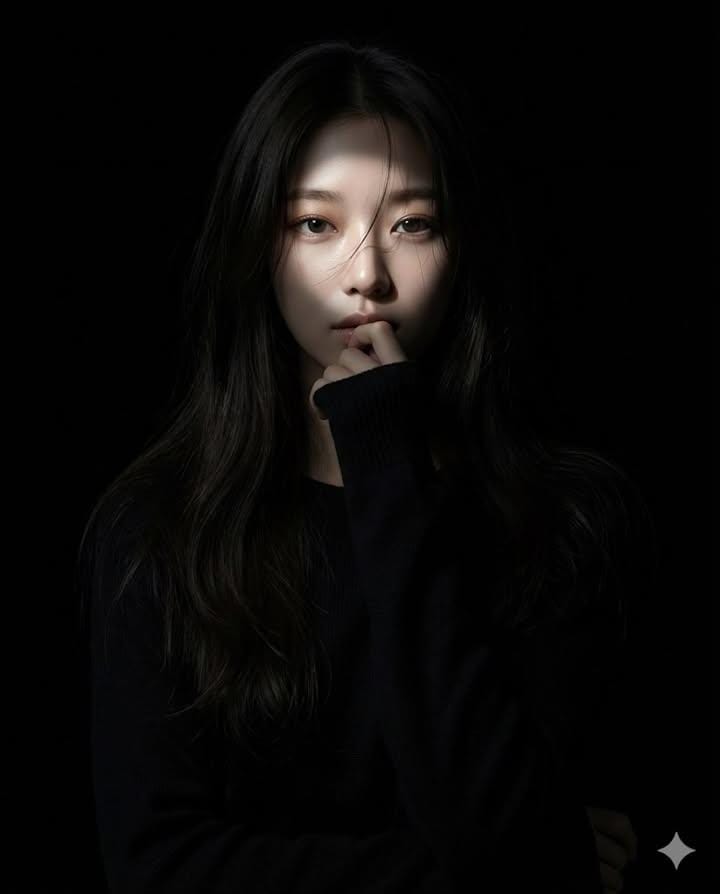
Create a hyperrealistic Realistic-anime Portrait
How to hyperrealistic realistic-anime portrait of a female character
2
Times used
0
Likes
The Ultimate Guide to Creating Hyperrealistic Realistic-Anime Portraits with AI
Have you ever looked at a stunning piece of anime art and wondered, "What if this character existed in our world?" What if you could capture the ethereal beauty and expressive eyes of anime, but render them with the breathtaking detail and texture of a real photograph? Welcome to the mesmerizing world of the "hyperrealistic realistic-anime portrait," a style that blurs the line between fantasy and reality. Thanks to powerful AI image editors like Orno, this once complex and time-consuming art form is now at your fingertips, ready to be explored. This guide will walk you through everything you need to know to master this captivating style and create stunning female character portraits that will leave viewers speechless.
This hybrid art style is more than just a trend; it's a new frontier in digital artistry and character design. It combines the best of both worlds: the beloved aesthetic of Japanese animation with the profound depth and detail of photorealism. Let's dive deep into how you can use Orno to generate these incredible images from simple text prompts.
What Exactly is the Hyperrealistic Realistic-Anime Portrait Style?
The hyperrealistic realistic-anime portrait is a sophisticated art style generated by AI that aims to create a photorealistic depiction of a character who retains core anime features. It's not simply a realistic painting of an anime character, nor is it a photo of a cosplayer. Instead, it's a seamless fusion where every element is carefully balanced.
Key Characteristics of the Style:
- Photorealistic Textures: This is the "hyperrealistic" part of the equation. The AI generates lifelike skin with subtle pores, textures, and imperfections. Hair isn't a solid block of color; it's rendered with individual strands, realistic sheen, and believable physics. Fabric in clothing has a tangible weave and drape.
- Expressive Anime Eyes: The eyes are the soul of the style. While they may be larger and more vibrantly colored than in real life, they are rendered with incredible detail. You'll see realistic reflections (specular highlights), intricate iris patterns, and believable moisture, making them deeply expressive and captivating.
- Harmonious Facial Structure: The style balances the often-stylized facial proportions of anime (like a smaller nose or a defined jawline) with the underlying principles of human anatomy. This creates a face that is both uniquely beautiful and structurally plausible.
- Cinematic Lighting and Depth: A key differentiator from traditional 2D anime is the use of complex, realistic lighting. The AI simulates how light would interact with the character, creating soft shadows, dramatic highlights (rim lighting), and a true sense of depth (depth of field) that makes the character feel present in a three-dimensional space.
Why Creators are Obsessed with Photorealistic Anime
The surge in popularity for this AI art style isn't a coincidence. It resonates deeply with both creators and audiences for several powerful reasons. It allows artists, writers, and gamers to visualize their characters with a new level of fidelity, bringing them out of the imagination and into a tangible, visual form. It's the ultimate tool for character concept art, creating unique social media profiles, or simply exploring the creative possibilities of AI.
For fans, it fulfills the fantasy of seeing their favorite characters in a more realistic light. This blend of the familiar and the new creates a powerful emotional connection, making the hyperrealistic realistic-anime portrait one of the most exciting frontiers in AI-generated art today.
Crafting the Perfect Prompt with Orno: A Step-by-Step Guide
The magic of creating these images lies in "prompt engineering"—the art of writing clear, detailed instructions for the AI. Orno's advanced text-to-image model is exceptionally skilled at interpreting nuanced prompts. Here’s how to build your prompt from the ground up to generate a stunning realistic-anime portrait of a female character.
The Foundation: Your Core Prompt Elements
Every great creation starts with a solid base. Your core prompt should clearly state the subject, style, and framing.
Start with this fundamental phrase: "hyperrealistic realistic-anime portrait of a beautiful female character".
- "Hyperrealistic" & "Realistic-anime": These are your key style guides. "Hyperrealistic" pushes the AI towards photorealistic textures and lighting, while "realistic-anime" ensures it retains the signature aesthetic. Using both creates the desired fusion.
- "Portrait": This tells the AI to focus on the character's face and upper body, ensuring a detailed and engaging shot.
- "Female character": This defines the primary subject.
Adding Detail and Personality: Describing Your Character
This is where your character truly comes to life. Be specific and descriptive. The more detail you provide, the more unique your result will be.
- Hair: Don't just say "hair." Describe its color, length, and style. For example: "with long, flowing lavender hair," "with a chic, messy black bob cut," or "with intricate silver braids."
- Eyes: The eyes are crucial. Specify their color and the emotion you want them to convey. For example: "with piercing, emerald green eyes," "with gentle, honey-colored eyes and a curious gaze," or "with glowing crimson eyes."
- Expression: What is your character feeling? An expression adds a story to your portrait. Try: "a gentle, serene smile," "a determined, pensive expression," or "a look of quiet melancholy."
- Features & Accessories: Add unique details. "faint freckles across her nose," "wearing delicate gold earrings," or "a small scar over her eyebrow."
Setting the Scene: Background and Lighting
A character doesn't exist in a void. The background and lighting establish the mood and context of your portrait.
- Lighting: This is one of the most powerful tools for creating atmosphere. Use cinematic terms to guide the AI. Examples include: "soft morning light filtering through a window," "dramatic rim lighting from behind," "neon glow from a futuristic city," or "warm, golden hour lighting."
- Background: Where is your character? Even a simple background is better than none. Try: "against a simple, blurred studio background," "in a lush, enchanted forest," or "on a balcony overlooking a cyberpunk cityscape at night." A blurred background (using terms like "depth of field" or "bokeh") helps the character pop.
The Secret Sauce: Technical and Artistic Modifiers
To elevate your image from "good" to "masterpiece," add a few technical keywords that tell the Orno AI to push for the highest quality.
Include terms like: "incredibly detailed," "sharp focus," "masterpiece," "8k resolution," "Unreal Engine 5," "cinematic composition," and "professional photography." These act as quality boosters, signaling to the AI that you want a polished, high-fidelity final product.
Example Prompts and Their Stunning Results in Orno
Let's put it all together. Here are a few example prompts you can try directly in the Orno AI image editor, or use as inspiration for your own creations.
Example 1: The Cyberpunk Hacker
Prompt: hyperrealistic realistic-anime portrait of a female cyborg hacker, short asymmetrical pink hair, one bionic glowing blue eye, determined expression, wearing a black leather jacket, background of a neon-lit Tokyo alley at night, rain-slicked pavement, volumetric lighting, incredibly detailed, sharp focus, masterpiece, 8k
Expected Result: A high-impact, moody portrait. Expect intense, realistic reflections from the neon lights on her jacket and skin, a highly detailed bionic eye, and an atmosphere thick with cyberpunk grit. The AI will create a character that feels both futuristic and human.
Example 2: The Forest Elf
Prompt: photorealistic realistic-anime portrait of a beautiful female elf, long silver hair braided with small flowers, gentle smile, piercing amber eyes, wearing simple white robes, enchanted forest background with sunbeams breaking through the canopy, soft cinematic lighting, depth of field, masterpiece, Unreal Engine 5
Expected Result: An ethereal and magical portrait. This prompt will generate a character with soft, delicate features. The lighting will be gentle and diffused, and the background will have a beautiful, blurry bokeh effect, making the elf the clear focal point. The textures on her hair and robes will be incredibly fine and realistic.
Example 3: The Modern Cafe Girl
Prompt: hyperrealistic realistic-anime portrait of a young Japanese woman sitting in a cozy cafe, messy brown bun, warm, friendly smile, wearing a knitted sweater, soft window light, background is a blurred cafe with bokeh lights, professional photography, incredibly detailed face, 8k resolution, sharp focus
Expected Result: A warm, inviting, and relatable character portrait. This prompt focuses on a simple, everyday scene, allowing the AI to pour all its effort into the realistic details of the character's face, the texture of her sweater, and the soft, natural lighting. The result will feel like a professional photograph of a character who could walk right off the screen.
Frequently Asked Questions (FAQ)
What's the difference between "realistic anime" and just "anime" style in AI art?
A standard "anime" prompt will typically generate art that looks like a high-quality 2D drawing or cel-shaded animation. The "hyperrealistic realistic-anime" style, however, specifically instructs the AI to blend that aesthetic with photorealism. It focuses on lifelike textures, complex lighting, and 3D depth that you wouldn't find in traditional anime art.
How can I get more consistent character designs using Orno?
Character consistency is a common challenge in AI art. To get similar results across different images, be extremely specific and reuse core parts of your prompt. Keep the description of the hair, eye color, and key facial features identical. While Orno doesn't yet support a "character lock" feature, using a highly detailed prompt is the best way to maintain consistency.
Why are my images sometimes not "hyperrealistic" enough?
If your results feel too painterly or stylized, reinforce the realism in your prompt. Double-down on keywords like "hyperrealistic," "photorealistic," "8k resolution," "lifelike skin texture," and "professional photography." Also, ensure your lighting descriptions (e.g., "soft window light") are realistic. Using a negative prompt in Orno to exclude terms like "painting, drawing, illustration, 2d" can also significantly help.
Can I create male characters with this style, too?
Absolutely! While our guide focused on female characters, the same principles apply perfectly to creating male characters. Simply change the subject in your prompt to "male character," "handsome man," or "young boy" and adjust the descriptive details accordingly. The core style remains the same and is just as effective.
What makes Orno the best AI image generator for this style?
Orno is optimized to understand and execute complex, nuanced prompts like the ones required for the hyperrealistic realistic-anime style. Our AI model is finely tuned to excel at generating detailed human features and sophisticated lighting. Combined with a user-friendly interface and fast generation speeds, Orno provides the perfect platform for both beginners and experienced prompt artists to explore this beautiful art form without limits.
Your Creative Journey Starts Now
The hyperrealistic realistic-anime portrait is more than just a style; it's a doorway to a new universe of creative expression. It empowers you to bring characters to life in a way that is vivid, emotional, and stunningly beautiful. The key is experimentation. Use this guide as your starting point, but don't be afraid to mix and match descriptors, try unexpected settings, and push the boundaries of your imagination.
Ready to create your own breathtaking character portraits? Fire up the Orno AI image editor, use what you've learned here, and start generating. The next masterpiece is just a prompt away.
Use This Prompt
Transform your images with AI
Save this prompt as its own icon for one-tap access.