
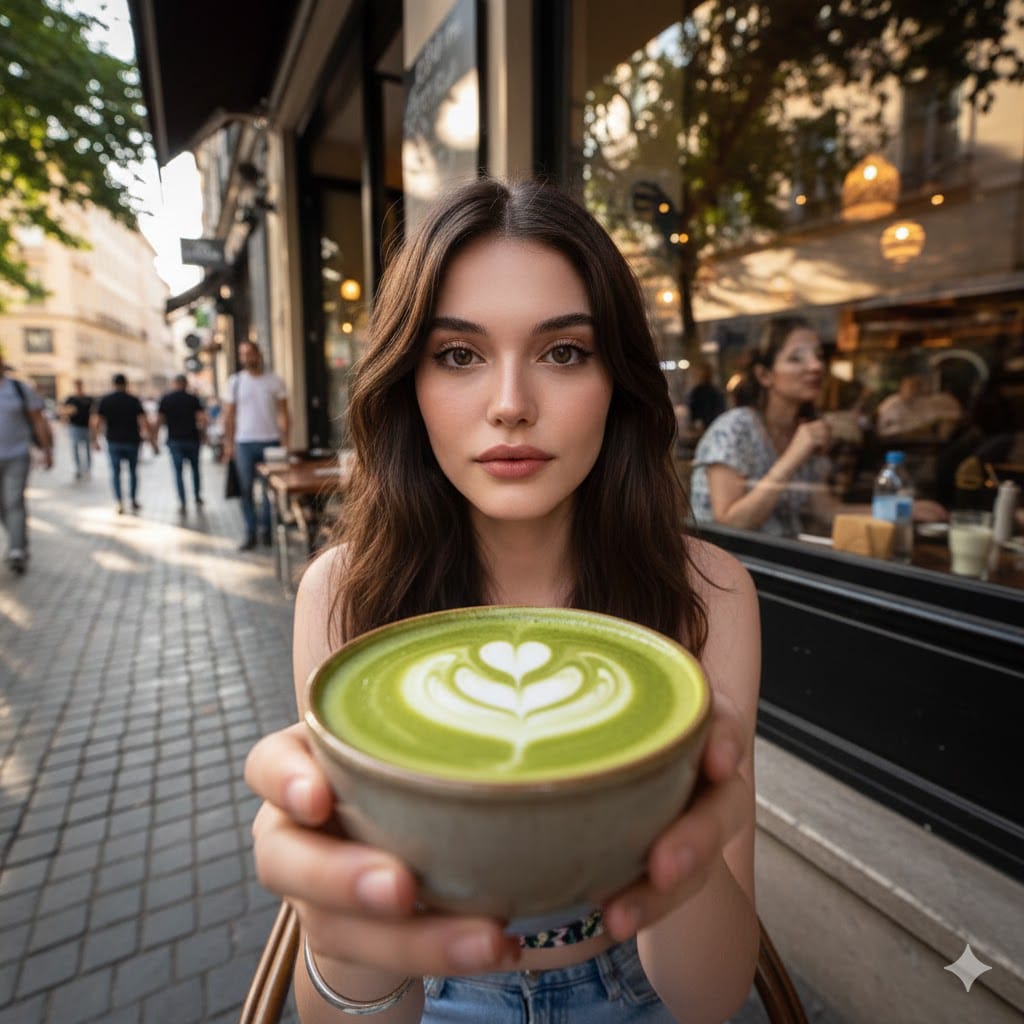
Create a hyper-realistic Wide-angle Street-café POV Photo
How to hyper-realistic wide-angle street-café POV photo featuring the attached face.
0
Times used
0
Likes
Mastering AI Photography: The Hyper-realistic Wide-angle Street-café POV Style
In the rapidly evolving world of AI image generation, some styles capture the imagination more than others. They don’t just create a picture; they tell a story. The "Hyper-realistic Wide-angle Street-café POV Photo" is one such style. It’s a powerful blend of technology and artistry that puts you, quite literally, in the picture. This isn’t about creating a fantasy avatar; it’s about crafting a believable, atmospheric moment in time, with you at the center. With Orno's advanced AI image editor, mastering this evocative style is not only possible but incredibly intuitive.
This detailed guide will explore every facet of this incredible AI generation style. We'll break down why it's so compelling, how you can use Orno to create your own stunning images, and provide pro-level tips to take your creations from great to breathtaking. Get ready to become the protagonist of your own AI-generated narrative.
Why This AI Photo Style is a Creative Game-Changer
What makes the "Street-café POV" so popular? It's the masterful combination of four key elements, each contributing to a final image that feels both personal and cinematic. Orno's AI has been finely tuned to understand and execute each component with stunning accuracy.
The Allure of Hyper-realism
The term "hyper-realistic" is the cornerstone of this style. It instructs the AI to move beyond digital illustration and into the realm of photorealism. This means paying meticulous attention to details that our brains subconsciously recognize as authentic: the subtle reflections in a coffee cup, the texture of a wooden table, the soft focus of the background (bokeh), and the natural play of light and shadow. Orno’s AI model excels at rendering these nuances, creating an image that could easily be mistaken for a high-end photograph taken with a professional DSLR camera.
The Immersive Wide-angle Perspective
A wide-angle lens in traditional photography captures a broader field of view, pulling the viewer into the scene and creating a sense of depth and scale. This AI style replicates that effect perfectly. It doesn't just show you sitting at a café; it shows the environment around you. You see the bustling street outside, the other patrons, the architecture, and the sky. This contextual richness makes the image feel like a genuine slice of life, a captured moment within a larger world. It transforms a simple portrait into an environmental narrative.
The Intimacy of the POV (Point-of-View)
This is where the storytelling truly shines. By specifying "POV," you are telling the AI to frame the shot from a first-person perspective. The image is often composed as if you are looking down at your hands, your coffee, or a book on the table, with the wider world unfolding before you. This creates an immediate, intimate connection for the viewer. It’s not just a picture *of* someone at a café; it’s the experience *of being* at a café. This personal perspective is incredibly engaging and makes the final image highly relatable and shareable.
Your Face, Your Story: Seamless Integration with Orno
The final, magical ingredient is you. The prompt’s instruction, "featuring the attached face," is where Orno’s powerful personalization technology comes into play. Unlike generic AI image generators that create random faces, Orno allows you to upload a photo of yourself. Our sophisticated AI then intelligently and seamlessly integrates your likeness into the hyper-realistic scene. It considers the lighting, shadows, and angle of the generated image to ensure your face looks natural and belongs in the environment. This elevates the final product from a cool AI creation to a personalized piece of digital art.
How to Create Your Street-Café POV Masterpiece with Orno: A Step-by-Step Guide
Ready to create your own stunning café scene? Orno makes the process simple and rewarding. Follow these steps to generate your personalized, hyper-realistic photo.
- Step 1: Select the "Wide-angle Street-café POV Photo" Style. Simply navigate to our style library on this page and click on this specific style. This pre-loads the foundational prompt, optimized for the best results.
- Step 2: Upload Your Source Photo. This is the most crucial step for personalization. Choose a clear, well-lit photo of your face. For best results, use a forward-facing image where your features are not obscured by shadows, hair, or accessories like sunglasses. The higher the quality of your input photo, the more accurate the final face integration will be.
- Step 3: Fine-Tune the Prompt (Optional). The base prompt is fantastic, but the real power of Orno lies in customization. You can add or modify keywords to change the scene. Want a rainy day? Add "rainy day, reflections on window." Prefer a Parisian vibe? Add "Parisian café, Eiffel Tower in distant background." We'll cover more pro tips on this below.
- Step 4: Generate and Iterate. Click the generate button and let Orno’s AI work its magic. In seconds, you’ll have your image. Don't love the first result? Don't worry! AI generation involves an element of chance. You can generate again to get a different composition, or you can tweak your prompt further and re-generate to get closer to your perfect vision.
Deconstructing the Prompt: A Deep Dive for AI Artists
Understanding the "why" behind a prompt is key to becoming a true AI artist. Let's break down the core components of the "Create a hyper-realistic Wide-angle Street-café POV Photo featuring the attached face" prompt.
- "Hyper-realistic": This keyword tells the AI model to prioritize realism over artistic stylization. It cues the AI to access its vast training data on real-world photography, focusing on realistic lighting, textures, and physics.
- "Wide-angle": This influences the "virtual camera lens" the AI uses. It results in a composition with a deep depth of field, slight edge distortion typical of wide lenses, and a greater sense of environmental context.
- "Street-café": This sets the entire scene. The AI draws upon concepts associated with this phrase: coffee cups, tables, chairs, windows, cityscapes, pedestrians, and a specific "cozy but public" ambiance. -
- "POV Photo": This dictates the camera angle and composition. The AI understands this as a first-person view, often resulting in shots that include hands, a lap, or objects immediately in front of the "viewer." -
- "Featuring the attached face": This is Orno's unique command. It triggers our proprietary face integration model, which analyzes your uploaded photo and masterfully blends it into the generated scene, ensuring continuity of lighting and style.
Pro Tips for Unforgettable AI Café Scenes
Once you've mastered the basics, use these advanced techniques to create truly unique and captivating images.
- Play with Lighting and Time of Day: Add terms like "golden hour," "dusk," "neon lights at night," or "bright morning sun" to dramatically change the mood of your image.
- Specify the Location: Go beyond a generic "street-café." Try "charming Parisian bistro," "bustling Tokyo coffee shop," "rustic Italian espresso bar," or "sleek New York City café." This will influence the architecture, fashion, and overall vibe.
- Add Objects and Activities: Make the scene your own. Include keywords like "with a steaming latte," "reading a vintage book," "typing on a glowing laptop," or "sketching in a notebook."
- Infuse Emotion and Weather: Add emotional or atmospheric keywords to deepen the story. Try "contemplative rainy day," "joyful and sunny," "pensive mood," or "wind blowing through hair."
Frequently Asked Questions (FAQ)
What kind of photo of myself should I upload for the best results?
For optimal face integration, upload a high-resolution photo where your face is clearly visible and well-lit from the front. Avoid photos with heavy shadows, sunglasses, hats obscuring your forehead, or extreme angles. A simple, passport-style photo or a clear selfie works best.
Can I change the setting from a street café to something else using this style as a base?
Absolutely! The principles of this prompt are highly transferable. You can keep the "hyper-realistic wide-angle POV" structure and simply change "street-café" to something else, like "mountain overlook," "beachside balcony," or "driver's seat of a vintage car." This prompt is a fantastic template for creating any kind of immersive, first-person AI photo.
Why does my AI-generated image sometimes look a little "off"?
AI image generation is a complex process. Occasionally, an AI can struggle with details like hands or the way an object is being held. If you're not satisfied with a result, the best course of action is to generate again. Each generation creates a unique output, and a second or third attempt often resolves minor imperfections. You can also slightly tweak your prompt, as adding more detail can help guide the AI more effectively.
How is Orno's face integration better than other AI face swap tools?
Many basic face swap tools simply cut and paste a face onto another image, often resulting in mismatched lighting, skin tones, and angles. Orno’s AI is far more advanced. It's not a simple "face swap." Our technology rebuilds the facial structure within the new scene, intelligently adapting it to the generated image's unique lighting, color grading, and perspective. This creates a truly seamless and believable integration that other tools can't match.
Your Story, Reimagined by AI
The "Hyper-realistic Wide-angle Street-café POV Photo" style is more than just a clever prompt; it's a gateway to personalized digital storytelling. It empowers you to create stunning, believable images that place you at the heart of any narrative you can imagine. With Orno's powerful and easy-to-use AI image editor, you have all the tools you need to explore this creative frontier.
So go ahead. Upload your photo, customize your scene, and generate your masterpiece. The perfect coffee, the perfect view, and the perfect moment are just a click away. Create your story with Orno today.
Use This Prompt
Transform your images with AI
Save this prompt as its own icon for one-tap access.