
Create a hyper-realistic Portrait Of The Beautiful
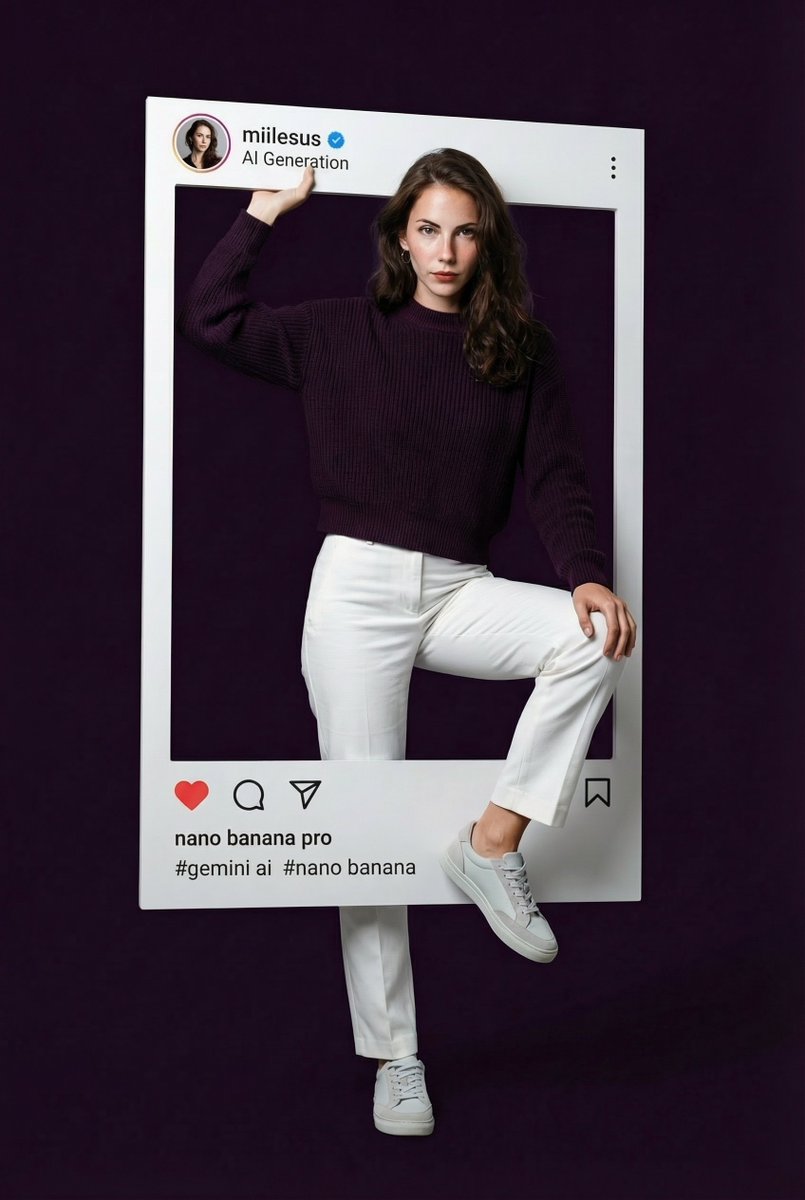
How to hyper-realistic portrait of the beautiful woman from the reference photo, presented inside an oversized Instagram post frame that dominates the scene.
0
Times used
0
Likes
Unlock Breathtaking Realism: Mastering the "Create a hyper-realistic Portrait Of The Beautiful" AI Style
In the ever-evolving world of digital art and content creation, the quest for the perfect image is relentless. We seek visuals that not only capture attention but also evoke emotion, tell a story, and resonate with viewers on a deeper level. Imagine being able to conjure a portrait so lifelike it blurs the lines between a photograph and a digital masterpiece, a face so captivating it feels like you could reach out and touch it. This is no longer a fantasy; it's a reality powered by advanced AI. Welcome to the definitive guide on the "Create a hyper-realistic Portrait Of The Beautiful" style, a revolutionary prompt available exclusively in the Orno AI image editor.
This unique style is more than just a text-to-image command; it's a gateway to creating stunning, photorealistic portraits that are perfect for social media, digital marketing, artistic projects, and personal keepsakes. In this comprehensive article, we'll dive deep into what makes this style so powerful, how you can leverage it to its full potential using Orno, and the secrets to achieving unparalleled realism in your AI-generated art.
Unveiling the "Create a hyper-realistic Portrait Of The Beautiful" Style
At its core, this Orno style is a sophisticated prompt engineered to produce a very specific and highly desirable outcome: a flawless, hyper-realistic portrait of a beautiful woman, elegantly framed within a modern, oversized Instagram post. Let's break down the key components that make this AI art style a game-changer.
What Exactly is This AI Art Style?
This style is a fusion of several powerful concepts meticulously combined into one seamless prompt. Understanding these elements is the first step to mastering the output:
- Hyper-realistic Portrait: This goes beyond simple photorealism. Hyperrealism in AI art focuses on exaggerating reality to create a more defined and detailed image. It involves rendering intricate details like skin pores, individual hair strands, subtle light reflections in the eyes, and realistic fabric textures. Orno's AI model has been fine-tuned to excel at this, producing portraits that are crisp, detailed, and incredibly lifelike.
- Of The Beautiful Woman: The prompt is intentionally guided to generate subjects that align with universally recognized standards of beauty and aesthetics. This ensures the output is consistently high-quality and visually appealing, making it ideal for marketing, advertising, and social media content where a strong visual hook is essential.
- From The Reference Photo: This is where Orno's powerful image-to-image capabilities shine. The style is designed to take a reference photograph—whether it's your own picture, a model's photo, or a concept image—and use it as a structural and compositional base, transforming it into a new, hyper-realistic work of art.
- Oversized Instagram Post Frame: This clever, meta-element adds a contemporary and stylish touch. It presents the final portrait within a clean, dominant Instagram UI frame, making the image instantly ready for social media campaigns or as a creative element in web design. It's a design choice that is both artistic and practical.
The Irresistible Allure of Hyperrealism in AI Portraits
Why has hyperrealism become a holy grail for AI image generation? The answer lies in its ability to suspend disbelief. A hyper-realistic AI portrait commands attention because it feels authentic and tangible. Our brains are wired to connect with human faces, and when an AI-generated face achieves this level of detail and emotional depth, it creates a powerful connection with the viewer. With Orno's advanced rendering engine, you can generate images that capture the subtle play of light and shadow, the delicate texture of skin, and the expressive depth in a subject's eyes, resulting in a truly captivating masterpiece.
Why This Style is a Game-Changer for Creators
The "Create a hyper-realistic Portrait Of The Beautiful" style isn't just a novelty; it's a powerful tool with practical applications across various fields. Its unique combination of artistry and modern framing makes it incredibly versatile.
For Social Media Influencers and Marketers
In the crowded space of social media, standing out is everything. This Orno style allows you to generate an endless supply of scroll-stopping, high-quality visuals. Imagine creating unique brand ambassadors, A/B testing different aesthetics for a campaign, or generating stunning product backdrops without the high cost of photoshoots. The integrated Instagram frame makes the content feel native to the platform, boosting engagement and creating a cohesive, professional look for your feed.
For Artists and Designers
Creative block can be a major hurdle. This AI style serves as an incredible source of inspiration. Use it to generate character concepts for video games or novels, create reference images for digital paintings, or quickly mock up visual ideas for clients. Orno empowers artists to accelerate their workflow, allowing them to focus more on the creative aspects of their projects by automating the time-consuming process of creating realistic human subjects from scratch.
For Personal Use and Fun
The creative power of AI isn't just for professionals. Transform your favorite selfies into breathtaking digital portraits. Create a unique and stunning avatar for your online profiles that truly represents you. Design personalized gifts for friends and family, like a custom portrait framed in a modern style. With Orno, exploring your creativity is easy, intuitive, and incredibly rewarding.
How to Master the "Create a hyper-realistic Portrait Of The Beautiful" Style with Orno
Orno makes using this sophisticated style incredibly simple. Follow these steps to start creating your own photorealistic masterpieces in minutes.
Step 1: Select Your Reference Photo
The quality of your final image often starts with the quality of your input. For the best results with Orno's image-to-image technology, choose a reference photo that is well-lit, in focus, and shows clear facial features. While Orno's AI is powerful enough to work with a variety of images, a high-resolution source photo will provide the generator with more data to create a more detailed and accurate transformation.
Step 2: Craft and Customize the Prompt
While the base style provides a fantastic starting point, the true magic happens when you add your own creative modifiers. Orno’s text-to-image engine allows for detailed customization. Try adding descriptive phrases to the end of the prompt to guide the AI. For example:
- "...with long, flowing auburn hair, smiling gently, cinematic lighting."
- "...wearing elegant silver jewelry, set against a blurred Parisian cafe background."
- "...with striking blue eyes, looking directly at the camera, golden hour."
Experimentation is key! The more descriptive you are, the more unique your final portrait will be.
Step 3: Leverage Orno's Advanced Settings
For those who want even greater control, Orno offers a suite of advanced settings. Use the "Negative Prompt" field to specify what you don't want to see, such as "cartoon, 3d render, blurry, deformed hands." You can also adjust the "Guidance Scale" to control how closely the AI adheres to your prompt, allowing you to find the perfect balance between your instructions and the AI's creative freedom.
Step 4: Refine and Upscale Your Masterpiece
Once you've generated a portrait you love, Orno's built-in AI photo editor tools make it easy to perfect it. Use the AI upscaler to increase the resolution for high-quality printing or detailed viewing. Make small adjustments to color, contrast, and brightness to make your portrait pop. This final step ensures your creation is polished and ready for any application.
Frequently Asked Questions (FAQ)
Here are answers to some common questions about using this hyper-realistic portrait style in Orno.
Can I use my own photo with this style?
Absolutely! This style is specifically designed to work with reference photos. Simply upload your photo to Orno, select the "Create a hyper-realistic Portrait Of The Beautiful" style, and watch as our AI transforms your image into a stunning, new artistic creation while preserving key features and composition.
What makes Orno's AI portraits hyper-realistic?
Orno utilizes a state-of-the-art diffusion model that has been extensively trained on a massive dataset of high-resolution photographs and digital art. Our model understands the complex physics of light, the subtle textures of human skin, and the nuances of facial expressions. This, combined with our carefully engineered prompts, allows the AI to generate images with a level of detail and realism that is second to none.
Is it difficult to use the "Create a hyper-realistic Portrait Of The Beautiful" prompt?
Not at all. We've designed it as a one-click style within Orno, making it accessible to everyone, regardless of their experience with AI image generation. For beginners, it's a simple way to get amazing results instantly. For advanced users, it serves as a powerful, fully customizable foundation for more complex creations.
Can I remove the Instagram frame from the generated image?
Yes. You have a few options. You can add "no frame, no UI" to your prompt to instruct the AI to generate the portrait without the Instagram element. Alternatively, once the image is generated, you can easily use Orno's built-in cropping tool to remove the frame and focus solely on the hyper-realistic portrait.
Are the AI images I create with Orno free to use?
The usage rights for images you create depend on your Orno subscription plan. Our paid plans typically include full commercial rights, allowing you to use your stunning AI-generated portraits for marketing, product sales, and any other commercial projects. Please refer to our terms of service for detailed information.
The "Create a hyper-realistic Portrait Of The Beautiful" style is more than just a prompt—it's your key to unlocking a new level of creative expression. It combines breathtaking realism with contemporary design, all powered by an intuitive and robust AI engine. Ready to stop dreaming and start creating?
Try the "Create a hyper-realistic Portrait Of The Beautiful" style in Orno today and bring your vision to life!
Use This Prompt
Transform your images with AI
Save this prompt as its own icon for one-tap access.