
Create a highly Stylized 3D Caricature
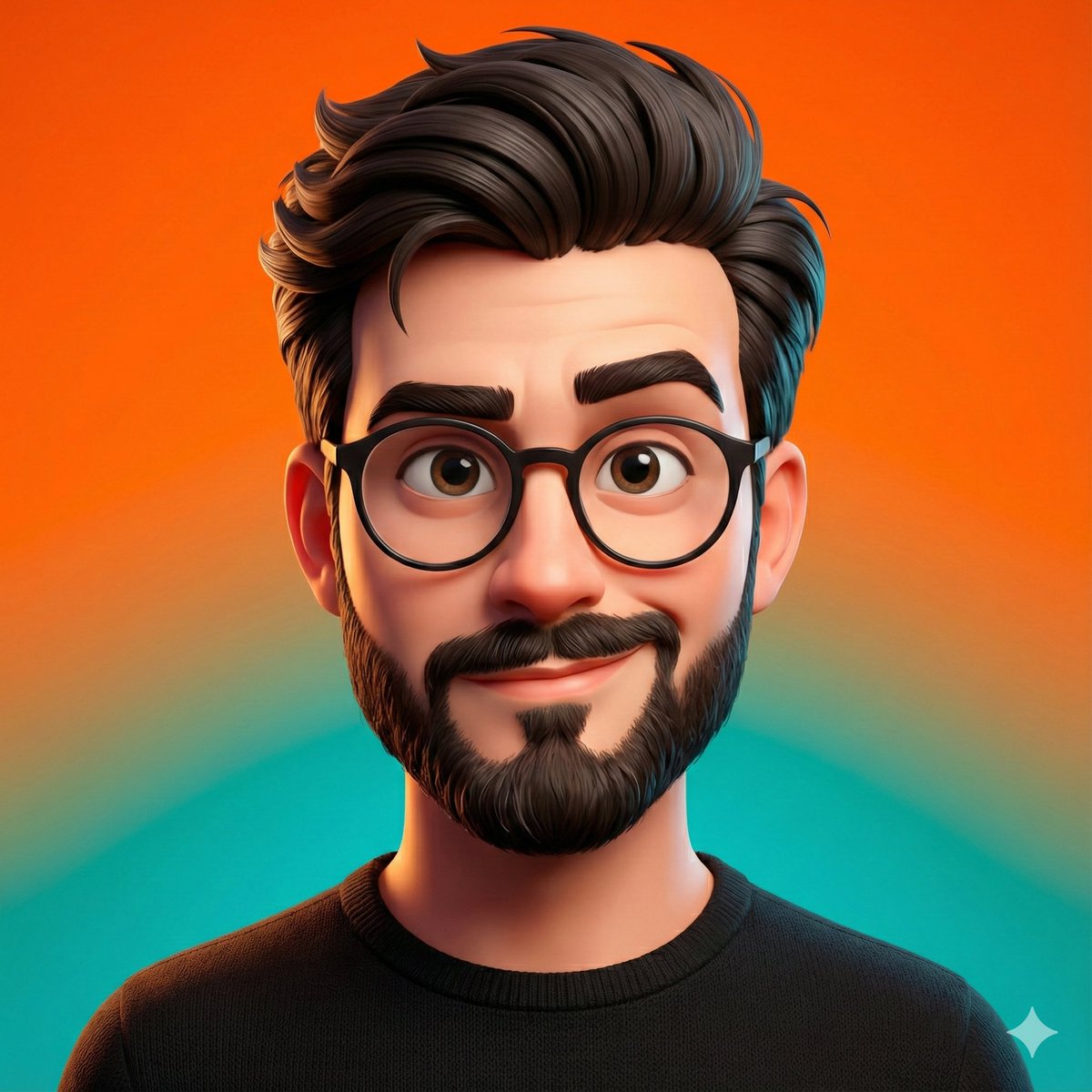
How to a highly stylized 3D caricature of the person in the uploaded image, with expressive facial features, and playful exaggeration.
0
Times used
0
Likes
Transform Your Photos into a Stylized 3D Caricature Masterpiece with Orno
Have you ever wondered what you’d look like as a character in a modern animated movie? Imagine a version of yourself with playfully exaggerated features, sparkling eyes full of expression, and a charming, three-dimensional quality that seems to pop right off the screen. For years, this kind of art was the exclusive domain of highly skilled 3D artists and animators. Today, thanks to the power of artificial intelligence, Orno puts this incredible creative tool directly into your hands with our "Stylized 3D Caricature" style.
This isn't just another photo filter that adds a simple "cartoon" effect. Orno’s advanced AI delves deep into the unique characteristics of your face, intelligently reinterpreting your portrait into a completely new, high-quality piece of digital art. It’s a fun, fast, and remarkably sophisticated way to create a unique profile picture, a personalized gift, or simply see yourself in a wonderfully whimsical new light. Get ready to unlock a new dimension of your digital identity.
What Exactly is a "Stylized 3D Caricature"?
To fully appreciate the magic of this AI style, let's break down the term. It’s a fusion of three distinct artistic concepts, all powered by cutting-edge AI technology.
The Art of Caricature: Personality and Exaggeration
A caricature is more than just a funny drawing; it's an artistic interpretation that captures a person's essence by exaggerating their most recognizable features. A traditional artist might emphasize a warm smile, inquisitive eyes, or a strong jawline. Orno's AI has been trained on countless examples of character art to do the same. It intelligently identifies what makes your face unique and amplifies those traits with a sense of "playful exaggeration," ensuring the final image is not just a likeness, but a character filled with personality.
The Depth of 3D: Beyond Flat Images
This is where our style truly separates itself from simple cartoonizers. The "3D" aspect means the AI generates an image that has a tangible sense of depth, volume, and form. Think about the characters from studios like Pixar or DreamWorks. They have realistic lighting that casts soft shadows, textures that make their skin and hair look believable, and a structure that makes them feel like they could exist in a three-dimensional space. Orno’s AI mimics these complex principles, rendering your caricature with sophisticated lighting and shading that gives it a professional, high-end feel.
The Beauty of "Stylized": A Unique Artistic Vision
"Stylized" means that the final result is a deliberate artistic choice, not just a literal translation. Instead of a photorealistic 3D model, the AI applies a specific, cohesive art style. This involves simplifying complex details, using a harmonious color palette, and shaping features in a way that is aesthetically pleasing and full of character. The result is a bespoke piece of art that is both instantly recognizable as you and as a creation in its own right.
How to Create Your 3D Caricature with Orno: A Simple Guide
You don't need to be a 3D artist or a tech wizard to create a stunning caricature. We've designed Orno to be intuitive and fun. Just follow these simple steps to transform your photo in seconds.
Step 1: Select the Perfect Source Photo
The quality of your input photo directly influences the magic the AI can perform. For the best results with the "Stylized 3D Caricature" generator, choose a photo where:
- Your face is clearly visible and well-lit. Natural, soft lighting works better than harsh shadows or direct flash.
- You are looking at or near the camera. This helps the AI capture your facial features accurately.
- Your expression is clear. A smile, a smirk, or even a neutral expression provides a great starting point for the AI to add its expressive touch.
- The background is relatively simple. A busy background can sometimes distract the AI, so a plain or blurred backdrop is ideal.
Step 2: Upload Your Image to the Orno Editor
Navigate to the Orno AI image editor tool. You'll find a straightforward "Upload Image" button. Click it, select your chosen photo from your device, and let our platform load it into the editor. The process is quick, secure, and seamless.
Step 3: Choose the "Create a highly Stylized 3D Caricature" Style
Once your image is uploaded, you'll see our library of incredible AI styles. Browse through the options until you find the prompt: "Create a highly Stylized 3D Caricature of the person in the uploaded image, with expressive facial features, and playful exaggeration." Select this style to tell our AI exactly what kind of artistic transformation you're looking for.
Step 4: Generate and Marvel at the Result
Click the "Generate" button and watch the magic happen! In a matter of seconds, Orno's powerful algorithms will analyze your facial structure, identify key features, and render a completely new 3D-style caricature based on your photo. You can even run the generation multiple times to see different subtle variations and interpretations by the AI.
Step 5: Download and Share Your Digital Persona
Once you have a caricature you love, simply click the "Download" button to save the high-resolution image to your device. It’s now yours to share! Update your social media profiles, send it to friends, or use it in one of the many creative ways listed below.
Unleash Your Creativity: 7 Fun Ways to Use Your AI Caricature
Your new 3D caricature is more than just a cool image; it's a versatile digital asset. Here are some ideas to get you started:
- A Standout Social Media Avatar: Ditch the boring headshot. A stylized 3D caricature is guaranteed to make your profile on Instagram, X (Twitter), Facebook, LinkedIn, or Discord memorable and unique.
- Personalized Gifts for Loved Ones: Print your caricature on a coffee mug, t-shirt, phone case, or poster. It makes for an unforgettable and truly personal gift for birthdays, holidays, or anniversaries.
- Custom Gaming Profiles: Level up your presence on Twitch, Steam, and other gaming platforms with a custom avatar that reflects your personality.
- Engaging Business Branding: If you're a freelancer, streamer, or content creator, a caricature can be a friendly and approachable element for your website's "About Me" page, business cards, or email signature.
- Unique Stickers and Emojis: Create a pack of custom reaction stickers for WhatsApp, Telegram, or Slack. Imagine reacting to messages with your own exaggerated expressions!
- Contact Photos for Friends and Family: Assign custom caricature images to contacts in your phone for a fun and visual way to see who's calling.
- Creative Art Projects: Use your caricature as a base for digital paintings, website banners, or even as a fun character in a personal comic strip.
Why Orno's AI is the Superior Choice for Caricatures
Creating this style of art used to require either expensive software or hiring a professional artist. Orno's AI-powered approach offers a powerful alternative with distinct advantages.
Speed and Accessibility vs. Manual Artists
A professional 3D artist could spend hours, or even days, modeling, texturing, and lighting a single custom caricature. While the results are beautiful, this process is time-consuming and costly. Orno delivers a comparably stunning result in under a minute, making high-quality character art accessible to everyone, regardless of budget or timeline.
True Transformation vs. Basic Photo Filters
Many "cartoonizer" apps are simply filters that apply a superficial effect over your existing photo. Orno's AI is fundamentally different. It doesn't just edit your photo; it deconstructs it and then reconstructs it from the ground up in a new artistic style. It creates new geometry, simulates realistic lighting, and makes artistic decisions about color and form, resulting in a genuine piece of generative art that is far more sophisticated than any simple filter.
Frequently Asked Questions (FAQ)
What kind of photo works best for the 3D Caricature style?
A clear, front-facing headshot with good, even lighting will produce the best results. A high-resolution image allows the AI to better analyze your facial details, but even standard smartphone photos work great. Try to avoid photos with hats, sunglasses, or heavy shadows covering the face.
Is the generated caricature a real 3D model that I can rotate?
The final output is a high-quality 2D image (like a JPG or PNG). The AI works by creating a 3D-style render, mimicking the techniques used in 3D animation to achieve its sense of depth, lighting, and texture. It is not a rotatable 3D file like an OBJ or FBX, but a perfectly framed final portrait.
How does Orno's AI know which features to exaggerate?
Our AI has been trained on a massive dataset of images, including portraits, character designs, and 3D art. It learns to recognize common facial structures and identify features that are most prominent in an individual—like the shape of the eyes, the curve of a smile, or the bridge of the nose. It then applies the principles of caricature art to amplify these features in a stylized and appealing way.
How is this different from a "cartoonizer" tool?
While both create non-realistic versions of a photo, a typical cartoonizer often simplifies colors and lines, creating a flat, 2D comic-book look. Orno's "Stylized 3D Caricature" style is far more advanced, focusing on creating volume, realistic lighting, shadows, and textures to give the impression of a three-dimensional character model.
Is my uploaded photo safe with Orno?
Absolutely. We prioritize your privacy and security. Your photos are used solely for the purpose of generating your AI artwork and are handled in accordance with our strict privacy policy. They are not used for any other purpose without your explicit consent.
Ready to see yourself as a work of 3D art? The process is simple, the results are stunning, and the possibilities are endless. Upload your photo and try Orno's Stylized 3D Caricature generator today!
Use This Prompt
Transform your images with AI
Save this prompt as its own icon for one-tap access.