
Create a highly Detailed Full-body Portrait
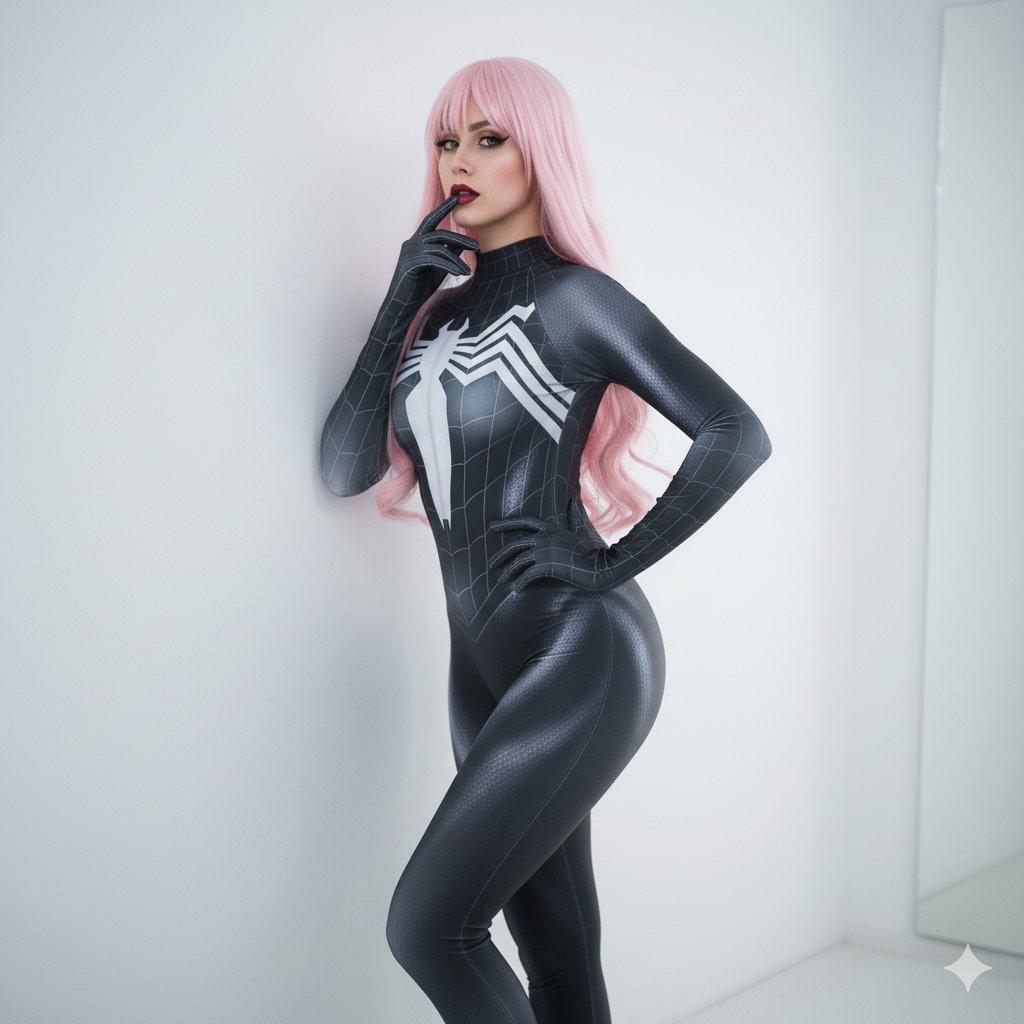
How to {highly detailed} {full-body portrait} of a {female cosplayer} wearing a {cosmic black and silver symbiote suit} with a {subtle embossed spider-web...
0
Times used
0
Likes
Unlocking a Universe of Characters: The Art of the "Highly Detailed Full--Body Portrait"
In the electrifying world of AI image generation, a single, well-crafted prompt is the key that unlocks infinite visual possibilities. It's the difference between a vague, generic image and a breathtaking masterpiece that feels plucked directly from your imagination. For artists, designers, writers, and dreamers, one of the most powerful keys in this new creative kingdom is the "Highly Detailed Full-Body Portrait." This isn't just a command; it's a declaration of intent, telling the AI that you demand quality, completeness, and intricacy. With Orno's advanced text-to-image engine, mastering this style allows you to generate complete, ready-to-use characters from head to toe, dripping with the exact details you envision.
Imagine creating a full character concept sheet with a single sentence. Picture designing a unique cosplay outfit without ever picking up a needle and thread. This is the power you wield with Orno. Let's dive deep into this transformative AI art style, using a stunning example to guide our way: creating a "highly detailed full-body portrait of a female cosplayer wearing a cosmic black and silver symbiote suit with a subtle embossed spider-web pattern."
Why "Highly Detailed Full-Body Portrait" is a Game-Changer for AI Art
Before we deconstruct our cosmic symbiote prompt, it's crucial to understand why this foundational phrase is so effective. In the language of AI, clarity and specificity are paramount. AI models like the one powering Orno process millions of images, and these keywords act as powerful filters and instructions.
- "Full-Body Portrait": This is your most important instruction for composition. Without it, the AI might default to a more common headshot or a mid-shot. By explicitly stating "full-body," you instruct the AI to render the entire figure, from the character's hairstyle down to the design of their boots. This is essential for character design, fashion concepts, and creating dynamic scenes.
- "Highly Detailed": This is your quality command. It tells the Orno AI to focus its computational power on rendering the finer points: the texture of fabric, the glint of light on metal, the subtle patterns in an outfit, and the intricate features of a face. It pushes the generation from a simple sketch to a hyperrealistic or beautifully stylized piece of art. This keyword is the secret to creating images that look professional and awe-inspiring.
Together, these terms form a powerful base for any character creation. They ensure you get the complete picture at the highest possible quality, setting the stage for all the creative details you're about to add.
Deconstructing the Perfect Prompt: A Symbiote Suit Case Study
Let's break down our example prompt piece by piece to see how each element contributes to the final, stunning result. This process of prompt engineering is a creative skill in itself, and Orno is the perfect canvas to practice on.
The Core Command: "Highly Detailed Full-Body Portrait"
As we've established, this is our foundation. It sets the scene, defines the shot, and demands quality. Every great character prompt should begin with this or a similar directive to ensure you get the results you want from the very first generation.
Defining the Subject: "of a female cosplayer"
Here, we define who our character is. The word "cosplayer" is more evocative than simply "woman." It hints at a specific context—a convention, a photoshoot, a fan's passion. This can influence the AI's interpretation of the pose (perhaps more dynamic and confident), the setting, and even the materials of the suit, making them look like real-world fabrics. You could easily swap this out to completely change the character's archetype:
- "of a stoic male knight"
- "of an ethereal elven sorceress"
- "of a grizzled cyborg detective"
- "of a cheerful goblin merchant"
Crafting the Attire: "wearing a cosmic black and silver symbiote suit"
This is where the visual magic truly begins. We're not just saying "a suit"; we're painting a picture with words. "Symbiote suit" gives the AI a strong concept to work with, drawing on a rich cultural understanding of this type of design—organic, sleek, and powerful. But we don't stop there. The adjectives are crucial:
- Cosmic: This word injects a sense of wonder and otherworldliness. It might prompt the AI to add subtle nebulae patterns, a star-like glitter, or a bioluminescent glow to the suit.
- Black and Silver: Defining the color palette is one of the most important steps for aesthetic control. This ensures a sleek, high-contrast design that is both intimidating and elegant.
This part of the prompt is your design studio. Think of the incredible costumes you can generate with Orno by simply changing the descriptors: "ornate golden plate armor," "tattered post-apocalyptic leather gear," "glowing neon-trimmed cyberpunk jacket."
The Devil is in the Details: "with a subtle embossed spider-web pattern"
This final clause is what separates a good image from a masterpiece. It's the "highly detailed" command put into specific action. An AI might generate a plain black and silver suit, but by adding "with a subtle embossed spider-web pattern," you are directing its attention to a specific, intricate texture. "Subtle" prevents the pattern from being overwhelming, and "embossed" describes how the pattern should interact with light, giving it a 3D, tactile quality. These tiny details are what make an AI-generated image feel real and professionally designed. Consider other finishing touches you could add:
- "...with glowing blue energy veins pulsing through it."
- "...with intricate silver filigree on the gauntlets."
- "...with battle-worn scratches and dents."
- "...made from an iridescent, shifting material."
Mastering Full-Body AI Portraits with Orno: Pro Tips & Tricks
Ready to become a prompt engineering expert with Orno? Here are some advanced tips to take your full-body character generations to the next level.
- Specify a Pose and Action: Don't leave posing to chance. Add dynamic verbs and descriptions. Instead of just "a knight," try "a knight kneeling and pledging an oath" or "a knight in a dynamic fighting stance, sword raised."
- Control the Camera and Lighting: Think like a director. Add cinematic terms to your prompt. "Low-angle shot" can make a character seem powerful and imposing. "Cinematic lighting" or "dramatic rim lighting" can create a moody, high-impact scene.
- Build a World Around Them: A character doesn't exist in a void. Ground them in a location by describing the background. For our symbiote cosplayer, we could add "standing on a rain-slicked neon city street at night" to create a complete, story-rich image.
- Use a Rich Vocabulary: The more descriptive your words, the better the AI can interpret your vision. Instead of "nice," try "elegant," "majestic," or "luxurious." Instead of "rough," try "weathered," "coarse," or "pitted." This linguistic palette is your primary tool.
- Iterate and Refine: Your first generation is just the starting point. Use Orno's intuitive interface to run the prompt again, or tweak a single word to see how it changes the outcome. This iterative process is the heart of AI art creation. You can also use negative prompts to exclude elements you don't want, like "blurry, poorly drawn, extra limbs."
Frequently Asked Questions (FAQ)
How do I make sure Orno generates a full-body image and not a close-up?
The key is to be explicit. Always include phrases like "full-body portrait," "full-length shot," or "standing character" in your prompt. You can also use Orno's negative prompt feature to add terms like "close-up, portrait, cropped, headshot" to further guide the AI away from those compositions.
Can I create male characters or non-human creatures with this prompt style?
Absolutely! The structure is completely versatile. Simply change the subject description to whatever you can imagine. For example: "Create a highly detailed full-body portrait of a powerful male warlock" or "Create a highly detailed full-body portrait of a reptilian alien ambassador in ceremonial robes." The possibilities are truly endless.
What makes the "highly detailed" command so effective in Orno's AI?
The "highly detailed" command acts as a trigger for the AI model to prioritize fidelity and complexity. It allocates more processing steps to rendering fine textures, intricate patterns, and the interplay of light and shadow. This results in a final image that is sharper, richer, and more photorealistic or artistically refined, depending on the other style words you use.
My AI-generated hands can sometimes look strange. Is there a way to fix this?
This is a known challenge across all AI image generation models, but it's constantly improving. To get better results in Orno, try being specific about what the hands are doing (e.g., "holding a glowing orb," "resting on a sword hilt"). Additionally, use the negative prompt feature to list common issues like "malformed hands, extra fingers, fused fingers, deformed." Iterating and re-rolling the generation often yields a better result as the AI tries different approaches.
Is the Orno AI image editor free to use?
Yes! You can get started and create your first stunning, highly detailed full-body portraits with Orno for free. Sign up today to explore our powerful features, experiment with prompts, and bring your most imaginative characters to vibrant life. Your next masterpiece is just a sentence away.
Use This Prompt
Transform your images with AI
Save this prompt as its own icon for one-tap access.