
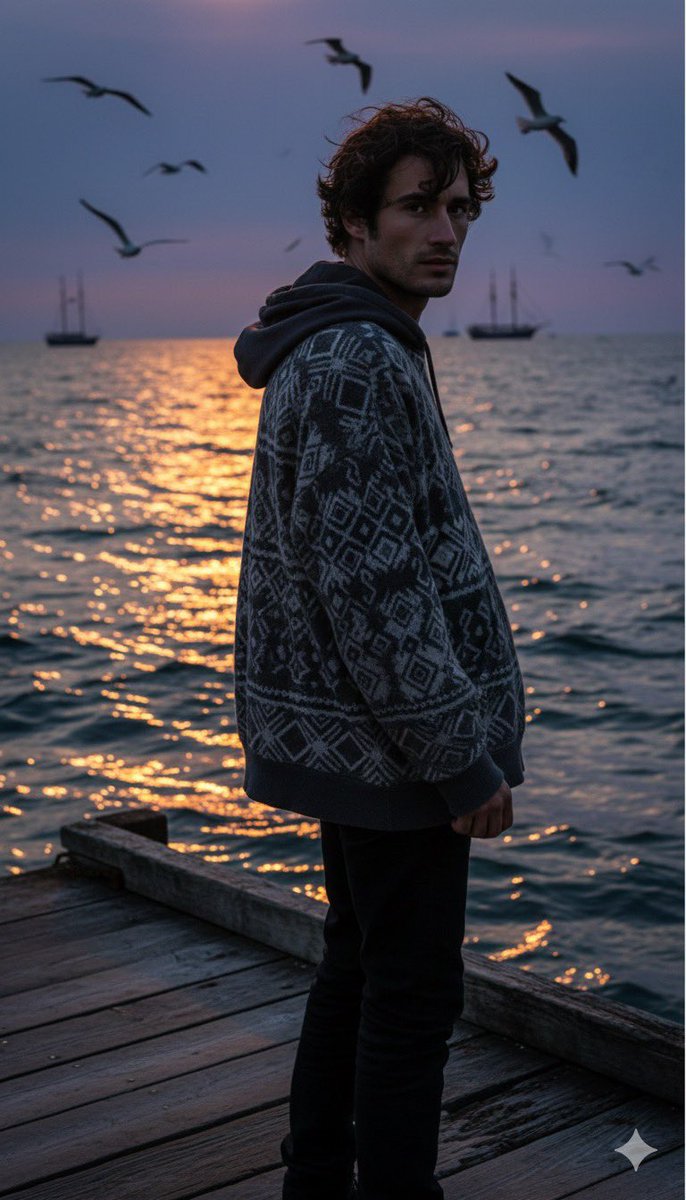
Create a high-resolution 8K Full-length Portrait
How to a high-resolution 8K full-length portrait of an attractive man [reference face in the photo] with dark, messy/wind-swept hair.
0
Times used
0
Likes
Unlocking Photorealism: A Deep Dive into the "High-Resolution 8K Full-Length Portrait" Style
In the rapidly evolving world of artificial intelligence, the quest for perfect digital realism is a constant pursuit. Artists, designers, marketers, and hobbyists alike are no longer content with grainy, abstract AI creations. The demand is for clarity, detail, and lifelike quality that blurs the line between the digital and the real. This is where the power of specific, high-intent prompting comes into play, and one of the most transformative styles available in Orno's AI image editor is the "Create a high-resolution 8K Full-length Portrait."
Gone are the days of awkwardly cropped AI images or portraits that lack the fine details that make a face unique. This advanced style is engineered to overcome common AI challenges, such as generating complete, well-proportioned figures and rendering images in breathtaking detail. This article will guide you through mastering this style, understanding its components, and leveraging Orno's unique features to create stunning, professional-grade portraits that truly stand out.
What Exactly is the "High-Resolution 8K Full-Length Portrait" Style?
Let's break down this powerful prompt into its core components to understand why it delivers such exceptional results. It’s not just a string of words; it’s a precise set of instructions for our advanced AI model, ensuring you get the quality and composition you envision.
- Full-Length Portrait: This specifies the composition. Unlike a headshot or a medium shot, a full-length (or full-body) portrait captures the subject from head to toe. This is crucial for fashion concepts, character design, and creating dynamic scenes where the subject's entire presence, including their attire and pose, is important. Many AI generators struggle with this, often producing distorted limbs or unnatural proportions. Orno's model is specifically trained to handle human anatomy with greater accuracy, making it a reliable full body AI generator.
- High-Resolution: This instruction tells the AI to prioritize detail, sharpness, and clarity over speed or abstraction. It focuses the model on creating clean lines, realistic textures (like skin, hair, and fabric), and a polished, professional finish.
- 8K: This is the technical specification for ultimate quality. An 8K image boasts a resolution of approximately 7680 x 4320 pixels. This immense pixel density means your final creation will be incredibly sharp, detailed, and suitable for large-format printing, professional portfolios, and high-end digital displays where every pixel matters.
By combining these three elements, you are instructing the Orno AI to generate not just a picture, but a masterpiece of digital art defined by its completeness, clarity, and unparalleled detail.
Why 8K Resolution is a Game-Changer in AI Image Generation
Many online AI image tools generate images at standard resolutions like 1024x1024 or slightly higher. While this is fine for social media icons or quick concepts, it falls short for professional use. Generating images natively at or upscaling to 8K resolution with Orno provides a significant competitive advantage.
The Tangible Benefits of 8K
Imagine generating a portrait of a character for your fantasy novel. In standard definition, the intricate embroidery on their cloak might be a blur. In 8K, you can see every single thread. The subtle glint in their eye, the texture of their leather boots, the individual strands of wind-swept hair—all are rendered with stunning fidelity. This level of detail is essential for:
- Professional Printing: Create posters, book covers, and canvas prints that remain crisp and clear, with no pixelation.
- Digital Portfolios: Showcase your work to clients or employers with images that scream quality and professionalism.
- Commercial Use: Generate unique, high-quality stock photos or marketing assets that can be cropped, zoomed, and manipulated without losing integrity.
- Future-Proofing Your Art: As display technologies improve, your 8K images will continue to look spectacular on next-generation screens and devices.
Orno's commitment to providing high-resolution AI generation places it a cut above other tools, empowering you to create assets that meet the highest standards of quality.
Mastering the Full-Length Portrait with Orno's AI
Creating a perfect full-body portrait with AI requires more than just high resolution; it demands an AI that understands anatomy, proportion, and context. Orno's advanced algorithms are fine-tuned to reduce common AI flaws like malformed hands or disproportionate limbs, giving you more consistent and realistic results.
Deconstructing the Perfect Prompt: A Case Study
Let's analyze the sample prompt to see how each part contributes to the final image: "Create a high-resolution 8K full-length portrait of an attractive man [reference face in the photo] with dark, messy/wind-swept hair."
a high-resolution 8K full-length portrait: This sets the foundation for quality and framing, as we've discussed.of an attractive man: This defines the subject's gender and general aesthetic. You can be more specific, like "a rugged man in his 40s" or "a young, androgynous man."[reference face in the photo]: This is where Orno’s magic truly shines. This command activates our powerful AI face swap technology, allowing you to upload a photo and seamlessly integrate that specific face onto the generated body. We'll explore this more in the next section.with dark, messy/wind-swept hair: These are the stylistic details that bring the character to life. The more descriptive you are, the more unique your result will be. This detail adds a sense of motion and a natural, candid feel to the portrait.
Tips for Customizing Your Masterpiece
The base prompt is just a starting point. To truly make the image your own, layer in more descriptive details. Think like a director setting a scene. Here are elements to consider adding to your prompt:
- Attire: Instead of leaving it to chance, specify the clothing. Try "wearing a sleek, black leather jacket and dark jeans" or "dressed in a flowing, ethereal white gown."
- Setting/Background: Where is your subject? Describe the environment to add context and mood. For example, "standing on a rain-slicked cyberpunk street at night," "in a lush, enchanted forest with dappled sunlight," or "against a simple, grey studio backdrop."
- Lighting: Lighting is key to mood. Use terms like "dramatic film noir lighting with harsh shadows," "soft, warm golden hour light," or "lit by the blue glow of a neon sign."
- Pose and Action: Give your subject something to do. "Confidently walking towards the camera," "leaning casually against a vintage car," or "sitting on a throne, looking pensively into the distance."
- Artistic Style: While the goal is often photorealism, you can guide the style. Add keywords like "photorealistic," "cinematic shot," "Vogue magazine photoshoot style," or even "in the style of an oil painting."
The Orno Advantage: Create AI Portraits From Your Photo
The single most powerful feature highlighted in our sample prompt is the ability to create an AI portrait from a photo. Orno’s sophisticated face integration technology sets it apart as a premier AI portrait generator. By uploading a clear picture of a face, you can generate endless scenarios, outfits, and styles featuring that exact person.
This isn't a simple copy-paste. Our AI analyzes the facial features, structure, and lighting from your reference photo and intelligently blends it into the new, generated scene. This ensures the head matches the body's angle, lighting, and overall aesthetic, creating a cohesive and believable final image.
This opens up a universe of possibilities:
- Personalized Avatars: See yourself as a knight, an astronaut, or a character from your favorite movie.
- Virtual Try-ons: Visualize how different fashion styles or hairstyles might look on you.
- Professional Headshots: Turn a well-lit selfie into a range of professional corporate headshots in different outfits and settings, saving you time and money.
- Consistent Characters: For writers and game developers, this feature is invaluable for creating consistent character art across multiple scenes and poses.
Step-by-Step: Your First 8K Portrait in Orno
Ready to bring your vision to life? Creating your first masterpiece with Orno is incredibly straightforward. Follow these simple steps:
- Navigate to Orno: Open the Orno AI Image Editor in your browser.
- Upload Your Reference Face: Look for the image upload option. Select a clear, well-lit photo of the face you want to use. Front-facing photos work best.
- Craft Your Prompt: Start with the base style: "High-resolution 8K full-length portrait..." Then, add all the descriptive details we discussed—clothing, setting, lighting, and pose.
- Generate: Hit the "Generate" button and let Orno's powerful AI work its magic. In moments, you'll have a stunning, high-quality image ready.
- Review and Refine: Don't love the first result? Tweak your prompt slightly—change the lighting, adjust the pose—and generate again. You can create multiple variations until you find the perfect one.
Frequently Asked Questions (FAQ)
Can I really use my own face in the AI-generated portrait?
Absolutely! This is one of Orno's standout features. By uploading a reference photo, our AI can map your facial features onto the generated model with remarkable accuracy, allowing you to create personalized, photorealistic AI portraits of yourself or anyone else (with their permission, of course).
What does 8K resolution actually mean for my downloaded image?
8K resolution means your image is packed with over 33 million pixels. This translates to incredible detail and sharpness. You can zoom in on the image and see fine textures like fabric weave or skin pores. It's ideal for high-quality printing, professional design work, and displaying on ultra-high-definition screens.
Does Orno have trouble with hands and feet like other AI generators?
While generating perfect hands is one of the toughest challenges in AI art, Orno's models are constantly being improved and are significantly better at rendering realistic anatomy than many other platforms. Our "High-Resolution Full-Length Portrait" style prioritizes anatomical correctness, leading to more natural-looking hands, feet, and overall proportions.
What if I don't need a full-length portrait?
Orno is a versatile tool! While this article focuses on the full-length style, you can easily adjust your prompt for other compositions. Simply change "full-length portrait" to "close-up portrait," "medium shot," or "headshot" to get the framing you desire. We offer a wide range of styles to suit any creative need.
Is it difficult to write a good AI art prompt?
Not at all! It's a skill that's easy to learn and fun to master. Start with a clear and simple description of what you want. As you get more comfortable, begin adding more layers of detail, as outlined in our tips above. The best part about Orno is the ability to quickly iterate and see how small changes in your prompt can dramatically alter the outcome. Experimentation is key!
Ready to move beyond generic AI images and create something truly spectacular? The "High-Resolution 8K Full-Length Portrait" style is your gateway to a new level of quality and personalization. Try Orno's AI Image Editor today and bring your most ambitious creative visions to life in breathtaking detail!
Use This Prompt
Transform your images with AI
Save this prompt as its own icon for one-tap access.