
Create a high-quality
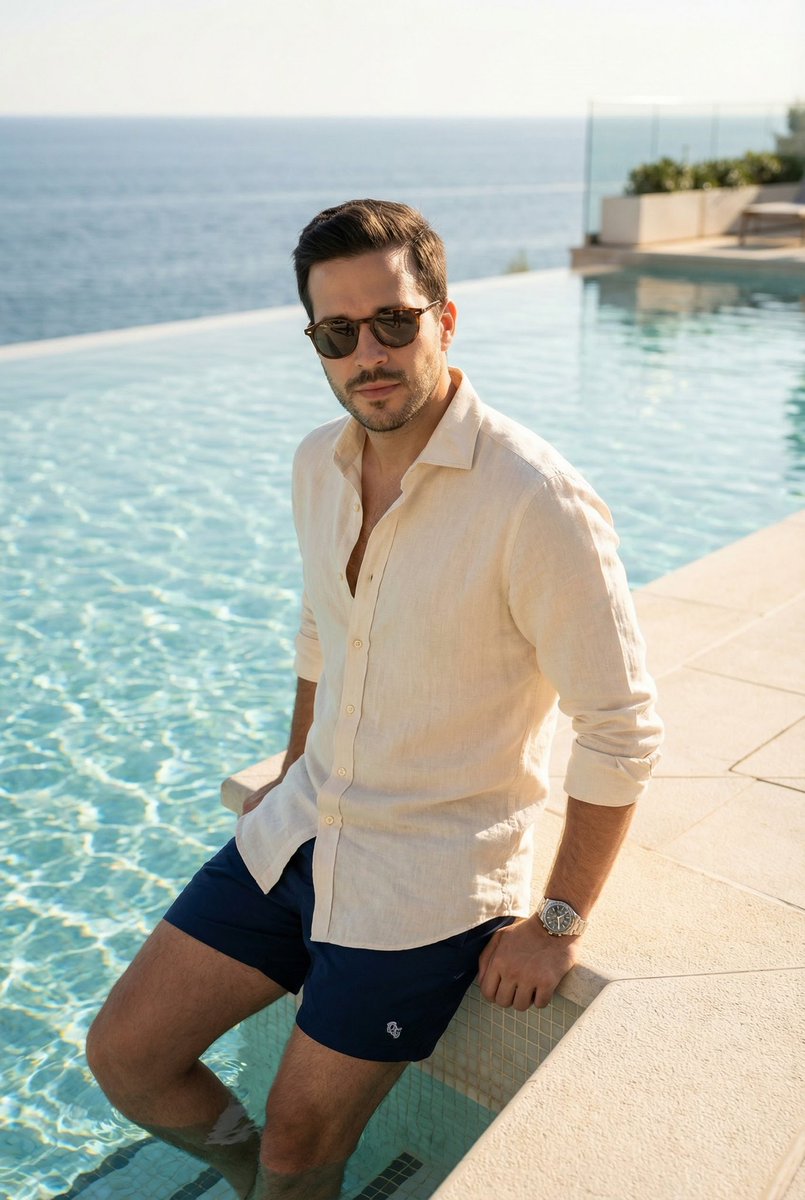
How to high-quality, editorial-style photoshoot of the same man as in the reference, at a luxurious swimming pool during daytime.
0
Times used
0
Likes
Unlock Magazine-Worthy Imagery: A Deep Dive into the "Create a High-Quality" AI Photoshoot Prompt
In the rapidly evolving world of digital content, the demand for stunning, unique, and professional-grade imagery has never been higher. Traditional photoshoots, with their logistical complexities and high costs, are no longer the only way to achieve breathtaking results. Enter the era of AI image generation, a revolutionary technology that puts the power of a world-class photographer in your hands. At Orno, we are at the forefront of this transformation, and one of our most powerful and popular styles is the "Create a high-quality, editorial-style photoshoot" prompt. This isn't just about making a picture; it's about crafting a narrative, evoking a mood, and producing images that rival those in the glossiest magazines. This guide will explore every facet of this incredible prompt, showing you how to leverage Orno's advanced AI to generate photorealistic, luxurious, and consistent imagery in seconds.
What Exactly is an "Editorial-Style Photoshoot" in AI?
Before we dive into the mechanics, let's understand the core concept. An editorial-style photograph is designed to tell a story or illustrate an idea, often accompanying an article in a publication. Unlike sterile stock photos, editorial images are rich with context, emotion, and artistic flair. They feel authentic and aspirational.
When you use this prompt in Orno, you're instructing the AI to think like a creative director. The AI focuses on:
- Storytelling: The image isn’t just of a person at a pool; it’s a moment captured in time. It might suggest a story of relaxation, success, or a luxurious escape.
- Composition: The AI employs principles of professional photography, like the rule of thirds, leading lines, and natural framing, to create a visually compelling shot.
- Authenticity: The goal is to produce an image that looks like it was captured by a real photographer with high-end equipment, not a digitally rendered graphic. This includes realistic lighting, natural poses, and subtle imperfections that add to its believability.
Deconstructing the Prompt: The Pillars of a Perfect AI Image
The magic of the prompt lies in its specific components. Each phrase is a powerful command that guides Orno's AI to produce a masterpiece. Let's break it down.
1. "Create a High-Quality..." - The Foundation of Photorealism
The term "high-quality" is the most crucial starting point. In the context of AI image generation, this goes far beyond simple resolution. It instructs the AI to prioritize detail, clarity, and realism. When Orno processes this command, it focuses on:
- Photorealistic Textures: Notice the realistic shimmer of water, the texture of skin, the fabric of clothing, and the subtle reflections on sunglasses.
- Dynamic Lighting: "High-quality" implies professional lighting. The AI will simulate natural daytime light, creating soft shadows, highlights, and a sense of depth that makes the subject pop.
- Flawless Details: Say goodbye to the common AI artifacts like strange hands or distorted facial features. Orno's engine, guided by this prompt, dedicates more processing power to rendering these complex details accurately.
2. "...of the Same Man as in the Reference" - The Key to Character Consistency
This is where Orno truly shines and solves one of the biggest challenges in AI art: character consistency. Anyone who has experimented with AI image generators knows the frustration of creating a character you love, only to lose them in the next generation. The "same man as in the reference" command activates Orno's sophisticated facial recognition and subject-locking technology.
By uploading a reference photo, you provide the AI with a clear blueprint. Our system analyzes the key facial features, structure, and essence of the person in your photo and ensures that the generated subject is a consistent and recognizable version. This allows you to create a whole series of images of the same person in different settings, outfits, and poses—perfect for building a brand identity, a social media presence, or a personal portfolio.
3. "...at a Luxurious Swimming Pool During Daytime" - Crafting the Perfect Scene
The final part of the prompt sets the stage. Your choice of environment and lighting dictates the mood and narrative of the entire image. Let's look at why this specific setting is so effective.
- "Luxurious Swimming Pool": This phrase conjures images of opulence, relaxation, and aspiration. Orno's AI is trained on a vast dataset of high-end photography, so it understands the visual cues of luxury: infinity edges, minimalist architecture, pristine blue water, and elegant lounge furniture. You can be even more specific with terms like "rooftop infinity pool overlooking a city" or "secluded pool surrounded by a tropical garden."
- "During Daytime": This specifies the lighting, which is the most critical element in photography. "Daytime" gives the AI a broad canvas, often resulting in bright, clean, and vibrant images. For more control, you can refine this with prompts like "during the golden hour," "with harsh midday sun creating strong shadows," or "on a slightly overcast day for soft, diffused light."
How to Create Your Editorial Photoshoot with Orno: A Step-by-Step Guide
Ready to bring your vision to life? Creating your own high-quality, editorial-style photoshoot with Orno is incredibly simple. Follow these steps:
- Access the Orno AI Editor: Navigate to our intuitive AI image generation tool.
- Upload Your Reference Image: Select a clear, well-lit photo of the person you want to feature. This will be the anchor for your character's consistency.
- Enter the Prompt: Start with our powerful base prompt: "Create a high-quality, editorial-style photoshoot of the same man as in the reference, at a luxurious swimming pool during daytime."
- Customize and Iterate: This is where your creativity takes over. Change the subject, location, or activity. Try prompts like:
- "Create a high-quality, editorial-style photoshoot of the same woman as in the reference, walking through a bustling street in Tokyo at night."
- "Create a high-quality, editorial-style photoshoot of the same man as in the reference, working on a laptop in a modern, sunlit cafe."
- Generate and Refine: Click generate and watch Orno work its magic. In seconds, you'll have several options to choose from. You can then use Orno's editing tools to upscale your favorite image for maximum detail or make minor adjustments to perfect the result.
Practical Applications: Who is This Prompt For?
The versatility of this AI image generation style makes it an invaluable tool for a wide range of users:
- Marketers and Brands: Create entire lifestyle advertising campaigns without the cost and time of a physical photoshoot. Generate aspirational content for social media, websites, and email newsletters.
- Social Media Influencers: Craft a stunning, consistent feed with high-end travel and lifestyle images, even if you never leave your home. Place yourself in exotic locations and professional settings with ease.
- Entrepreneurs and Startups: Build a professional brand identity on a budget. Create high-quality headshots and team photos in various settings for your website's "About Us" page.
- Graphic Designers and Artists: Quickly generate realistic human elements for your designs, create storyboards for film or advertising, or produce concept art for client pitches.
- Personal Users: See yourself in a new light! Create professional-looking portraits for your LinkedIn profile or simply have fun generating creative and artistic photos for personal use.
Frequently Asked Questions (FAQ)
Can I use a photo of myself as the reference image?
Absolutely! That's one of the most popular uses of this feature. Upload a clear photo of yourself to star in your very own high-fashion, editorial-style photoshoot generated by Orno.
How does Orno ensure the generated person looks like the reference?
Orno uses a proprietary AI model that performs a detailed analysis of the facial features in your reference photo. It then uses this data as a strong guide during the image generation process, ensuring a high degree of resemblance while seamlessly integrating the subject into the new scene and lighting conditions.
What makes an AI-generated image "editorial-style"?
An "editorial-style" image is defined by its artistic and storytelling qualities. The AI focuses on creating a mood, using professional-grade composition and lighting, and producing a photorealistic image that feels authentic and compelling, much like a photo you'd find in a high-end magazine.
Can I change the location from a swimming pool to something else?
Of course! The location is fully customizable. The "luxurious swimming pool" is just a powerful example. You can replace it with virtually any setting you can imagine, such as "a rustic cabin in the woods," "a futuristic cityscape at dusk," or "a minimalist art gallery." The more descriptive you are, the better the result will be.
Is there a limit to the quality or resolution I can generate with Orno?
Orno is designed to produce high-resolution images suitable for digital use and even print. After generating your image, you can use our built-in AI upscaler to increase its resolution even further, ensuring your final creation is crisp, clear, and packed with detail.
Start Creating with Orno Today!
The "Create a high-quality, editorial-style photoshoot" prompt is more than just a string of words; it's your key to unlocking a new world of creative possibility. It democratizes high-end photography, making it accessible, affordable, and incredibly fast. Whether you're building a brand, growing your online presence, or simply exploring your creative potential, Orno provides the tools you need to produce images that truly stand out. Stop dreaming about the perfect shot and start generating it.
Try Orno's AI image editor today and create your first magazine-worthy photoshoot in just a few clicks!
Use This Prompt
Transform your images with AI
Save this prompt as its own icon for one-tap access.