
Create a faithfully Maintaining All Facial Features
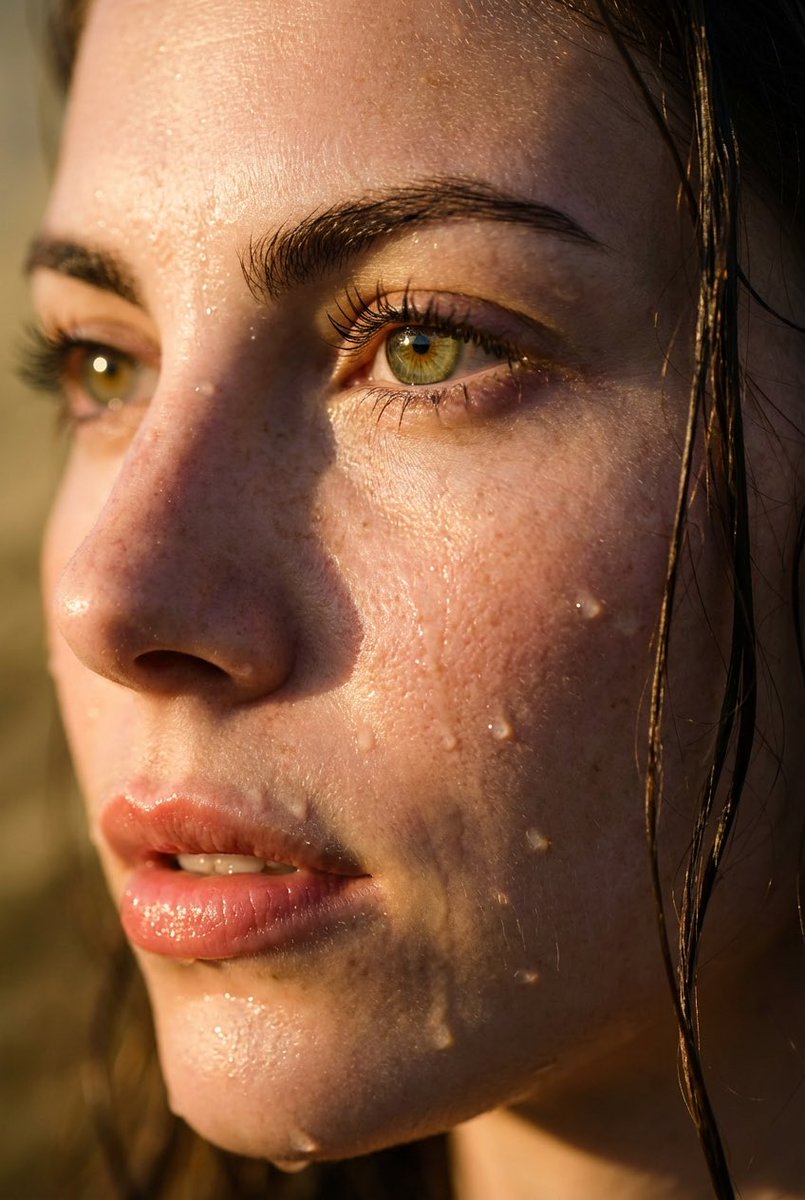
How to faithfully maintaining all facial features from reference photo, thick, well-defined eyebrow, long wet lashes
0
Times used
0
Likes
The Art of a Perfect Likeness: Mastering the "Faithfully Maintaining All Facial Features" Style in AI
In the rapidly evolving world of AI image generation, one of the greatest challenges and most sought-after goals is achieving a true-to-life representation of a specific person. We've all seen AI-generated images that are beautiful but generic, or attempts at portraits that fall into the uncanny valley, creating something that’s close but unsettlingly *not quite right*. The dream has always been to upload a reference photo and have an AI tool create a new, artistic image that flawlessly preserves the subject's unique identity. This is where the groundbreaking "Faithfully Maintaining All Facial Features" style, perfected by Orno, changes the game forever.
This powerful prompt is more than just a command; it's a sophisticated instruction that guides the AI to prioritize identity above all else. It's the key to unlocking stunningly realistic AI portraits, creating consistent characters, and turning your personal photos into works of art without losing the essence of what makes you, you. In this guide, we'll dive deep into this technique, exploring how it works, its creative applications, and how you can use Orno’s advanced AI image editor to achieve results that were once the exclusive domain of professional digital artists.
The Challenge of Facial Fidelity in AI Image Generation
Why is it so difficult for artificial intelligence to perfectly replicate a face? The human face is a landscape of incredible subtlety. The unique curve of a smile, the specific distance between the eyes, the slight asymmetry of an eyebrow—these are the details that define our identity. Early AI models often struggled with this nuance, producing images with common pitfalls:
- Loss of Likeness: The AI might capture the general "idea" of a face—hair color, gender, approximate age—but lose the specific features that make the person recognizable to their friends and family.
- The "Uncanny Valley": This is the unsettling feeling we get when something looks almost human, but minor imperfections create a sense of unease. This can manifest as oddly smooth skin, mismatched eyes, or an unnatural expression.
- Feature Distortion: In more complex scenes or artistic styles, the AI might warp or distort facial features, leading to unintentionally surreal or comical results.
- Generic "AI Face": Some models have a tendency to revert to a sort of averaged, conventionally attractive face, erasing the unique character and imperfections that give a face its personality.
For anyone looking to create a personalized digital avatar, a professional headshot, or a piece of fantasy art featuring their own likeness, these issues have been a major roadblock. Preserving facial identity isn't just a technical challenge; it's the core requirement for creating meaningful, personal AI-generated art.
Unlocking Perfect Likeness: A Deep Dive into the "Faithfully Maintaining All Facial Features" Style
The "Faithfully Maintaining All Facial Features" prompt is a masterclass in AI control. It’s a multi-layered instruction that combines the need for high-fidelity replication with specific, artistic details. Let’s break down its core components to understand its power:
"Faithfully maintaining all facial features from reference photo"
This is the foundational command. By using words like "faithfully" and "maintaining," you are instructing the AI model to treat the facial structure in your uploaded reference photo as a non-negotiable blueprint. The AI's primary goal becomes matching the key facial landmarks: the shape of the eyes, the structure of the nose, the curve of the jawline, and the position of the mouth. Orno's AI is specifically tuned to understand this hierarchy of commands, ensuring that the core identity is locked in before any stylistic elements are applied. This is the secret to moving beyond generic portraits to create a genuine AI self-portrait.
"Thick, well-defined eyebrow"
This part of the prompt demonstrates how you can layer stylistic choices on top of the high-fidelity base. Eyebrows are incredibly expressive and can dramatically change the mood of a portrait. This specific instruction adds a bold, confident, and defined look to the subject. It tells the AI to not just copy the eyebrows, but to enhance them in a specific, artistic way. This is where creative control comes in. You could easily change this to "thin, arched eyebrows" or "natural, feathery eyebrows" to achieve a different aesthetic, all while the underlying facial structure remains perfectly intact.
"Long wet lashes"
Similar to the eyebrow command, this adds another layer of artistic detail and emotion. "Long wet lashes" can evoke a sense of glamour, vulnerability, or drama. It could suggest a scene in the rain, a moment of intense emotion, or simply a high-fashion makeup look. This detail adds texture and a photorealistic quality that elevates the image from a simple rendering to a compelling piece of art. It’s a testament to how you can use specific, descriptive language to control the fine details and narrative of your AI-generated image, all powered by Orno's sophisticated prompt interpretation.
How Orno Perfects High-Fidelity AI Portraits
While the prompt is powerful, the tool you use is just as important. Orno’s AI image editor is engineered for precision and realism, making it the ideal platform for this style. Our advanced models are trained on vast datasets with a special focus on facial anatomy and identity preservation, allowing our AI to deliver unparalleled accuracy.
Here’s how simple it is to create your own photorealistic portrait with Orno:
- Upload a High-Quality Reference Photo: Start with a clear, well-lit picture of yourself or your subject. The better the source image, the more data the AI has to work with, resulting in a more accurate final product.
- Choose Your Style: Select a pre-set style or head to the advanced prompt editor. Here, you can type in "Create a faithfully Maintaining All Facial Features, thick, well-defined eyebrow, long wet lashes" to get started.
- Customize and Add Context: This is where your creativity shines. Add more to the prompt to place your hyper-realistic portrait in any setting. Try adding "cinematic lighting, sitting in a Parisian cafe, detailed background, 8k resolution."
- Generate and Be Amazed: Click the generate button and watch as Orno’s AI meticulously crafts an image that combines the perfect likeness from your photo with the artistic details of your prompt. You can generate multiple variations to find the one you love most.
Tips for Getting the Best Results
- Start with a Great Photo: Use a high-resolution image where the face is clearly visible, facing forward, and in good, even lighting. Avoid photos with heavy shadows, sunglasses, or obstructions.
- Be Specific and Descriptive: The more detail you provide, the better. Instead of just "happy," try "a gentle, knowing smile." Instead of "fantasy," try "elven warrior with intricate silver armor."
- Iterate and Refine: Don’t be afraid to run a few generations. You can take a result you like and refine the prompt further, perhaps by adding "change hair to dark brown" or "add a subtle glow effect."
- Combine with Other Styles: The "Faithfully Maintaining" command is a foundation. Build upon it! Try adding "in the style of an oil painting" or "cyberpunk neon aesthetic" to see how Orno masterfully blends your face into entirely new artistic worlds.
Creative Applications: Beyond the Perfect Selfie
The ability to generate images that look exactly like a specific person opens up a universe of creative possibilities:
- Digital Avatars and Profile Pictures: Craft a unique and consistent online identity for social media, gaming, or professional networks that is an idealized yet instantly recognizable version of you.
- Character Design for Creatives: Writers, game developers, and D&D players can now bring their characters to life with stunning realism. Use a face model or your own face as a base to create consistent character art across different scenes and outfits.
- Personalized Art and Gifts: Transform a cherished photo of a loved one into a breathtaking piece of fantasy, historical, or abstract art. It’s the ultimate personalized gift that retains the person's true likeness.
- AI-Powered Headshots: Need a professional headshot but don't have time for a photoshoot? Use a well-lit selfie to generate a variety of professional-looking headshots with different outfits and backgrounds.
- Conceptual Fashion and Makeup: Virtually try on different makeup styles, hairstyles, or even entire fashion aesthetics without ever leaving your home.
Frequently Asked Questions (FAQ)
What makes Orno better at maintaining facial features than other AI generators?
Orno utilizes a proprietary AI model that has been specifically fine-tuned for high-fidelity facial replication. Unlike general-purpose models, our system places a heavy emphasis on analyzing and preserving the unique biometric data of a reference photo, ensuring the likeness is the top priority before applying any artistic styles.
Can I use a photo with multiple people as a reference?
For the "Faithfully Maintaining All Facial Features" style to work with maximum accuracy, it is highly recommended to use a clear photo of a single person. This allows the AI to focus entirely on one set of facial features without confusion. For group shots, it's best to crop the image to focus on the individual you wish to render.
How can I combine this facial fidelity style with other artistic effects in Orno?
It's incredibly easy! Simply use the "Faithfully Maintaining..." command as the base of your prompt, and then add your desired artistic descriptors. For example: "Faithfully maintaining all facial features from reference photo, portrait of a Jedi knight, holding a blue lightsaber, cinematic lighting, in the style of a sci-fi movie poster." Orno's AI will intelligently merge the two sets of instructions.
Is my data and are my uploaded photos safe with Orno?
Absolutely. We prioritize user privacy and data security above all else. Your uploaded photos are used solely for the purpose of generating your requested images and are handled according to our strict privacy policy. We do not use your personal photos for training our models without your explicit consent.
What's the difference between this and an AI face swap?
AI face swapping typically cuts out a face from one image and "pastes" it onto another, which can often result in mismatched lighting, skin tones, and awkward seams. Orno's method is far more sophisticated. It rebuilds the entire image from scratch, using the facial structure from your reference photo as the core blueprint. This creates a completely cohesive, natural, and integrated image where the subject truly belongs in the new scene.
Can I change my expression while maintaining my features?
Yes! This is one of the most powerful aspects of Orno's AI. After establishing your likeness with the core command, you can add descriptors like "a joyous laugh," "a thoughtful, pensive expression," or "a confident smirk." The AI will intelligently adapt your facial muscles and expression to match the description while keeping your core identity intact.
The era of generic AI faces is over. With Orno's "Faithfully Maintaining All Facial Features" style, you now have the power to place yourself, your friends, and your characters at the center of any universe you can imagine, with a level of realism and accuracy that has to be seen to be believed. Ready to create your stunningly realistic AI portrait? Try Orno today and bring your true self into the world of AI art.
Use This Prompt
Transform your images with AI
Save this prompt as its own icon for one-tap access.