
Create a draw An Anime Poster
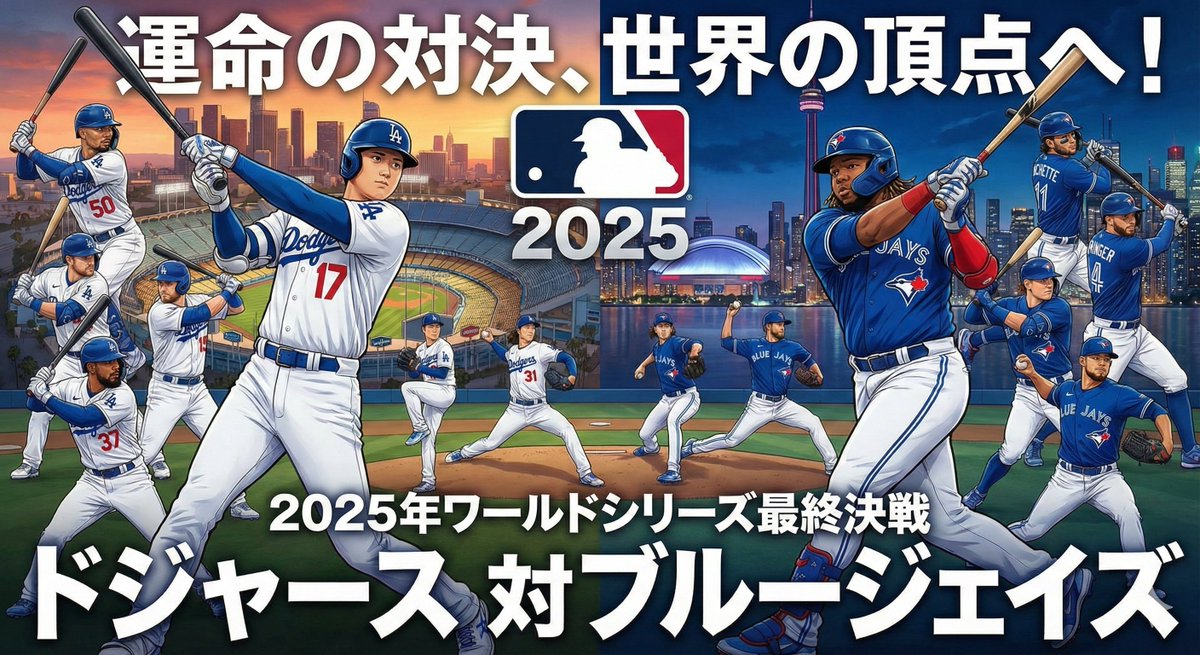
How to draw an anime poster for the 2025 World Series: The Dodgers vs.
0
Times used
0
Likes
Unleash Your Inner Animator: How to Create a Stunning Anime Poster with AI
Imagine the roar of the crowd, the crack of the bat, the intense, silent stare-down between the pitcher on the mound and the batter at the plate. Now, imagine all that drama, passion, and high-stakes action captured in the vibrant, dynamic style of a classic anime movie poster. This isn't a fantasy for skilled artists alone. With the power of AI image generation, specifically Orno's "Create a draw An Anime Poster" style, you can become the director and lead artist of your own epic sports saga. This article will dive deep into how you can use this incredible tool to generate breathtaking anime posters, using the thrilling prompt "How to draw an anime poster for the 2025 World Series: The Dodgers vs." as our prime example.
Whether you're a die-hard baseball fan, an anime enthusiast, or a creative looking for a new way to express your ideas, you're about to discover how text-to-image AI is revolutionizing visual storytelling. Get ready to transform simple words into a masterpiece that captures the heart and soul of a championship showdown.
What Makes the "Create a draw An Anime Poster" Style So Powerful?
Many AI image generators can create anime-style characters, but Orno's "Create a draw An Anime Poster" style is different. It's not just about applying a filter; it's a sophisticated model trained to understand the fundamental components of professional anime poster design. It goes beyond simple character creation to incorporate the core elements that make these posters so compelling.
When you use this style, you're telling the AI to think like a movie poster designer. It considers:
- Dynamic Composition: The AI arranges characters and elements in a way that creates a sense of movement, tension, and scale. Think dramatic low-angle shots of a pitcher, or a split-screen view of two rival players.
- Emotional Expression: This style excels at capturing the intense emotions of the story. You'll see determined glares, triumphant shouts, and the quiet focus of a high-pressure moment, all rendered with classic anime flair.
- Dramatic Lighting and Color: Forget flat, boring colors. This prompt encourages the use of high-contrast lighting, lens flares, atmospheric glows, and a vibrant color palette that makes the scene pop. It understands how light can be used to highlight a hero or cast a menacing shadow on a rival.
- Cinematic Flair: The AI adds elements like motion lines, energy auras, and stylized backgrounds that mimic the look and feel of a professionally produced anime series or film. It knows how to make a static image feel like a frame ripped from an action sequence.
In essence, you're not just asking for "a drawing." You're commissioning a complete, story-driven piece of promotional art, all generated in seconds from your text description.
Step-by-Step Guide: Crafting Your 2025 World Series Anime Poster with Orno
Let's bring our example to life. We want to create an epic poster for a hypothetical 2025 World Series matchup featuring the Dodgers. The beauty of AI art generation with Orno is the iterative process. You start with a base idea and build upon it with descriptive details to guide the AI toward your perfect vision.
Step 1: Start with the Core Prompt
Begin with the foundational instruction. Open the Orno AI image editor and select the "Create a draw An Anime Poster" style. In the text box, enter your base prompt. This tells the AI the subject, context, and desired output.
Example Prompt: Create a draw An Anime Poster for the 2025 World Series. The Dodgers vs. the Yankees.
This is a solid start. The AI now knows the sport (baseball), the event (World Series), the teams, and the art style (anime poster). It will likely generate an image featuring players from both teams in a stylized, confrontational pose.
Step 2: Add Character Details and Archetypes
Now, let's get more specific. Anime is all about compelling characters. Instead of just "a player," describe their role, appearance, and emotion. Think in terms of anime archetypes: the stoic ace, the fiery rookie, the veteran slugger.
Example Prompt Enhancement: Create a draw An Anime Poster for the 2025 World Series. A stoic Dodgers ace pitcher with a blue energy aura around his throwing arm, facing off against a confident, smirking Yankees power hitter clutching a bat.
By adding these details, you're giving the AI narrative direction. It's no longer just two players; it's a clash of personalities and powers, a classic anime trope that the model is trained to recognize and render beautifully.
Step 3: Define the Scene and Atmosphere
Where is this epic showdown taking place? What's the mood? A great poster tells a story through its environment. Describe the background, the time of day, and the weather to add layers of drama.
Example Prompt Enhancement: Create a draw An Anime Poster for the 2025 World Series. A stoic Dodgers ace pitcher with a blue energy aura, facing off against a confident Yankees power hitter. The scene is set under the dramatic, bright lights of a packed stadium at night, with a low-angle perspective making the players look like titans.
Now we've introduced a cinematic perspective ("low-angle") and a specific setting ("bright lights of a packed stadium at night"). This helps the AI build a more complex and visually interesting composition.
Step 4: Inject Action, Color, and Stylistic Flourishes
This is where you can truly art-direct the final piece. Add details about colors, visual effects, and even text elements that are common in anime posters. Use strong, evocative adjectives.
Final Prompt Example: Create a draw An Anime Poster, dynamic and vibrant, for the 2025 World Series. A stoic Dodgers ace pitcher with a glowing blue energy aura around his throwing arm, in mid-pitch. He's facing off against a confident, smirking Yankees power hitter clutching a bat, ready to swing. The perspective is a dramatic low-angle shot under the bright stadium lights at night. The background is a blur of a cheering crowd and the city skyline. Use high contrast, cinematic lighting, and add stylized Japanese text for 'Championship Showdown'.
This final prompt is a rich tapestry of instructions. It defines the characters, their actions, the mood, the lighting, the composition, and even stylistic text elements. Running this through Orno's "Create a draw An Anime Poster" style will yield a highly detailed, professional-looking piece of art that perfectly matches your vision.
Beyond Baseball: Other Ideas for the Anime Poster Style
The power of this AI prompt style isn't limited to sports. Its ability to create dramatic, character-focused visuals makes it perfect for a huge range of subjects. Here are a few ideas to get your creative juices flowing:
- Fantasy Battles:
Create a draw An Anime Poster for a battle between a knight in shining silver armor wielding a flaming sword and a dark sorceress surrounded by purple magical energy, on a crumbling castle bridge. - Sci-Fi Epics:
Create a draw An Anime Poster of a lone starship pilot looking out her cockpit window at a giant, swirling nebula, with enemy fighters closing in. - Video Game Showdowns:
Create a draw An Anime Poster featuring two rival fighting game characters, one wreathed in electricity and the other in fire, clashing in a neon-drenched Tokyo street. - Musical Moments:
Create a draw An Anime Poster of a rock band on stage, the lead singer screaming into a microphone under dramatic spotlights, with the energy of the crowd visible.
Frequently Asked Questions (FAQ)
Do I need to be an artist to use this style?
Absolutely not! That is the core benefit of using Orno. The "Create a draw An Anime Poster" style is designed for everyone. You provide the creative direction through your words (the prompt), and our powerful AI acts as your personal, world-class anime artist. No drawing skills are required, only your imagination.
How specific should my prompts be?
The more specific you are, the closer the result will be to your vision. Start with a simple idea and add more detail in subsequent generations. Experiment with describing colors, emotions, camera angles, and character actions. The process of prompt engineering is a creative journey of discovery!
Can I create posters of real people or players?
While the AI can generate images inspired by real-world figures, it's best to describe them using archetypes and characteristics (e.g., "a veteran shortstop with a determined look") rather than specific names to avoid generating direct likenesses. This gives you more creative freedom and helps you create a unique artistic interpretation.
What makes Orno the best tool for creating AI anime posters?
Orno is optimized for high-quality, stylized image generation. Our "Create a draw An Anime Poster" style is not a generic anime filter but a purpose-built model that understands the nuances of cinematic composition, character emotion, and dramatic storytelling inherent in this art form. Combined with our user-friendly interface, Orno makes it incredibly easy to go from a simple idea to a stunning, finished piece of art in just a few clicks.
Can I use the images I create for my projects?
Yes, the images you generate with Orno can be used for a wide variety of personal and, depending on your plan, commercial projects. You can use them for social media posts, blog headers, personal prints, or as inspiration for your own creative work. We always recommend checking our terms of service for specific usage guidelines.
Your Story, Your Poster, Your AI Artist
The "Create a draw An Anime Poster" style in Orno is more than just an image generator; it's a gateway to visual storytelling. It empowers you to capture the drama of a World Series final, the magic of a fantasy epic, or any other story you can imagine, all in a style that is globally beloved and instantly recognizable. You no longer need to be a passive observer of great art—you can be its creator. Dive into the Orno AI image editor today, select this powerful style, and start bringing your most epic visions to life. The stadium lights are on, the crowd is waiting, and your masterpiece is just a prompt away.
Use This Prompt
Transform your images with AI
Save this prompt as its own icon for one-tap access.