
Create a dimly Lit Retro Gamer Room
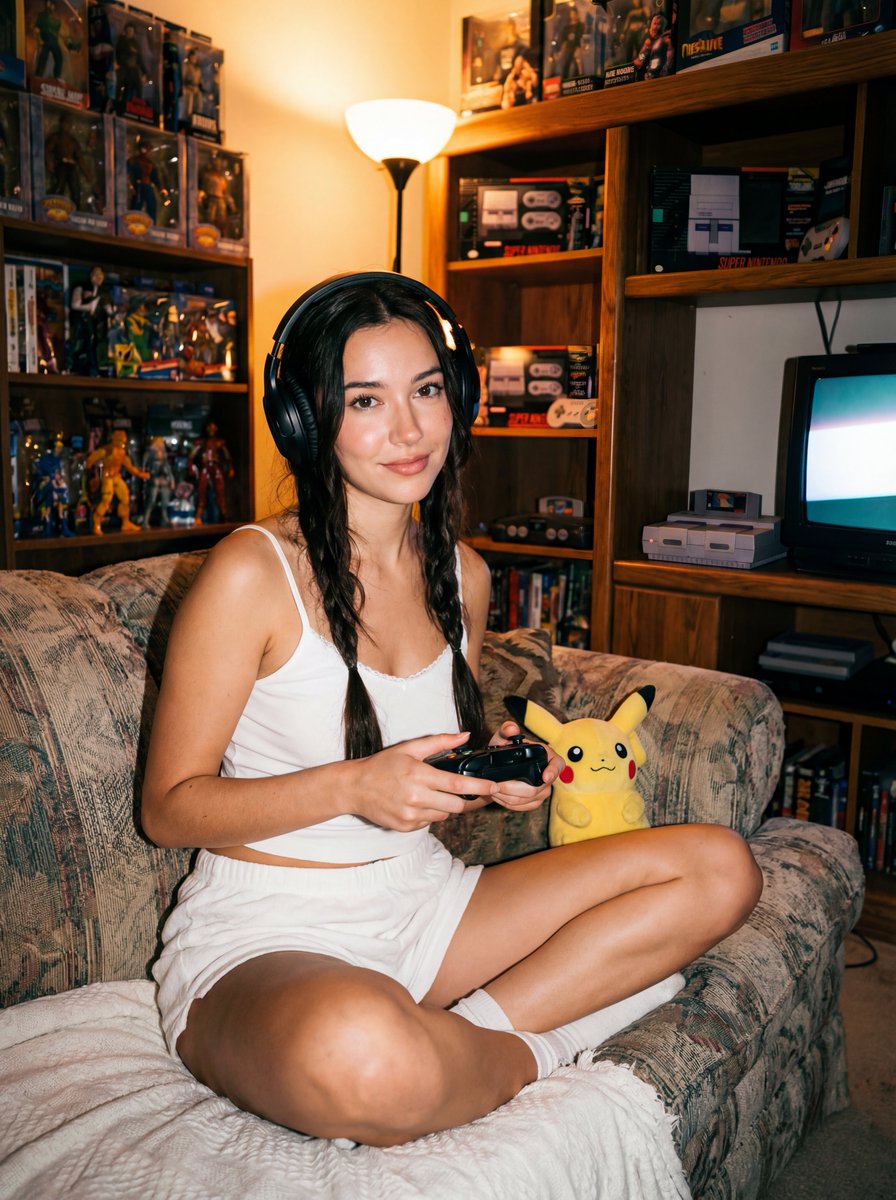
How to a dimly lit retro gamer room filled with densely packed shelves of action figures, boxed toys, handheld consoles, and vintage game cases; warm...
0
Times used
0
Likes
Step Back in Time: Crafting the Perfect AI-Generated Dimly Lit Retro Gamer Room
There's a unique magic to the glow of a CRT monitor in a dark room. It’s a portal to another time—an era of 8-bit heroes, chunky plastic cartridges, and the satisfying click of a joystick. This feeling of nostalgia, a warm, fuzzy memory of countless hours spent in a personal digital sanctuary, is what the "Dimly Lit Retro Gamer Room" AI art style is all about. With an AI image editor like Orno, you can not only revisit that feeling but create stunning, detailed, and infinitely customizable visions of that perfect nostalgic space. This guide will dive deep into the art of generating the ultimate retro gamer room, breaking down the prompt, and showing you how to become a master of AI-powered nostalgia with Orno.
The Undeniable Allure of the Retro Gaming Aesthetic
Why are we so captivated by images of old-school gaming setups? It's more than just an appreciation for vintage tech. A retro gamer room represents a personal haven, a curated museum of joy. It’s the antithesis of modern minimalist design. Instead of clean lines and empty space, it celebrates "organized chaos." Every inch of the scene tells a story.
- A Sense of History: Each console, from the NES to the PlayStation, represents a milestone in technology and culture. Seeing them side-by-side evokes a powerful timeline of personal and collective memories.
- The Thrill of the Collection: The densely packed shelves aren't just clutter; they're a testament to passion. Boxed action figures, rare Japanese import games, and a library of well-loved titles showcase a dedication that resonates with any hobbyist.
- Cozy, Intimate Atmosphere: The "dimly lit" aspect is crucial. It creates an intimate, focused environment. The only light sources are the warm glow from the television, the neon pulse of a sign on the wall, and maybe a lava lamp in the corner. It feels like a secret clubhouse, a world away from the outside world.
This aesthetic has exploded in popularity, influencing everything from music (vaporwave and synthwave) to interior design. Using an AI image generator like Orno allows you to tap into this trend, creating perfect visual representations for mood boards, social media backgrounds, or just for the sheer joy of creation.
Deconstructing the "Dimly Lit Retro Gamer Room" AI Prompt
The beauty of a well-crafted AI prompt is that every word has a purpose. It acts as a set of instructions for the AI, guiding it toward the precise image you have in your mind. Let’s break down the core components of this powerful prompt to understand how Orno interprets it to create such evocative scenes.
The Foundation: "Dimly Lit"
This is the mood-setter. It tells the AI to prioritize atmosphere over bright, clinical lighting. When Orno processes "dimly lit," it understands it needs to use specific lighting techniques. This includes creating soft shadows, emphasizing light sources within the scene (like a TV screen or a neon sign), and using a technique called chiaroscuro—the contrast between light and dark—to add depth and drama. Think less of an overhead light and more of the ambient, colorful glow from the technology itself. This is key to achieving that cozy, late-night gaming session vibe.
The Era: "Retro Gamer"
This is the heart of the theme. The term "Retro" signals a specific time period, primarily the 1980s and 1990s. Orno's AI model has been trained on countless images from this era, allowing it to accurately generate the right technology and accessories. It knows to include:
- Iconic Consoles: Expect to see systems like the Nintendo Entertainment System (NES), Super Nintendo (SNES), Sega Genesis/Mega Drive, and even hints of an N64 or original PlayStation.
- Vintage Displays: Crucially, it will generate bulky CRT (cathode-ray tube) televisions or monitors with their characteristic curved screens, rather than modern flat-screens.
- Classic Peripherals: Joysticks, light guns, clunky controllers with wires, and oversized headphones will often appear, grounding the image in the correct time period.
The Soul of the Room: "Densely Packed Shelves"
This instruction is what gives the image its personality and sense of a lived-in space. It's the difference between a sterile showroom and a true enthusiast's den. By specifying "densely packed shelves," you're telling the AI to fill the environment with a rich tapestry of collectibles. This is where the detail shines through, with Orno generating intricate collections of:
- Action Figures & Boxed Toys: From Star Wars figures still in their packaging to Transformers and G.I. Joe, the AI populates the shelves with the heroes of the era.
- Handheld Consoles: Look closely at the generated images, and you might spot a classic Game Boy, a Sega Game Gear, or an Atari Lynx sitting on a desk or shelf.
- Vintage Game Cases: The AI understands the specific art styles and logos of classic game boxes, creating a believable library of NES cartridges, SNES boxes, and CD jewel cases.
The Feeling: "Warm..."
The prompt description ends with "warm...," and this single word is an emotional direction for the AI. It influences the color palette and the overall feeling of the image. "Warm" tells Orno to lean into golden, orange, and red tones, mimicking the soft glow of incandescent bulbs or the comforting hum of old electronics. It’s the visual equivalent of a fond memory, ensuring the final image feels inviting and nostalgic, not cold or sterile.
How to Master and Customize the Prompt with Orno
The base prompt is fantastic, but the real power of Orno lies in its ability to understand your modifications. You can act as the director of your scene, adding specific details to craft your perfect retro haven. Here’s how to take your AI image generation to the next level.
Step 1: Start with the Core Prompt
Begin by entering the foundational prompt into the Orno image editor: "A dimly lit retro gamer room filled with densely packed shelves of action figures, boxed toys, handheld consoles, and vintage game cases; warm, ambient lighting, nostalgic."
Step 2: Add Modifiers for a Unique Touch
Now, let's customize it. Think about the specific vibe you want and add descriptive keywords. Here are some examples:
- To Specify an Era or Sub-Genre: Add phrases like `80s basement aesthetic`, `early 90s bedroom`, `Japanese otaku room`, or `vaporwave and synthwave influence`. For a sci-fi twist, try adding `cyberpunk neon glow`.
- To Control the Color Palette: Be specific with colors. Use prompts like `glowing with blue and pink neon lights`, `warm orange light from a lava lamp`, or `monochromatic green from a computer terminal`.
- To Include Specific Items: Want to see your favorite console? Add it! Try `a Super Nintendo console on the shag carpet`, `a CRT TV is on, showing an 8-bit video game`, or `posters of classic 80s movies on the wood-paneled walls`.
- To Define the Style and Composition: Control how the image looks. Add keywords like `cozy isometric view`, `wide-angle lens shot`, `pixel art style`, `hyperrealistic`, `cinematic lighting`, or `fisheye perspective`.
Example of a Customized Prompt:
"Cozy isometric view of a dimly lit 90s retro gamer room, shelves densely packed with Super Nintendo game boxes and Star Wars action figures, a glowing CRT TV is on, showing a pixel art game, vaporwave and synthwave influence with blue and pink neon lights, cinematic."
This detailed prompt gives Orno much more information to work with, resulting in a highly specific and unique image that perfectly matches your vision. Don't be afraid to experiment! The joy of AI art is in the discovery.
Creative Uses for Your AI-Generated Gamer Rooms
Once you've generated the perfect image with Orno, what's next? These creations are more than just pretty pictures; they're versatile assets for a wide range of creative projects.
- Inspiration for Real-Life Design: Planning to build your own game room? Use Orno to generate dozens of concepts and mood boards to help you visualize the layout, lighting, and decor.
- Unique Streaming & Video Backgrounds: Tired of boring backgrounds? An AI-generated retro room is the perfect, copyright-free backdrop for your Twitch stream, YouTube videos, or Zoom calls.
- Social Media Content: Create a cohesive, nostalgic aesthetic for your Instagram, Twitter, or TikTok. These images are guaranteed to grab attention and evoke a powerful sense of shared memory.
- Digital Art & Concept Art: Use your generated images as a starting point for a digital painting, a piece of concept art for a game, or as a texture in a larger graphic design project.
- Custom Merchandise & Wall Art: Orno can produce high-resolution images perfect for printing. Create custom posters, mousepads, coffee mugs, or T-shirts featuring your unique AI-generated sanctuary.
Frequently Asked Questions (FAQ)
Can I specify the exact games or consoles in my AI retro gamer room?
Yes, you can! While the AI may not replicate a game's box art perfectly due to copyright, you can guide it by including prompts like "a Nintendo Entertainment System on the floor" or "shelves filled with red-and-black Sega Genesis game cases." The more specific you are, the closer Orno will get to your intended result. The AI excels at capturing the *style* and *feel* of these items.
How do I get a more realistic vs. a more stylized look with Orno?
You can control the artistic style by adding specific keywords to your prompt. For realism, use terms like `photorealistic`, `hyperrealistic`, `8k`, `detailed`, and `cinematic lighting`. For a more stylized look, try `pixel art`, `anime style`, `ghibli inspired`, `watercolor painting`, or `graphic novel illustration`.
What are some good keywords to add for a more cyberpunk or vaporwave retro room?
To infuse a cyberpunk or vaporwave feel, focus on the lighting and color. Add keywords like `neon glow`, `pink and cyan lighting`, `holographic displays`, `futuristic`, `dystopian`, `rainy night outside the window`, and `synthwave aesthetic`. This will combine the retro tech with a futuristic, stylized color palette.
Can I use the images I generate with Orno for commercial purposes?
Yes. The images you create with Orno are yours to use. Our terms of service provide you with the rights to use your generations for both personal and commercial projects, such as for marketing materials, social media content, merchandise, and more. This makes Orno a powerful tool for creators and businesses alike.
Ready to build your own digital sanctuary? The past is just a prompt away. Dive into the Orno AI image editor and start creating your perfect "Dimly Lit Retro Gamer Room" today!
Use This Prompt
Transform your images with AI
Save this prompt as its own icon for one-tap access.