
Create a diminutive Street Musician
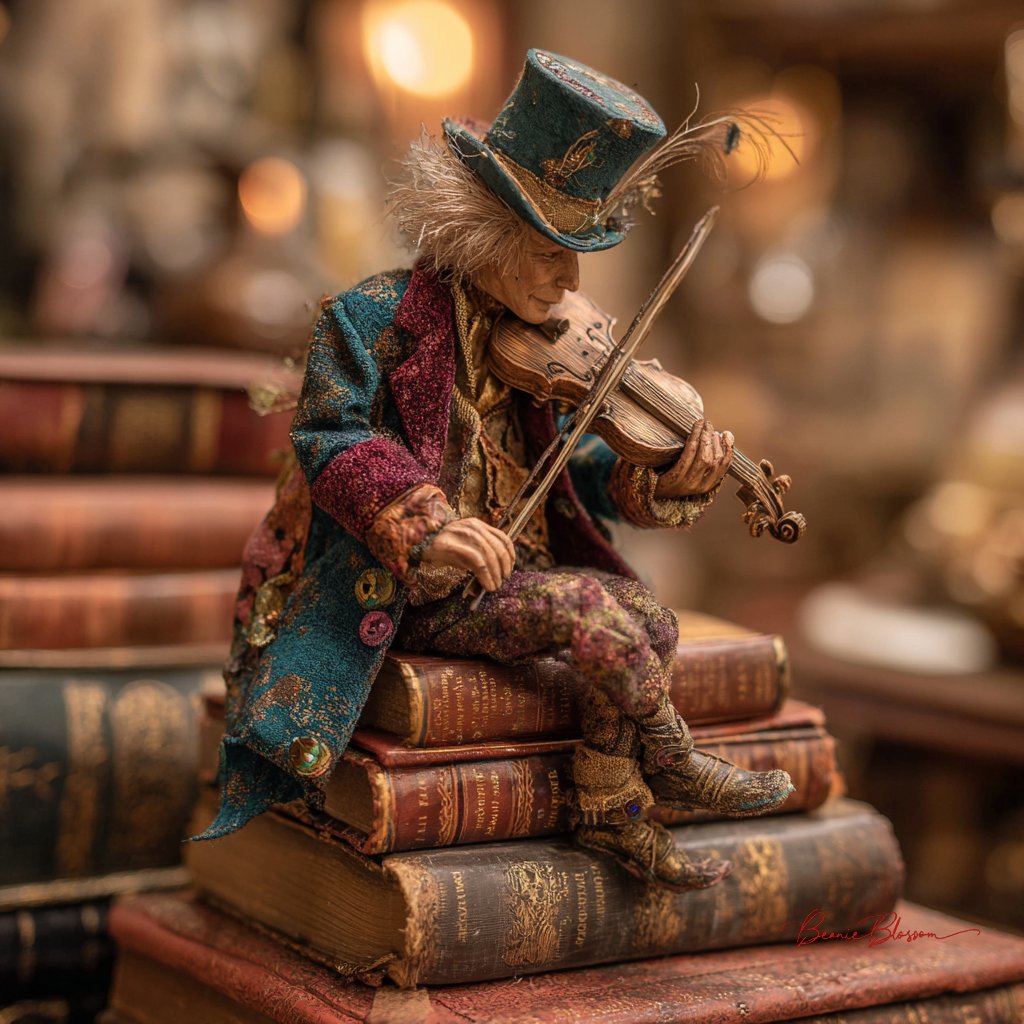
How to a diminutive street musician, no taller than a wine bottle, performing atop a stack of vintage leather-bound books in a cozy Parisian bookshop.
0
Times used
0
Likes
Unlocking a Miniature World: How to Create a Diminutive Street Musician with AI
Imagine a world hidden within our own, a place where the magic of everyday life is magnified. Picture a cozy Parisian bookshop, the air thick with the scent of old paper and leather. Sunlight, golden and dusty, streams through a tall window, illuminating towering shelves. And there, on a stage made of stacked, vintage books, a musician performs. This is no ordinary performer; they are a diminutive street musician, no taller than a wine bottle, their tiny instrument filling the quiet space with an enchanting melody. This isn't a scene from a forgotten fairytale; it's a world you can create in seconds with the power of AI image generation, and Orno is your key to unlocking it.
The "Diminutive Street Musician" prompt is more than just a set of instructions for an AI; it's a gateway to whimsical storytelling. It combines elements of fantasy, realism, and cozy aesthetics to create images that are not only visually stunning but also rich with narrative. In this detailed guide, we'll explore how to master this captivating AI art style using Orno, breaking down the prompt, offering advanced customization tips, and showcasing how you can bring your own miniature marvels to life.
The Anatomy of Whimsy: Deconstructing the "Diminutive Street Musician" Prompt
At its heart, a great AI-generated image starts with a great prompt. The beauty of this particular style lies in its specific, evocative language. Each word plays a crucial role in instructing the AI to build the scene you envision. Let's break down the core components of the base prompt: "A diminutive street musician, no taller than a wine bottle, performing atop a stack of vintage leather-bound books in a cozy Parisian bookshop."
- "A diminutive street musician": This is our subject. "Diminutive" immediately sets the fantastical scale, telling the AI to think small and delicate. "Street musician" provides the character's archetype, suggesting a certain style of dress, a potential instrument, and a sense of raw, public performance.
- "no taller than a wine bottle": This is a brilliant use of a "scale anchor." Instead of just saying "small," providing a real-world object for comparison gives the AI a concrete measurement to work with. This simple phrase dramatically improves the consistency and believability of the character's size.
- "performing atop a stack of vintage leather-bound books": This defines the character's immediate environment and stage. "Vintage leather-bound books" adds texture, history, and a rich color palette of deep browns, reds, and golds. It reinforces the classic, cozy atmosphere.
- "in a cozy Parisian bookshop": This sets the wider scene and establishes the mood. "Cozy" suggests warm lighting, soft shadows, and a feeling of comfort. "Parisian bookshop" conjures specific architectural details, a romantic ambiance, and a sense of timeless intellectual charm.
Together, these elements form a powerful and descriptive prompt that gives the Orno AI image generator a clear and compelling blueprint to build from, resulting in a cohesive and magical image.
Crafting Your Masterpiece: A Step-by-Step Guide to Customization in Orno
The base prompt is a fantastic starting point, but the real magic begins when you start to customize and add your own creative flair. Orno's advanced text-to-image engine is designed to understand nuance, allowing you to tweak every detail of your miniature world. Here’s how you can become the director of your tiny concert.
Fleshing Out Your Musician: From Archetype to Character
Give your musician a unique personality by adding descriptive details. Think about their instrument, clothing, and expression. The more specific you are, the more unique your creation will be.
- Specify the Instrument: Instead of a generic musician, define their craft. Try adding phrases like "...playing a tiny, handcrafted violin," "...with a weathered miniature accordion," or "...strumming a ukulele made from a walnut shell." -
- Detail Their Attire: What is your musician wearing? This can define their era and personality. Experiment with "...wearing a patched tweed jacket and a newsboy cap," "...in a flowing bohemian dress," or "...with a smartly-tailored vest and bow tie."
- Evoke Emotion: An expression can tell a whole story. Add emotional cues like "...with a look of intense concentration," "...singing with joyful abandon," or "...a wistful expression on their face as they play."
Enhancing the Ambiance: Painting the Parisian Bookshop
The setting is just as important as the character. You can transform the mood and visual appeal of the bookshop by adding details about lighting, composition, and background elements.
- Master the Lighting: Lighting is key to mood. Try prompts that include "...with dramatic, cinematic lighting," "...soft, warm light from a nearby reading lamp," or "...god rays streaming through a dusty window, illuminating the scene."
- Populate the Scene: Make the bookshop feel lived-in. Add elements like "...a curious cat watching from a nearby armchair," "...steam rising from a forgotten cup of tea on a table," or "...surrounded by towering, chaotic shelves filled to the brim with books."
- Choose Your Camera Angle: Direct the AI's "camera" to get the perfect shot. Use terms like "macro photo," "close-up shot," "low-angle view looking up at the musician," or "a tilt-shift style photo" to further emphasize the miniature scale.
Defining the Artistic Style with Orno's Modifiers
This is where Orno truly shines. You can combine your descriptive prompt with powerful style modifiers to dictate the final look and feel of your image, transforming it from a simple generation into a piece of art.
- For Photorealism: Append your prompt with keywords like "photorealistic, 8K, sharp focus, detailed skin texture, professional photography." This will push the AI to create an image that looks like it was captured with a real camera.
- For a Painterly Feel: If you prefer a more traditional art style, try adding "oil painting, detailed brushstrokes, impressionistic," or "watercolor illustration, soft washes of color, delicate lines."
- For a Cinematic Look: Create a movie-still-like image with terms like "cinematic lighting, anamorphic lens, film grain, color graded, shot on Arri Alexa."
- For Animated Charm: Evoke the feeling of your favorite animated films by adding "Studio Ghibli style, whimsical, anime illustration," or "Pixar style, 3D render, vibrant colors."
The Power of Narrative: Why This AI Art Style Captivates Us
The "Diminutive Street Musician" prompt resonates so deeply because it excels at micro-storytelling. It’s not just an image; it’s a snapshot of a hidden life, a secret world. The inherent contrast—a tiny, fragile figure creating beautiful art amidst the grand, silent knowledge of countless books—is compelling. It sparks our imagination and invites us to ask questions. Who is this musician? Is this their home? Do the books listen to their songs? This is the true power of advanced AI image generation with tools like Orno: it’s not just about creating pictures, but about kindling stories.
From Imagination to Application: Using Your Miniature Creations
These enchanting images have a wide range of practical uses for creators, marketers, and enthusiasts alike.
- Content Creators: Elevate your blog posts, social media feeds, or YouTube thumbnails with completely unique and royalty-free visuals that stop the scroll and capture attention.
- Marketers: Design unforgettable ad campaigns or branding materials with a touch of magic and whimsy that makes your product or service stand out.
- Writers and Storytellers: Use the images as a springboard for inspiration, generating character concepts, book covers, or illustrations for children's stories.
- Personal Projects: Create custom phone wallpapers, print-on-demand posters, personalized greeting cards, or simply a gallery of beautiful art that reflects your unique creative vision.
Your Questions Answered: FAQ on Generating Diminutive Characters with Orno
Here are answers to some common questions you might have while exploring this AI art style.
How can I make my diminutive musician look more realistic?
To enhance realism, focus on detailed keywords. Use phrases like "hyperrealistic," "8K resolution," "Unreal Engine 5 render," "intricate details," and "tack sharp focus." Also, specify textures like "worn leather jacket" or "polished wood violin." Using Orno's high-resolution output settings is also crucial for capturing those fine details that sell the illusion.
Can I change the location from a bookshop?
Absolutely! The prompt structure is highly adaptable. Simply replace the setting. Try creating a "diminutive astronaut on a pile of moon rocks in a spaceship cockpit" or a "tiny chef atop a stack of pancakes in a bustling kitchen." The possibilities are endless.
What if the AI isn't making the character small enough?
If you're having trouble with scale, reinforce it with more descriptive language. Use multiple scale anchors, such as "no taller than a coffee mug," and add photographic terms that imply small scale, like "macro photography," "diorama," "miniature faking," and "shallow depth of field." This gives the AI more clues to focus on the intended size.
Can I create different types of diminutive characters?
Yes. The "street musician" is just a starting point. You can apply the same principles to any character. Think of a "diminutive librarian organizing a shelf with a thimble," a "tiny artist painting a masterpiece on a postage stamp," or a "miniature explorer navigating a houseplant jungle."
Why should I use Orno for this type of complex AI art?
Orno is optimized for handling complex, descriptive prompts like this one. Our AI model excels at interpreting nuance, layering details, and understanding the relationship between subject, scale, and environment. Combined with an intuitive interface and a versatile range of built-in style modifiers, Orno provides the perfect blend of power and ease-of-use, making it the ideal tool for both beginners and experienced AI artists to bring their most imaginative and detailed visions to life.
The world of a tiny musician in a vast bookshop is waiting for you. It's a testament to the idea that with the right tools and a spark of imagination, you can create entire universes. Ready to compose your own visual symphony? Dive into the Orno AI image editor and start creating your miniature masterpiece today!
Use This Prompt
Transform your images with AI
Save this prompt as its own icon for one-tap access.