
Create a deep Red Velvet Winter Outfit
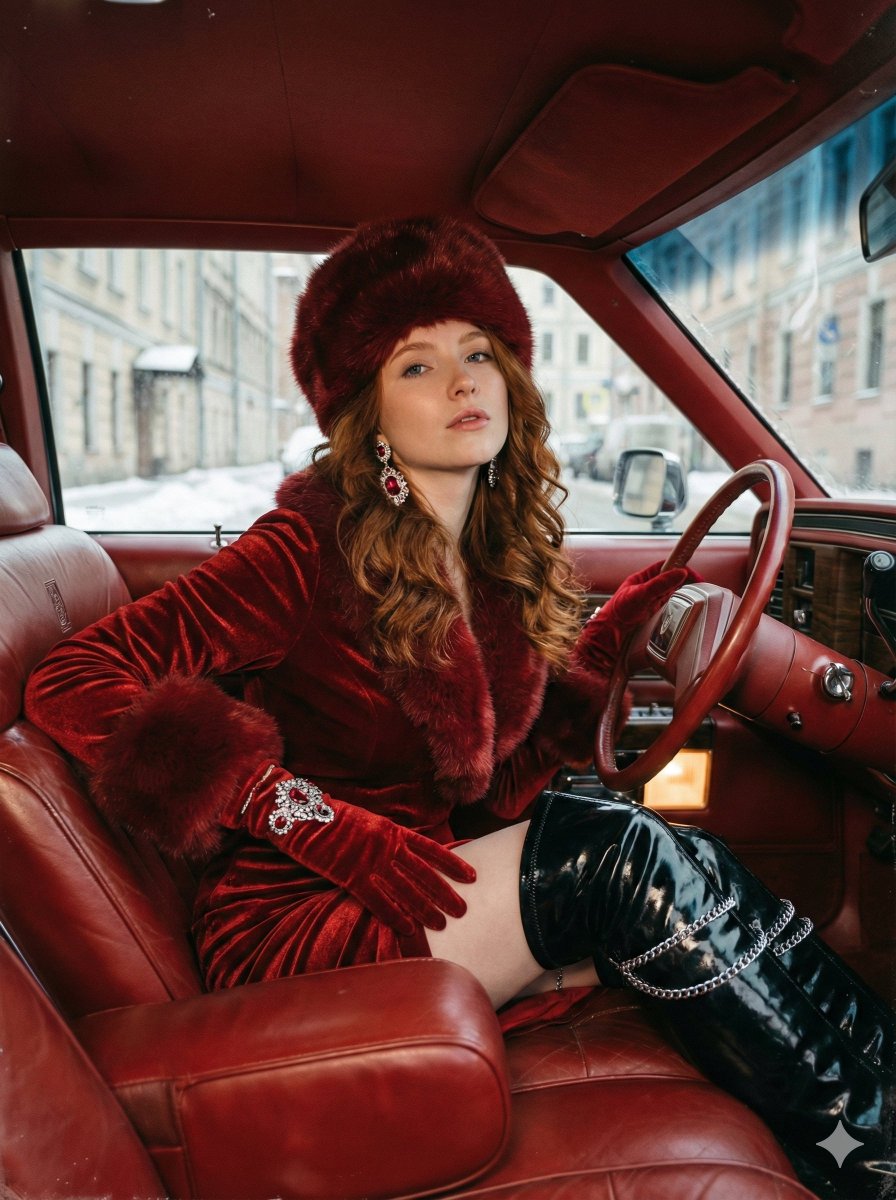
How to deep red velvet winter outfit with rich texture, long-sleeved with fur trim on collar and cuffs
0
Times used
0
Likes
Unveiling the Magic: How to Create the Perfect Deep Red Velvet Winter Outfit with AI
There's a certain magic to the winter season, a feeling of opulence and warmth that stands in stark contrast to the cold. Few fabrics capture this essence better than deep red velvet. It's the color of holly berries and festive cheer, with a texture that speaks of luxury, history, and comfort. Imagine a long-sleeved gown or a tailored coat, rich in this material, accented with soft fur trim at the collar and cuffs. It’s a timeless image of elegance. Now, what if you could bring this vision to life not with a needle and thread, but with the power of a few words? Welcome to the world of AI image generation with Orno, where your imagination is the only limit.
This guide will explore the enchanting "Create a deep Red Velvet Winter Outfit" style, a powerful prompt designed to generate stunning, detailed, and evocative fashion concepts. We'll delve into the nuances of the prompt, show you how to master it within Orno's AI image editor, and unlock advanced techniques to customize every detail. Whether you're a fashion designer, a fantasy author, a content creator, or simply an art enthusiast, you're about to discover how AI can become your ultimate creative partner in fashion design.
The Timeless Allure of Red Velvet in Fashion
Before we dive into the AI prompt itself, it’s worth appreciating why this specific style is so compelling. Velvet has been a symbol of nobility and wealth for centuries. Its complex weaving process and lustrous sheen made it a fabric reserved for royalty and the elite. Red velvet, in particular, carried immense power, often associated with monarchs, cardinals, and festive grandeur.
In winter, this fabric is more than just a statement piece; it's a practical choice that exudes warmth. The deep, plush pile of velvet catches the light in a unique way, creating a dynamic interplay of shadow and highlight that gives it an incredible visual depth. When you combine this with the classic winter motif of fur trim, you evoke images of fairytale queens, Victorian carolers, and cozy, luxurious evenings by the fire. By using AI to generate a "deep Red Velvet Winter Outfit," you are not just creating a piece of clothing; you are tapping into a rich well of cultural and historical symbolism to create images that are instantly recognizable and emotionally resonant.
Deconstructing the Prompt: Your Blueprint for AI Fashion Design
The beauty of Orno's AI image generation lies in its ability to understand and interpret descriptive language. The prompt, "How to deep red velvet winter outfit with rich texture, long-sleeved with fur trim on collar and cuffs," is a carefully constructed set of instructions for our AI. Let's break down each component:
- Deep Red Velvet: This is the core of our creation. "Deep red" specifies a particular shade—not a bright cherry, but a darker, more sophisticated crimson or burgundy. "Velvet" tells the AI to generate a specific fabric with a soft, plush, and light-absorbing surface.
- Winter Outfit: This sets the context. The AI understands this means heavier materials, longer sleeves, and a design suitable for cold weather. It prevents the generation of a summer dress or light blouse, guiding the AI toward coats, gowns, and elegant winter wear.
- Rich Texture: This is a crucial command for quality. Without it, you might get a flat, cartoonish red color. By adding "rich texture," you are prompting the AI to simulate the fine details of the fabric's pile, the way it folds, and how light plays across its surface, aiming for a more photorealistic and tactile result.
- Long-Sleeved: A specific and important design instruction that reinforces the "winter" theme and contributes to a more elegant and regal silhouette.
- Fur Trim on Collar and Cuffs: This is the luxurious accent that completes the vision. It adds a wonderful textural contrast to the velvet and frames the outfit beautifully. The AI will often interpret this as classic white or brown fur, but as we'll see, this is an element you can easily customize.
A Step-by-Step Guide to Generating Your First Outfit in Orno
Ready to create? Generating your first masterpiece with Orno is incredibly simple. Follow these steps to bring your red velvet vision to life:
- Navigate to the Orno AI Generator: Open the Orno app or website and find our powerful text-to-image tool. This is where your creative journey begins.
- Enter the Core Prompt: In the text box, type or paste the base prompt: A deep red velvet winter outfit with rich texture, long-sleeved with fur trim on collar and cuffs.
- Generate and Observe: Click the generate button and watch as Orno's AI model processes your request. Within seconds, you'll be presented with several unique visual interpretations of your prompt. You might see a flowing medieval gown, a chic modern coat, or a fantasy-inspired robe.
- Iterate and Refine: Don't love the first batch? Simply click generate again! Each click provides a new set of creative possibilities. Find one you like and use Orno's built-in tools like upscaling to enhance its resolution and detail.
Mastering the Prompt: Advanced Customization Techniques
The base prompt is just the starting point. The real power of Orno lies in your ability to modify, add, and refine your text prompts to achieve a precise vision. Here’s how to become a true AI fashion director.
Giving Your Outfit a Model
An outfit is best seen on a person. To add a subject, simply describe them at the beginning of your prompt. This transforms the image from a product shot into a portrait or a piece of character art.
- Example 1 (Fantasy): "An elven queen with long silver hair wearing a deep red velvet winter outfit..."
- Example 2 (Photorealistic): "Photorealistic portrait of a beautiful woman smiling, wearing a deep red velvet winter outfit..."
- Example 3 (Character Design): "Concept art of a handsome fantasy prince wearing a tailored deep red velvet winter coat..."
Setting the Scene
Where is your model? Placing them in an environment adds context, mood, and storytelling to your image. Add descriptive phrases about the background to transport your character anywhere you can imagine.
- Example 1 (Winter Wonderland): "...standing in a snowy forest at twilight, soft light."
- Example 2 (Regal Interior): "...in a grand ballroom with a large chandelier, cinematic lighting."
- Example 3 (Urban Elegance): "...walking on a cobblestone street in 19th-century London, foggy atmosphere."
Defining the Artistic Style
Orno can emulate virtually any art style. Do you want a photo, a painting, or a sketch? Just tell the AI what you're looking for by adding style keywords, typically at the beginning or end of the prompt.
- For a realistic look: "Photorealistic, hyper-detailed, 8K, sharp focus, cinematic lighting."
- For a painted feel: "Digital painting, oil painting, impressionistic, concept art, by John Singer Sargent."
- For a stylized illustration: "Fashion illustration, anime style, clean lines, vibrant colors, studio Ghibli aesthetic."
Fine-Tuning the Fashion Details
This is where you can get really specific. Use your prompt to change the cut, add embellishments, and swap out materials. Think like a real fashion designer!
- Change the cut: "floor-length gown," "short, tailored jacket," "A-line coat," "outfit with a hood."
- Add details: "with intricate gold embroidery on the cuffs," "with pearl buttons," "a silver clasp at the collar."
- Specify the trim: "with thick white faux fur trim," "with luxurious black fur trim," "with a simple ermine fur collar."
Creative & Professional Applications for Your AI-Generated Designs
These stunning AI-generated images are more than just pretty pictures. They are powerful assets that can be used in a multitude of creative and professional fields.
- Fashion Designers: Rapidly visualize concepts, create entire digital mood boards in minutes, and explore dozens of variations on a design without ever picking up a sketchbook.
- Authors and Game Developers: Create compelling and consistent character art. Visualize the costumes of your fantasy world or historical novel to share with your audience or guide your art team.
- Content Creators: Generate unique, royalty-free images for your blogs, social media posts, or YouTube thumbnails. An image of a character in a red velvet dress is perfect for content about winter, holidays, fantasy, or fashion.
- AI Artists and Hobbyists: Push the boundaries of your creativity. Use this prompt as a foundation for digital art, experiment with different styles, and create a portfolio of beautiful, evocative imagery.
Frequently Asked Questions (FAQ)
Can I create this red velvet outfit for male characters or different body types?
Absolutely! The AI is incredibly flexible. Simply adjust the subject in your prompt. For example, use "A powerful king wearing a deep red velvet winter robe..." or "A cheerful plus-size woman in a stylish deep red velvet winter coat...". The more specific your description, the better the result.
How do I make my AI-generated image look more photorealistic?
To enhance realism, use specific keywords that guide the AI. Add terms like "photorealistic," "hyper-detailed," "8K resolution," "shot on a Sony a7 III," "cinematic lighting," and "sharp focus" to your prompt. These phrases tell the AI to emulate the quality and characteristics of a high-end photograph.
What if the AI misunderstands a detail, like the fur trim?
AI generation can sometimes require a little guidance. If a detail isn't quite right, try rephrasing or being more specific. Instead of just "fur trim," you could try "thick, fluffy white faux fur trim" or "elegant, short black mink fur on the collar." You can also generate a new set of images, as the AI will offer different interpretations each time.
Are the images I create in Orno mine to use?
Please refer to Orno's latest terms of service for specific details, but generally, images you create on our platform, especially with a subscription, come with broad commercial usage rights. This allows you to use your stunning fashion designs for your blog, brand, or creative projects with peace of mind.
What other fashion styles can I generate with Orno?
The possibilities are literally endless. You can design anything you can describe. Try generating a "bioluminescent cyberpunk jacket," a "delicate silk floral kimono from the Edo period," or a "rugged leather adventurer's outfit." If you can imagine it, you can create it with Orno.
Start Designing Your Dream Wardrobe Today
The "deep Red Velvet Winter Outfit" is more than just a prompt; it's a gateway to a new era of creative expression. It demonstrates how complex ideas of texture, color, history, and style can be translated into breathtaking visuals through the power of AI. Orno puts this power directly into your hands, providing an intuitive and robust platform for bringing your most imaginative fashion concepts to life.
Don't just dream of elegant winter fashion. Create it. Refine it. Make it uniquely yours. Dive into the Orno AI image editor today and start generating your own deep red velvet masterpieces. Your design journey awaits.
Use This Prompt
Transform your images with AI
Save this prompt as its own icon for one-tap access.