
Create a creative Style 9
How to カワイイ猫耳少女のイラストを生成して。ちびきゃら風で、フリフリのお洋服を着せて、ロングヘアーのピンク色の髪にして。
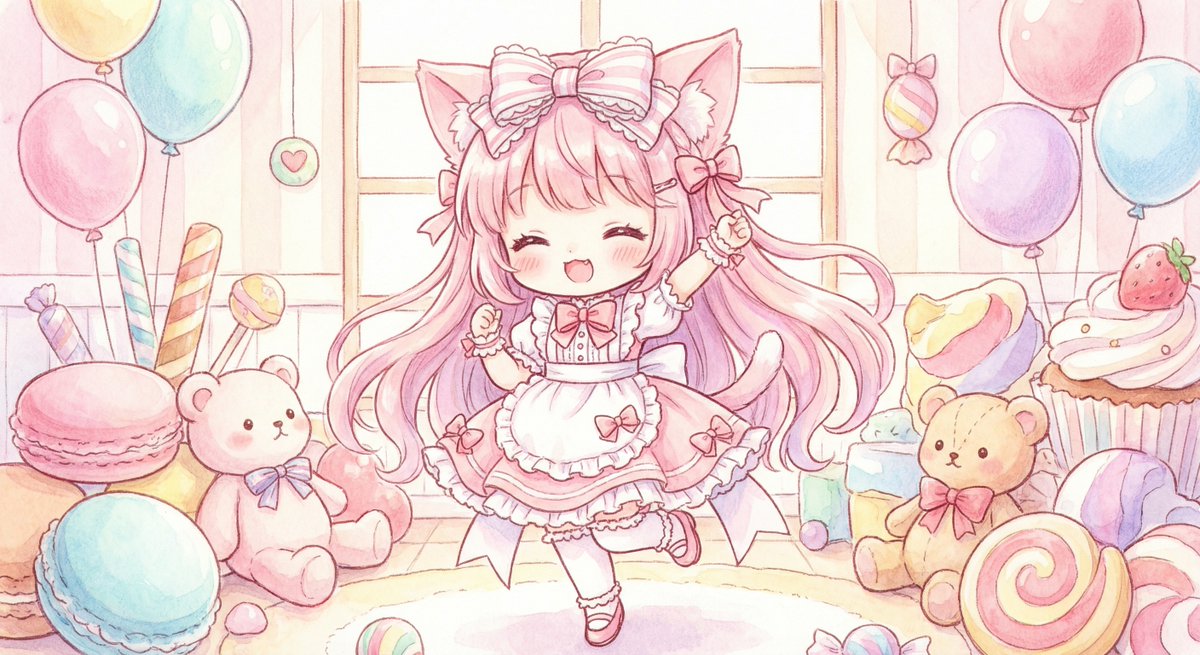
2
Times used
0
Likes
Unlocking Kawaii Creativity: A Deep Dive into Orno’s "Creative Style 9"
In the vast and imaginative world of AI image generation, specific prompts act as magical incantations, transforming simple text into breathtaking visual art. For fans of Japanese anime, manga, and the universally adored "kawaii" culture, one style stands out for its sheer charm and concentrated cuteness. We're talking about Orno's "Creative Style 9," a powerful prompt designed to generate the perfect chibi-style, cat-eared anime girl. This detailed guide will explore every facet of this delightful style, breaking down its components, showing you how to master it with Orno's AI image editor, and empowering you to create endless variations of adorable characters.
Whether you're a seasoned digital artist looking for quick concepting tools, a content creator in need of unique avatars and mascots, or simply an enthusiast eager to bring your imagination to life, this style is your gateway to a world of cuteness. Let's delve into the prompt that makes it all happen: "How to カワイイ猫耳少女のイラストを生成して。ちびきゃら風で、フリフリのお洋服を着せて、ロングヘアーのピンク色の髪にして。"
Deconstructing the Magic: The Four Pillars of "Creative Style 9"
The beauty of this prompt lies in its precision. It’s not just a vague request for "an anime girl"; it's a carefully constructed recipe for a very specific and popular aesthetic. By understanding each component, you can better appreciate the AI's output and learn how to tweak it for your own creative projects. Let's break down the Japanese text into its four core elements.
1. The Heart of the Matter: A Cute Cat-Eared Girl (カワイイ猫耳少女)
The foundation of this style is the "kawaii nekomimi shoujo," or "cute cat-eared girl." This is a cornerstone trope in anime and manga culture, representing a blend of human and feline characteristics that is both playful and endearing. "Nekomimi" (cat ears) are more than just an accessory; they evoke a sense of agility, curiosity, and mischievous charm. The term "kawaii" itself is a cultural phenomenon, signifying a specific type of endearing, innocent, and lovable cuteness. When you use this part of the prompt in Orno's advanced text-to-image engine, you're telling the AI to tap into a massive visual library of beloved anime characters to produce something that is instantly recognizable and appealing.
2. The Perfect Proportions: Chibi Character Style (ちびきゃら風)
Next, the prompt specifies "chibi-kyara fuu," or "chibi character style." The word "chibi" in Japanese means "short" or "small." In art, it refers to a specific style of caricature where characters are drawn in an exaggeratedly cute and miniature form. Key features of the chibi style include:
- Large heads and eyes, often taking up a significant portion of the face.
- Small, simplified bodies with short limbs.
- Minimalist facial expressions that are highly emotive.
- A general focus on softness and roundness, avoiding sharp angles.
This style is perfect for creating stickers, emojis, icons, and avatars because it remains clear and expressive even at small sizes. By instructing Orno's AI to generate in a chibi style, you ensure the final image is packed with maximum adorableness and charm.
3. The Adorable Attire: Frilly Clothes (フリフリのお洋服)
A character's design is incomplete without the right outfit. The prompt calls for "furifuri no oyoufuku," which translates to "frilly clothes." This detail adds layers of texture, complexity, and personality to the illustration. Frills, lace, and ribbons are staples of certain Japanese fashion subcultures like Lolita, and they are frequently used in anime to emphasize a character's femininity, innocence, or whimsical nature. This command tells the Orno AI to move beyond simple clothing and generate an outfit with intricate details, ruffles, and a soft, delicate aesthetic that perfectly complements the kawaii and chibi elements.
4. The Signature Look: Long, Pink Hair (ロングヘアーのピンク色の髪)
Finally, the prompt defines the character's hairstyle: "long hair no pink-iro no kami," or "long, pink-colored hair." Hair color in anime is a powerful tool for visual storytelling and character distinction. Pink is often associated with youthfulness, romance, and a cheerful or gentle personality. Combining it with a long hairstyle creates a flowing, elegant silhouette that contrasts beautifully with the compact, chibi-style body. This specific instruction ensures the AI-generated image has a striking and memorable color palette, making the character pop.
How to Create Your Chibi Cat Girl with Orno: A Simple Guide
Bringing "Creative Style 9" to life is incredibly easy with Orno's intuitive AI image editor. You don't need any prior experience with AI art generation to get stunning results in seconds.
- Navigate to the Orno AI Image Editor: Open the tool and locate the text input box where you'll enter your prompt.
- Select "Creative Style 9": You can either find the style in our curated list of creative prompts or simply copy and paste the full Japanese prompt into the generator.
- Generate Your Image: Click the "Generate" button and watch as Orno’s powerful AI interprets the prompt, creating a unique, high-quality illustration of your chibi cat girl.
- Refine and Iterate: Don't love the first result? No problem! Each click generates a new variation. You can also edit the prompt to make small changes, a process we'll explore next.
Mastering Prompt Engineering: Customizing Your Kawaii Creations
"Creative Style 9" is a fantastic starting point, but the true power of Orno lies in its flexibility. You can use the original prompt as a template and modify it to create a universe of unique characters. This is the core of prompt engineering—the art of crafting the perfect text to get the exact image you envision.
Changing Colors and Features
Want a different look? Simply swap out keywords in the prompt. Try changing "pink-colored hair" (ピンク色の髪) to "blue-colored hair" (青色の髪) or "blonde hair" (金髪). You can do the same for eye color by adding a descriptor like "with blue eyes."
- Example Prompt 1: "A cute chibi cat girl with short, white hair and red eyes, wearing a frilly black dress."
- Example Prompt 2: "カワイイ狐耳少女のイラストを生成して。ちびきゃら風で、和風のお洋服を着せて、ロングヘアーの黒色の髪にして。" (A cute fox-eared girl in a chibi style, wearing Japanese-style clothes, with long black hair.)
Adding Backgrounds and Settings
Don't let your character float in a void! Add a simple background description to place them in a world. The AI can create everything from simple gradients to complex scenes.
- Example Prompt 3: "A cute chibi cat girl with long pink hair and a frilly dress, sitting in a candy-filled room."
- Example Prompt 4: "A chibi cat girl with pink hair, standing under a cherry blossom tree at night, glowing moon."
Defining Mood and Pose
You can also guide the character's emotion and action. Use keywords like "smiling," "energetic pose," "shy," or "sleeping" to add another layer of personality to your AI-generated art.
- Example Prompt 5: "A happy, smiling chibi cat girl with long pink hair, waving at the camera, frilly dress."
- Example Prompt 6: "A sleepy, yawning chibi cat girl with pink hair, frilly pajamas, sitting on a crescent moon."
Frequently Asked Questions (FAQ)
What exactly is Orno's "Creative Style 9"?
"Creative Style 9" is a pre-designed, high-quality prompt for Orno's AI image generator. The prompt, "How to カワイイ猫耳少女のイラストを生成して。ちびきゃら風で、フリフリのお洋服を着せて、ロングヘアーのピンク色の髪にして。," is specifically engineered to create a detailed illustration of a cute, chibi-style, cat-eared girl with long pink hair and frilly clothes.
Can I change the character's hair color, clothes, or species?
Absolutely! "Creative Style 9" is a fully customizable template. You can edit the text prompt to change any element you wish. Try swapping "cat-eared" (猫耳) for "fox-eared" (狐耳) or "bunny-eared" (ウサ耳). Change the hair color, clothing style, or add accessories. The possibilities are limitless with Orno's flexible AI engine.
Is this AI image generation style free to use in Orno?
Yes, you can use "Creative Style 9" and experiment with our AI image editor within the limits of our free usage tier. Orno is committed to making powerful creative tools accessible to everyone. For users who need higher volume generation or advanced features, we offer affordable premium plans.
How can I get the best results for anime-style images?
For optimal results, be specific in your prompts. Use descriptive keywords related to art style (e.g., "chibi," "manga sketch," "digital painting"), character features (e.g., "amethyst eyes," "twin-tail hairstyle"), clothing, and background. The more detail you provide Orno's AI, the closer the generated image will be to your vision.
Can I use the images I create with Orno for commercial purposes?
The usage rights for AI-generated images can be complex and depend on your local jurisdiction and our terms of service. We encourage you to review Orno's latest terms of service for detailed information on commercial usage rights for the images you create on our platform.
Start Your Kawaii Creation Journey with Orno Today!
"Creative Style 9" is more than just a line of text; it's a key that unlocks a world of artistic potential. It perfectly demonstrates how a well-crafted prompt can harness the power of AI to create something specific, detailed, and emotionally resonant. By understanding its components and learning to modify them, you can move from being a user to being a true creator.
Ready to design your own adorable character? There's no need to wait. Dive into the delightful world of AI-powered art, experiment with "Creative Style 9," and see what enchanting creations you can bring to life. Try Orno’s AI Image Editor now and start generating your own unique kawaii masterpieces today!
Use This Prompt
Transform your images with AI
Save this prompt as its own icon for one-tap access.