
Create a cozy Indoor Portrait
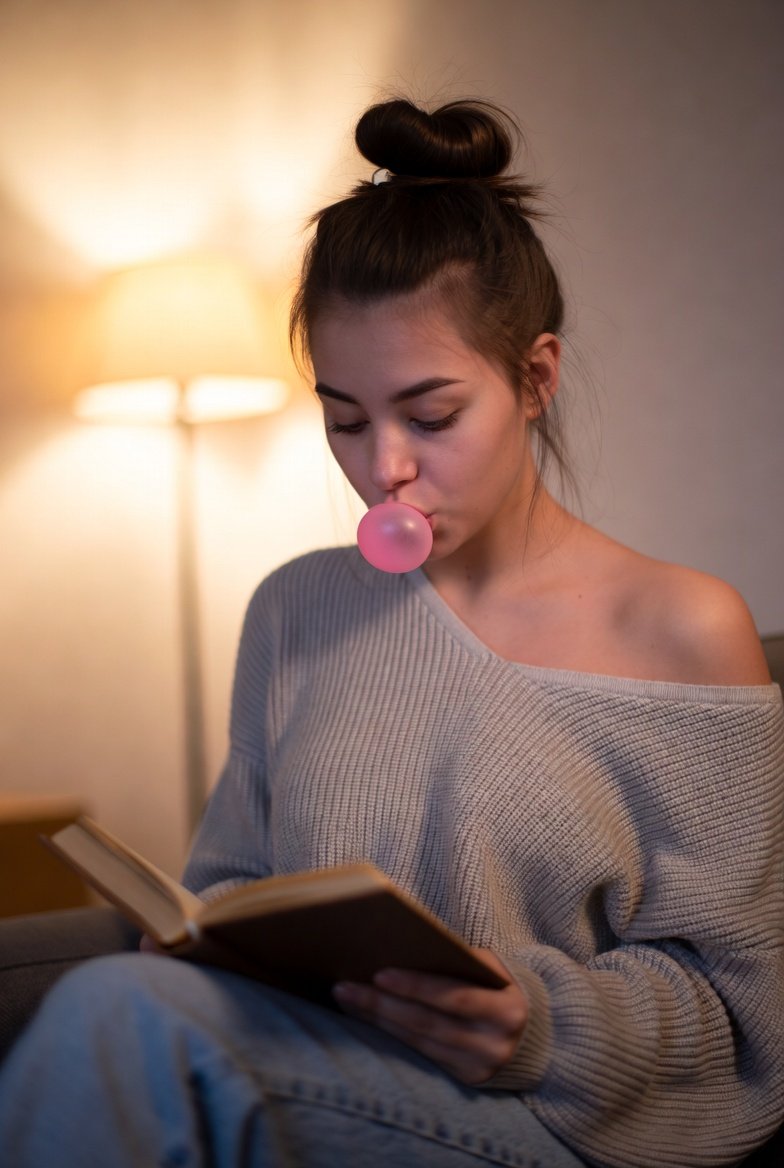
How to a cozy indoor portrait of a young woman sitting on a sofa, wearing a loose, off-shoulder knitted sweater.
0
Times used
0
Likes
Mastering the Art of the "Cozy Indoor Portrait" with AI
In the vast world of digital art and content creation, certain aesthetics capture our collective imagination. They evoke a feeling, a mood, a sense of place we instantly connect with. One of the most beloved and enduring styles is the "Cozy Indoor Portrait." It's the visual equivalent of a warm hug, a steaming cup of tea on a rainy day, or the comfort of a soft blanket. It speaks of tranquility, warmth, and intimate serenity. But what if you could create this professional-grade, emotionally resonant imagery in seconds, without a camera, a model, or a perfectly styled set? Welcome to the power of Orno, your AI image editor, where crafting the perfect cozy scene is as simple as describing it.
This guide will delve deep into the "Create a cozy Indoor Portrait" style, a prompt designed to generate stunning images of a young woman in a comfortable, inviting setting. We'll explore the core elements of this aesthetic, learn how to master the art of prompt engineering to customize every detail, and see how Orno’s powerful tools can help you generate and refine breathtaking visuals for your blog, social media, marketing campaigns, or personal art collection.
What Defines the "Cozy Indoor Portrait" Style?
At its heart, this style is a narrative captured in a single frame. It's not just a picture; it's a story of comfort and peace. Understanding its key components is the first step to creating compelling images with Orno's AI.
- The Subject: The prompt centers on a "young woman." This choice creates a relatable and often aspirational figure. She isn't just posing; she's inhabiting the space, lost in a moment of quiet reflection or gentle contentment. Her presence is meant to feel natural and unstaged.
- The Setting: An "indoor" location, specifically a "sofa," is crucial. The sofa is a universal symbol of relaxation and home life. It immediately grounds the image in a private, safe space, away from the hustle and bustle of the outside world. This indoor context allows for complete control over the most important element: light.
- The Wardrobe: The "loose, off-shoulder knitted sweater" is the cornerstone of the cozy aesthetic. The texture of the knit suggests warmth and softness. The "loose" and "off-shoulder" cut implies a relaxed, carefree attitude, a state of being completely at ease. It's a garment chosen for comfort over formality, perfectly encapsulating the style's ethos.
- The Mood: Every element works in concert to create a mood that is warm, inviting, serene, and often a little nostalgic. It's about capturing a feeling of "hygge"—the Danish concept of cozy contentment and well-being. The lighting is soft, the colors are warm, and the overall composition feels balanced and peaceful.
Why is This Aesthetic So Popular in AI Art and Digital Media?
The "cozy" trend has dominated visual media for years, from Instagram feeds to brand advertisements, and for good reason. It taps into a fundamental human desire for comfort, safety, and authenticity. AI image generation has supercharged this trend, making it more accessible than ever.
- Emotional Connection: These images are emotionally resonant. Viewers can easily project themselves into the scene, imagining the feel of the soft sweater or the comfort of the sofa. This makes the style incredibly effective for brands in the lifestyle, home decor, wellness, and fashion industries.
- Versatility: A cozy indoor portrait can be used in countless ways. It can be a hero image for a blog post about self-care, a background for a motivational quote on social media, a visual for a scented candle advertisement, or simply a beautiful piece of digital art to admire.
- Democratization of Creativity: Traditionally, achieving this look required a skilled photographer, a model, a stylist, a location, and expensive equipment. Orno's AI image generator democratizes this process. Now, anyone with a creative vision can produce high-quality, professional-looking portraits that perfectly match their desired aesthetic.
Crafting the Perfect Cozy Indoor Portrait with Orno: A Step-by-Step Guide
Orno makes the process of creation intuitive and fun. Let's break down how you can go from a simple idea to a fully realized, stunning portrait. We'll start with the base prompt and build upon it with specific keywords and commands.
Step 1: The Foundational Prompt
Your starting point is the core description. This gives the AI the essential building blocks of your scene.
Base Prompt: cozy indoor portrait of a young woman sitting on a sofa, wearing a loose, off-shoulder knitted sweater.
This simple sentence already contains the subject, setting, and wardrobe. Orno's AI is powerful enough to generate a beautiful image from this alone, but the real magic happens when you start adding layers of detail.
Step 2: Sculpting the Atmosphere with Keywords
This is where you become the director of your scene. Use descriptive keywords to control the lighting, color, and overall mood.
- Lighting is Everything: The right light can transform a good image into a great one. Try adding these phrases:
soft window light: for a natural, gentle, and realistic feel.warm golden hour light: for a dreamy, nostalgic mood with long shadows and a warm, orange-yellow glow.fireplace glow: to introduce a secondary, intimate light source that screams cozy.string lights in the background: to add magical bokeh and a touch of whimsy.
- Define Your Color Palette: Guide the AI towards a specific color scheme to enhance the mood.
warm earthy tones: for a rustic, grounded feel (browns, beiges, deep greens, terracotta).muted pastel colors: for a soft, airy, and more modern aesthetic.creamy whites and beiges: for a clean, minimalist, and sophisticated Scandinavian look.
- Add Photographic Detail: To achieve a more professional, photorealistic result, use terms from photography.
photorealistic, hyper-detailed: Directly tells the AI your goal is realism.shot on a 50mm lens, f/1.8 aperture: Mimics a classic portrait lens, creating a shallow depth of field.beautiful soft bokeh background: Blurs the background, drawing focus to the subject.cinematic lighting, film grain: Adds a touch of movie-like drama and texture.
Step 3: Customizing the Details in Orno
Now, let's focus on the specific elements within your image. The more detail you provide, the closer Orno can get to your vision.
- The Subject: Don't be afraid to be specific. Describe her appearance and expression. Examples:
a young woman with wavy brunette hair in a messy bun...a young Scandinavian woman with freckles......with a gentle, serene smile, looking towards the camera....gazing thoughtfully out a window.
- The Setting: Flesh out the room around her. What else is in the scene?
...on a plush velvet sofa in a bohemian living room....surrounded by lush green houseplants....holding a steaming mug of hot chocolate....with an open book resting in her lap.
- The Sweater: Give her wardrobe more character.
...wearing an oversized, chunky cream-colored knit sweater....wearing a delicate, grey cashmere sweater falling off one shoulder.
By combining these elements, you can create incredibly detailed and unique prompts. For example: "Photorealistic cozy indoor portrait of a young woman with wavy brunette hair, sitting on a plush velvet sofa holding a steaming mug. She wears a chunky cream-colored knitted sweater. The scene is illuminated by soft window light and the warm glow of a fireplace, creating a beautiful soft bokeh background, warm earthy tones."
Beyond the Prompt: Enhancing Your Creation with Orno's Editor
Generating the image is just the beginning. Orno is a complete AI image editor, giving you the tools to refine your creation to perfection. After you've generated a portrait you love, you can use our built-in editing suite to:
- Adjust Colors: Use our color grading tools to enhance the warm tones, increase the contrast, or apply a specific color filter to perfect the mood.
- Crop and Reframe: Easily crop your image to the perfect aspect ratio for Instagram Stories (9:16), a blog banner (16:9), or a Pinterest pin.
- Apply Effects: Add a subtle film grain effect or a soft glow to amplify the cozy, nostalgic feeling.
- AI Upscale: With a single click, use Orno's AI Enhance feature to increase the resolution and sharpness of your image, making it crystal clear and ready for high-quality printing or professional use.
Frequently Asked Questions (FAQ)
How can I make my AI portrait look more realistic?
To increase realism, use specific photographic terms in your prompt. Phrases like "photorealistic," "hyper-detailed," "shot on Portra 400 film," and mentioning lens details like "85mm lens, f/1.4" are very effective. Also, ensure your lighting descriptions are natural, such as "soft, diffused morning light from a large window." Finally, use Orno's AI Upscale tool after generation to enhance detail and clarity.
Can I create portraits with different body types and ethnicities in Orno?
Absolutely. Orno is designed to be inclusive and versatile. We encourage you to create diverse and representative art. Simply include these details in your prompt. For example: "cozy indoor portrait of a young curvy Black woman with natural hair..." or "cozy indoor portrait of a young East Asian woman with glasses..." The more specific your description, the better the AI can represent your vision.
What if the AI doesn't get the "off-shoulder" sweater right?
AI can sometimes be literal. If the "off-shoulder" detail isn't coming through, try rephrasing it. Use prompts like "wearing a wide-neck sweater falling off one shoulder" or "a slouchy sweater slipping off her shoulder." You can also use Orno's negative prompt feature to exclude things you don't want, like adding "-straps, -collar" to ensure it looks like a single garment. Often, simply regenerating the image a few times will yield the perfect result.
Is the "Cozy Indoor Portrait" style good for commercial use?
Yes, this style is exceptionally effective for commercial purposes. It's ideal for lifestyle brands, authors, home decor companies, wellness bloggers, coffee shops, and anyone looking to evoke a sense of comfort and authenticity. The images created with Orno can be used for social media marketing, website banners, email newsletters, and product mockups. As always, we recommend reviewing Orno's terms of service regarding commercial usage rights for the latest information.
Why should I use Orno instead of other AI image generators?
Orno is more than just a generator; it's an integrated creative suite. We excel in producing high-fidelity, photorealistic images, especially for styles like this one. Our intuitive interface makes it easy for beginners to get started, while our advanced prompting capabilities and post-generation editing tools provide the depth and control that professional creators demand. Orno offers a seamless workflow from idea to finished, polished image, all in one place.
Ready to create your own warm and inviting masterpiece? The world of cozy aesthetics is waiting for you. Dive into Orno today and bring your most comfortable, serene, and beautiful visions to life with the power of AI.
Use This Prompt
Transform your images with AI
Save this prompt as its own icon for one-tap access.