
Create a completing The Look
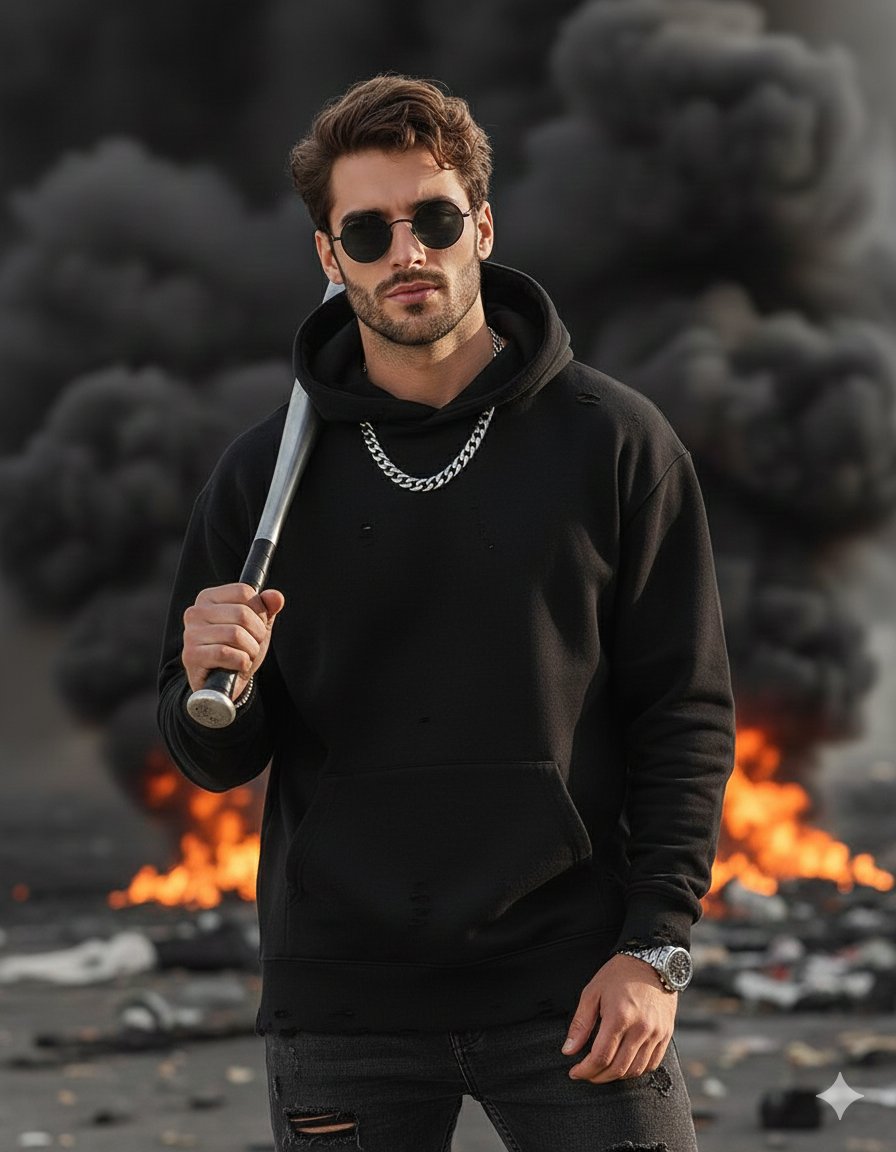
How to completing the look with a chunky silver chain around his neck, dark round frame sunglasses and a wristwatch.
3
Times used
0
Likes
Unlocking Character and Style: A Deep Dive into the "Completing The Look" AI Image Prompt
In the world of visual art, fashion, and character design, details are not just details; they are the story. A simple accessory can transform a generic portrait into a compelling narrative, revealing personality, status, and attitude. But what if you could add these defining touches with the speed and power of artificial intelligence? Welcome to the next level of creative control with Orno's "Create a completing The Look" AI image generation style. This powerful prompt is your key to instantly adding a layer of cool, sophistication, and completeness to your digital creations, effortlessly styling your subjects with a chunky silver chain, dark round frame sunglasses, and a wristwatch.
Whether you're a digital artist crafting your next protagonist, a marketer designing lifestyle imagery, or a fashion enthusiast exploring new aesthetics, understanding how to leverage specific AI prompts is a game-changer. This guide will explore the nuances of the "Completing The Look" style, showing you how to use it within Orno to elevate your AI-generated images from simple concepts to fully realized, stylish portraits.
What is the "Create a completing The Look" AI Image Style?
At its core, the "Create a completing The Look" prompt is a specific command given to the Orno AI to add a curated set of accessories to a character. It's an instruction that goes beyond simple object addition; it's a styling recipe designed to inject a cohesive and modern aesthetic into your image. This prompt instructs the AI to artfully integrate three key elements: "a chunky silver chain around his neck, dark round frame sunglasses and a wristwatch." Let's break down the significance of each piece and how Orno’s advanced AI renders them with stunning realism.
The Chunky Silver Chain: A Statement of Confidence
The chunky silver chain is more than just jewelry; it's a statement. It evokes a sense of modern street style, confidence, and a touch of rebellious luxury. When you use this prompt, Orno's AI doesn't just paste a 2D image of a chain. It understands the physics of weight and gravity, draping the chain naturally around the character's neck and collarbones. The AI meticulously renders the metallic texture, capturing the way light reflects off each individual link, creating a hyperrealistic effect that adds depth and dimension to your subject.
Dark Round Frame Sunglasses: An Aura of Mystery and Cool
Sunglasses have always been a symbol of cool. The choice of dark, round frames specifically adds a retro, intellectual, and slightly mysterious vibe. Orno’s AI engine excels at placing these sunglasses perfectly on the character's face, considering factors like facial structure and perspective. It masterfully generates the subtle reflections on the dark lenses—glints of light, distorted backgrounds—that make the image incredibly believable. This single accessory can completely alter a character's perceived personality, turning a simple gaze into an enigmatic stare.
The Wristwatch: A Touch of Timeless Class
The final element, the wristwatch, grounds the look with a touch of sophistication and purpose. It suggests that the character is grounded, punctual, and has an appreciation for craftsmanship. The beauty of using this prompt within the Orno AI image editor is its contextual awareness. Depending on the overall theme of your image, the AI can generate a sleek modern smartwatch, a classic diver's watch with a metal band, or a vintage timepiece with a leather strap. It ensures the watch fits the character's wrist and complements the overall outfit, completing the stylistic trifecta.
Why Details Matter: Elevating Your AI-Generated Characters with Orno
A great image tells a story, and accessories are the vocabulary of that visual language. The "Completing The Look" style is a powerful tool for visual storytelling, allowing you to instantly build a more complex and engaging character. A portrait of a man in a t-shirt is just a picture; a portrait of a man in a t-shirt with these specific accessories becomes a character study. He's confident, has a strong sense of personal style, and moves with purpose.
This level of instant character development is invaluable for a wide range of creators:
- Concept Artists and Game Developers: Quickly generate dozens of detailed character variations for protagonists, NPCs, or villains, saving hours of manual illustration.
- Fashion Designers and Stylists: Use the AI to visualize how different accessories interact with clothing, creating digital lookbooks and mood boards with photorealistic models. - Social Media Managers and Marketers: Create unique, eye-catching lifestyle and brand imagery that stands out from generic stock photos, without the cost of a photoshoot.
- Writers and Storytellers: Generate visual representations of their characters to help solidify their image and inspire further creative writing.
With Orno, this professional-grade styling is democratized. You don't need to be an expert in fashion or a master of complex software. You just need your idea and the right AI prompt to bring it to life with incredible detail.
How to Use the "Completing The Look" Prompt in Orno: A Step-by-Step Guide
Harnessing the power of this AI image style in Orno is remarkably simple. Our platform is designed for an intuitive workflow, allowing you to focus on creativity, not complicated processes. Follow these steps to start generating stunningly styled images.
Step 1: Establish Your Base Character or Scene
Every great look needs a foundation. Start by creating your base image. You can do this by typing a descriptive text prompt. Be as simple or as detailed as you like. For example, you could start with a prompt like: "A handsome man in his late 20s, wearing a black crewneck t-shirt, studio portrait, soft lighting."
Step 2: Add the "Completing The Look" Style Prompt
This is where the magic happens. Simply append the styling command to your base prompt. Your new, combined prompt will now be: "A handsome man in his late 20s, wearing a black crewneck t-shirt, studio portrait, soft lighting, completing the look with a chunky silver chain around his neck, dark round frame sunglasses and a wristwatch." Orno's AI will now process both parts of the prompt, seamlessly merging the accessories onto your base character while respecting the established lighting and composition.
Step 3: Experiment and Iterate for Unique Results
The initial prompt is a fantastic starting point, but true creativity lies in experimentation. Orno encourages you to tweak the prompt to match your vision. Try modifying the accessories for different aesthetics. For instance, you could change "silver" to "gold," or "chunky" to "thin." The possibilities are endless, and each small change can result in a completely different mood.
Step 4: Generate, Refine, and Download
Click the generate button and watch as Orno brings your vision to life in seconds. Review the generated image. If you love it, download it in high resolution. If you want to see other variations, you can generate again or refine your prompt further. Orno's powerful engine ensures that each generation is unique, giving you a wealth of creative options.
Prompt Engineering Showcase: Variations of the "Completing The Look" Style
To truly master this AI style, it's helpful to see how it interacts with different base prompts. Here are a few examples to inspire your own text-to-image creations in Orno, demonstrating the incredible versatility of this accessory combination.
-
The Urban Explorer
Prompt: "Photo of a man on a rooftop overlooking a city at sunset, wearing a denim jacket. He is completing the look with a chunky silver chain around his neck, dark round frame sunglasses and a rugged field wristwatch."
Expected Result: A cinematic, adventurous image. The AI will render the sunset reflecting off the sunglasses and the silver chain, creating a warm, golden-hour glow that enhances the rugged, stylish feel. -
The Minimalist Tech CEO
Prompt: "Minimalist portrait of a man with short hair wearing a grey turtleneck sweater, against a plain concrete wall. He is completing the look with a subtle silver chain around his neck, sleek dark round frame sunglasses and a modern smartwatch."
Expected Result: A clean, sophisticated, and modern portrait. The accessories will appear elegant and understated, perfectly matching the minimalist aesthetic of the clothing and background. -
The Retro Musician
Prompt: "Vintage 1970s film photograph of a rock musician backstage, wearing a leather jacket, grainy texture. He is completing the look with a heavy silver chain around his neck, dark round frame sunglasses and a classic steel wristwatch."
Expected Result: An authentic-looking, nostalgic image. Orno's AI will apply a film grain and retro color palette, and the accessories will have a design appropriate for the era, adding to the believability of the scene.
The Orno Advantage: Photorealism and Unmatched Creative Freedom
While many AI image generators can add objects to a scene, Orno excels in the art of integration and realism. Our AI model has been trained on vast datasets of high-resolution photography and art, allowing it to understand the subtle interplay of light, shadow, texture, and context. This means the chunky silver chain won't look like a flat sticker; it will have weight. The sunglasses won't be empty black circles; they will have depth and reflection. The wristwatch will conform perfectly to the wrist, viewed from the correct angle.
This commitment to quality and detail is what sets Orno apart as the premier AI image editor for creators who refuse to compromise on their vision. We provide the tools for you to move beyond simple image generation and into the realm of true digital artistry.
Frequently Asked Questions (FAQ)
Can I use the "Completing The Look" style for female characters?
Absolutely! While the example prompt uses "his," the AI is incredibly flexible. Simply describe your female subject and add the prompt. Orno will adapt the fit and style of the accessories to complement a female form, offering an androgynous, chic, or powerful aesthetic depending on your base prompt.
How can I customize the accessories in the prompt?
You have full control. You can easily edit the prompt to change the materials, colors, or styles. Try swapping "chunky silver chain" for "thin gold necklace," or "dark round frame sunglasses" for "aviator sunglasses." Each modification lets you tailor the look to your exact specifications.
Do I need to be a professional artist to use this feature in Orno?
Not at all. Orno is designed for everyone, from seasoned professionals to curious beginners. The "Completing The Look" prompt is a perfect example of how you can achieve highly detailed, professional-quality results using simple, natural language. No technical skills required.
What types of images work best with this AI styling prompt?
This style is incredibly versatile, but it shines in portraits and character-focused shots where the subject is the main focal point. It works well for modern, urban, fashion, and lifestyle-themed images, but as the examples show, it can also be adapted for retro or even futuristic concepts.
How does Orno make the generated accessories look so realistic?
Orno's realism comes from its advanced generative AI model, which understands spatial relationships, lighting physics, and material properties. It analyzes the entire image context—the lighting source, the character's pose, the environment—to render accessories that are not just present, but are a believable and integrated part of the scene.
Ready to transform your creative concepts into fully styled, compelling characters? The power of detail is now at your fingertips. Try Orno's AI image editor today and use the "Create a completing The Look" prompt to see just how profound an impact the right accessories can make. Your next masterpiece is just a prompt away.
Use This Prompt
Transform your images with AI
Save this prompt as its own icon for one-tap access.