
Create a collage Of Four Portraits
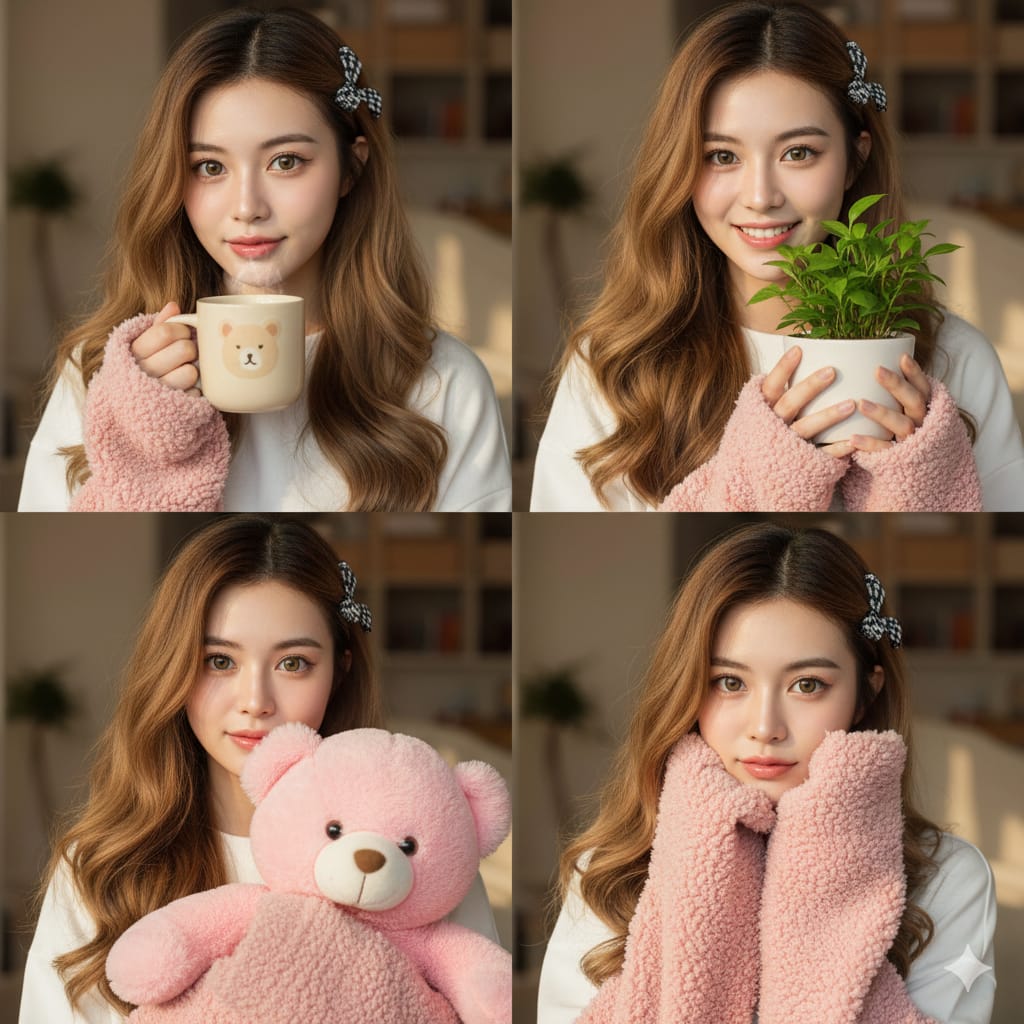
How to a collage of four portraits, each featuring a young Asian woman with long, wavy brown hair, styled with a small checkered bow clip on the right side.
1
Times used
0
Likes
Discover the Art of Visual Storytelling: The "Create a Collage Of Four Portraits" Style
In the world of digital art and visual communication, a single image can speak volumes. But what if you could tell a richer, more nuanced story? Imagine capturing four distinct moments, four subtle emotions, four unique angles of the same character, all harmoniously presented in a single, stunning piece of art. This is the power of the portrait collage, a timeless format reimagined through the lens of artificial intelligence. With Orno's AI image editor, the "Create a collage Of Four Portraits" style is not just a prompt; it's your gateway to sophisticated character exploration and breathtaking visual narratives.
This guide will delve deep into this captivating AI image generation style. We'll explore how to master the prompt, customize it to your unique vision, and unlock its potential for everything from character design to creating one-of-a-kind social media content. Get ready to transform a simple text description into a multi-faceted artistic statement with Orno.
Unlocking the "Create a Collage Of Four Portraits" Style with Orno
At its core, the "Create a collage Of Four Portraits" prompt is an instruction to an AI to generate a grid of four distinct yet related images. What makes this style so compelling is its focus on consistency and detail. It’s not about mashing four random pictures together; it’s about creating a cohesive character study. Let's break down the foundational prompt:
"Create a collage Of Four Portraits, each featuring a young Asian woman with long, wavy brown hair, styled with a small checkered bow clip on the right side."
Each element of this prompt is a deliberate instruction that Orno’s advanced AI model interprets to build your masterpiece:
- "Collage of Four Portraits": This sets the structure. It tells the AI to create a composition with four panels, each containing a portrait. This is the canvas for your story.
- "Young Asian woman": This defines the subject. By specifying ethnicity and age, you guide the AI in generating a consistent facial structure and features across all four images.
- "Long, wavy brown hair": This adds a key physical characteristic. The consistency of the hairstyle is crucial for the viewer to recognize the subject as the same person in each panel.
- "A small checkered bow clip on the right side": This is the anchor detail. A unique, recurring element like this bow acts as a powerful visual cue, cementing the identity of the character and tying the entire collage together. It’s these small details that elevate AI art from generic to specific and personal.
Orno’s powerful text-to-image engine processes these layers of information simultaneously, ensuring that while each portrait might have a slightly different angle or expression, the core identity of the subject remains flawlessly consistent.
Why This AI-Generated Collage Style is a Game-Changer
Generating a cohesive multi-panel image has long been a challenge in the AI art space. The "Create a collage Of Four Portraits" style, especially when powered by an intuitive tool like Orno, overcomes this hurdle and offers several unique advantages for creators.
Consistency is Key to Believability
One of the biggest frustrations for AI artists is maintaining character consistency across multiple generations. You create the perfect character, but struggle to replicate them in a different scene or pose. This collage prompt structure inherently solves that problem by instructing the AI to render the same subject four times within a single generation process. The resulting collage feels professional, intentional, and believable.
Mastering Visual Storytelling
This style is a playground for narrative. The four panels allow you to explore a character's emotional range or a sequence of actions. You could depict a character moving from a pensive frown to a joyful smile, or show them from four different cinematic angles. It transforms a static image into a dynamic character sheet or mood board, perfect for writers, game designers, and brand storytellers looking to convey a specific personality.
Efficiency Meets High-End Aesthetics
Manually creating a similar collage would require significant skill in photography, illustration, and graphic design software like Photoshop. It would involve sourcing or creating four separate images, ensuring consistent lighting and style, and arranging them in a balanced composition. With Orno's AI collage generator, you can achieve a professional-grade result in mere seconds, democratizing artistic expression and empowering anyone to become a visual creator.
A Step-by-Step Guide to Generating Your Four-Portrait Collage in Orno
Ready to create your own stunning collage? Orno makes the process incredibly simple and fun. Follow these steps to bring your vision to life.
Step 1: Navigate to Orno's AI Image Generator
First, open your Orno application or visit our website. Find your way to our powerful and user-friendly AI Image Generator. This is where your text prompts will be magically transformed into visual art.
Step 2: Crafting Your Perfect Prompt
The prompt is your creative command center. Start with the base prompt and then let your imagination run wild by customizing it. The more specific you are, the more tailored your result will be.
Base Prompt: Create a collage Of Four Portraits of a young Asian woman with long, wavy brown hair, styled with a small checkered bow clip on the right side.
Customizing the Subject:
The main character is yours to define. Swap out the description to create anyone you can imagine. Try prompts like:
- "…a rugged man with a short beard and kind eyes…"
- "…an elven princess with long silver hair and pointed ears…"
- "…a cheerful young boy with a cap of red curly hair and freckles…"
Changing the Defining Details:
The small, unique accessory is what makes the collage special. Change the checkered bow to something that fits your character's personality:
- "…wearing round, wire-frame glasses…"
- "…with a single feather braided into her hair…"
- "…styled with a delicate pearl earring…"
Adding Artistic Styles:
Define the entire mood and aesthetic of the collage by adding a style modifier. Orno can generate your collage in countless artistic styles. Simply add phrases like these to the end of your prompt:
- "…in the style of a detailed pencil sketch."
- "…cinematic lighting, epic fantasy art."
- "…in the style of a vibrant watercolor painting."
- "…high-fashion black and white photography."
Step 3: Generate, Refine, and Perfect
Once your prompt is ready, hit the "Generate" button and watch Orno's AI work its magic. In moments, you'll have your four-portrait collage. Don't love the first result? No problem! You can regenerate the image for a new variation or go back and tweak your prompt for a more refined outcome. Once you have a collage you adore, use Orno's built-in editing tools to upscale the resolution, adjust colors, or crop it for the perfect final touch.
Prompt Engineering: Advanced Tips for Perfect Collages
Once you've mastered the basics, you can use more advanced prompt engineering techniques to gain even greater control over your AI-generated collages.
Controlling Emotion and Expression
Direct the AI to show a range of feelings. Instead of letting the AI decide, specify the emotions for each panel. For example: "…create a collage of four portraits, showing her happy, sad, angry, and surprised."
Playing with Angles and Composition
Add photographic or cinematic terms to vary the composition within the collage. This can make the final piece more dynamic and visually interesting. Try including terms like: "…one portrait a close-up, one a profile view, one a three-quarter view, one from a low angle."
Defining the Background and Atmosphere
Don't leave the background to chance. A consistent background can unify the collage and enhance the mood. Add descriptions like: "…against a blurred city lights background," or "…in a cozy room filled with books."
Frequently Asked Questions (FAQ)
Can I create a collage with a different number of portraits?
Absolutely! While this style is optimized for four portraits, you can easily adapt the prompt. Try "Create a collage of two portraits..." or "Create a triptych (collage of three portraits)..." to experiment with different compositions. Orno's AI is flexible enough to handle various numerical and compositional requests.
How does Orno ensure the character looks the same in all four portraits?
Orno's AI model is trained to recognize and maintain consistency when a subject is described within a single prompt generation. By including specific, unchanging details like the "checkered bow clip" or "a scar above the left eye," you provide the AI with strong anchors that it uses to ensure the character's identity remains consistent across all panels of the collage.
What if I don't like the checkered bow? Can I change the accessory?
Of course! The checkered bow is just an example of a unique identifier. The key is to include *any* specific, recurring detail. You can replace it with anything you like: "a silver necklace with a moon pendant," "a small daisy tucked behind her ear," or "a pair of bright red glasses." Get creative and choose a detail that defines your character.
Is the "Create a collage Of Four Portraits" style free to use in Orno?
Yes, all Orno users can access our powerful AI image generator and use prompts like this one. Depending on your plan, you may have a certain number of free generations. Check our pricing page for more details on creating unlimited AI art with Orno.
Can I generate collages of real people or celebrities?
While AI is capable of generating images that resemble real people, we strongly advise against it. Creating images of individuals without their consent raises significant ethical and privacy concerns. Furthermore, generating images of celebrities can infringe on their personality rights and copyright. We encourage all Orno users to focus on creating original characters and artwork to ensure a safe, respectful, and creative community.
The "Create a collage Of Four Portraits" style is more than just a fun AI prompt—it's a powerful tool for creativity, character development, and visual storytelling. It represents the perfect synergy of human imagination and artificial intelligence. Ready to tell your own four-part story? Jump into Orno's AI image editor today and start creating your own stunning portrait collages!
Use This Prompt
Transform your images with AI
Save this prompt as its own icon for one-tap access.