
Create a close-up Selfie Portrait
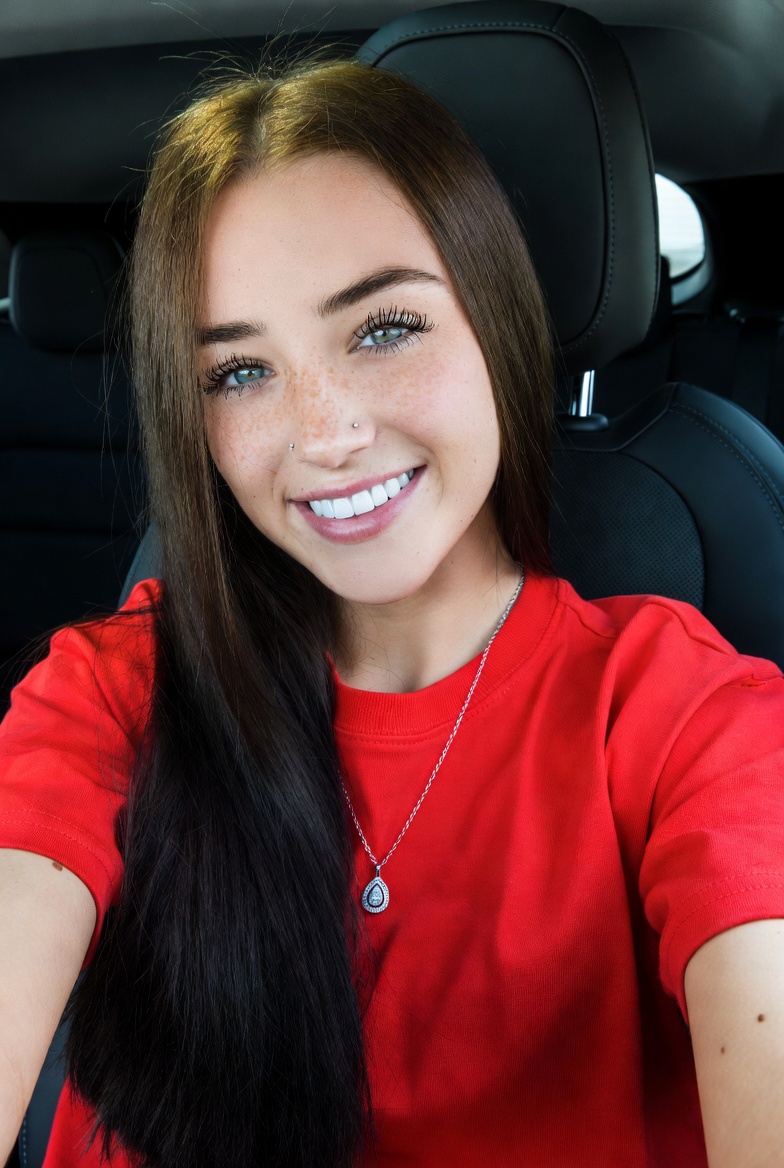
How to a close-up selfie portrait of a young woman smiling brightly, seated inside a vehicle.
1
Times used
0
Likes
Unlocking the Perfect AI Selfie: A Deep Dive into the "Close-up Selfie Portrait" Style
In the age of social media, the selfie is more than just a photo; it's a statement, a mood, a personal brand. We spend countless minutes, sometimes hours, trying to capture the perfect angle, the ideal lighting, and that genuine, effortless smile. But what if you could bypass the trial and error and generate a flawless, studio-quality selfie portrait in seconds? Welcome to the revolutionary world of AI image generation, powered by Orno. Today, we're exploring one of our most popular and versatile styles: the "Create a close-up Selfie Portrait."
This powerful prompt is your key to crafting stunning, emotionally resonant, and hyper-realistic portraits that capture the intimate and personal feel of a selfie. Let's break down how this style works, how you can master it, and how Orno's advanced AI engine brings your vision to life with breathtaking detail.
Deconstructing the Magic: What's in an AI "Close-up Selfie Portrait" Prompt?
The beauty of AI image generation lies in the art of the prompt. A well-crafted prompt is like giving instructions to a world-class photographer, digital artist, and lighting technician all at once. The base prompt, "A close-up selfie portrait of a young woman smiling brightly, seated inside a vehicle," is a fantastic starting point. Each component tells the Orno AI something specific and crucial.
The Framing: "Close-up"
This is the first command you give the AI photographer. "Close-up" instructs the AI to frame the shot tightly on the subject's face and upper shoulders. This immediately creates a sense of intimacy and connection. Unlike a wider shot, a close-up forces the viewer to focus on the subject's expression, eyes, and emotions. In the world of AI art, this keyword is essential for generating images that are rich in detail, from the subtle texture of the skin to the catchlights in the eyes.
The Style: "Selfie Portrait"
This two-word combination is incredibly powerful. "Portrait" signals a focus on the subject's likeness and character. However, adding "selfie" transforms the entire mood. The AI understands that a selfie has a distinct visual language:
- Implied Angle: The perspective often suggests the camera is being held at arm's length, sometimes slightly above or to the side of the subject.
- Direct Gaze: Subjects in selfies are typically looking directly at the lens, creating a personal and engaging connection with the viewer.
- Informal Atmosphere: A selfie feels more candid and less staged than a traditional studio portrait. Orno's AI incorporates this feeling into the final image, resulting in a more natural and relatable aesthetic.
The Subject and Emotion: "A Young Woman Smiling Brightly"
This is where you bring your character to life. Let's break it down further:
- "A Young Woman": This defines the primary subject. Orno's AI can generate an infinite variety of faces, but you can get far more specific. Try adding descriptors like "with freckles," "with long auburn hair," or specifying an ethnicity to guide the generation.
- "Smiling Brightly": Emotion is the soul of a portrait. "Smiling brightly" is a fantastic descriptor because it implies more than just an upturned mouth. The Orno AI interprets this as a genuine, joyous expression—often with teeth showing, cheeks raised, and a sparkle in the eyes. Don't be afraid to experiment with other emotions like "a thoughtful expression," "laughing heartily," or "a serene, gentle smile."
The Context and Lighting: "Seated Inside a Vehicle"
The background is never just a background; it's a storytelling element that dramatically affects lighting and mood. Placing your subject "inside a vehicle" is a brilliant choice for several reasons:
- Natural Lighting: The AI will often render beautiful, soft light filtering through the car windows. You'll see realistic highlights on one side of the face and soft shadows on the other, creating depth and dimension.
- Interesting Reflections: Car windows and rearview mirrors provide opportunities for the AI to add subtle, complex reflections, which greatly enhances the realism of the image. You might see blurred scenery or a hint of the sky reflected in the glass.
- Sense of Narrative: Is she on a road trip? Waiting for a friend? Just enjoying a moment of solitude? The setting instantly adds a layer of story to your AI-generated portrait, making it far more compelling.
Your Creative Canvas: A Step-by-Step Guide to Using Orno
Ready to create your own masterpiece? Using Orno's AI image editor is intuitive and fun. Here's how you can take the "Close-up Selfie Portrait" style and make it uniquely yours.
Step 1: Open the Orno AI Image Generator
Navigate to our powerful yet user-friendly AI generation tool. You'll find a simple text box where you can input your creative vision.
Step 2: Start with the Base Prompt
Enter the core prompt into the text field: "A close-up selfie portrait of a young woman smiling brightly, seated inside a vehicle." This gives you a solid foundation to build upon.
Step 3: Customize and Personalize Your Prompt
This is where your creativity shines. Think of yourself as an art director. Modify and add details to the prompt to get closer to your desired outcome. Here are some ideas to get you started:
- Change the Subject: "A handsome man with a short beard," "an older woman with kind eyes and silver hair," "a young boy with curly red hair."
- Refine the Hairstyle: "with a messy bun," "with sleek, black hair in a bob cut," "with colorful braided hair."
- Add Accessories: "wearing sunglasses," "with delicate gold earrings," "wearing a cozy knit scarf."
- Specify the Vehicle: "seated in a vintage convertible with red leather seats," "in the passenger seat of a modern SUV," "in the back of a classic yellow taxi."
- Control the Lighting: "during golden hour with warm light streaming in," "at night with neon city lights reflecting on the window," "on a cloudy day with soft, diffused light."
- Introduce an Artistic Style: Add phrases like "cinematic film still," "vibrant digital painting," "shot on 35mm film, grainy," or "hyperrealistic."
For example, a more advanced prompt might look like this: "Cinematic close-up selfie portrait of a young woman with freckles and long auburn hair, laughing heartily, seated in a vintage convertible during golden hour, soft light, shot on 35mm film."
Step 4: Generate, Iterate, and Perfect
Click the "Generate" button and watch Orno's AI work its magic. In seconds, you'll have a unique image based on your prompt. Don't love the first result? No problem! The creative process is iterative. You can generate again for a new variation or tweak your prompt slightly to refine the details. Change one or two keywords and see how it transforms the output. This process of exploration is part of the fun!
Why Orno is the Ultimate Tool for AI Portraits
While many tools can generate images, Orno is specifically engineered to deliver superior quality, realism, and creative control, especially for portraits. Our AI model is fine-tuned to understand the nuances of human anatomy, expression, and the physics of light. This means you get fewer strange artifacts and more lifelike, believable results. From the subtle texture of skin to the complex interplay of light and shadow, Orno provides the detail that turns a simple generation into a work of art.
Frequently Asked Questions (FAQ)
Can I use my own face or the face of a specific person in the AI selfie?
For privacy and ethical reasons, Orno does not support generating images of specific, real private individuals, including yourself, from a photo. Our tool is designed for creating new, original, and artistic concepts based on textual descriptions. You can, however, be highly descriptive (e.g., "a woman with blue eyes, a sharp jawline, and a small nose piercing") to guide the AI toward a specific "type" or aesthetic you have in mind.
How realistic are the AI selfie portraits generated by Orno?
Orno prides itself on producing state-of-the-art, hyper-realistic images. Our AI excels at rendering lifelike skin textures, realistic hair, and convincing lighting. By using specific keywords like "hyperrealistic," "photorealistic," or "shot on a Canon 5D Mark IV," you can push the level of realism even further to create images that are virtually indistinguishable from actual photographs.
Can I generate portraits of men, non-binary people, or individuals of different ages and ethnicities?
Absolutely! The prompt is fully customizable. You can simply change "young woman" to anything you desire, such as "a middle-aged man with a salt-and-pepper beard," "a teenager with a confident smirk," "an elderly person with a lifetime of stories in their eyes," or "a non-binary person with androgynous features." Orno is designed to be inclusive and versatile, allowing you to represent a wide diversity of people in your creations.
What are the best keywords to add for more detail in my selfie portrait?
To increase detail, focus on sensory and technical language. Here are some powerful keywords: "ultra-detailed," "sharp focus," "8k resolution," "intricate details," "professional photography," "soft rim lighting," and specifying a camera lens like "85mm f/1.8 lens" can signal to the AI that you want a high-quality, detailed output.
Is it free to create AI selfie portraits with Orno?
Orno offers various plans, including a free trial that allows you to experience the power of our AI image generator firsthand. This gives you the opportunity to create a number of images and explore different styles, like the "Close-up Selfie Portrait," to see the incredible results for yourself before deciding on a subscription that fits your creative needs.
The "Close-up Selfie Portrait" is more than just a prompt; it's a gateway to limitless creative expression. It allows you to become the photographer, the model, and the art director of your own perfect picture. Dive into Orno today and start generating the stunning, evocative, and picture-perfect selfies you've always imagined.
Use This Prompt
Transform your images with AI
Save this prompt as its own icon for one-tap access.