
Create a close-up 3
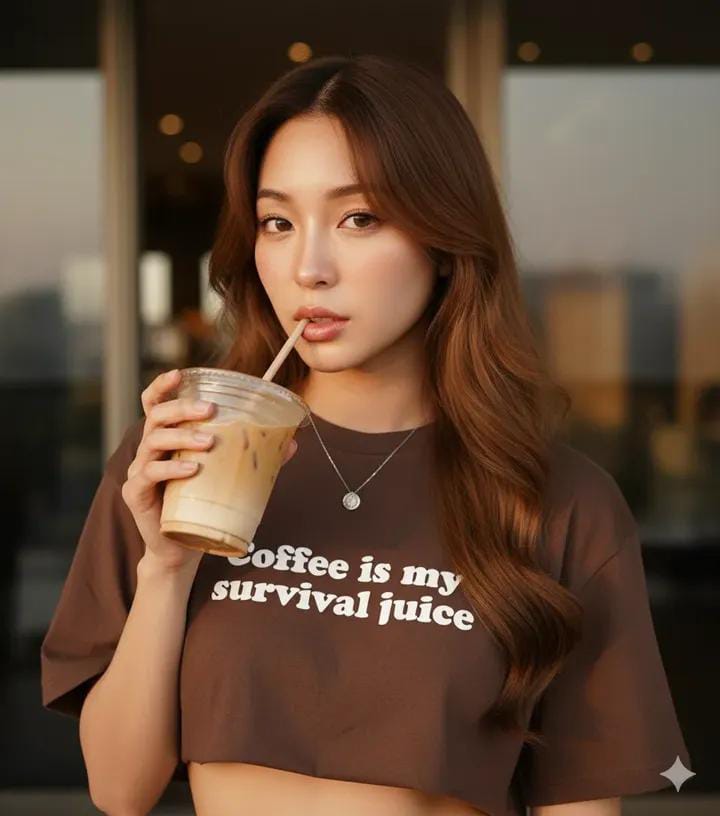
How to close-up, eye-level selfie portrait of a young woman with a fair flawless complexion, captivating light brown eyes, and long, cascading wavy brown...
1
Times used
0
Likes
Unlocking Photorealism: A Deep Dive into the "Create a close-up 3" AI Style
In the ever-evolving world of AI image generation, the quest for photorealism is the ultimate goal. Creators, artists, and marketers alike seek tools that can bridge the gap between a simple text prompt and a breathtakingly lifelike image. This is where Orno, your advanced AI image editor, excels. One of the most powerful tools in our arsenal for achieving this realism is a style we call "Create a close-up 3." This style is more than just a preset; it's a meticulously engineered starting point for crafting intimate, detailed, and emotionally resonant portraits that can rival professional photography.
This comprehensive guide will explore the nuances of the "Create a close-up 3" style, breaking down its core prompt and showing you how to master it to generate stunning, unique AI portraits. Whether you're a seasoned prompt engineer or a curious newcomer, you'll discover how to leverage this style to bring your digital human creations to life with unparalleled detail and beauty.
Deconstructing the "Create a close-up 3" Prompt: The Anatomy of an AI Portrait
The magic of this style begins with its descriptive base prompt: "How to close-up, eye-level selfie portrait of a young woman with a fair flawless complexion, captivating light brown eyes, and long, cascading wavy brown...". At first glance, it seems specific, but each phrase is a deliberate instruction to the AI, guiding it toward a particular aesthetic. Let's break down these key components to understand their impact.
The Framing: "Close-up, eye-level selfie portrait"
This part of the prompt sets the entire scene and mood.
- Close-up: This command tells the AI to focus tightly on the subject's face, making features like the eyes, skin texture, and hair the primary focus. It eliminates distracting backgrounds and creates an immediate sense of intimacy.
- Eye-level: By specifying an eye-level perspective, you create a direct and personal connection between the viewer and the AI-generated subject. It feels as though you are looking directly at them, fostering a sense of engagement and realism that high-angle or low-angle shots might lack.
- Selfie portrait: This keyword subtly influences the final image's feel. It suggests a more casual, modern, and authentic pose, often with softer lighting and a more relaxed expression, as if the subject captured the moment themselves.
The Subject: "A young woman with a fair flawless complexion"
Here, we define the character. The "Create a close-up 3" style is fine-tuned to render human skin with incredible subtlety. The phrase "fair flawless complexion" guides Orno's AI to produce smooth skin textures, paying close attention to the gentle play of light and shadow that defines facial contours. As we'll explore later, this is a fantastic foundation that can be easily modified to represent a vast diversity of skin tones and characteristics.
The Soul of the Portrait: "Captivating light brown eyes"
Eyes are often called the windows to the soul, and this holds true in AI art. This part of the prompt doesn't just ask for a color; it asks for an emotion. The word "captivating" encourages the AI to generate eyes that are not just technically correct but also expressive. It focuses the AI's rendering power on creating depth, reflection, and a lifelike glimmer that can make or break a portrait's realism.
The Crowning Glory: "Long, cascading wavy brown hair"
Generating realistic hair is one of the most complex challenges in AI image generation. This prompt provides a rich description—"long," "cascading," "wavy," and "brown"—that gives the Orno AI engine a clear blueprint. It instructs the model to render individual strands, create natural volume, and simulate how light interacts with wavy textures, resulting in hair that looks soft, touchable, and authentic.
Mastering the Art of Customization with Orno
The "Create a close-up 3" style is not a rigid template; it's a launchpad for your creativity. The true power lies in your ability to tweak, modify, and build upon this foundation. Here’s how you can take control and generate truly unique portraits within Orno.
Expanding Diversity: Skin Tone and Features
While the default is "fair flawless complexion," you have an entire palette at your fingertips. Try substituting this phrase with more descriptive alternatives to create characters from all walks of life.
- For different skin tones: "a woman with a warm olive complexion," "a woman with rich ebony skin," "a woman with sun-kissed tan skin."
- For added realism: "a woman with a fair complexion and light freckles across her nose," "a woman with laugh lines around her eyes," "a man with a rugged, weathered complexion."
Changing Expressions: Eyes and Mood
Modify the eyes to completely change the portrait's emotional tone. Be specific with both color and expression.
- Color Variations: "piercing ice-blue eyes," "warm, honey-colored hazel eyes," "deep, mysterious dark green eyes."
- Expressive Details: "eyes filled with a gentle smile," "a thoughtful and curious gaze," "a confident, determined stare," "eyes sparkling with mischief."
Styling the Hair: From Classic to Contemporary
The hair is another area ripe for customization. Don't be afraid to experiment with length, style, color, and even accessories.
- Styles & Lengths: "a short, chic platinum blonde bob," "a mane of vibrant fiery red curls," "long, elegant black hair in a sleek ponytail," "intricate cornrow braids."
- Adding Accessories: "wavy brown hair adorned with a single white flower," "wearing a black beanie," "with stylish glasses perched on her nose."
Setting the Scene: Lighting and Background
A great portrait is also defined by its environment. Even in a close-up, adding details about lighting and background can dramatically enhance the mood and professionalism of your image.
- Lighting Prompts: "soft window light illuminating her face," "dramatic cinematic lighting with strong shadows," "the warm glow of a golden hour sunset," "neon city lights reflecting in her eyes."
- Background Elements: "with a soft, blurry bokeh background," "sitting in a cozy, book-lined library," "against a minimalist grey studio backdrop," "with the faint outline of a rainy city street behind her."
Why Orno is Your Ideal Partner for AI Portrait Generation
Generating high-quality, realistic portraits requires a powerful and intuitive AI engine. Orno is specifically designed to excel in this area. Our models are trained on vast datasets that emphasize the nuances of human anatomy, light physics, and texture. When you use the "Create a close-up 3" style, you're tapping into a system that understands the subtle art of portraiture. Orno's user-friendly interface allows you to easily select this style, modify the prompt, and generate stunning results in seconds. We prioritize quality and consistency, so you can spend less time wrestling with unpredictable outputs and more time realizing your creative vision.
Practical Applications: Who Needs the "Create a close-up 3" Style?
This versatile AI style isn't just for creating beautiful images; it's a practical tool with real-world applications across various fields.
- Digital Artists & Designers: Quickly generate high-quality character concepts, reference images for paintings, or visual elements for mood boards without spending hours searching for stock photos.
- Marketers & Content Creators: Create unique, royalty-free visuals for social media campaigns, blog posts, and advertisements. Generate diverse and inclusive persona avatars that resonate with your target audience.
- Writers & Storytellers: Bring your characters to life. Visualize the protagonists of your novel or screenplay with stunning accuracy, helping you stay inspired and maintain a consistent vision.
- Hobbyists & AI Enthusiasts: Explore the limitless possibilities of AI art. Create custom avatars for your online profiles, generate beautiful art for personal projects, or simply enjoy the creative process of turning words into images.
Frequently Asked Questions (FAQ)
Can I use the "Create a close-up 3" style to generate portraits of men?
Absolutely! The prompt is easily adaptable. Simply change "young woman" to "young man," "handsome man," or a more specific description. You'll also want to adjust other features accordingly, such as changing "long, cascading wavy brown hair" to "short-cropped dark hair" or "a rugged beard."
How can I make my portraits even more photorealistic?
To push the realism further, try adding technical photography terms to your prompt. Phrases like "hyperrealistic," "ultra-detailed," "8K resolution," "shot on a Sony a7 III with a 85mm f/1.4 lens," and "natural lighting" can signal to the Orno AI that you are aiming for a result indistinguishable from a real photograph.
What if the AI struggles with details like hands or eyes?
AI can sometimes misinterpret complex details. If you're having trouble with eyes, try rephrasing the prompt to be more emphatic, such as "flawless, detailed, captivating light brown eyes." You can also use Orno's editing and inpainting features to refine specific areas of a generated image. Sometimes, simply generating a new image will produce a better result due to the inherent creativity of the AI.
Are the images I create with Orno's "Create a close-up 3" style free to use?
Your usage rights for images generated on Orno depend on your subscription plan. We offer various options, including plans that grant you full commercial rights to the images you create. For detailed information, please refer to our Terms of Service page.
How is this style different from other portrait styles on Orno?
While Orno offers many fantastic portrait styles, "Create a close-up 3" is specifically tuned for that intimate, modern, "selfie" aesthetic. It excels at producing soft lighting, natural expressions, and incredibly detailed close-ups of facial features, making it the perfect choice when connection and realism are your top priorities.
The "Create a close-up 3" style is your gateway to a new level of AI artistry. It provides the perfect blend of a powerful, high-quality foundation and limitless creative freedom. Stop searching for the perfect image and start creating it. Dive into Orno today, select the "Create a close-up 3" style, and watch as your words transform into faces you won't forget.
Use This Prompt
Transform your images with AI
Save this prompt as its own icon for one-tap access.