
Create a classroom Blackboard With The Pythagoras
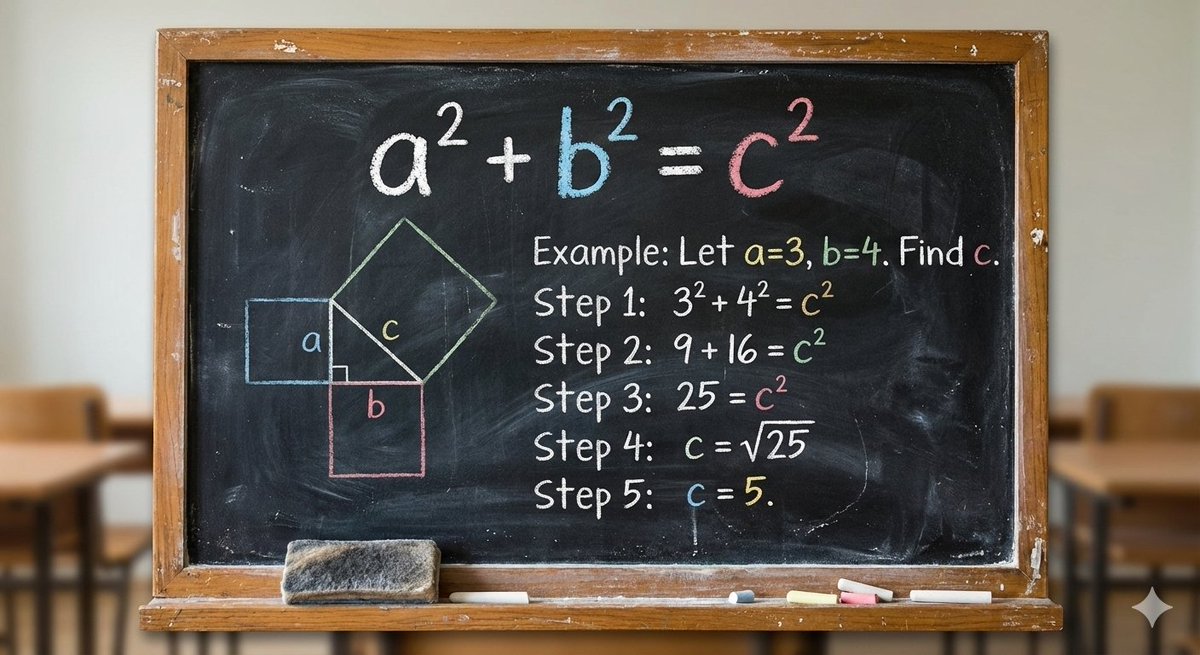
How to a classroom blackboard with the Pythagoras theorem being solved step by step.
0
Times used
0
Likes
Recreating a Classic: How to Generate a Classroom Blackboard with Pythagoras Theorem using AI
Remember the distinct smell of chalk dust, the satisfying sound of a new piece of chalk scraping against a slate-green surface, and the quiet hum of a classroom focused on a problem? For many of us, one of the most iconic images from our school days is the blackboard, covered in the elegant, logical steps of a mathematical proof. And few are as classic as the Pythagorean theorem.
Today, this nostalgic and powerful educational tool can be recreated, customized, and perfected in seconds, thanks to the power of AI image generation. With Orno’s intuitive AI image editor, you can harness the “Create a classroom Blackboard With The Pythagoras” style to generate stunningly realistic and visually compelling images that are perfect for educators, content creators, designers, and anyone with a love for the academic aesthetic. This article will guide you through how to master this specific style, explore its vast applications, and unlock your creative potential with Orno.
What is the "Create a classroom Blackboard With The Pythagoras" Style?
This Orno style is more than just a simple text-to-image prompt. It's a finely-tuned model designed to understand the specific elements that make up this iconic scene. When you use this style, you’re instructing the AI to generate an image of a blackboard where the Pythagorean theorem (a² + b² = c²) is being solved, often in a clear, step-by-step manner.
The magic lies in the details that the AI expertly renders:
- Authentic Chalk Textures: The AI doesn't just write text; it simulates the look of real chalk. You'll see the subtle variations in line thickness, the powdery residue, and the imperfect, handcrafted feel of a teacher’s handwriting.
- Realistic Blackboard Surfaces: Whether you envision a classic, slightly faded green board or a modern, sleek black one, the AI can generate the appropriate surface, complete with faint eraser smudges and light reflections.
- Step-by-Step Clarity: The core of this style is its ability to lay out the mathematical proof logically. It can generate the initial formula, the diagram of a right-angled triangle, the substitution of values, and the final solution, making it a powerful visual aid.
- Classroom Ambiance: The AI can also infer the surrounding environment, adding elements like a wooden frame, a chalk ledge with a dusty eraser, or even hints of a classroom in the background to enhance the image’s authenticity.
In essence, this style is your digital key to creating an infinite number of educational and aesthetically pleasing blackboard images, each one unique and generated to your specifications.
Why Generate Images of a Blackboard with Pythagoras Theorem? Creative & Educational Applications
You might be wondering, "Why would I need an AI-generated image of a math problem?" The applications are surprisingly diverse and incredibly useful across various fields. Let's explore some of the key use cases.
For Educators and Students
Visual learning is a cornerstone of modern education. A well-crafted image can make a complex topic more approachable and memorable. With Orno's AI image generator, educators can instantly create:
- Engaging Presentation Slides: Move beyond boring text and clipart. A custom-generated blackboard image can serve as a beautiful and effective title slide or illustrative example in your lectures.
- Custom Worksheets and Study Guides: Design visually appealing materials that capture students' attention. You can generate different variations of the problem to keep content fresh. -
- Online Course Thumbnails and Banners: Attract more students to your online courses on platforms like Udemy or Skillshare with professional, eye-catching visuals that clearly communicate the subject matter.
- Classroom Decorations: Print high-resolution generated art to create inspiring and educational posters for your physical or virtual classroom.
For Content Creators and Bloggers
In the crowded digital landscape, unique visuals are essential for capturing an audience's attention. This AI style is a game-changer for creators focusing on education, technology, history, or even lifestyle topics with a nostalgic twist.
- Unique Blog Post Headers: An AI-generated blackboard image makes for a far more interesting featured image than a generic stock photo for an article about learning, problem-solving, or education reform.
- Striking Social Media Graphics: Create posts for Instagram, X (formerly Twitter), or Facebook that stop the scroll. Pair a visually interesting math problem with a thought-provoking caption about overcoming challenges.
- Illustrations for Videos: Use these images as B-roll or explanatory graphics in your YouTube videos and tutorials, adding a professional and thematic touch to your content.
For Designers and Artists
Aesthetic trends like "dark academia" and "scholarly chic" have brought educational motifs into the mainstream of design. This Orno style provides a rich source of inspiration and ready-made assets.
- Design Inspiration: The texture of the chalk, the typography of the handwriting, and the composition of the blackboard can spark ideas for branding, web design, or personal art projects.
- Background Elements: Seamlessly integrate these generated images as authentic-looking backgrounds for larger design compositions, advertisements, or digital art pieces.
- Mood Board Creation: Quickly generate a series of images to establish a vintage, academic, or intellectual mood for a project or brand.
How to Use Orno to "Create a classroom Blackboard With The Pythagoras"
Generating your perfect blackboard image with Orno is a simple and intuitive process. Follow these steps to go from a simple idea to a stunning visual in minutes.
Step 1: Navigate to the Orno Style
Once you are in the Orno AI image editor, browse through our extensive library of styles. You can easily find the “Create a classroom Blackboard With The Pythagoras” style. Clicking on it will load the pre-configured model, ready for your creative input.
Step 2: Customize Your Prompt (Prompt Engineering 101)
The base style is fantastic, but the real power of Orno lies in customization. Your text prompt is where you become the director of the final image. Think about the details you want to see. Here are some examples to get you started:
- For a vintage look: "A detailed chalk drawing of the Pythagoras theorem on a dusty, scratched green blackboard in a dimly lit, abandoned classroom."
- For a modern feel: "A clean, step-by-step solution to a Pythagorean problem on a modern black chalkboard, written with vibrant, colorful chalk."
- For an action shot: "A teacher's hand holding chalk, finishing the final step of the Pythagorean theorem on a large, well-used blackboard."
- For an artistic angle: "Extreme close-up macro photo of the chalk texture on the word 'Hypotenuse', part of the Pythagoras theorem on a blackboard."
Don't be afraid to experiment! Add descriptors like "photorealistic," "cinematic lighting," "minimalist," "messy handwriting," or "technical diagram" to guide the AI toward your specific vision.
Step 3: Generate, Refine, and Download
Once you’re happy with your prompt, hit the "Generate" button. Orno’s powerful AI will process your request and present you with a unique image. Not quite perfect? No problem. You can run the generation again for a different variation or tweak your prompt to refine the details. Once you have the perfect image, you can download it in high resolution for all your projects.
Frequently Asked Questions (FAQ)
Can I generate images of other math problems or subjects?
Absolutely! While this style is optimized for the Pythagorean theorem, its underlying model is excellent at creating blackboard visuals for any subject. Simply adjust your prompt. Try "A blackboard with the quadratic formula being solved," "A detailed chalk diagram of cellular mitosis," or "A blackboard filled with Shakespearean quotes in elegant cursive."
How realistic is the chalk texture in the generated images?
The realism is one of the standout features of the Orno AI image editor. Our models are trained on vast datasets to understand the nuanced physics of how chalk interacts with a blackboard. This results in incredibly authentic textures, from solid, bold lines to faint, powdery smudges, making the images highly believable.
Is it free to use the "Create a classroom Blackboard With The Pythagoras" style on Orno?
Orno offers various plans, including a free tier that allows you to experience the power of our AI image generation tools. You can start creating images right away. For users who require higher volumes, faster generation times, and advanced features, we offer affordable premium plans.
Can I use the images I create with Orno for commercial purposes?
Yes, depending on your subscription plan. Users on our commercial plans are granted the rights to use the images they generate for business purposes, including marketing, advertising, product design, and more. Please refer to our terms of service for specific details on licensing.
What makes Orno better for creating educational images than other AI generators?
Orno stands out due to its curated and specialized styles. Instead of relying on generic models that require complex and lengthy prompts, Orno’s pre-tuned styles, like this blackboard example, give you a massive head start. This approach ensures higher quality, more consistent results, and a much more user-friendly experience, especially for users who want to create specific, high-quality visuals without becoming expert prompt engineers.
Ready to bring your academic and nostalgic visions to life? The blackboard is blank, the chalk is in your hand, and the possibilities are infinite. Try the "Create a classroom Blackboard With The Pythagoras" style on Orno today and start generating stunning, educational AI art!
Use This Prompt
Transform your images with AI
Save this prompt as its own icon for one-tap access.