
Create a cinematic Christmas Coca-cola Scene Filled
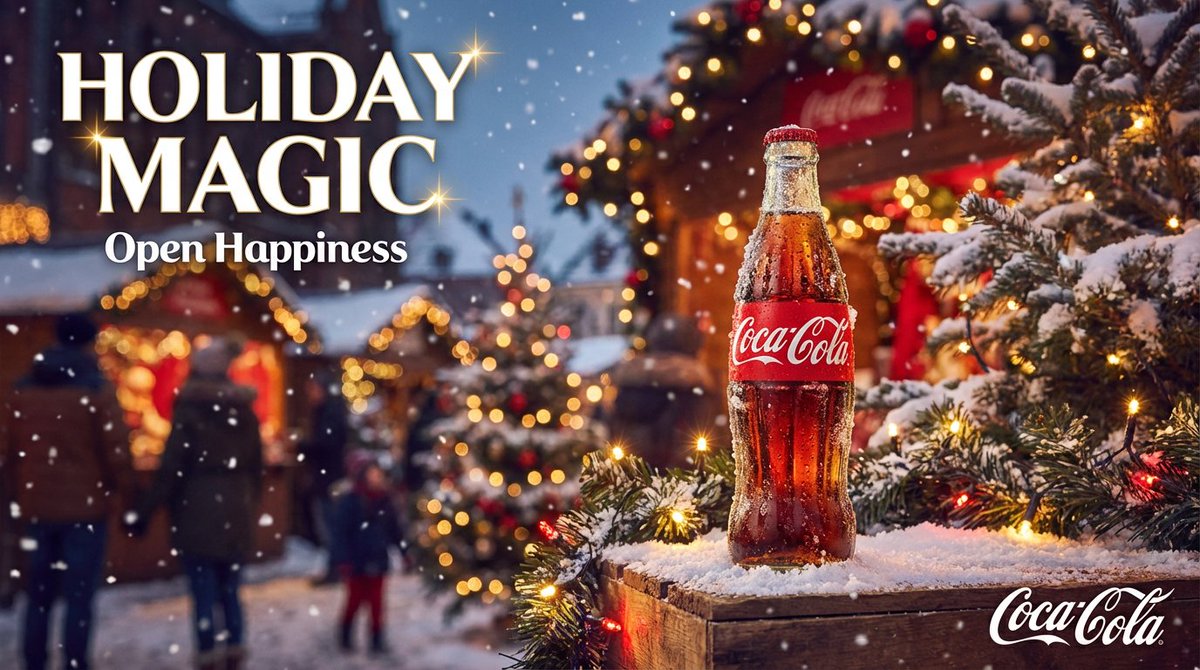
How to a cinematic Christmas Coca-Cola scene filled with festive lights, snow, and holiday magic.
0
Times used
0
Likes
Uncork the Magic: Create a Cinematic Christmas Coca-Cola Scene with AI
There’s a certain kind of magic that arrives with the first chill of winter. It’s a feeling captured perfectly in the iconic Christmas advertisements by Coca-Cola. The warm glow of festive lights reflecting on freshly fallen snow, the cheerful face of a rosy-cheeked Santa Claus, and the nostalgic image of the glowing red holiday truck making its way through a sleepy town. This imagery is more than just advertising; it’s a cornerstone of the holiday season, evoking feelings of warmth, joy, and togetherness. For decades, creating this level of cinematic holiday magic was reserved for big-budget production studios. But now, with the power of AI, that magic is at your fingertips. With the Orno AI image editor, you can become the director of your own festive masterpiece using the “Create a cinematic Christmas Coca-cola Scene Filled” style.
This detailed guide will walk you through how to master this incredible AI art style, deconstruct the perfect prompt, and use Orno to generate stunning, high-quality Christmas visuals that rival the classics. Whether you’re a marketer, a content creator, or simply someone looking to spread some digital holiday cheer, get ready to bring your most enchanting winter visions to life.
What Makes the "Cinematic Christmas Coca-Cola Scene" So Iconic?
Before we dive into creating our own images, it’s important to understand the DNA of this particular aesthetic. The Coca-Cola Christmas style isn’t just about putting a bottle of soda in a snowy landscape. It's a carefully crafted blend of emotional and visual elements that have been refined over nearly a century. When you use this prompt in Orno, the AI taps into this vast visual library to replicate that unique feeling.
The Power of Nostalgia and Warmth
At its heart, the Coca-Cola Christmas aesthetic is built on nostalgia. It evokes a sense of a simpler, more magical time. The visuals are centered around themes of family, community, and the simple joy of sharing a moment. The color palette is crucial: the vibrant, unmistakable "Coca-Cola Red" is juxtaposed against pure white snow and the warm, golden glow of tungsten lights from homes and streetlamps. This creates a powerful visual contrast that feels both exciting and comforting.
Magical Realism: Polar Bears and Santa
Coca-Cola didn’t invent Santa Claus, but their depiction, largely credited to artist Haddon Sundblom in the 1930s, defined the modern image of a jolly, kind, and human-like St. Nick. Likewise, the introduction of the charming animated polar bears in the 1990s added a layer of whimsical, family-friendly magic. These elements of magical realism—where the fantastical feels right at home in our world—are key to the style. The AI understands these iconic characters and can integrate them seamlessly into your scenes.
The Cinematic Quality
The word "cinematic" is a vital part of the prompt. This tells the AI to think like a filmmaker. Key cinematic elements you’ll see in your Orno generations include:
- Soft Lighting: Not harsh or direct, but a soft, diffused glow that wraps around objects and characters, creating a dreamlike atmosphere.
- Bokeh Effect: Those beautiful, out-of-focus orbs of light in the background, typically from Christmas lights, add depth and a professional photographic quality.
- Atmospheric Effects: Gently falling snow, a hint of winter mist, or the warm breath of a character visible in the cold air. These details make the scene feel alive.
- Rich Color Grading: Deep blacks, vibrant reds, and warm golden highlights give the images a rich, high-production-value feel, much like a frame from a holiday blockbuster.
How to Generate Your Own Coca-Cola Christmas Scene with Orno AI
Now for the fun part! With Orno’s powerful and intuitive AI image generator, translating your vision into a stunning reality is simple. The “Create a cinematic Christmas Coca-cola Scene Filled” prompt is your master key to unlocking this aesthetic.
Deconstructing the Master Prompt: A Step-by-Step Guide
Let's break down why this specific sequence of words works so well and how each part instructs the AI:
- "Cinematic": As discussed, this sets the entire mood. It dictates the lighting, camera style, depth of field, and overall professional quality of the image. It’s the difference between a simple snapshot and a movie poster.
- "Christmas": This is the thematic anchor. The AI will immediately pull from its knowledge of Christmas trees, decorations, wreaths, winter clothing, and festive environments.
- "Coca-Cola Scene": This is the secret sauce. This phrase doesn't just tell the AI to add a logo. It cues the AI to adopt the entire brand's holiday marketing aesthetic—the specific shade of red, the vintage feel, the Sundblom-style Santa, the iconic glass bottles, and the famous red delivery trucks.
- "Filled with festive lights, snow, and holiday magic": These are powerful modifiers. Instead of just hoping for these elements, you are explicitly commanding the AI to make them prominent features. "Festive lights" ensures a beautiful bokeh and warm glow. "Snow" creates the winter wonderland setting. And "holiday magic" is a creative instruction that encourages the AI to add an extra touch of sparkle, wonder, or whimsical charm.
Tips for Customizing Your AI-Generated Christmas Scene
The master prompt is a fantastic starting point, but the true power of Orno lies in customization. Think of the prompt as a recipe that you can tweak to your exact taste. Try adding these details to make your creation unique:
- Specify a Subject: "A classic 1950s Coca-Cola delivery truck parked on a snowy small-town main street at twilight..."
- Add Characters: "...filled with a happy family in vintage winter clothes sharing glass bottles of Coke."
- Define the Setting: "A cozy living room with a fireplace and a Christmas tree, a classic Coca-Cola train set running around the base..."
- Incorporate Brand Mascots: "...featuring the Coca-Cola polar bear family watching the snow fall outside the window."
- Set the Era: Add terms like "1960s style," "retro advertisement," or "vintage postcard" to push the AI towards a specific historical aesthetic.
- Choose a Camera Angle: Try "wide angle shot," "extreme close-up on a frosted bottle," or "dynamic low-angle shot" to control the composition.
Beyond the Prompt: Leveraging Orno's Features for a Perfect Image
Generating the image is just the first step. Orno is a complete AI image editor, giving you the tools to perfect your creation after the initial generation.
Refining Your Generation with Orno's Editing Suite
Once you have a version you love, use Orno's built-in editing tools to make it truly perfect. You can adjust the contrast to make the iconic red pop even more, increase the saturation for a more vibrant feel, or sharpen the details to make every snowflake crystal clear. Our AI-powered upscaler can increase the resolution of your image, making it suitable for high-quality prints, posters, or website banners without losing any detail.
Exploring Aspect Ratios for Different Platforms
Your cinematic Christmas scene might be destined for an Instagram story, a YouTube thumbnail, or a printed Christmas card. With Orno, you can easily set your desired aspect ratio before generating, ensuring your image is perfectly framed for its final destination.
- 16:9 (Landscape): The standard for desktop wallpapers, website headers, and video content.
- 9:16 (Portrait): Perfectly tailored for mobile content like Instagram Reels, Stories, and TikTok.
- 1:1 (Square): The classic choice for Instagram grid posts and profile pictures.
- 3:2 or 4:3: Traditional photography ratios that lend a classic, timeless feel to your images.
Frequently Asked Questions (FAQ)
What is the "cinematic Christmas Coca-Cola scene" AI style?
This AI image generation style is a prompt designed to create images that replicate the iconic, nostalgic, and magical aesthetic of Coca-Cola's famous holiday advertisements. It combines cinematic lighting, a warm and festive color palette, classic Christmas elements like snow and lights, and brand-specific imagery like the vintage red truck and the classic Santa Claus.
Do I need artistic skills to use Orno's AI image generator?
Absolutely not! That's the beauty of Orno. You don't need any drawing or design skills. Your creativity is expressed through words. If you can describe the scene you imagine, our AI can bring it to life. The key is to be descriptive and clear in your text prompts.
Can I use the generated images for commercial purposes?
Yes. Images you create with Orno can be used for a wide range of commercial purposes, such as social media marketing, blog posts, advertisements, and digital products, depending on your subscription plan. This allows you to create high-quality, royalty-free festive content without the cost of a photoshoot.
How can I make my AI Christmas scene look more vintage?
To achieve a more retro or vintage look, try adding specific keywords to your prompt. Phrases like "1950s Christmas advertisement," "vintage film grain," "retro illustration style," "Kodachrome photo," or "sepia tones" will guide the AI to generate an image with a classic, nostalgic feel.
What makes Orno the best AI tool for creating festive images?
Orno is designed for both power and ease of use. Our AI model is finely tuned to understand nuanced and creative prompts, delivering exceptionally high-quality and coherent images. Combined with our built-in editing suite, aspect ratio flexibility, and user-friendly interface, Orno provides a complete solution for generating and perfecting stunning visuals for the holidays and beyond.
Ready to create your own holiday magic? The warmth of the fire, the glow of the lights, and the crisp winter air are just a few words away. Try Orno's "Create a cinematic Christmas Coca-cola Scene Filled" generator today and bring your most festive visions to life!
Use This Prompt
Transform your images with AI
Save this prompt as its own icon for one-tap access.